



Hardware components | ||||||
 |
| × | 1 | |||
 |
| × | 1 | |||
 |
| × | 1 | |||
Software apps and online services | ||||||
 |
| |||||
 |
| |||||
Hand tools and fabrication machines | ||||||
| ||||||
EDGE AI SENTINEL is a smart infrastructure guardian designed to bring safety, compliance, and environmental intelligence directly to the edge.
Instead of treating buildings and facilities as passive structures, EDGE AI SENTINEL turns them into self‑monitoring environments—capable of detecting risks, anomalies, and violations in real time, without relying on continuous cloud connectivity.
Powered by the Arduino UNO Q, the project demonstrates how edge‑native AI can be deployed as a sovereign, always‑on node inside hospitals, data centers, public buildings, and other critical installations where reliability, privacy, and low latency are essential.
Why This Project Exists
Modern infrastructure systems still depend heavily on cloud‑centric monitoring, disconnected sensors, and reactive alerting models. This approach creates blind spots in:
- Public and occupational safety
- Environmental compliance
- Energy efficiency
- ESG accountability
In many real‑world environments—especially critical or regulated ones—reliable internet access cannot be assumed, and raw sensor data should not leave the site.
EDGE AI SENTINEL was created to address this gap.
The goal was to design a system that could:
- Operate fully offline
- Make local, autonomous decisions
- Protect sensitive data
- Remain simple to deploy and replicate
- Look and behave like a real infrastructure product, not a lab prototype
EDGE AI SENTINEL is built around a hybrid execution model made possible by the Arduino UNO Q.
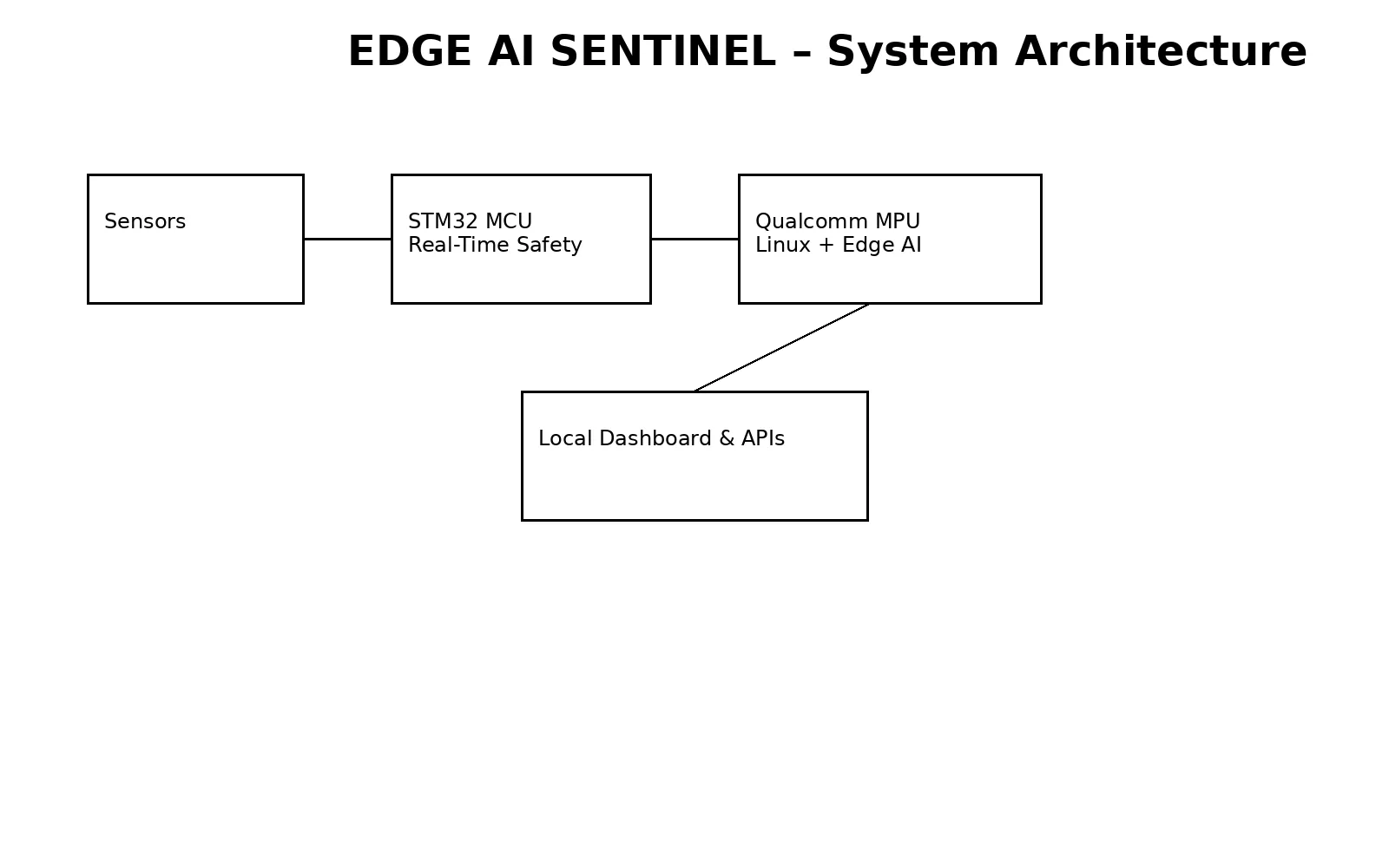
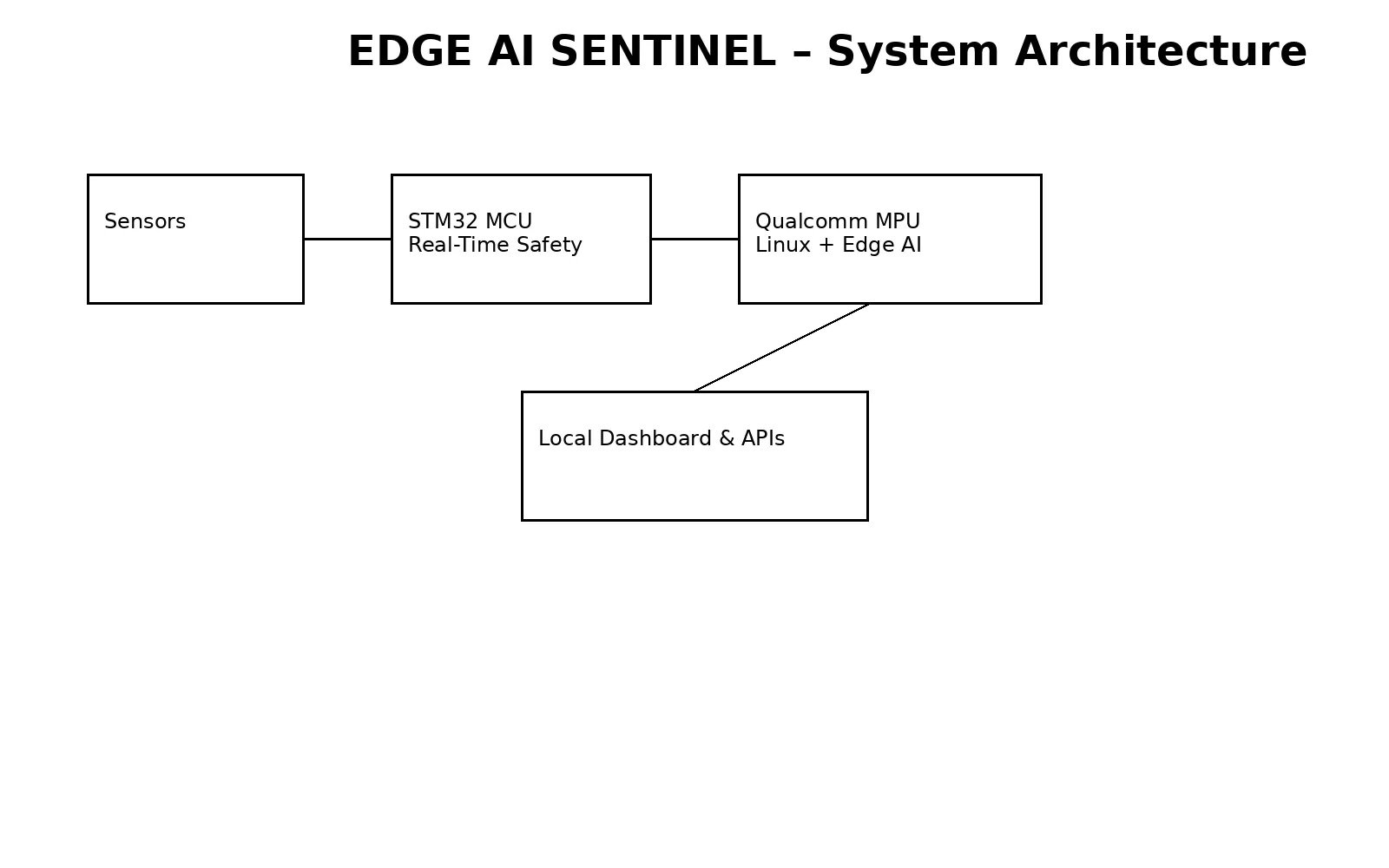
1. Physical Edge NodeAs shown in the project image, the system is assembled inside a compact enclosure that hosts:
- The Arduino UNO Q at its core
- Environmental sensors for temperature, humidity, air quality, and sound
- A presence sensor to detect unauthorized or unsafe occupancy
The result is a wall‑mountable, infrastructure‑ready node that can be deployed discreetly and reliably.
2. Real‑Time Sensing (MCU Layer)The STM32 MCU on the UNO Q is responsible for:
- Deterministic sensor acquisition
- Continuous monitoring loops
- Safety watchdog logic
This guarantees predictable timing and reliability, which is critical for safety‑related use cases.
3. Edge AI Intelligence (Linux Layer)Sensor data is passed to the Linux‑based Qualcomm Dragonwing™ MPU, where:
- AI models perform offline inference
- Environmental conditions are correlated and analyzed
- Risk patterns and anomalies are identified locally
No raw data needs to be sent to the cloud for the system to function.
4. Visualization and IntegrationUsing Arduino App Lab, EDGE AI SENTINEL exposes its intelligence through:
- A clean, production‑grade dashboard
- Real‑time status indicators and alerts
- Historical trends for analysis and reporting
Standard REST/JSON APIs for integration with:
- Building management systems
- Facility and compliance platforms
- ESG and sustainability reporting tools
- Standard REST/JSON APIs for integration with:
Building management systems
Facility and compliance platforms
ESG and sustainability reporting tools
When connectivity is available, data can be synchronized externally—but this is optional, not required.
What EDGE AI SENTINEL DetectsThe system continuously monitors and detects, entirely at the edge:
- Degradation in air quality (CO₂, VOCs, particulates)
- Abnormal acoustic signatures (leaks, impacts, mechanical stress)
- Temperature and humidity conditions outside compliance thresholds
- Unauthorized presence in restricted or sensitive areas
- Environmental conditions associated with fire or electrical risk
Each alert is the result of correlated analysis, not isolated sensor thresholds.
Sustainability and Social ImpactEDGE AI SENTINEL is designed with measurable impact in mind.
By detecting issues early and operating locally, the system helps:
- Reduce unnecessary energy consumption
- Prevent costly equipment damage
- Improve safety for occupants and operators
- Minimize cloud usage and data transmission
- Support ESG and regulatory compliance with real data
This is sustainability driven by engineering, not assumptions.
Why Arduino UNO QEDGE AI SENTINEL exists because of the unique architecture of the Arduino UNO Q.
Traditional MCUs lack the compute power for advanced AI, while typical single‑board computers lack deterministic real‑time control. The UNO Q brings both worlds together in one platform, enabling a class of reliable, intelligent, and sovereign edge systems that were previously difficult to deploy.
Final ThoughtEDGE AI SENTINEL is not a demo or proof‑of‑concept.
It is a deployable edge‑AI infrastructure node that demonstrates how modern buildings and facilities can become active participants in safety, compliance, and sustainability—powered by the Arduino UNO Q.


Comments