


This DIY Arduino game console is a mini handheld gaming device that uses:
Arduino Nano as the brain
- Arduino Nano as the brain
SSD1306 OLED display for graphics
- SSD1306 OLED display for graphics
4 push buttons for game control
- 4 push buttons for game control
Simple diode-based button matrix
- Simple diode-based button matrix
Analog input for signal or control variation
- Analog input for signal or control variation
You can play simple retro games like:
Snake Game 🐍
- Snake Game 🐍
Racing Game 🏎️
- Racing Game 🏎️
Dodge / Jump Games 🎯
- Dodge / Jump Games 🎯
Menu-based mini games
- Menu-based mini games
Component
Quantity
- Arduino Nano
- 0.96" OLED Display (SSD1306, I2C)
- Push Buttons x4
- Diodes (1N4007)x4
- Potentiometer (10K)x1
- Resistors (100K, 390K) As required
- DC Jack / Signal Input
- Breadboard / PCB
- Jumper Wires
- As required
- 5V Power Source
Discover Easy, Affordable, and Reliable PCB manufacturing with JLCPCB!Register to get $70 New customer coupons:https://jlcpcb.com/?from=EST Special Deal: Get a $30 coupon for JLCPCB premium 6-layer PCBs: https://jlcpcb.com/6-layer-pcb?from=getcoupon
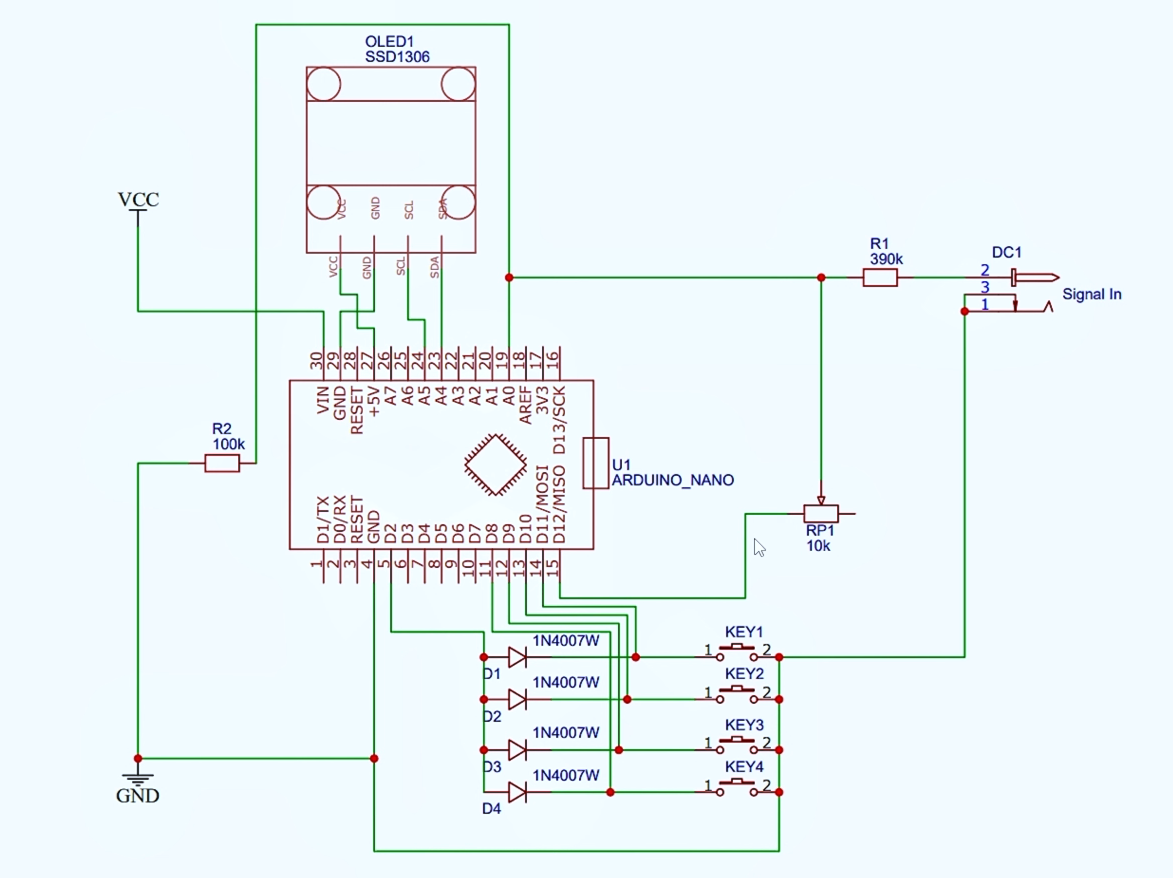
The provided circuit diagram is carefully designed for stable and responsive gameplay:
🔹 OLED Display Connection (I2C)VCC → Arduino 5V
- VCC → Arduino 5V
GND → Arduino GND
- GND → Arduino GND
SCL → A5
- SCL → A5
SDA → A4
- SDA → A4
The OLED uses the SSD1306 driver, which is very popular for Arduino game projects.
🔹 Button Controls (KEY1 – KEY4)Four push buttons are connected using 1N4007 diodes, creating a clean and noise-free input system.
Each button is connected to:
Arduino digital pins (D9–D12)
- Arduino digital pins (D9–D12)
Diodes prevent false triggering and backflow
- Diodes prevent false triggering and backflow
These buttons are typically used for:
Up
- Up
Down
- Down
Left
- Left
Right / Select
- Right / Select
10K Potentiometer (RP1) is connected to an analog pin
- 10K Potentiometer (RP1) is connected to an analog pin
Used for:
Game speed control
- Game speed control
Brightness control
- Brightness control
Menu navigation
- Menu navigation
- Used for:Game speed controlBrightness controlMenu navigation
A 390K resistor and DC input jack are used to safely feed an external signal or control voltage.
💻 Arduino Code Explanation (Logic Overview)The Arduino code (provided with this project) performs the following tasks:
Initializes the SSD1306 OLED display
- Initializes the SSD1306 OLED display
Reads button states from digital pins
- Reads button states from digital pins
Reads analog input from potentiometer
- Reads analog input from potentiometer
Displays game graphics using pixel-based drawing
- Displays game graphics using pixel-based drawing
Controls game logic (movement, collision, score)
- Controls game logic (movement, collision, score)
📌 Important Libraries Used:
Adafruit_GFX.h
Adafruit_GFX.h
Adafruit_SSD1306.h
Adafruit_SSD1306.h
Make sure these libraries are installed from Arduino Library Manager.
🛠️ Step-by-Step AssemblyStep 1: Prepare the Arduino NanoUpload the provided Arduino code
- Upload the provided Arduino code
Select Board: Arduino Nano
- Select Board: Arduino Nano
Processor: ATmega328P
- Processor: ATmega328P
Follow I2C wiring carefully
- Follow I2C wiring carefully
Double-check SDA & SCL pins
- Double-check SDA & SCL pins
Solder diodes in correct direction
- Solder diodes in correct direction
Connect buttons firmly
- Connect buttons firmly
Use USB or 5V regulated supply
- Use USB or 5V regulated supply
Avoid over-voltage
- Avoid over-voltage
Discover Easy, Affordable, and Reliable PCB manufacturing with JLCPCB!Register to get $70 New customer coupons:https://jlcpcb.com/?from=EST Special Deal: Get a $30 coupon for JLCPCB premium 6-layer PCBs: https://jlcpcb.com/6-layer-pcb?from=getcoupon
📟 Final OutputOnce powered ON:
OLED shows game menu
- OLED shows game menu
Buttons respond instantly
- Buttons respond instantly
Smooth animation on screen
- Smooth animation on screen
Compact handheld console feel 🎮
- Compact handheld console feel 🎮
You can easily modify the code to add new games, sound effects, or animations.


Comments