



Hardware components | ||||||
 |
| × | 1 | |||
 |
| × | 1 | |||
 |
| × | 1 | |||
Software apps and online services | ||||||
 |
| |||||
 |
| |||||
| ||||||
At times we wish to set alarm for a said time in our office. But due to some failure the bell might not ring and can cause our perfect scheduled task to lack behind. Well, we can just automate it! This project makes use of online cloud facility to control a electric bell of high volts, say 220V 50Hz. The bell is connected to a relay module, where the relay act just like a switch. This system can trigger the relay on or off at the said time along with SMS alerts. You can deploy the code in online clouding facility like Digital Oceans, or a with Linux Kernel will do.
This project make use of Boltiot, Digital Ocean cloud computing, Twilio programmable SMS service, Python programming language, boltiot module, relay module. Make sure to check out them for better understanding. If you are new to relay module, click here for module description. Here I have used 2 channel relay module. You may use single channel relay if you wish to do so.
How to connect my BoltIot wifi module? click here
How to set up account in Twilio and get started? click here
Setting up account in Digital Ocean? click here
Wait! what is Digital Ocean? How to setup boltiot with Digital Ocean? I am sure you would get answers for free!. Still confused? Follow up the BoltIot training course for more info regarding IOT and machine learning. Well, I found my answers there ;)
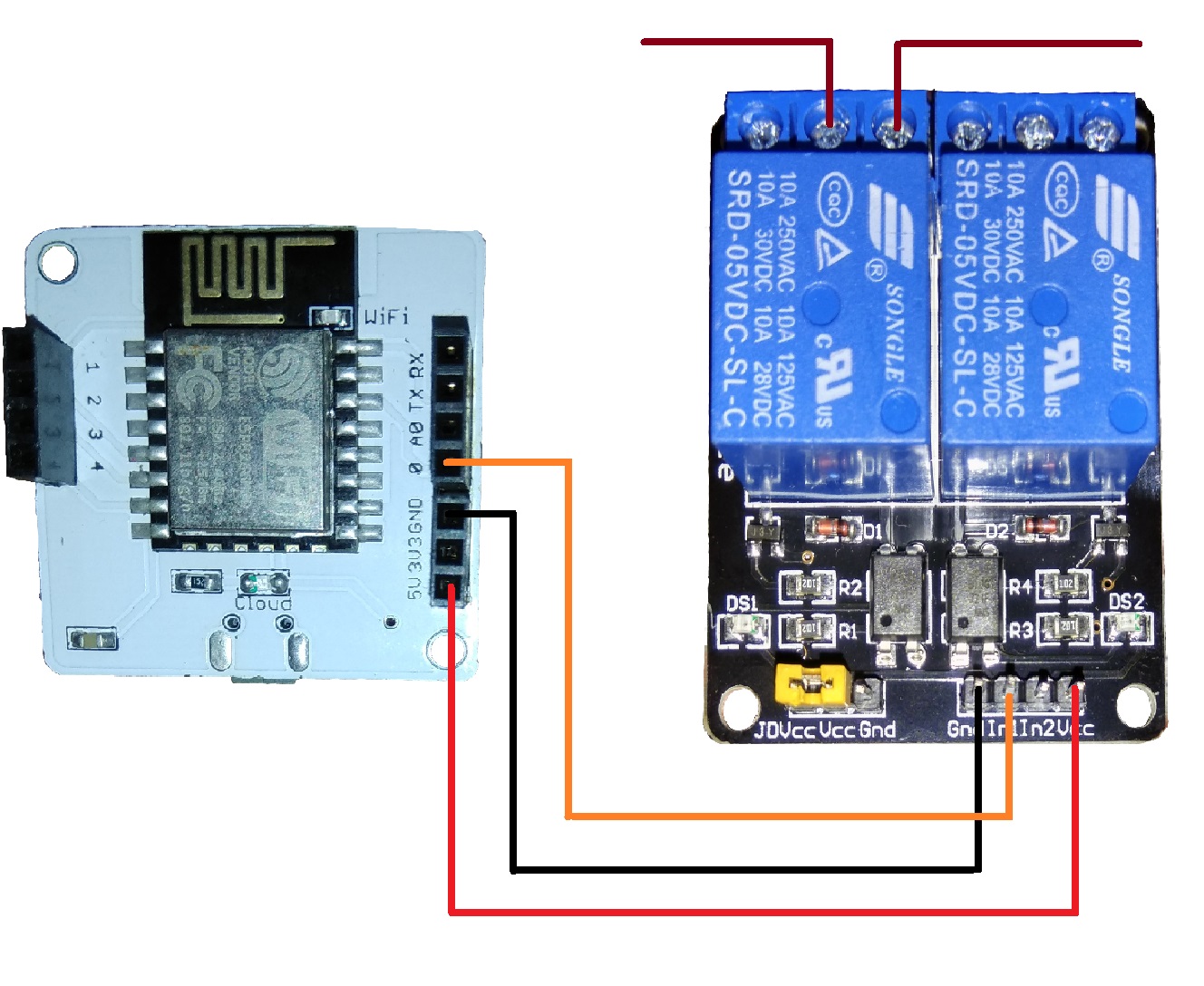
Lets get connecting the wires...
- Connect 5v of boltiot module to vcc of relay module
- Connect gnd of boltiot module to gnd of relay module
- Since we are using pin no '0', connect '0' pin of boltiot wifi module to In1 pin of relay module. We will make use of relay number 1. See the board and read the description to locate it.
- Replace the switch of the electric bell to the first relay of the relay module. Connect one wire to the center of the relay module and the other wire to normally off part of the relay module. Read the marks of the relay module to determine them.
- Note that some of the relay modules are inverting while others are non-inverting. Make sure you check your device before deploying them. You may make use of a multi-meter to check how your relay reacts to you!
If you cant get an electric bell, don't worry. First setup a simple circuit connecting a switch, a buzzer, a battery such that the buzzer rings when switch is turned on. Now replace the switch with the relay module just as explained above.
Now upload the code in any online Cloud computing facility or in your system. You will have to fetch your device details like device ID, API key and your twilio account details into a file named info.py. Now run the code and enter the alarm time. Keep your phone ready, cause you will receive sms soon!.
Well that's it. You just made an iot device.
Think big, you can modify the code so as to control any devices online. Thanks to IOT :)


Comments