ESP32-S3 NES EmulatorBuild a fully functional, pocket-sized NES emulator using an ESP32-S3 and a TFT display.
Video tutorial:
Step 1: SD Card & Game Preparation- Download your legally obtained NES ROMs, ensuring the file extension is '.nes'.
- Rename the files to be shorter so they display cleanly on the game selection menu.
- Format your SD card to FAT32.
- Copy the game files and paste them directly into the root folder of the SD card.
Step 2: Software & Library Setup- Ensure you have Arduino IDE version 2.3.7 and ESP32 boards version 3.3.7 installed.
- Download the project source code (.zip) from the provided GitHub repository.
- In the Arduino IDE, navigate to Sketch > Include Library > Add.ZIP Library, and select the downloaded file.
- Open the project by going to File > Examples > Esp32NofrendobyDSN > Dsn_nes_Emulator.
- Note: The code includes a custom TFT display driver, so no external display libraries are required.
Step 3: Arduino IDE Tools ConfigurationBefore clicking upload, you must configure your board settings exactly as follows:
- Board: ESP32S3 Dev Module.
- USB CDC On Boot: Enabled.
- CPU Frequency: 240MHz.
- Flash Size: 16MB.
- Partition Scheme: Huge APP (3MB APP, 1MB SPIFFS).
- PSRAM: OPI PSRAM (This is the most critical setting; missing this will prevent most games from running).
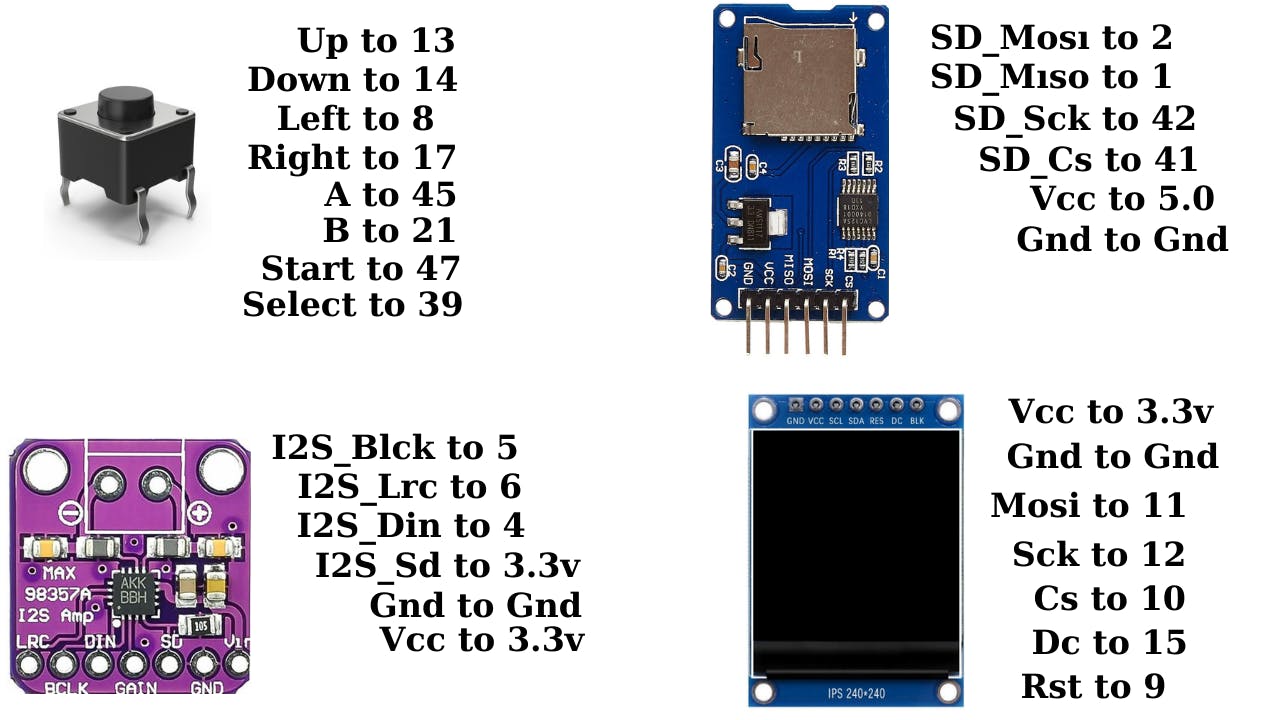
Step 4: Controls and Audio Notes- Navigation: Use the UP and DOWN pushbuttons to scroll through the menu. * Selection: Click the SELECT button to open a game, and START to begin playing.
- Audio: Sound support is currently a work in progress. It is disabled (set to '0') in the hardware config file by default. Changing it to '1' enables audio, but the quality is currently very poor.






Comments