IntroductionWelcome to this tutorial where I share a new Arduino project: a WiFi-controlled mini tank. This project is fully 3D printable and does not require a special PCB. I will show you every detail of making this from scratch to the final product.
The Motor Hack: Repurposing a Broken ServoOne of the unique aspects of this system is the use of a broken servo. If I had chosen a 360-degree or endless servo, I would have needed a voltage booster. This is because servos typically have a working range between 4.8 and 6.0 volts. Using a step-up module in an embedded system is something I prefer to avoid, as it is not effective.
Instead, I use only the geared reduction parts of the servo and extract the broken circuit boards. The 3.7 volts from the battery is enough to drive this motor directly. I soldered two wires directly to the motor pins and attached a female pin header. This modification makes the motor much easier to use in the project.
Software & Code ConfigurationThe source files for the Arduino script are published on my GitHub repository. When you download and extract the files, you will see two different folders: one for the LED control and the other for the main code.
For this project, I used the Arduino IDE version 2.3.8. To compile the code, follow these steps:
Install ESP8266 Tools: Open your IDE preferences, paste the copied link, and click OK. Then, go to the boards manager, type "esp8266" in the search bar, and install it.
Install External Libraries: You need to install three external libraries from the library section. Search for and install Adafruit GFX, Adafruit SSD1306, and Adafruit neopixel.
Upload the Code: Open the main code and go to the tools menu. Select "Wemos D1 mini clone" and the right COM port, then click the upload button without changing other settings. Once uploaded, ensure everything is working properly.
3D Printing and AssemblyAll parts were 3D printed on my own design and build, the DSN D1 3D printer, which is designed for high speed and quality. The 3D models themselves are published on my Cults3D page : https://cults3d.com/en/3d-model/game/rc-tank-mini-car-arduino-based
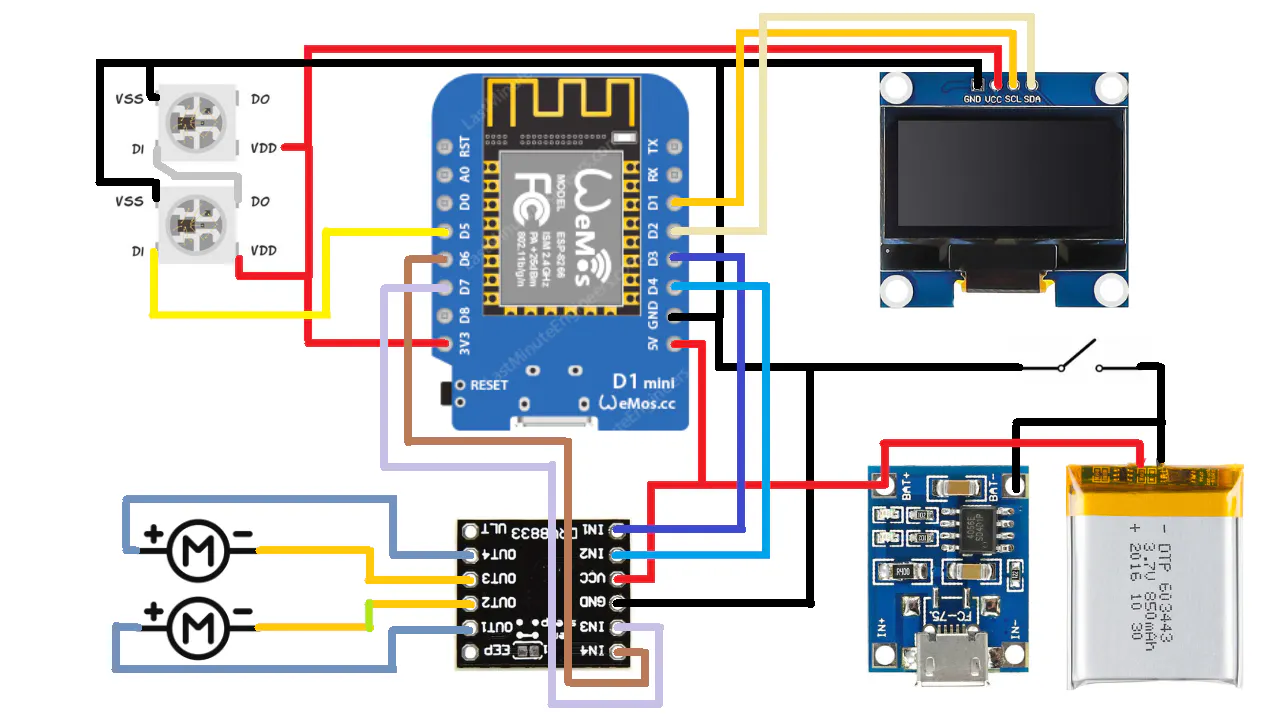
After preparing the breadboard assemblies and completing the soldering sequence, verify that everything is working properly before moving on to the final physical assembly. When putting the parts together, be careful not to make the wheels too tight; the wheels must turn freely.
Once fully assembled, the mini tank project is complete and ready to work






_3u05Tpwasz.png?auto=compress%2Cformat&w=40&h=40&fit=fillmax&bg=fff&dpr=2)


Comments