



Hardware components | ||||||
| × | 1 | ||||
| × | 1 | ||||
 |
| × | 1 | |||
 |
| × | 1 | |||
Software apps and online services | ||||||
 |
| |||||
DIY ESP32 BLE Wireless Touchscreen Keyboard
Read moreThis project demonstrates how to build a fully functional, battery-efficient wireless keyboard for a PC using an ESP32 and an ILI9341 touch display. By utilizing the Bluetooth Low Energy (BLE) protocol, this device offers low power consumption and reliable connectivity.
Video TutorialBuild your own following the step-by-step guide!
🛠 Features- BLE Connectivity: Connects directly to a PC as a standard HID device.
- Touch Interface: Full QWERTY keyboard with multi-page support for special characters.
- Low Power: Optimized for battery operation, making it a truly portable peripheral.
- Microcontroller: ESP32-S3 (or any BLE-supported ESP32 board).
- Display: ILI9341 Touch Display.
- Miscellaneous: Breadboard and jumper cables.
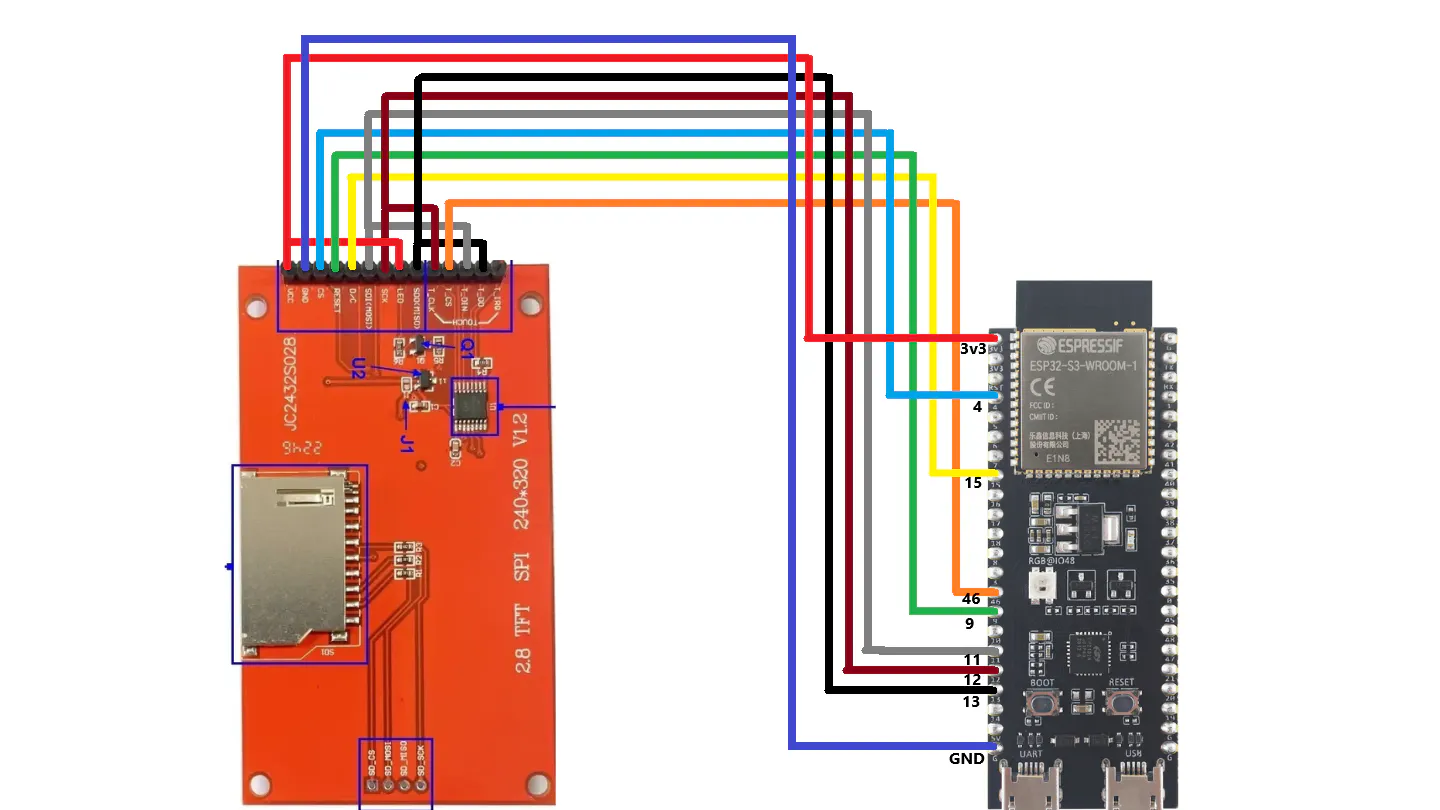
The touch interface and the display share the same SPI pins, with the exception of the CS (Chip Select) pin, which is used to toggle between controlling the display and the touch panel.
💻 Software Setup1. Arduino IDE Configuration- IDE Version: 2.3.8 or later.
- Board Manager: Install the ESP32 board package (v3.3.7 recommended).
- Libraries: * TFT_eSPI (v2.5.43): Install via Library Manager and configure your
User_Setup.haccording to your specific wiring and display model.
Before running the main script, you must calibrate your touchscreen:
- Open the
touch_calibrateexample. - Set the display rotation (Landscape mode is typically setting
3). - Upload the script, open the Serial Monitor (115200 baud), and follow the on-screen prompts to touch the corners.
- Copy the resulting calibration values.
- Open the
wireless_keyboardproject. - Paste your calibration values into the setup section of the code.
- Ensure the rotation setting matches your calibration.
- Upload the code to your ESP32.
- Pairing: Turn on Bluetooth on your PC and search for "Dsn wireless KB".
- Interaction: Once paired, the keyboard becomes clickable. You can switch between two different pages of keys for full functionality.
- Troubleshooting: If you see a white screen, press the Reset button on the ESP32 or double-check your SPI wiring and
User_Setupfile.
If you found this project helpful, please consider:
- Subscribing to the YouTube Channel.
- Giving the video a Like.
- Starring this GitHub Repository!
YouTube: [https://www.youtube.com/@DsnIndustries/videos]
Patreon: [https://www.patreon.com/c/dsnIndustries]
Happy Making!
Games- Maze Escape:https://play.google.com/store/apps/details?id=com.DsnMechanics.MazeEscape
- Air Hockey:https://play.google.com/store/apps/details?id=com.DsnMechanics.AirHockey
- Click Challenge:https://play.google.com/store/apps/details?id=com.DsNMechanics.ClickChallenge
- Flying Triangels:https://play.google.com/store/apps/details?id=com.DsnMechanics.Triangle
- SkyScrapper:https://play.google.com/store/apps/details?id=com.DsnMechanics.SkyScraper


Comments