


Hardware components | ||||||
 |
| × | 1 | |||
| × | 1 | ||||
| × | 1 | ||||
| × | 1 | ||||
| × | 1 | ||||
| × | 1 | ||||
| × | 1 | ||||
Human brain is built of complex layer of structures which helps us to be a dominant species on earth. For example the entorhinal cortex in your brain can give you sense of direction helping you to navigate easily through places that you are not familiar with. But unlike us, Robots and unmanned Ariel vehicles need something to get this sense of direction so they could manoeuvre autonomously in new terrains and landscapes. Different robotsuse different types of sensors to accomplish this, but the commonly used one is a magnetometer, which could inform the robot in which geo-graphic direction it is currently facing at. This will not only help the robot to sense direction but also to take turns in a pre-defined direction and angel.
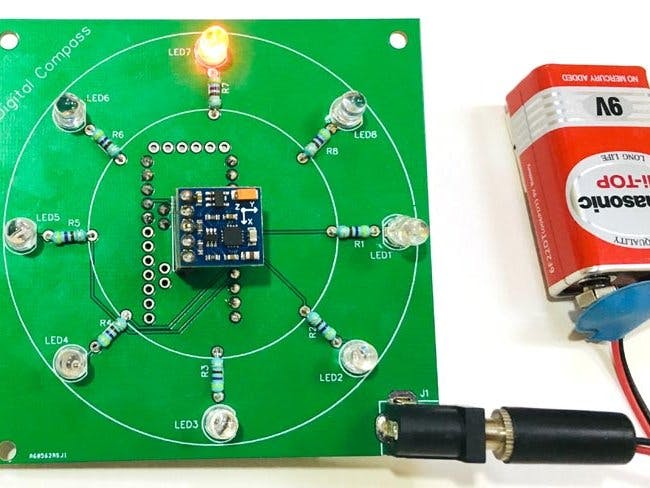
Since the sensor could indicate the geo-graphic North, South, East and West, we humans could also use it at times when required. So in this article let us try to understand how Magnetometer sensor works and how to interface it with a microcontroller like Arduino. Here we will build a cool Digital Compasswhich will help us in finding the directions by glowing an LED pointing North Direction. This Digital Compass is neatly fabricated on PCB from PCBGOGO, so that I can carry it next time when I go out in the wild and wish that I would get lost just to use this thing for finding my way back home. Let’s get started.
What is a Magnetometer and How does it Work?Before we dive into the circuit, let’s understand a bit about magnetometer and how they work. As the name suggests the term Magneto does not refer to that crazy mutant in marvel who could control metals by just playing piano in the air. Ohh! But I like that guy he is cool.
Magnetometer is actually a piece of equipment that could sense the magnetic poles of the earth and point the direction according to that. We all know that Earth is huge piece of spherical magnet with North Pole and South Pole. And there is magnetic field because of it. A Magnetometer senses this magnetic field and based on the direction of the magnetic field it can detect the direction we are facing.
How the HMC5883L Sensor Module WorksThe HMC5883L being a magnetometer sensor does the same thing. It has the HMC5883L IC on it which is from Honeywell. This IC has 3 magneto-resistive materials inside which are arranged in the axes x, y and z. The amount of current flowing through these materials is sensitive to the earth’s magnetic field. So by measuring the change in current flowing through these materials we can detect the change in Earth’s magnetic field. Once the change is magnetic field is absorbed the values can then be sent to any embedded controller like a microcontroller or processor through the I2C protocol.
Since the sensor works by sensing the magnetic field, the output values will be greatly affected if a metal is placed nearby. This behavior can be leveraged to use these sensors as metal detectorsalso. Care should be taken not to bring magnets near this sensor since the strong magnetic field from a magnet might trigger false values on the sensor.
Difference between HMC5883L and QMC5883L
There is a common confusion revolving around these sensors for many beginners. This is because some vendors (actually most) sell the QMC5883L sensors instead of the original HMC5883L from Honeywell. It is mostly because the QMC5883L is way cheaper than the HMC5883L module. The sad part is that the working of these two sensors is slightly different and the same code cannot be used for both. This is because the I2C address of both the sensors is not the same. The code give in this tutorial will work only for QMC5883L the commonly available sensor module.
To know which model of sensor you are having, you just have to look up closely at the IC itself to read what is written on top of it. If it is written something like L883 then it is the HMC58836L and if it is written something like DA5883 then it is the QMC5883L IC. Both the modules are shown in picture below for easy understating.
The idea of the circuit is place the 8 LEDs in a circular fashion so that each Led points all the 8 directions namely North, North-East, East, South-East, South, South-West, West and North West respectively. So it is not easy to arrange them neatly on a breadboard or even on a perf board for that matter. Developing a PCB for this circuit will make it look more neat and easy to use. So I opened my PCB designing software and placed the LEDs and resistor in a neat circular pattern and connected the tracks to form the connections. My Design looked something like this below when completed. You can also download the Gerber file from the link given below.
After the board was ordered, it reached me after some days though courier in a neatly labeled well packed box and like always the quality of the PCB was awesome. I am sharing few pictures of the boards below for you to judge.
I turned on my soldering rod and started assembling the Board. Since the Footprints, pads, vias and silkscreen are perfectly of the right shape and size I had no problem assembling the board. The board was ready in just 10 minutes from the time of unpacking the box.
Few pictures of the board after soldering are shown below.

_3u05Tpwasz.png?auto=compress%2Cformat&w=40&h=40&fit=fillmax&bg=fff&dpr=2)

Comments