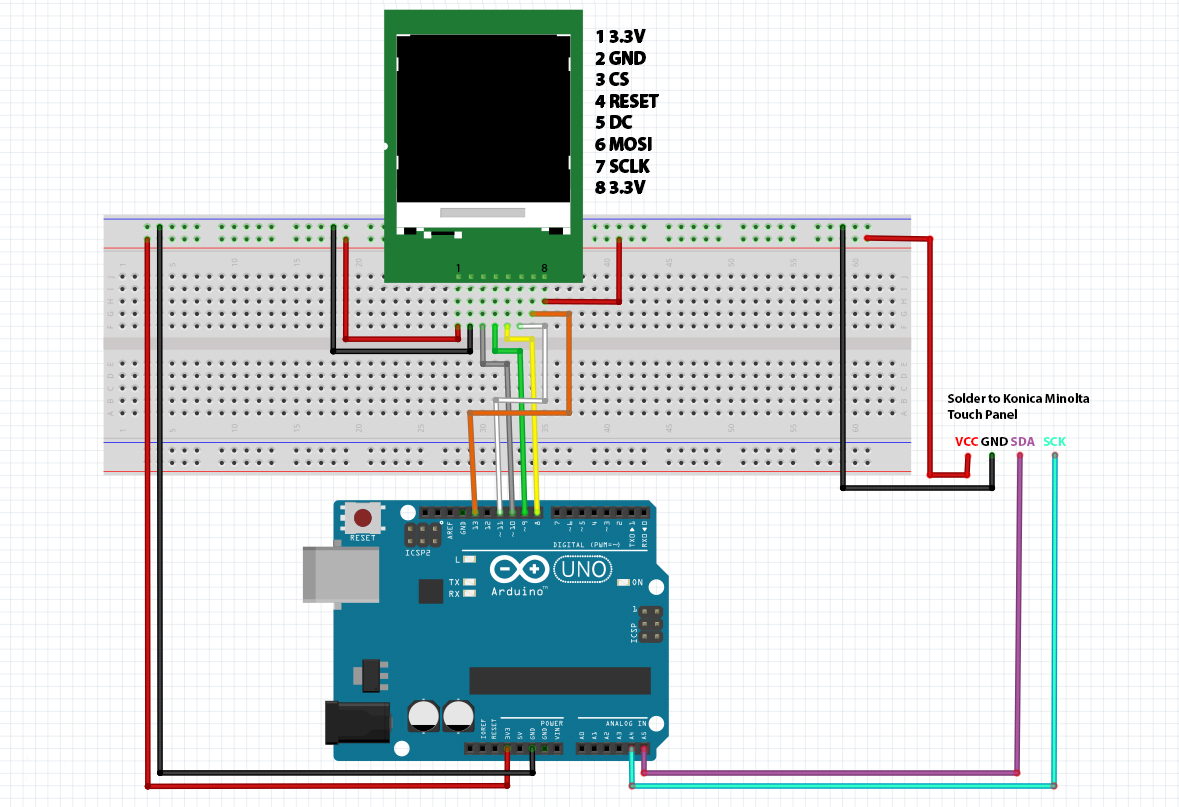
#include <Wire.h>               //Connect Konica Minolta touch screen SDA to A04 and SCK to A05
#include <Adafruit_GFX.h>       //Core graphics library
#include <Adafruit_ST7735.h>    //Hardware-specific library
#include <SPI.h>

#define TFT_SCLK 13
#define TFT_MOSI 11
#define TFT_CS 10
#define TFT_RST 9
#define TFT_DC 8

Adafruit_ST7735 tft = Adafruit_ST7735(TFT_CS, TFT_DC, TFT_MOSI, TFT_SCLK, TFT_RST);

byte register1;
byte register2;
byte register3;
byte register4;
byte register5;
byte register6;
byte register7;
byte register8;
byte register9;
byte register10;
byte register11;

int xx1, xx2, yy1, yy2, r, x, y; //variables

void setup() {
  tft.initR(INITR_REDTAB);    //initialize a ST7735S chip, black tab
  tft.fillScreen(ST7735_BLACK); //clear screen
  Wire.begin(0x5c);           //join i2c bus (address optional for master)
  //Serial.begin(115200);     //start serial for output
  //Serial.println("starting"); //print "starting" to serial
}

void loop() {
  Wire.beginTransmission(0x5C); //touch panel address
  Wire.write(0x00);       //start register
  Wire.endTransmission();     //communication close
  Wire.requestFrom(0x5c, 11);   //how many byte to read from address 0x5C

  register1 = Wire.read();    //first byte reading (Touch counter)
  register2 = Wire.read();    //second reading (????)
  register3 = Wire.read();    //etc etc etc (first finger X coordinate low byte)
  register4 = Wire.read();    //first finger X coordinate high byte
  register5 = Wire.read();    //first finger Y coordinate low byte
  register6 = Wire.read();    //first finger Y coordinate high byte
  register7 = Wire.read();    //??
  register8 = Wire.read();    //second finger X coordinate low byte
  register9 = Wire.read();    //second finger X coordinate high byte
  register10 = Wire.read();   //second finger Y coordinate low byte
  register11 = Wire.read();   //second finger Y coordinate high byte


  xx1 = (register4 * 256) + register3;    //calculate 2 byte to touch coordinate (0-1024)
  yy1 = (register6 * 256) + register5;    //calculate 2 byte to touch coordinate (0-600)
  xx2 = (register9 * 256) + register8;    //calculate 2 byte to touch coordinate (0-1024)
  yy2 = (register11 * 256) + register10;  //calculate 2 byte to touch coordinate (0-600)

  xx1 = xx1 / 8;              //divide by 8 to scale 128x128
  xx1 = 128 - xx1;

  yy1 = yy1 / 4.6875;         //divide by 4.6 to scale 128x128
  yy1 = 128 - yy1;

  xx2 = xx2 / 8;
  xx2 = 128 - xx2;

  yy2 = yy2 / 4, 6875;
  yy2 = 128 - yy2;

  //x= xx1 - xx2;             //calculate radius
  //y= yy2 - yy2;

  //x= x*x;                   //pythagoras
  //y= y*y;
  //r = x +y;
  //r= sqrt(r);

  //Serial.print("Touch counter:");
  //Serial.println(register1);
  //Serial.print("First finger horinzontal (X) coordinate:");
  //Serial.println(xx1);

  //Serial.print("First finger vertical (Y) coordinate:");
  //Serial.println(yy1);

  //Serial.print("Second finger horinzontal (X) coordinate:");
  //Serial.println(xx2);

  //Serial.print("Second finger vertical (Y) coordinate:");
  //Serial.println(yy2);

  tft.drawPixel(xx1, yy1, ST7735_WHITE);  //write dots to screen first finger

  tft.drawPixel(xx2, yy2, ST7735_GREEN);  //write dots to screen second finger

  //Draw line between two finger
  //tft.drawLine(xx1,yy1,xx2,yy2, ST7735_WHITE); // test

  //Draw dot for first finger and draw circle with radius between first and second finger disatance
  //if (register1 <= 1) {             //test
  //  tft.drawPixel(xx1, yy1, ST7735_WHITE);    //test
  //}                       //test
  //else {tft.drawCircle (xx1,yy1,r,ST7735_BLUE); //test
  //}                       //test
  //delay(100);                   //test

    }





_ztBMuBhMHo.jpg?auto=compress%2Cformat&w=48&h=48&fit=fill&bg=ffffff)




Comments