


Hardware components | ||||||
 |
| × | 1 | |||
 |
| × | 1 | |||
 |
| × | 1 | |||
 |
| × | 1 | |||
 |
| × | 1 | |||
 |
| × | 1 | |||
Software apps and online services | ||||||
 |
| |||||
Original tutorial:Arduino UNO R4 - Sound Sensor (newbiely.com)
A sound sensor is the cheapest way to give an Arduino UNO R4 an ear. It will not tell you what it heard - it tells you that something was loud enough. That turns out to be plenty: clap to switch on a lamp, bang to trigger a relay, knock to wake a servo.
Two flavours of the module- Digital - one OUT pin, a plain ON / OFF signal.
- Analog - a DO pin that behaves like the digital one, plus an AO pin that gives you a continuous loudness value.
Both carry an electret microphone, a comparator, a sensitivity potentiometer, and two LEDs - one for power, one that lights when the threshold is crossed.
The one thing that trips people upThe output is inverted. Silence reads HIGH; a sound pulls the pin LOW. If your sketch seems to be firing constantly, it is almost certainly this and not the wiring.
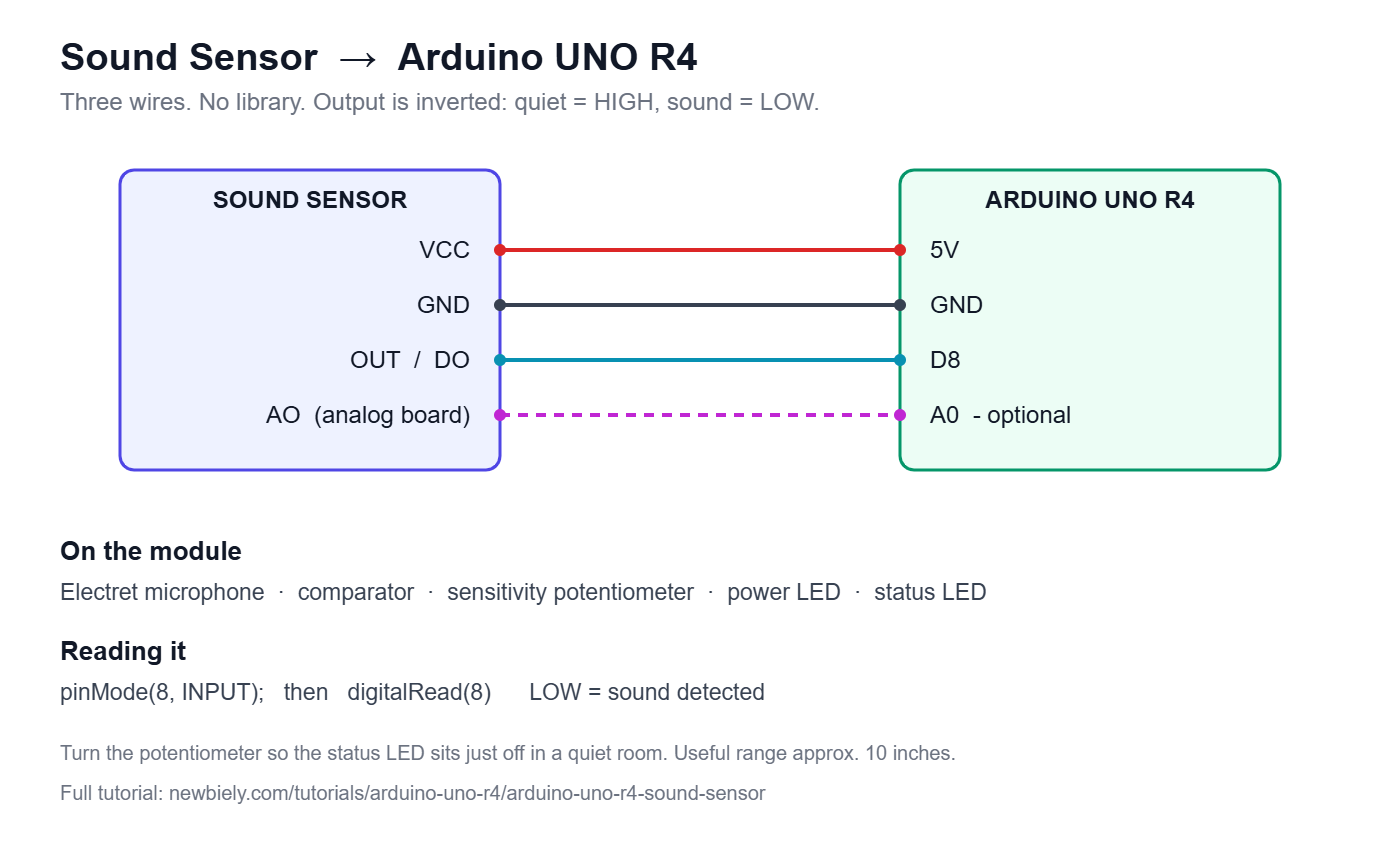
Wiring- VCC to 5V (the module is happy anywhere from 3.3V to 5V)
- GND to GND
- OUT (or DO on the analog board) to pin 8
- On the analog board, AO to any analog pin if you want a loudness reading as well
No library needed - pinMode(8, INPUT) and digitalRead(8) is the whole API.
This is the part worth spending a minute on. Turn the little screw until the status LED sits just off in a quiet room, then claps light it and normal talking does not. Too sensitive and the sensor triggers on everything; too dull and you have to shout at it. Useful range is about 10 inches.
CodeTwo sketches - a bare detector that prints sound events to the Serial Monitor, and a clap-controlled LED demo with four patterns (Blink All, Water Wave, Inside Out, Random Dance). Both live in the original tutorial rather than being repeated here:
https://newbiely.com/tutorials/arduino-uno-r4/arduino-uno-r4-sound-sensor
If it misbehaves- Status LED stuck on or stuck off: turn the sensitivity pot, not the code.
- Random triggers: the module picks up vibration through the bench. Screw it down to something solid.
- Erratic readings: it is an analog front end, so give it clean power. A noisy supply shows up as phantom claps.
Full tutorial, wiring diagram and complete code:https://newbiely.com/tutorials/arduino-uno-r4/arduino-uno-r4-sound-sensor


Comments