



Hardware components | ||||||
 |
| × | 1 | |||
| × | 1 | ||||
| × | 1 | ||||
| × | 1 | ||||
| × | 1 | ||||
Software apps and online services | ||||||
| ||||||
| ||||||
Hand tools and fabrication machines | ||||||
| ||||||
| ||||||
| ||||||
| ||||||
I've always been fascinated by the intersection of embedded hardware and modern payment systems. When I got the opportunity to work on a real-world vending machine project for Budkoin — a blockchain-based payment platform — I jumped at it.
Traditional vending machines are outdated. They rely on coins, rigid interfaces, and offer zero traceability. The client needed something completely different: a cashless, modern, and traceable system that could integrate with their existing blockchain payment infrastructure.
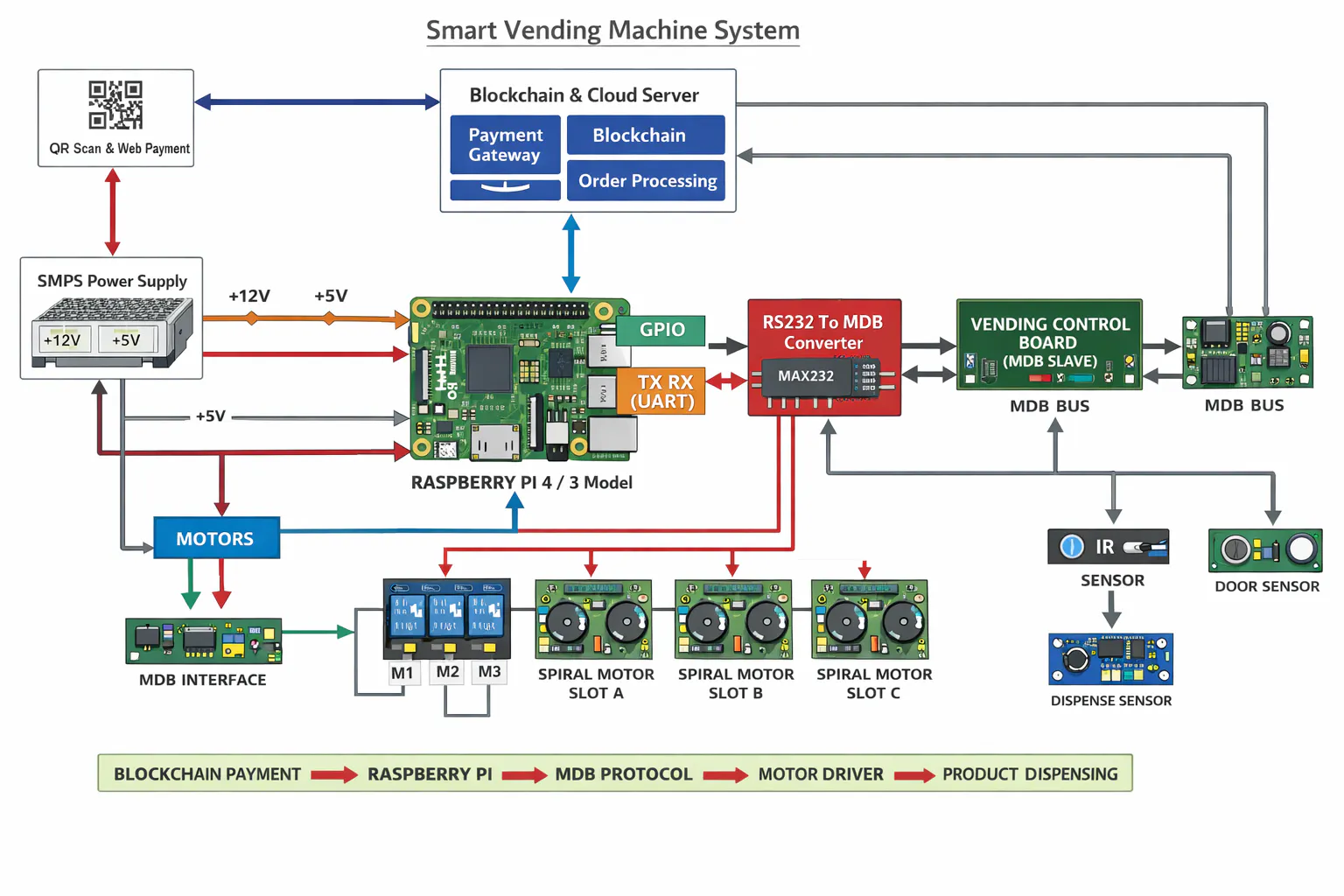
What I BuiltI designed and developed a smart vending machine powered by a Raspberry Pi, capable of:
- Accepting blockchain-based payments via QR code
- Displaying a mobile-friendly web ordering interface
- Verifying orders and triggering dispensing via MDB protocol
- Running a smooth, PyTorch-based interactive UI on the machine screen
Step 1 — QR Code ScanThe user walks up to the machine and scans the QR code displayed on the screen. This opens a mobile-friendly ordering page directly on their phone.
Step 2 — Web-Based Order & PaymentThe user browses products on the web interface, selects their item, and completes payment through Budkoin's blockchain payment gateway. After successful payment, the system generates a unique Order ID.
Step 3 — Order ID Entry on MachineThe user enters this Order ID on the machine's touchscreen UI. The Raspberry Pi backend verifies the ID against the web app database.
Step 4 — Dispensing via MDB ProtocolOnce verified, the system sends a dispense command through the MDB (Multi-Drop Bus) protocol to the vending hardware, which releases the selected product.
The Raspberry Pi is the brain of the entire system. It handles:
- Running the on-screen interactive UI (built with PyTorch)
- Communicating with the web app backend via API
- Sending MDB protocol commands to the vending hardware
The beauty of this setup is that Raspberry Pi acts as both the display controller and the hardware communication layer — eliminating the need for a separate industrial controller.
LayerTechnologyOn-screen UIPyTorch-based interfaceBackendWeb app with order/payment APIPayment IntegrationBudkoin blockchain gatewayHardware CommunicationMDB ProtocolPlatformRaspberry Pi (Linux)
Key Challenges & How I Solved ThemChallenge 1 — MDB Protocol ImplementationMDB is an industry-standard but tricky to implement from scratch on a Pi. I wrote a custom serial interface to handle the timing-sensitive communication between the Pi and the vending hardware.
Challenge 2 — Order ID SecuritySince order IDs are user-entered, I had to ensure they couldn't be guessed or reused. I implemented server-side one-time validation — each ID expires immediately after dispensing.
Challenge 3 — UI Responsiveness on Pi HardwareRunning a smooth, visually guided interface on limited Pi resources required careful optimization of the PyTorch rendering pipeline and asset loading.
Real-World DeploymentThis wasn't a prototype — it was a full client deployment for Budkoin. The machine now runs in a real environment, offering a completely cashless, modern vending experience powered by blockchain payments.
I documented the full development process and architecture in a case study write-up, which goes deeper into the system design decisions, client requirements, and testing process: Full Case Study & Technical Write-up
What I Learned- MDB protocol is powerful but requires very precise timing — always test with real hardware early
- Raspberry Pi is more than capable of running production embedded systems when optimized properly
- QR-based payment flows are surprisingly smooth UX once the web backend is solid
- Blockchain payment integration doesn't have to be complex — clean API design makes it seamless
- Add RFID staff bypass for free purchases without payment
- Integrate real-time inventory management dashboard
- Add camera-based product recognition as a backup verification layer
Support multiple payment methods (UPI, NFC) alongside blockchainTHINGS / COMPONENTS SECTION
Hardware:
- Raspberry Pi (4 or 3B+)
- Vending Machine with MDB-compatible VMC
- Touchscreen Display (7" or 10")
- QR Code Scanner module
- MDB Interface Board / Serial Adapter
- Power Supply Unit
Software & Tools:
- Python (backend & MDB communication)
- PyTorch (on-screen UI framework)
- Linux (Raspberry Pi OS)
- Web framework (Flask / FastAPI for backend)
- Budkoin Blockchain Payment API


Comments