// include the library code:
#include <LiquidCrystal.h>

// initialize the library by associating any needed LCD interface pin
// with the arduino pin number it is connected to
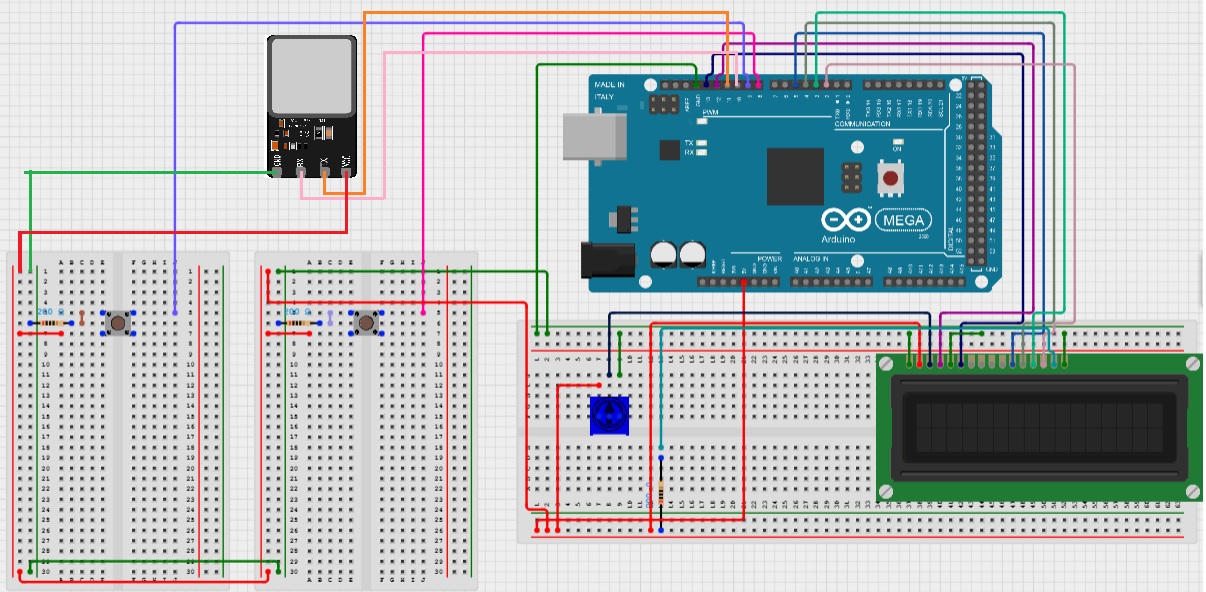
const int rs = 12, en = 13, d4 = 5, d5 = 4, d6 = 3, d7 = 2;
int Candidate1Votes = 0; // Initialize the number of votes to zero for each candidate
int Candidate2Votes = 0;
int Candidate3Votes = 0;
int Candidate4Votes = 0;
int MenuType = 4;        // Variable takes control of the menu the user is located
int CursorButton = 8;    // Cursor button pin number
int SelectButton = 9;    // Select button pin number
int Cursor = 0;          // Variable takes control of the main menu cursor position
int CursorVote = 0;      // Variable takes control of the vote menu cursor position
int CursorCandidate = 0; // Variable takes control of the candidate cursor position
LiquidCrystal lcd(rs, en, d4, d5, d6, d7);
                         // Setting lcd pins
void setup() {
  // Setting up the LCD's number of columns and rows:
  lcd.begin(16, 2);
  // Setting up the buttons:
  pinMode(CursorButton, INPUT_PULLUP);
  pinMode(SelectButton, INPUT_PULLUP);
  // Initializing lcd to display main menu:
  updateMenu();
}

void loop() {
  if (MenuType == 4)    // If main menu
  {
    // If cursor button is pressed:
    if (digitalRead(CursorButton) == HIGH){
      Cursor = (Cursor + 1) % 4;
      updateMenu();     // Move cursor and hold while button is pressed
      while (digitalRead(CursorButton) == HIGH);
    }
    // If select button is pressed:
    if (digitalRead(SelectButton) == HIGH){
      MenuType = Cursor + 4;
      updateVoteMenu(); // Change menu type and hold while button is pressed
      while (digitalRead(SelectButton) == HIGH);
    }
   }

  if (MenuType == 5)    // If vote menu
  {
    // If cursor button is pressed:
    if (digitalRead(CursorButton) == HIGH){
      CursorVote = (CursorVote + 1) % 4;
      updateVoteMenu(); // Move cursor and debounce with a while loop
      while (digitalRead(CursorButton) == HIGH);
    }

    if (digitalRead(SelectButton) == HIGH){
      // If select button is pressed, increase number of votes:
      if (CursorVote == 0)
        Candidate1Votes++;
      if (CursorVote == 1)
        Candidate2Votes++;
      if (CursorVote == 2)
        Candidate3Votes++;
      if (CursorVote == 3)
        Candidate4Votes++;
      // Hold while button is pressed:
      while (digitalRead(SelectButton) == HIGH);
      // Display thanks for voting, reset CursorVote and go back to main menu:
      lcd.clear();
      lcd.print("Thanks");
      lcd.setCursor(0, 1);
      lcd.print("for voting!");
      CursorVote = 0;
      delay(5000);
      updateMenu();
      MenuType = 4;
    }
  }

  if (MenuType == 6)    // If results
  {
    // Compare votes per candidate and display results:
    lcd.clear();
    if (Candidate1Votes > Candidate2Votes and Candidate1Votes > Candidate3Votes and Candidate1Votes > Candidate4Votes){
      lcd.print("Candidate1 won");
      lcd.setCursor(0, 1);
      lcd.print("the election!");
    }
    else if (Candidate2Votes > Candidate1Votes and Candidate2Votes > Candidate3Votes and Candidate2Votes > Candidate4Votes){
      lcd.print("Candidate2 won");
      lcd.setCursor(0, 1);
      lcd.print("the election!");
    }
    else if (Candidate3Votes > Candidate1Votes and Candidate3Votes > Candidate2Votes and Candidate3Votes > Candidate4Votes){
      lcd.print("Candidate3 won");
      lcd.setCursor(0, 1);
      lcd.print("the election!");
    }
    else if (Candidate4Votes > Candidate1Votes and Candidate4Votes > Candidate2Votes and Candidate4Votes > Candidate3Votes){
      lcd.print("Candidate4 won");
      lcd.setCursor(0, 1);
      lcd.print("the election!");
    }
    else
    {
      lcd.print("There was");
      lcd.setCursor(0, 1);
      lcd.print("a tie.");
    }
    delay(5000);
    Candidate1Votes = 0; // Reset number of votes per candidate
    Candidate2Votes = 0;
    Candidate3Votes = 0;
    Candidate4Votes = 0;
    updateMenu();
    MenuType = 4;
  }

  if (MenuType == 7)    // If reset vote count
  {
    // Display Clearing votes and go back to main menu:
    lcd.clear();
    lcd.print("Clearing votes...");
    delay(5000);
    Candidate1Votes = 0;
    Candidate2Votes = 0;
    Candidate3Votes = 0;
    Candidate4Votes = 0;
    updateMenu();
    MenuType = 4;
  }
}
// Function moves cursor depending on the value of Cursor:
void updateMenu(){
  switch (Cursor) {
    case 0:
      lcd.clear();
      lcd.print(">JBU Engineering");
      lcd.setCursor(0, 1);
      lcd.print(" Vote");
      break;
    case 1:
      lcd.clear();
      lcd.print(" JBU Engineering");
      lcd.setCursor(0, 1);
      lcd.print(">Vote");
      break;
    case 2:
      lcd.clear();
      lcd.print(">Results");
      lcd.setCursor(0, 1);
      lcd.print(" Reset Vote Cnt");
      break;
    case 3:
      lcd.clear();
      lcd.print(" Results");
      lcd.setCursor(0, 1);
      lcd.print(">Reset Vote Cnt");
      break;
  }
}

// Function moves cursor depending on the value of CursorVote:
void updateVoteMenu() {
  switch (CursorVote) {
    case 0:
      lcd.clear();
      lcd.print(">Candidate 1");
      lcd.setCursor(0, 1);
      lcd.print(" Candidate 2");
      break;
    case 1:
      lcd.clear();
      lcd.print(" Candidate 1");
      lcd.setCursor(0, 1);
      lcd.print(">Candidate 2");
      break;
    case 2:
      lcd.clear();
      lcd.print(">Candidate 3");
      lcd.setCursor(0, 1);
      lcd.print(" Candidate 4");
      break;
    case 3:
      lcd.clear();
      lcd.print(" Candidate 3");
      lcd.setCursor(0, 1);
      lcd.print(">Candidate 4");
      break;
  }
}




_wzec989qrF.jpg?auto=compress%2Cformat&w=48&h=48&fit=fill&bg=ffffff)



_3u05Tpwasz.png?auto=compress%2Cformat&w=40&h=40&fit=fillmax&bg=fff&dpr=2)

Comments