#include <Wire.h>
#include <LiquidCrystal_I2C.h>

// Initialize the I2C LCD (set the address to 0x27 or 0x3F based on your module)
LiquidCrystal_I2C lcd(0x27, 16, 2);

// ADJUST GAME SPEED HERE
// Lower number = Faster game (e.g., 70 is fast, 100 is normal, 150 is slow)
const int GAME_SPEED = 70;

// Timing variables for non-blocking loop
unsigned long lastScrollTime = 0;

// game score
int score = 0;

// limit jump frequency
bool allow_jump = false;

// Button and Buzzer Pins
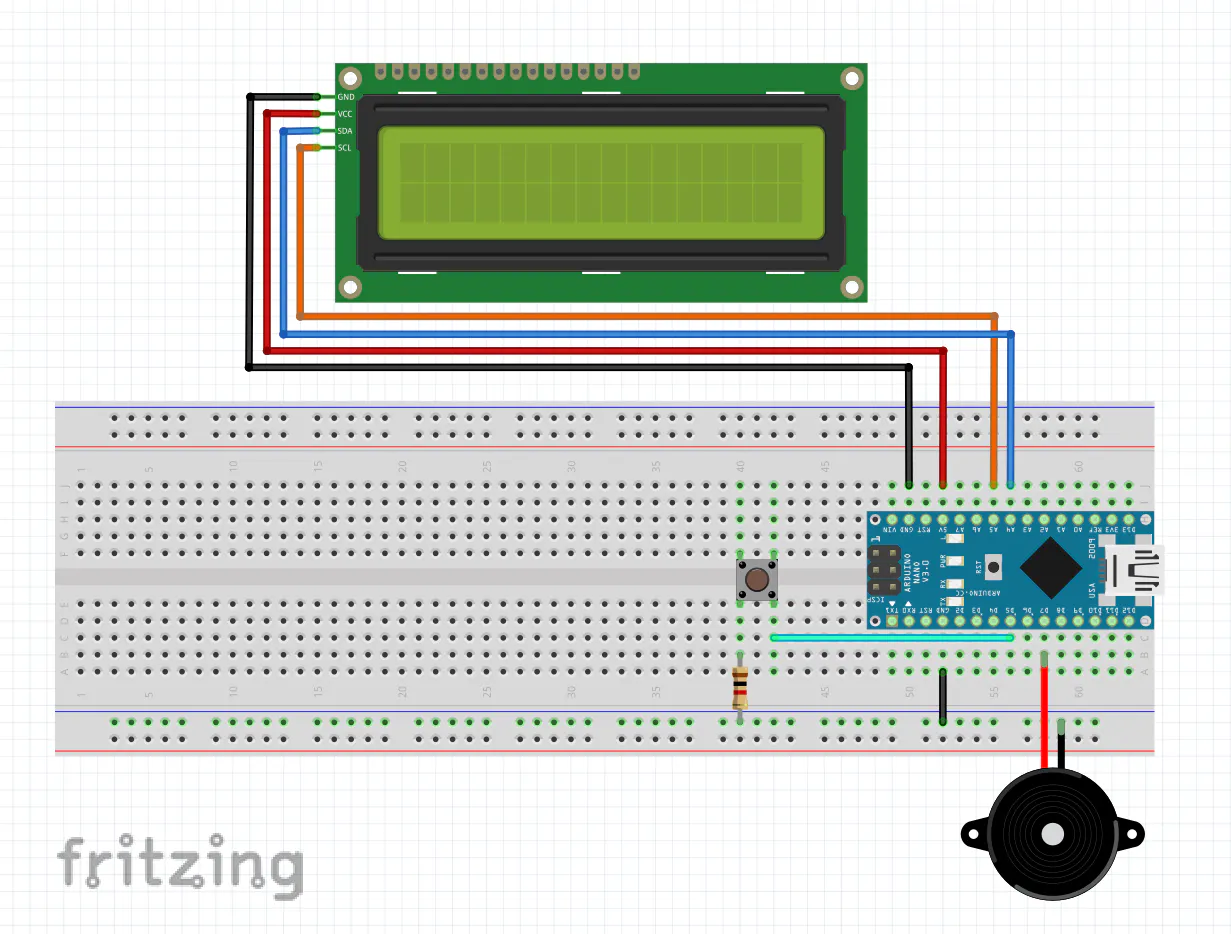
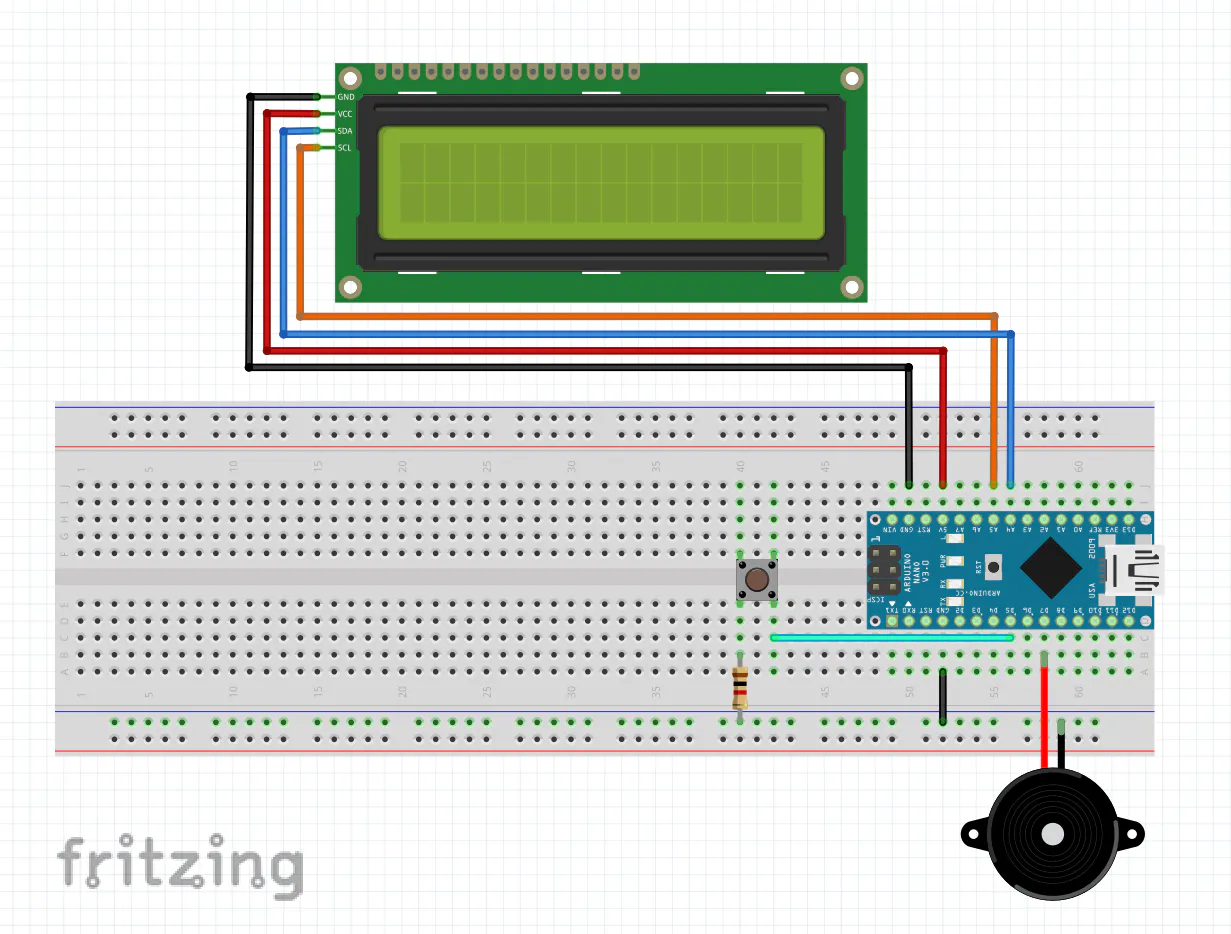
const int jumpButton = 5;  // Jump button
const int buzzer = 7;      // Buzzer

// dino left leg char
byte dino_l[8] = {
  B00000111,
  B00000101,
  B00000111,
  B00010110,
  B00011111,
  B00011110,
  B00001110,
  B00000100
};

// dino right leg char
byte dino_r[8] = {
  B00000111,
  B00000101,
  B00000111,
  B00010110,
  B00011111,
  B00011110,
  B00001110,
  B00000010
};

// small cactus
byte cactus_small[8] = {
  0b00100,
  0b00101,
  0b10101,
  0b10101,
  0b10111,
  0b11100,
  0b00100,
  0b00000
};

// big cactus
byte cactus_big[8] = {
  B00000000,
  B00000100,
  B00000101,
  B00010101,
  B00010110,
  B00001100,
  B00000100,
  B00000100
};

// game world
char world[] = {
  32, 32, 32, 32, 32, 32, 32, 83, 99, 111, 114, 101, 58, 32, 32, 32,
  32, 0, 32, 32, 32, 32, 32, 32, 32, 32, 32, 32, 32, 32, 32, 32,
};

// infinite run routine
uint8_t scroll_world() {
  // Removed the forcing delay(100) from here so it doesn't freeze during jumps

  // create next random object on the map (small/big cactus or empty square)
  char random_object = random(2, 35);  // '35' is a probability of encountering a cactus

  // place cactus on map
  if (random_object < 4) world[31] = random_object;

  // place empty square on map
  else world[31] = 32;

  // loop over second row of game world map
  for (int i = 16; i < 32; i++) {
    // scroll only if encounter a cactus
    if (world[i] == 2 or world[i] == 3) {
      // previous cell (cactus or empty)
      char prev = (i < 31) ? world[i + 1] : 32;

      // dino and cactus collision detection (game over)
      if (world[i - 1] < 2) return 1;

      // scroll world
      world[i - 1] = world[i];
      world[i] = prev;
    }
  }

  // erase top right cell on map (otherwise it gets a cactus as a side effect)
  world[15] = 32;

  // erase cactus behind dino after jump
  if (world[16] < 2) world[16] = 32;

  // no collisions, hence keep running
  return 0;
}

// update world
void update_world() {
  // scroll map, detect collisions
  int game_over = scroll_world();

  // winning condition
  if (score == 999) {
    lcd.setCursor(0, 0);
    lcd.print("    YOU WIN!    ");
    lcd.setCursor(0, 1);
    lcd.write(byte(0));
    lcd.write(byte(32));
    lcd.write(byte(2));
    lcd.write(byte(2));
    lcd.write(byte(2));
    lcd.write(byte(3));
    lcd.write(byte(3));
    lcd.write(byte(3));
    lcd.write(byte(3));
    lcd.write(byte(3));
    lcd.write(byte(3));
    lcd.write(byte(2));
    lcd.write(byte(2));
    lcd.write(byte(2));
    lcd.write(byte(32));
    lcd.write(byte(1));
    while (1)
      ;
  }

  // hit a cactus
  if (game_over) {
    tone(buzzer, 500, 500);  // Play collision sound
    lcd.setCursor(0, 1);
    lcd.write(byte(0));
    lcd.write(byte(3));
    lcd.print(" GAME OVER! ");
    lcd.write(byte(3));
    lcd.write(byte(0));
    score = 0;
    delay(1500);
    lcd.setCursor(0, 1);
    lcd.write(byte(0));
    lcd.write(byte(3));
    lcd.print("Press Start!");
    lcd.write(byte(3));
    lcd.write(byte(0));
    while (get_button() == HIGH)
      ;
    lastScrollTime = millis(); // Reset clock after restart
  }

  // increase the score
  score++;

  // update score
  lcd.setCursor(13, 0);
  lcd.print("   ");
  lcd.setCursor(13, 0);
  lcd.print(score);

  // set cursor to top left corner of LCD
  lcd.setCursor(0, 0);

  // loop over game world map array
  for (int i = 0; i < 32; i++) {
    // mimic dino stepping left and right legs
    if (world[i] < 2) world[i] ^= 1;

    // update cursor for rendering lower row of th LCD
    if (i == 16) lcd.setCursor(0, 1);

    // do not overwrite score to avoid flickering
    if (i < 13 || i > 15)
      lcd.write(byte(world[i]));
  }
}

// get user input
bool get_button() {
  return digitalRead(jumpButton);
}

// arduino setup
void setup() {
  pinMode(jumpButton, INPUT_PULLUP);

  // init LCD and force maximum backlight brightness
  lcd.init();
  lcd.backlight();

  // create sprites
  lcd.createChar(0, dino_l);
  lcd.createChar(1, dino_r);
  lcd.createChar(2, cactus_small);
  lcd.createChar(3, cactus_big);

  lastScrollTime = millis();
}

// arduino loop
void loop() {
  lcd.setCursor(0, 1);
  lcd.write(byte(0));
  lcd.write(byte(3));
  lcd.print("Press Start!");
  lcd.write(byte(3));
  lcd.write(byte(0));
  while (get_button() == HIGH)
    ;

  // game loop
  while (true) {
    // dissallow dino hanging on the upper row all of the time
    allow_jump ^= 1;

    // INSTANT JUMP CHECK: Check button input immediately without waiting for timers
    if (get_button() == LOW && allow_jump == true) {
      // update dino position on LCD
      lcd.setCursor(1, 1);
      lcd.write(byte(32));
      lcd.setCursor(1, 0);
      lcd.write(byte(0));
      tone(buzzer, 1000, 100);  // Play jump sound

      // update dino position on world map
      world[1] = byte(0);
      world[17] = byte(32);

      // scroll map smoothly while jumping
      for (int i = 0; i < 4; i++) {
        update_world();
        delay(GAME_SPEED); // Uses customized speed instead of fixed lag
      }

      // update dino position on world map
      world[1] = byte(32);
      world[17] = byte(0);

      // update dino position on LCD
      lcd.setCursor(1, 0);
      lcd.write(byte(32));
      lcd.setCursor(1, 1);
      lcd.write(byte(0));

      lastScrollTime = millis(); // Reset timer after jump sequence completes
    }

    // SCROLL TIMER: Only scroll when the custom speed interval has passed
    if (millis() - lastScrollTime >= GAME_SPEED) {
      update_world();
      lastScrollTime = millis();
    }
  }
}



_ztBMuBhMHo.jpg?auto=compress%2Cformat&w=48&h=48&fit=fill&bg=ffffff)




_3u05Tpwasz.png?auto=compress%2Cformat&w=40&h=40&fit=fillmax&bg=fff&dpr=2)
Comments