



Hardware components | ||||||
 |
| × | 1 | |||
| × | 1 | ||||
| × | 1 | ||||
| × | 1 | ||||
| × | 5 | ||||
| × | 3 | ||||
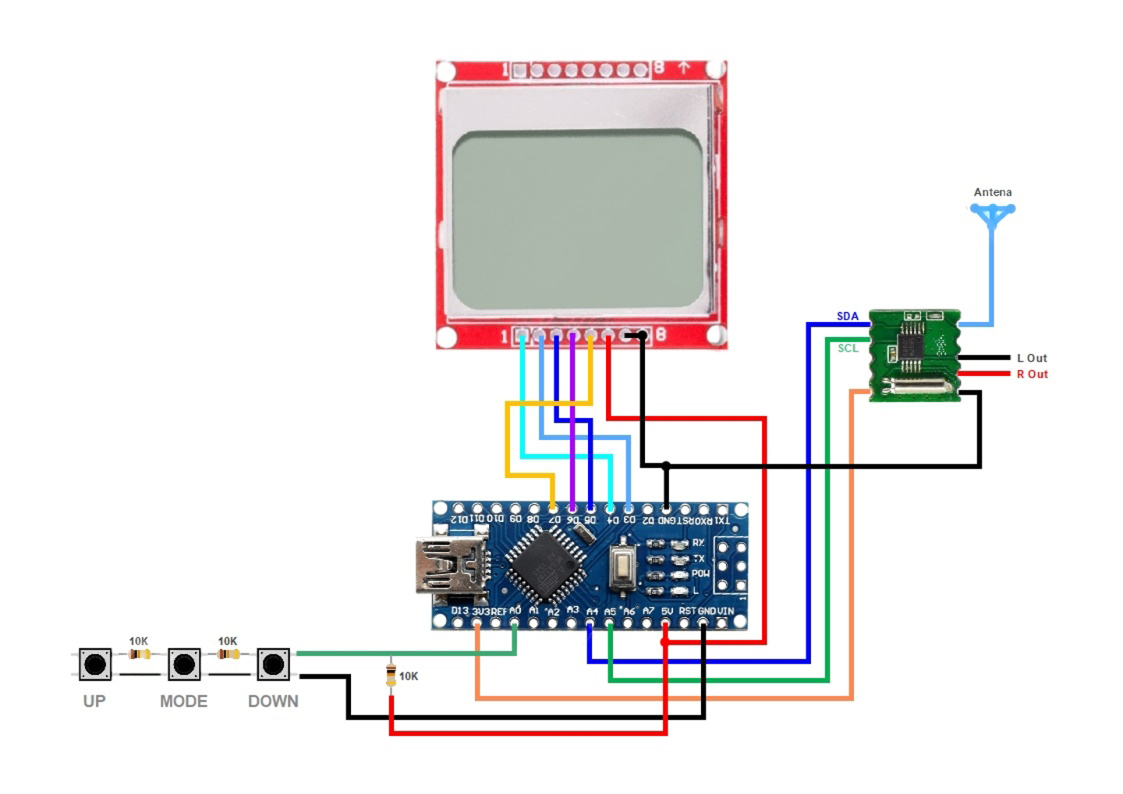
A compact, DIY digital FM stereo radio receiver built around the Arduino Nano / Uno, RDA5807M FM radio chip, and a classic Nokia 5110 LCD screen (PCD8544 controller).
This project features real-time digital tuning across the 87.0–108.0 MHz FM band, RSSI (signal strength) monitoring, dynamic Stereo/Mono indicator, volume level display, and simple push-button navigation.
Youtube Tutorial :-
- Frequency Tuning: Manual frequency adjustment in standard 100 kHz steps across 87.0–108.0 MHz.
- Graphical Display: Clear monochrome UI showing current frequency, RSSI signal bar, audio output mode (Stereo/Mono), and volume level.
- Digital Audio Processing: Bass boost, soft mute, and automated noise suppression via RDA5807M built-in DSP.
- Low Power Consumption: Runs easily on USB power or a single 3.7V Li-ion battery with a 3.3V regulator.
Note: The Nokia 5110 display operates on 3.3V logic. If connecting directly to 5V Arduino boards, use inline 1kΩ resistors or logic level converters on SPI data lines (RST, CE, DC, DIN, CLK).
Note: The Nokia 5110 display operates on 3.3V logic. If connecting directly to 5V Arduino boards, use inline 1kΩ resistors or logic level converters on SPI data lines (RST, CE, DC, DIN, CLK).
Note: RDA5807M runs on 3.3V VCC. Do NOT connect VCC to 5V.
Note: RDA5807M runs on 3.3V VCC. Do NOT connect VCC to 5V.
Connect four tactile buttons with 10kΩ pull-down resistors to digital pins:
- All Buttons: Arduino Pin A0
Install the following libraries using the Arduino Library Manager (Sketch > Include Library > Manage Libraries):
RADIOby Matthias HertelAdafruit GFX Libraryby AdafruitAdafruit PCD8544 Nokia 5110 LCD Libraryby Adafruit
- Connect hardware components according to the Wiring Table.
- Install the necessary libraries in the Arduino IDE.
- Copy the code into your sketch and select your board model (e.g., Arduino Nano).
- Connect a pair of 3.5mm headphones or powered speakers to the RDA5807M audio jack (the headphone cable also acts as an antenna!).
- Upload the code and enjoy your radio!
This project is open-source.


Comments