




Hardware components | ||||||
 |
| × | 1 | |||
Software apps and online services | ||||||
 |
| |||||
Movement control order executed at various countries including mine has resulted in closure of government library. Book lover is not able to borrow book. A self service logistic handling automation system that allows book lover to continue to borrow and return book without jeopardizing safety.
How does this work?A kiosk that operates 24 hours with Core2 for AWS IoT Edukit as the HMI and controller. The kiosk allow user to scan book tag (bar code) and drop the book for returning. Books returned is UV-C light sanitized by the kiosk to provide safety for the library staff who pick up the books behind the scene without physical contact with the borrower. for book borrowing, the user will make the booking online, and the library staff will put the book at the automation rack. The system will notify the user for readiness of pickup and the borrower will then use the IoT Edukit HMI to retrieve the book from the rack wihout physical contact with library staff.
Demo
The video below shows the working principle of the kiosk
The video show the overview operation
as can be seen, one can return book by scanning the bar code on the book
Development Getting Started
after following [1] to install PlatformIO and clone the tutorial project, i get to this screen below
upon starting up the device for the first time, i am pleasantly surprise by its built in introduction about its onboard hardware, with some nice small demo.
the board comes with ATECC608 crypto-auth pre-provisioned static certificates.
however, then the error comes, i get the error platformio Error: Detected a whitespace character in project paths
the problem is mentioned under limitations at https://docs.platformio.org/en/latest/frameworks/espidf.html#configuration and at https://www.alexharper.co.uk/platform-io-build-failure-when-tool-path-contains-whitespace/
initially i have attended to add the line core_dir but it doesn't work and it fail to finish installation
Solution
my solution is the harder renaming the c:\users\Leow Cheah Wei to c:\users\LeowCheahWei
one has to use the wmic command to do so. One reference is [3]
installing latest version
We found 607.85MB of unnecessary PlatformIO system data (temporary files, unnecessary packages, etc.).
Use 'pio system prune --dry-run' to list them or `pio system prune` to save disk space.
finally, i can run it properly
Building
in terminal, browse to correct folder with cd, then key in
pio run --environment core2foraws
Basic Usage
upload : pio run --environment core2foraws --target upload
monitor: pio run --environment core2foraws --target monitor
erase firmware after usage, stop the device by ctrl+c and :
pio run --environment core2foraws --target erase
AWS IoT
The tutorial starts at this prerequisite
we can test the functionality of CLI by typing aws --version
we can also test the MQTT endpoint
aws iot describe-endpoint --endpoint-type iot:Data-ATS
i face problem for the arrow key is not working in the espressif menu config which is similar to this post. luckily i can navigate with the J and K key instead
further question is that i need to set the compiler path to
.platformio\packages\toolchain-xtensa32@2.50200.97\bin , which is mentioned at this thread
The policy that was set earlier in the registration script constrained the topics that the device can subscribe and publish to. This is critical for filtering, and potentially for security. Your device can only send or receive to topics that match the client Id, which in this case is the same as the unique serial number of the device’s secure element.
System Operating Principles
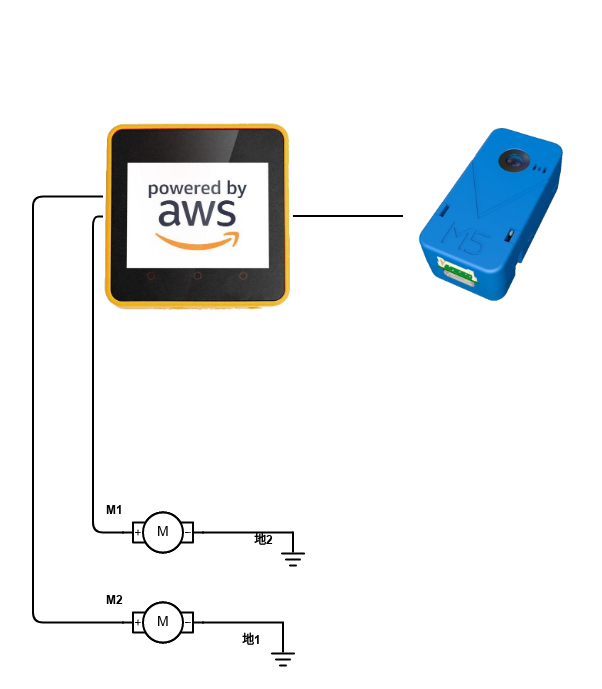
AWS IoT edukit is connected to a M5Stack UnitV2 camera module. this module is used for scanning bar code on boom as well as on phone screen. AWS IoT Edukit can then be used to control the dc motor that run a belt to alllow user to place the book to be returned onto it. For user to borrow book, he can scan the bar code on phone screen using the kiosk, and the book which is preplaced by librarian can be sent to the user via the conveyor without human interaction. Details of this is documented on Github on its readme.md
this video show the operation
DC motor control
the conveyor belt that i have chosen has a DC motor driven by 24 V. luckily it can be driven with normal spst relay
Working Images
Figure 1
References
[1] getting started for windows 10 https://edukit.workshop.aws/en/getting-started/prerequisites/windows.html
[2] https://edukit.workshop.aws
[3] https://www.windows-commandline.com/rename-local-user-account/
[4] Hardware API example
For examples of how to use the hardware features without any connectivity, take a look at the repository from M5Stack: https://github.com/m5stack/M5Core2/tree/master/examples/core2_for_aws/FactoryTest

Comments