


Hardware components | ||||||
 |
| × | 1 | |||
 |
| × | 1 | |||
| × | 2 | ||||
| × | 2 | ||||
| × | 1 | ||||
| × | 1 | ||||
| × | 1 | ||||
| × | 1 | ||||
| × | 1 | ||||
Software apps and online services | ||||||
 |
| |||||
| ||||||
| ||||||
| ||||||
| ||||||
| ||||||
| ||||||
| ||||||
| ||||||
| ||||||
| ||||||
| ||||||
Hand tools and fabrication machines | ||||||
 |
| |||||
 |
| |||||
 |
| |||||
Boafoc (pronounced as Bwafour)
A fully offline, privacy-first AI voice assistant running on a Raspberry Pi 5 that understands and responds in Twi, Ga, Ewe, and English built from scratch for African communities who shouldn't have to wait for Silicon Valley to care about their languages.
Every major voice assistant on the market today Siri, Google Assistant, Alexa treats African languages as an afterthought. You want to interact in Twi? Too bad. Ga? Not a chance. Ewe? You're dreaming.
And even the rare assistant that supports some African languages is cloud-dependent. Every word you say gets shipped overseas, processed on someone else's servers, and sent back. For communities with unreliable internet which describes a significant portion of West Africa that's a dealbreaker before the conversation even starts.
Boafoc fixes both problems simultaneously. Everything runs locally on the Raspberry Pi 5. Unplug the ethernet. Turn off the Wi-Fi. Boafoc still works.
Video Demonstration[INSERT VIDEO EMBED — Full system demo: "Yooree" wake word activation → query in English/Twi → OLED display activates → LLM response → TTS output through Bluetooth speaker]
How It WorksThe system is a modular pipeline where each stage hands off to the next. Nothing is a black box every component can be swapped independently.
The Pi 5 with 8GB RAM is the minimum comfortable platform for running a 3B quantized LLM, faster-whisper, and Piper TTS simultaneously without memory pressure. The Pi 4 can technically do it but it's uncomfortable. The Pi 5 handles it without breaking a sweat. The Cortex-A76 cores also make a real difference for I/O throughput when you're streaming audio, running inference, and updating an OLED at the same time.
Software Stack (All Free and Open Source)
All sensors connect to I2C Bus 1 on the Pi 5, that's GPIO2 (SDA, Pin 3) and GPIO3 (SCL, Pin 5).
To verify everything is connected:
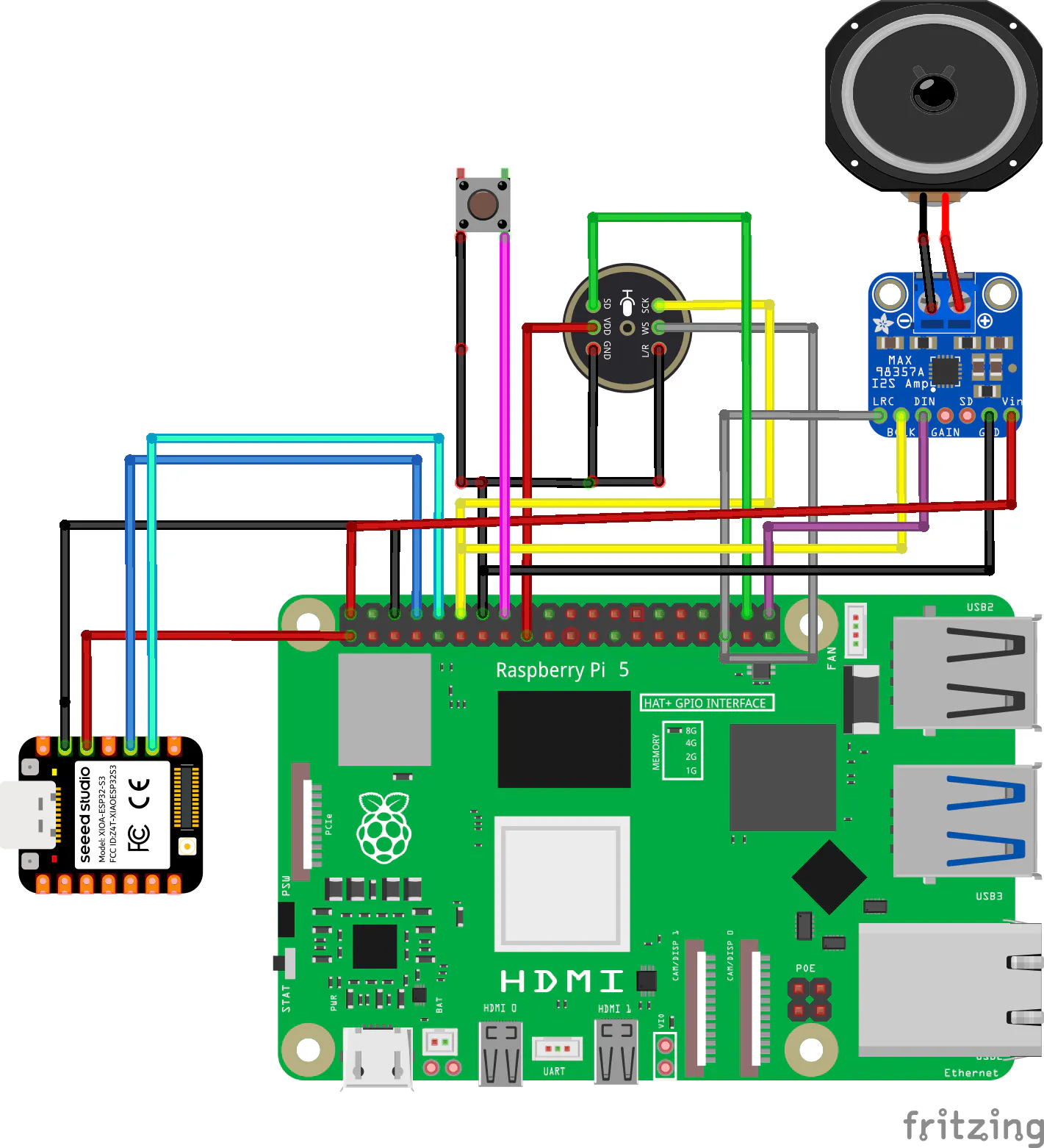
i2cdetect -y 1[SCHEMATIC PLACEHOLDER — Fritzing diagram showing:]
- [HARDWARE PHOTO PLACEHOLDER — Photo of the actual Pi 5 with VoiceHAT, OLED, and sensor modules wired up]
Key lesson: The MPU6050's Errno 121 (Remote I/O error) was a loose jumper wire — not a driver problem. Always check physical connections before debugging software.
Audio PipelineThe Google VoiceHAT uses I2S a digital audio protocol over GPIO. It requires a kernel device tree overlay to activate the soundcard driver. Without this, no microphone will be detected.
But due to the absence of the actual voiceHAT I put together my own with the following article on medium , using an INMP441 mems microphone and a MAX98357A I2S amplifier module.
picture above is from medium
Add the following line to /boot/firmware/config.txt:
dtoverlay=googlevoicehat-soundcardReboot, then verify the soundcard appears:
arecord -lYou should see: card 2: sndrpigooglevoi [Google voiceHAT SoundCard...]
Bluetooth Audio SetupBoafoc uses PipeWire to route audio to Bluetooth earphones. Install the required packages:
sudo apt install -y pipewire pipewire-pulse wireplumber pulseaudio-utils libasound2-pluginsPair your earphones using bluetoothctl:
bluetoothctl
power on
scan on
pair XX:XX:XX:XX:XX:XX
connect XX:XX:XX:XX:XX:XX
Replace XX:XX:XX:XX:XX:XX with your earphone's MAC address. Once connected, PipeWire sets it as the default output automatically.
The VoiceHAT ChallengeThe VoiceHAT records at 48kHz, stereo, S32_LE (32-bit signed). Every AI model in the pipeline wants 16kHz, mono, int16. So the very first thing that happens to every audio frame is a conversion:
- Parse the raw bytes as int32 samples
- Bit-shift right by 16 - brings S32 into int16 range, drops noise from the bottom 16 bits
- Keep only the left channel - stereo becomes mono
- Decimate 3:1 - 48kHz becomes 16kHz
This happens in a single numpy operation before any AI model ever sees the audio. It's lightweight, adds near-zero latency, and the quality is perfectly adequate for voice at 16kHz.
Wake Word: "Boafoc"The wake word is "Boafoc", a custom-trained phrase chosen specifically for this project. The model is a custom .onnx file (Boafoc.onnx) trained with OpenWakeWord's training pipeline.
One critical implementation detail: OpenWakeWord's Model() class takes a positional list, not a keyword argument. Model(["Boafoc.onnx"]) works. Model(wakeword_models=["Boafoc.onnx"])raises a TypeError. This caught me out early and isn't obvious from the docs.
WebRTC VAD runs after wake word detection, accumulating audio frames until it detects silence for ~600ms. This defines the end of the user's utterance and triggers the ASR stage. Without VAD, the system would either cut off speech too early or record forever.
Speech RecognitionModel SelectionBoafoc uses a tiered approach:
- Twi Wav2Vec2 CTranslate2 (int8) - for Twi speech. CTranslate2 int8 is significantly faster on CPU than the original PyTorch model.
- Akan Whisper fine-tune - fallback for Akan/Twi when Wav2Vec2 confidence is low, or as a secondary check.
- faster-whisper (base, int8) - for English, Ga, and any auto-detected language. int8 quantization gives roughly 2x speedup over float32 on CPU.
All models load at startup, not on-demand. This adds 30–60 seconds to boot time but means zero model-loading latency during actual conversations. For a voice assistant, that trade-off is obvious.
Language ConfigurationThe active language is set in .env:
BOAFOC_LANGUAGE=twi # or: en, ga, eweThe language module reads this at startup and routes audio to the correct ASR model. No runtime language detection, this keeps things fast and predictable.
Language Model (The Brain)Boafoc runs llama3.2:3b locally via Ollama. This is the minimum viable model size for reliable tool-following behaviour, smaller models (1B, 0.5B) frequently fail to follow structured output formats correctly, which breaks tool calls.
The LLM handles:
- Understanding what the user is asking
- Deciding whether to call a tool (sensors, filesystem, etc.) or respond directly
- Generating the response text
- Naturally blending Ghanaian language phrases into English replies words and expressions from Twi and Ewe appear in responses where appropriate, giving the assistant its cultural character
TTS uses three different engines depending on language context:
- Piper TTS - for English and mixed-language responses. Fast, high quality, outputs raw PCM piped directly to
aplay. - Ewe MMS VITS (Meta's Massively Multilingual Speech) - for Ewe language output. MMS covers 1100+ languages including several West African ones.
- Ghana NLP HQ TTS - high-quality Ghanaian voices for Twi/Akan output.
Audio reaches the speaker through the PipeWire audio system. For Bluetooth output specifically, aplay -D pulse is used which requires libasound2-plugins installed separately (this isn't obvious from the Piper docs and caused a frustrating debugging session).
The I2C sensors feed into voice-queryable tools. Ask "What's the temperature?" and Boafoc reads the AHT40, formats the result, and speaks it.
The OLED is particularly useful for debugging. Watching words appear on the screen as they're transcribed confirms the ASR is working before you even hear the TTS response.
Filesystem Tool — Security ModelBoafoc can read and write local files via voice command. Because giving an AI unrestricted filesystem access is a terrible idea, the tool uses an eight-layer security model:
- Path resolution - no symlink traversal, no [
../]escape attempts - Sandbox enforcement - absolute path whitelist, configured in
.env - Size limits - won't read files over a configurable limit (default 10MB)
- Extension blocklist -
.key,.pem,.env,.id_rsaand similar are permanently blocked - Auto-backup - creates a timestamped
.bakbefore any write operation - Soft delete - files move to trash, never permanent deletion
- Full audit log - every operation is timestamped and logged as JSON
- YAML command allowlist - only explicitly permitted operations in
config/fs_commands.yamlcan run
The sandbox root is configured per-deployment in .env:
BOAFOC_SANDBOX_ROOT=/home/shadowlessblu/boafoc_workspaceOn Debian Trixie + Pipenv + Python 3.13, the correct installation method is:
# Always use this form
pipenv run pip install <package>

# Capture full dependency list with
pipenv run pip freeze > requirements.txt
CPU-only PyTorch must be installed first, before any other AI packages otherwise pip resolves to the CUDA build which is 3-4x larger and won't run properly on a Pi:
pipenv run pip install torch --index-url https://download.pytorch.org/whl/cpuFor GPIO access without sudo, add your user to the gpio and dialout groups and reboot. lgpio is the correct GPIO backend for Pi 5, the older RPi.GPIO library requires patching.
Project Structure
/home/shadowlessblu/AI/jarvis-assistant/
├── jarvis/
│   ├── __main__.py          # Entry point (supports python -m jarvis)
│   ├── main.py              # Main pipeline orchestration
│   ├── voice_pipeline.py    # Wake word → VAD → ASR
│   ├── language/
│   │   ├── ghanaian_asr.py  # Twi Wav2Vec2, Akan Whisper
│   │   └── ghanaian_tts.py  # Ewe MMS VITS, Ghana NLP TTS
│   ├── hardware/
│   │   ├── sensors.py       # AHT40, BMP280, MPU6050
│   │   └── display.py       # SSD1306 OLED
│   └── tools/
│       └── filesystem_tool.py  # 8-layer secure file operations
├── models/                  # All AI model files live here
├── config/
│   ├── fs_commands.yaml     # Filesystem tool allowlist
│   └── config.yaml          # General configuration
├── logs/                    # Audit logs, system logs
├── .env                     # Runtime configuration (language, paths, addresses)
└── requirements.txt # Full pip freeze output (70+ packages)git clone https://github.com/ShadowlessBlu/Boafoc-The-Helper.git
cd Boafoc-The-Helper
# Install CPU PyTorch FIRST to avoid pulling the CUDA build
pipenv run pip install torch --index-url https://download.pytorch.org/whl/cpu
# Then install everything else
pipenv run pip install -r requirements.txtStep 2: Enable I2C and Check Sensors
sudo raspi-config nonint do_i2c 0
i2cdetect -y 1   # Should show 0x38, 0x3C, 0x68, 0x76
Step 3: Set Up Ollama and Pull the Model
curl -fsSL https://ollama.ai/install.sh | sh
ollama pull llama3.2:3b
ollama serve &
Step 4: GPIO Access (No sudo)
sudo usermod -aG gpio,dialout $USER
sudo reboot # Required — log out alone is not enoughEvery layer can be tested independently without starting the full pipeline. This makes debugging straightforward, isolating the failing component rather than guessing inside a running system.
# Scan I2C bus — all sensors should appear
pipenv run python -m jarvis.test.sensors i2c

# Test individual sensors
pipenv run python -m jarvis.test.sensors bmp280
pipenv run python -m jarvis.test.sensors aht40
pipenv run python -m jarvis.test.sensors mpu6050

# OLED demo — walks through all six display modes
pipenv run python -m jarvis.test.sensors oled

# Test Ollama connection
pipenv run python -c "import ollama; r = ollama.Client().chat(
model='llama3.2:3b',
messages=[{'role':'user','content':'say: ready'}]
); print(r['message']['content'])"

# Test TTS to Bluetooth earphones
echo 'Akwaaba! Boafoc is online.' | pipenv run piper \
--model models/tts/en_US-lessac-medium.onnx \
--output_file /tmp/t.wav && aplay -D pulse /tmp/t.wav

# Run the full pipeline
pipenv run python -m jarvis
Step 6: Configure and Run
All settings are in a single.env file at the project root. Change this file to switch modes, models, or hardware without touching any Python code.
# Audio hardware
AUDIO_INPUT_DEVICE=hw:2,0
AUDIO_SAMPLE_RATE=48000
AUDIO_OUTPUT_DEVICE=bluetooth

# Input mode: wakeword or button
JARVIS_MODE=wakeword

# Wake word model
WAKE_MODEL_PATH=./models/wakeword/your_model.onnx
WAKE_THRESHOLD=0.5

# ASR and LLM
WHISPER_MODEL=tiny.en
OLLAMA_MODEL=llama3.2:3b

# I2C hardware
I2C_BUS=1
OLED_ENABLED=true

# Language mode: english | twi | akan | ewe
AFRICAN_LANG_MODE=english
TTS_ENGINE=mms_ewe
Step 7: Run
cp .env.example .env
# Edit .env to set BOAFOC_LANGUAGE, sandbox paths, I2C addresses

python -m jarvis
Performance (on Pi 5)
The system fits comfortably within 8GB RAM. The active cooler is non-negotiable but had to exclude it and take the risk of not having it installed sustained LLM inference hits ~80°C without it.
What's Coming NextCurrently in progress:
- Twi and Ewe TTS quality - current output needs improvement, evaluating fine-tuning options
Upcoming features:
- Ga language support (spoken widely in Accra high priority)
- Hausa support (largest language group in West Africa)
- MQTT and ESPNOW home automation integration (Using the Xiao Esp32S3)
- Web dashboard for remote monitoring without SSH
Bigger goals:
- Solar-powered outdoor demo unit for rural Ghana use cases
- Community-driven voice corpus collection for underrepresented languages
- Model compression research, how small can a good Twi TTS actually get?
GitHub:https://github.com/ShadowlessBlu/Boafoc-The-Helper
All models used are either MIT licensed, Apache 2.0, or have been verified to permit non-commercial and research use. The Facebook MMS TTS model (CC-BY-NC 4.0) is used for demonstration purposes. Users intending commercial deployment should verify licensing terms directly


Comments