#include <Wire.h>
#include <LiquidCrystal_I2C.h>
#include <Keypad.h>
#include <Servo.h>

// LCD Setup
LiquidCrystal_I2C lcd(0x27, 16, 2);

// Keypad Setup
const byte ROWS = 4;
const byte COLS = 4;
char keys[ROWS][COLS] = {
  {'1', '2', '3', 'A'},
  {'4', '5', '6', 'B'},
  {'7', '8', '9', 'C'},
  {'*', '0', '#', 'D'}
};
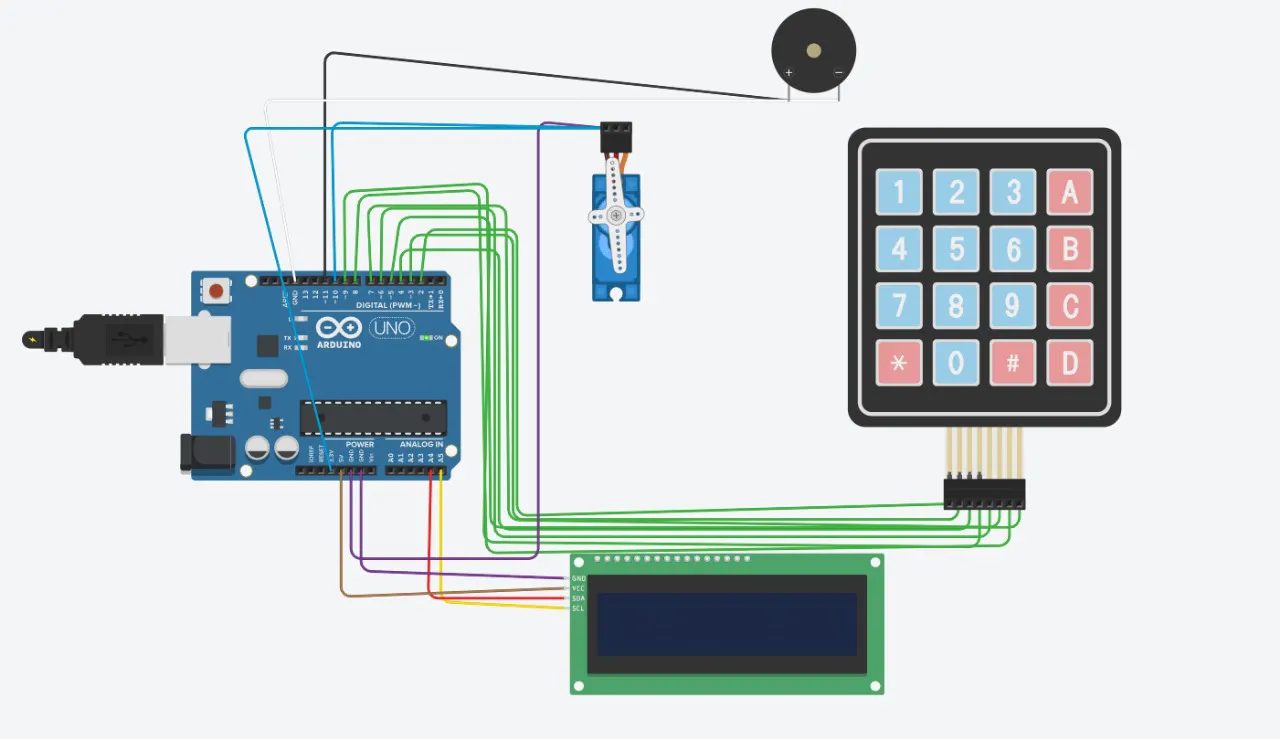
byte rowPins[ROWS] = {2, 3, 4, 5}; // Connect to the row pinouts of the keypad
byte colPins[COLS] = {6, 7, 8, 9}; // Connect to the column pinouts of the keypad
Keypad keypad = Keypad(makeKeymap(keys), rowPins, colPins, ROWS, COLS);

// Servo Setup
Servo doorServo;

// Variables
String password = "1234"; // Default password
String inputPassword = "";
bool doorOpen = false;

// Buzzer Pin
const int buzzerPin = 11;

void setup() {
  // Initialize LCD
  lcd.init();
  lcd.backlight();
  lcd.setCursor(0, 0);
  lcd.print("Door Lock System");
  delay(2000);
  lcd.clear();

  // Initialize Servo
  doorServo.attach(10);
  doorServo.write(0); // Locked position

  // Initialize Buzzer
  pinMode(buzzerPin, OUTPUT);
  digitalWrite(buzzerPin, LOW);

  lcd.setCursor(0, 0);
  lcd.print("Enter Password:");
}

void loop() {
  char key = keypad.getKey();

  if (key) {
    if (key == '#') {
      if (inputPassword == password) {
        unlockDoor();
      } else {
        lcd.clear();
        lcd.setCursor(0, 0);
        lcd.print("Access Denied");
        buzz();
        delay(2000);
        lcd.clear();
        lcd.setCursor(0, 0);
        lcd.print("Enter Password:");
      }
      inputPassword = "";
    } else if (key == '*') {
      inputPassword = "";
      lcd.clear();
      lcd.setCursor(0, 0);
      lcd.print("Enter Password:");
    } else {
      inputPassword += key;
      lcd.setCursor(0, 1);
      lcd.print(inputPassword);
    }
  }
}

void unlockDoor() {
  lcd.clear();
  lcd.setCursor(0, 0);
  lcd.print("Access Granted");
  doorServo.write(90); // Unlock position
  digitalWrite(buzzerPin, HIGH);
  delay(500);
  digitalWrite(buzzerPin, LOW);
  doorOpen = true;
  delay(5000); // Keep the door unlocked for 5 seconds
  lockDoor();
}

void lockDoor() {
  doorServo.write(0); // Locked position
  lcd.clear();
  lcd.setCursor(0, 0);
  lcd.print("Door Locked");
  delay(2000);
  lcd.clear();
  lcd.setCursor(0, 0);
  lcd.print("Enter Password:");
  doorOpen = false;
}

void buzz() {
  digitalWrite(buzzerPin, HIGH);
  delay(500);
  digitalWrite(buzzerPin, LOW);
}




_ztBMuBhMHo.jpg?auto=compress%2Cformat&w=48&h=48&fit=fill&bg=ffffff)




Comments