


Hardware components | ||||||
_ztBMuBhMHo.jpg?auto=compress%2Cformat&w=48&h=48&fit=fill&bg=ffffff) |
| × | 1 | |||
 |
| × | 1 | |||
| × | 1 | ||||
 |
| × | 1 | |||
 |
| × | 1 | |||
 |
| × | 1 | |||
 |
| × | 2 | |||
 |
| × | 1 | |||
Software apps and online services | ||||||
 |
| |||||
| ||||||
Hand tools and fabrication machines | ||||||
 |
| |||||
 |
| |||||
 |
| |||||
This project is a fully functional smart door lock prototype built using an
Arduino UNO, a 4×4 matrix keypad, and a custom 3D printed rack & pinion
linear actuator that physically drives a door bolt open and closed.
Unlike typical servo lock projects that just rotate a latch, this build
converts the servo's rotary motion into smooth linear motion using a 3D
printed rack and pinion gear pair — making it a realistic, mechanically
sound door bolt mechanism.
The entire lock mechanism and housing enclosure are designed and 3D printed
in PLA, making this project fully reproducible with any FDM printer.
## How It Works1. The LCD displays "Enter Password:" and waits for input.
2. The user enters a 4-digit password using the 4×4 keypad.
Each keypress is shown as * on the LCD and confirmed with a short beep.
3. Pressing # submits the password for verification.
✅ Correct Password:
→ LCD shows "Access Granted!"
→ Green LED turns ON
→ Servo rotates → Pinion turns → Rack slides OUT → Door unlocks
→ After 3 seconds, servo reverses → Rack retracts → Door re-locks automatically
❌ Wrong Password:
→ LCD shows "Wrong Password!"
→ Red LED turns ON
→ Buzzer beeps 4 times as an alert
→ System resets and waits for next input
Mechanical DesignThe most unique part of this project is the 3D printed rack and pinion
door lock mechanism.
- The **servo motor** is mounted inside the enclosure and drives a small
**pinion gear** (circular gear) on its shaft.
- The **pinion** meshes with a long **rack** (a toothed linear bar) that
slides through a slot in the enclosure wall.
- When the servo rotates, the pinion turns and pushes/pulls the rack
in a straight line — acting as the physical door bolt.
- The **enclosure** is also fully 3D printed and houses the Arduino,
breadboard, servo, and all wiring neatly inside.
All parts are printed in PLA filament on a standard FDM 3D printer.
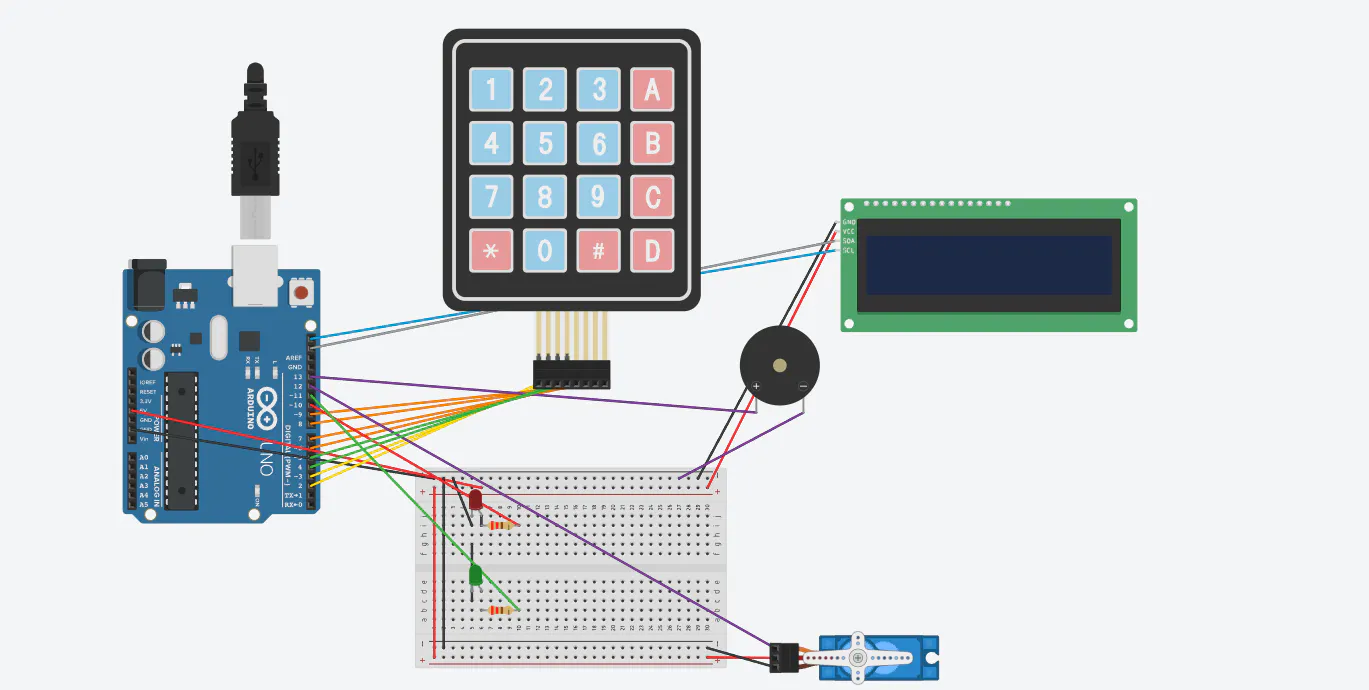
Circuit Connections & Simulationshttps://www.tinkercad.com/things/aacsPU6gOUL-smart-lock-atl-series-3
Libraries Used- **Keypad.h** — Matrix keypad scanning
- **LiquidCrystal_I2C.h** — I2C LCD control
- **Servo.h** — Servo motor control
- **Wire.h** — I2C communication
Install all libraries via Arduino IDE → Sketch → Include Library →
Manage Libraries.
Future Improvements- Add EEPROM support to allow password changes without re-uploading code
- Add a second servo for double-bolt locking
- Integrate with Bluetooth or WiFi (ESP8266) for remote unlocking
- Add a fingerprint sensor as a second authentication layer
- Design a PCB
- --
##Tags
Arduino, 3D Printing, Door Lock, Servo Motor, Rack and Pinion, Keypad,
LCD Display, Security, Embedded Systems, IoT, PLA, Mechanism, Prototype,
Mini Project, Smart Lock, Home Automation


Comments