


Hardware components | ||||||
_ztBMuBhMHo.jpg?auto=compress%2Cformat&w=48&h=48&fit=fill&bg=ffffff) |
| × | 1 | |||
 |
| × | 1 | |||
 |
| × | 1 | |||
 |
| × | 1 | |||
 |
| × | 1 | |||
 |
| × | 1 | |||
 |
| × | 1 | |||
Software apps and online services | ||||||
 |
| |||||
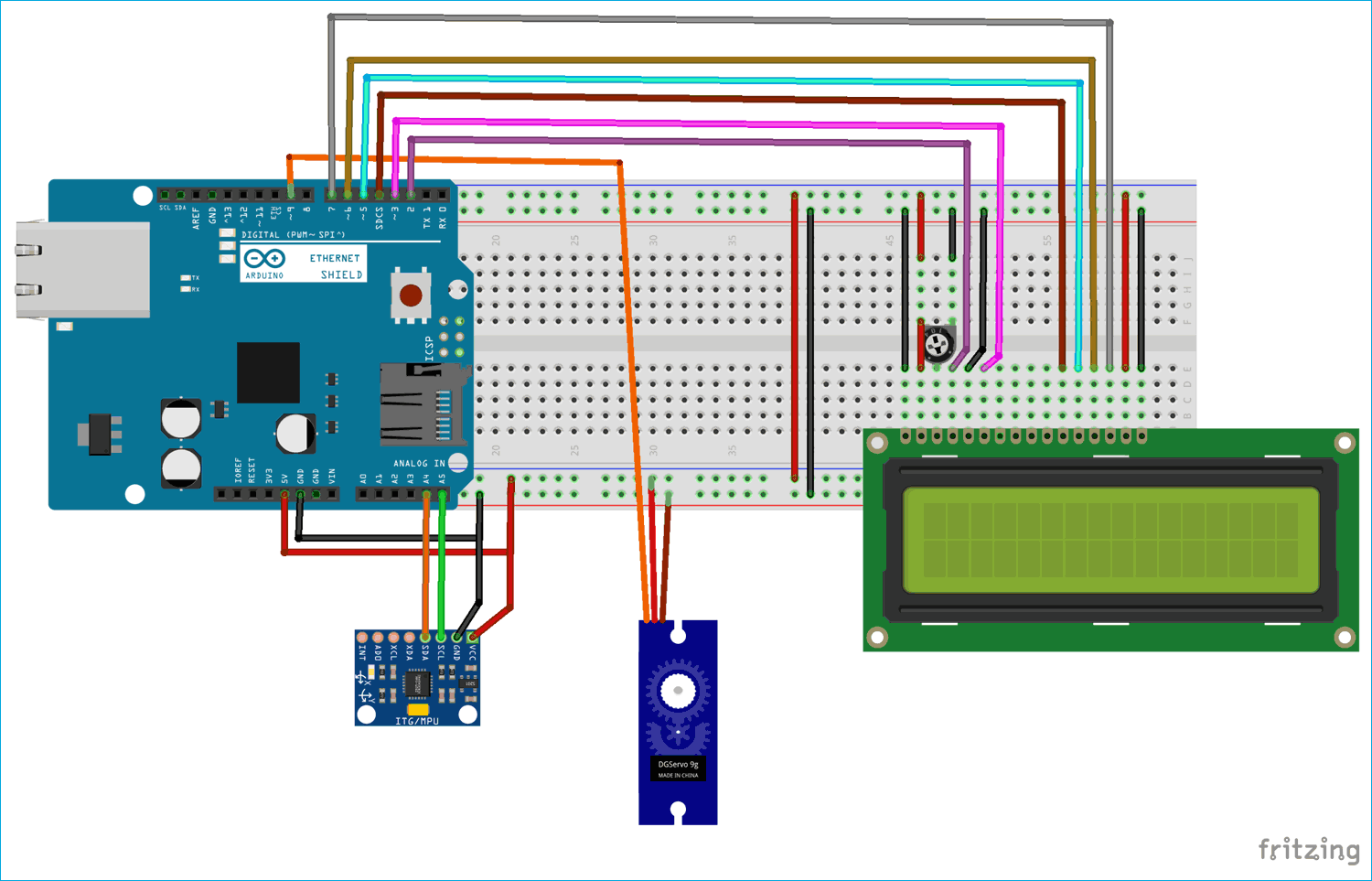
In this project, I'm going to show you how to make a MPU6050 based small hand gesture robot. It only can rotate its head from your hand gesture. Here I have fixed a servo motor to rotate where it can fix the angle by the gesture of your hand. as well as you can see the angle of your hand rotation through LCD display also.
MPU6050 is an IC 3-axis accelerometer and 3-axis gyroscope combined into one unit. It's also include temperature sensor DCM to perform complex tasks. It is commonly used in building drone, self balancing robots.
Thanks UTSOURCE.net to offer electronic components for my projects
An accelerometer is used to measure the acceleration. It can actually measure both dynamic and static acceleration of an object. for example You can see on smart phone, when you rotate the phone, it can sense that where it is on landscape or portrait.
A gyroscope is used to measure angular velocity that uses earth’s gravity to determine the orientation of the object in motion.
you can watch the tutorial from YouTube also
Components1.Arduino uno
2. Servo motor
3. MPU6050
4. jumper wires
5. LCD display
click here to Download the library
Note: while you are making wire connection make sure to wire it properly. because I had faced some problem with the output that I had connected all the wire perfectly but circuit was very complex so I didn't see any changes in the values of angle and no any changes in servo motor's position. then when I make the circuit without any complex wiring as well as I could see output through my eyes.
Finally when you have done those wiring part then move into programming criteria. before going to upload the code please make sure to add the library into your Arduino library directory. you can add the library through add zip folder option in your Arduino IDE. then select the correct COM port and board type after click on Upload button to upload the code.
Hope You have like this post also keep share this post between your friends or family members who aspiring to make these kind of stuffs. and don't forget to press the subscribe button for my You Tube channel that I had provided above in this article.😊



_3u05Tpwasz.png?auto=compress%2Cformat&w=40&h=40&fit=fillmax&bg=fff&dpr=2)


Comments