


Hardware components | ||||||
_ztBMuBhMHo.jpg?auto=compress%2Cformat&w=48&h=48&fit=fill&bg=ffffff) |
| × | 1 | |||
 |
| × | 1 | |||
 |
| × | 1 | |||
 |
| × | 1 | |||
Software apps and online services | ||||||
 |
| |||||
Today we'll be making an automatic system to control appliances by hand gesture or Motion sensing using just Arduino and PIR sensor.
In our project we'll make an Emergency light that light On/off by just moving your hand around it. In another word gesture or wave controlled light system. This can be used as an emergency light - when you reach home it'll automatically switch the lights on.
So our goal is to make a system that switches on once you wave at it, and switches off when you wave it back again.
There's Some issues to keep in mind before you'd work with PIR sensor.
- PIR doesn't work properly for at least one minute when starts.
- PIR output value is always 1 for some seconds.
- It some times doesn't read motions.
To Solve that I've made a simple algorithm that's explained here https://ashrafminhajfb.blogspot.com/2018/10/problems-using-pir-sensor-always-high.html
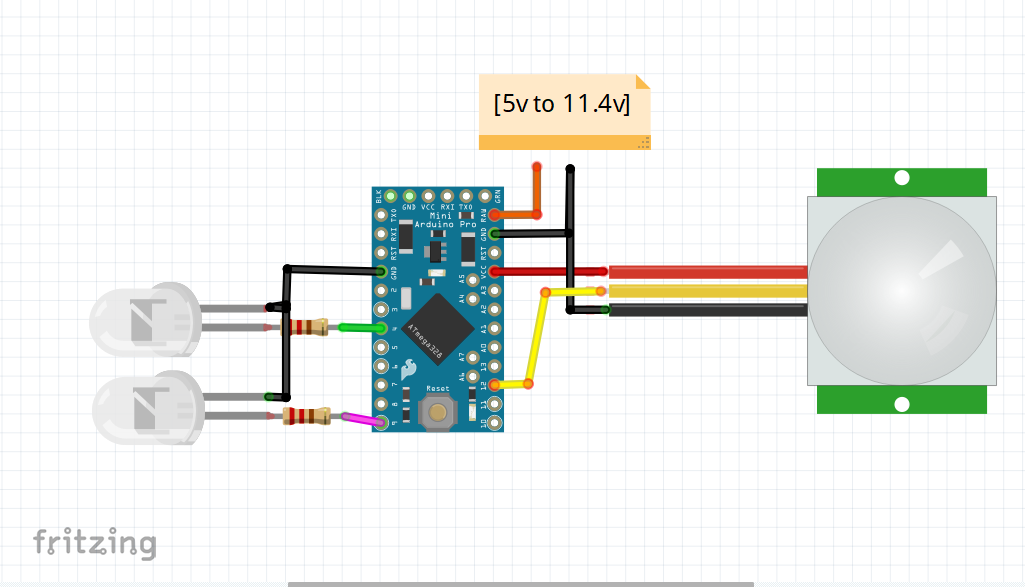
Circuit DiagramCircuit is pretty simple, I'm driving some lEDs on but if you want to control home appliances or bigger loads like main light orfanhere's a circuit with relay module.
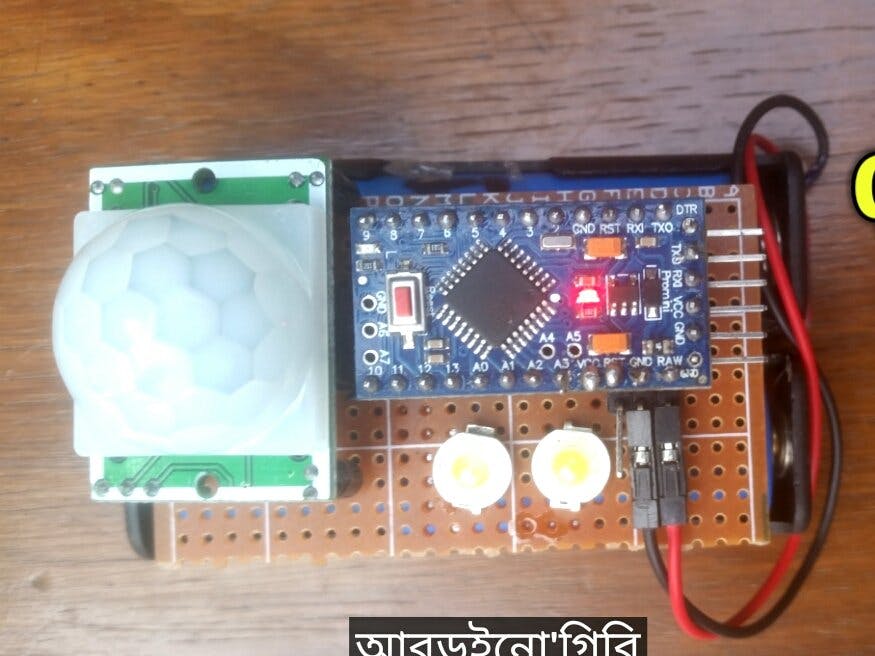
Make the circuit and it should look something like this
See, Arduino pro mini doesn't have USB programming option. So you may Upload code using a USB to TTL converter. Or you may use an Arduino Uno. We all have an uno right?
So let's upload code using an arduino Uno.
- Remove The ATmega IC from Uno (using a screwdriver) [be carefull not to harm the IC]
- Connect Arduino pro mini ------ Uno as following
- TX to tx
- Rx to rx
- Vcc to 5v
- Gnd to gnd
- rst to Reset
Then start arduino.ide and go to tools>board> select arduino pro or pro mini
Note: You can just upload code to Arduino pro (5v 16 mHz) mini using UNO not the 3.3v one. Check before you buy one.
Now download the code from herehttps://github.com/ashraf-minhaj/Gesture-or-Motion_controlled_Appliances
Then Upload and
Power it UpFor powering this use 7.4v to 11.4 volts. Although I've said that 5v is okay, its okay as long as loads are limited and you are powering from a 1Amp source.
Power up and- Have fun.
Happy Making!!!!
I didn't explain that much because it's just an easy project. Pretty Interesting and functional though.



_3u05Tpwasz.png?auto=compress%2Cformat&w=40&h=40&fit=fillmax&bg=fff&dpr=2)


Comments