


Hardware components | ||||||
 |
| × | 1 | |||
 |
| × | 1 | |||
 |
| × | 1 | |||
Software apps and online services | ||||||
 |
| |||||
This project turns a simple ESP8266 + MAX7219 Dot Matrix Display into a full-featured smart clock with:
✅ Real-Time Clock (via NTP)✅ Custom scrolling messages✅ Stopwatch✅ Countdown timer✅ Alarm with buzzer✅ Web dashboard (Dark/Light mode)✅ Mobile-friendly UI✅ Shows IP address on boot
Everything runs without any external apps — only a web browser is needed.
I previously built Version-1 of my ESP8266-based clock, which was a simple IP clock displaying time on a dot-matrix display. While it worked as a basic prototype, it lacked features like alarm control, multiple modes, and a proper user interface. The goal of this upgrade is to make the device user-friendly, feature-rich, and suitable for real-world daily use.I tried my best explain the code and hardware, if you like all this built and such thing can follow my Instagram: Arka Manna (@arka_r0b0_n3rd)
⭐ Features🕒 1. Real-Time Internet Clock- Fetches accurate Indian Standard Time (IST) using NTPClient.
- Updates every second.
- Shows time in HH:MM format on the LED matrix.
- Set alarm from the dashboard.
- Buzzer auto-stops after 5 seconds.
- Alarm triggers even if you change modes.
- Start / Stop / Reset buttons.
- Runs in background without freezing the ESP.
- Enter any duration in seconds.
- Buzzer triggers when timer ends.
- Displays any text you enter (supports long messages).
- Smooth left scrolling.
Modern UI with:
- Dark/light theme toggle
- Touch-friendly buttons
- Responsive design (mobile ready)
Shows IP address one segment at a time so you can connect easily.
✅ Code Explanation (Step-by-Step)
This project uses an ESP8266 to control a MAX7219 LED matrix and provides a complete dashboard through a web interface. Below is a breakdown of what each part of the code does.
1. Library Imports#include <MD_Parola.h>
#include <MD_MAX72xx.h>
#include <SPI.h>
#include <ESP8266WiFi.h>
#include <WiFiClient.h>
#include <ESP8266WebServer.h>
#include <WiFiUdp.h>
#include <NTPClient.h>
These libraries handle:
MD_Parola + MD_MAX72XX → controlling the LED matrix
ESP8266WiFi + WebServer → hosting the web dashboard
NTPClient → accurate internet time
WiFiUDP → required for NTP communication
2. WiFi Setupconst char* ssid = "*******";
const char* password = "********";
The ESP8266 connects to your home WiFi network to enable:
Web dashboardNTP online time
3. LED Matrix Initialization
#define HARDWARE_TYPE MD_MAX72XX::FC16_HW
#define MAX_DEVICES 4
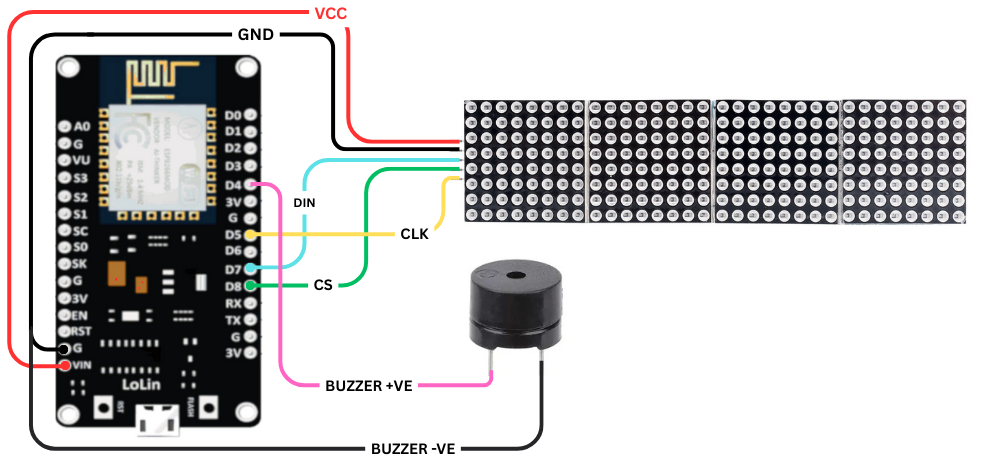
#define CS_PIN 15
MD_Parola display = MD_Parola(HARDWARE_TYPE, CS_PIN, MAX_DEVICES);
FC16 type → matches most 4-in-1 matrix modules
MAX_DEVICES = 4 → number of modules
CS pin → chip select for SPI
MD_Parola handles text animations and drawing.
4. Time Client (NTP)NTPClient timeClient(ntpUDP, "pool.ntp.org", 19800, 60000);
Contacts an NTP server
Offset +19800 seconds = IST (UTC+5:30) //need to setup according to your country time zone
Refresh every 60 seconds
This ensures accurate real-time clock.
5. Web ServerESP8266WebServer server(80);
ESP8266WebServer server(80);
Runs a full HTML UI on port 80.
The HTML is stored in one giant string:
String htmlPage = R"rawliteral( ... )rawliteral";
#include <MD_Parola.h>
#include <MD_MAX72xx.h>
#include <SPI.h>
#include <ESP8266WiFi.h>
#include <WiFiClient.h>
#include <ESP8266WebServer.h>
#include <WiFiUdp.h>
#include <NTPClient.h>
// WiFi credentials
const char* ssid = "********";
const char* password = "**********";
// LED Matrix setup
#define HARDWARE_TYPE MD_MAX72XX::FC16_HW
#define MAX_DEVICES 4
#define CS_PIN 15

MD_Parola display = MD_Parola(HARDWARE_TYPE, CS_PIN, MAX_DEVICES);
// Time client
WiFiUDP ntpUDP;
NTPClient timeClient(ntpUDP, "pool.ntp.org", 19800, 60000); // IST
// Web server
ESP8266WebServer server(80);
// Buzzer setup
#define BUZZER_PIN 2 // GPIO2 (D4)
bool buzzerState = false;
unsigned long buzzerStart = 0;
// Alarm
bool alarmEnabled = false;
int alarmHour = -1, alarmMinute = -1;
// Stopwatch
bool stopwatchRunning = false;
unsigned long stopwatchStart = 0;
unsigned long stopwatchElapsed = 0;
// Timer
bool timerRunning = false;
unsigned long timerStart = 0;
unsigned long timerDuration = 0;
// Modes
enum Mode { MODE_CLOCK, MODE_CUSTOM, MODE_STOPWATCH, MODE_TIMER };
Mode currentMode = MODE_CLOCK;
String customMessage = "Hello it's me ARKA";
// Show IP address on boot
void showIP(IPAddress ip) {
char ipPart[6];
for (int i = 0; i < 4; i++) {
sprintf(ipPart, "%d", ip[i]);
display.displayClear();
display.displayText(ipPart, PA_CENTER, 100, 0, PA_PRINT, PA_NO_EFFECT);
display.displayAnimate();
delay(1500);
}
}
// HTML Webpage
String htmlPage = R"rawliteral(
<!DOCTYPE html>
<html lang='en'>
<head>
<meta charset='UTF-8'>
<meta name='viewport' content='width=device-width, initial-scale=1.0'>
<title>ESP8266 Dashboard</title>
<style>
:root {
--bg: #f4f4f4;
--card: #ffffff;
--text: #111;
--primary: #007bff;
--button-hover: #0056b3;
}
body.dark {
--bg: #1e1e1e;
--card: #2c2c2c;
--text: #e0e0e0;
--primary: #2196f3;
--button-hover: #0b72c9;
}
body {
font-family: 'Segoe UI', sans-serif;
background: var(--bg);
color: var(--text);
padding: 20px;
text-align: center;
transition: background 0.3s, color 0.3s;
}
h2 { margin-bottom: 10px; }
.topbar {
display: flex;
justify-content: space-between;
align-items: center;
margin-bottom: 20px;
}
.toggle-btn {
font-size: 14px;
padding: 6px 12px;
background: var(--primary);
color: #fff;
border: none;
border-radius: 6px;
cursor: pointer;
}
.card {
background: var(--card);
padding: 20px;
margin: 15px auto;
border-radius: 12px;
max-width: 420px;
box-shadow: 0 4px 12px rgba(0,0,0,0.08);
}
label {
display: block;
text-align: left;
margin: 12px 0 6px;
font-weight: 600;
}
input[type='text'], input[type='number'], input[type='submit'], button {
width: 100%; padding: 10px; font-size: 16px;
border-radius: 8px; border: 1px solid #ccc; margin-top: 5px;
}
input[type='submit'], button {
background-color: var(--primary);
color: white; border: none; cursor: pointer;
}
input[type='submit']:hover, button:hover {
background-color: var(--button-hover);
}
.button-grid {
display: grid; grid-template-columns: 1fr 1fr;
gap: 10px; margin-top: 10px;
}
@media(max-width: 420px) {
.button-grid { grid-template-columns: 1fr; }
}
</style>
</head>
<body>
<div class='topbar'>
<h2>ESP8266 Dashboard</h2>
<button class='toggle-btn' onclick='document.body.classList.toggle("dark")'>🌓</button>
</div>
<form class='card' action='/setMessage'>
<label>💬 Custom Message</label>
<input type='text' name='message' placeholder='Enter your message'>
<input type='submit' value='Set Message'>
</form>
<form class='card' action='/setAlarm'>
<label>⏰ Alarm Time</label>
<div style='display: flex; gap: 10px;'>
<input type='number' name='hour' min='0' max='23' placeholder='Hour'>
<input type='number' name='minute' min='0' max='59' placeholder='Minute'>
</div>
<input type='submit' value='Set Alarm'>
</form>
<form class='card' action='/setTimer'>
<label>⏳ Timer (seconds)</label>
<input type='number' name='seconds' min='1' placeholder='e.g. 30'>
<input type='submit' value='Start Timer'>
</form>
<div class='card'>
<label>🎛 Modes</label>
<div class='button-grid'>
<a href='/clock'><button type='button'>Clock</button></a>
<a href='/custom'><button type='button'>Message</button></a>
<a href='/stopwatch'><button type='button'>Stopwatch</button></a>
<a href='/timer'><button type='button'>Timer</button></a>
</div>
</div>
<div class='card'>
<label>⏱ Stopwatch</label>
<div class='button-grid'>
<a href='/startStopwatch'><button type='button'>Start</button></a>
<a href='/stopStopwatch'><button type='button'>Stop</button></a>
<a href='/resetStopwatch'><button type='button'>Reset</button></a>
</div>
</div>
<div class='card'>
<label>🔔 Buzzer</label>
<a href='/buzz'><button type='button'>Buzz Now</button></a>
</div>
</body>
</html>
)rawliteral";
// Web Routes
void handleRoot() { server.send(200, "text/html", htmlPage); }
void handleSetMessage() { if (server.hasArg("message")) { customMessage = server.arg("message"); currentMode = MODE_CUSTOM; } server.send(200, "text/html", htmlPage); }
void handleClock() { currentMode = MODE_CLOCK; server.send(200, "text/html", htmlPage); }
void handleCustom() { currentMode = MODE_CUSTOM; server.send(200, "text/html", htmlPage); }
void handleStopwatch() { currentMode = MODE_STOPWATCH; server.send(200, "text/html", htmlPage); }
void handleTimer() { currentMode = MODE_TIMER; server.send(200, "text/html", htmlPage); }
void handleSetAlarm() { if (server.hasArg("hour") && server.hasArg("minute")) { alarmHour = server.arg("hour").toInt(); alarmMinute = server.arg("minute").toInt(); alarmEnabled = true; } server.send(200, "text/html", htmlPage); }
void handleSetTimer() { if (server.hasArg("seconds")) { timerDuration = server.arg("seconds").toInt() * 1000; timerStart = millis(); timerRunning = true; currentMode = MODE_TIMER; } server.send(200, "text/html", htmlPage); }
void handleStartStopwatch() { stopwatchRunning = true; stopwatchStart = millis() - stopwatchElapsed; server.send(200, "text/html", htmlPage); }
void handleStopStopwatch() { stopwatchRunning = false; stopwatchElapsed = millis() - stopwatchStart; server.send(200, "text/html", htmlPage); }
void handleResetStopwatch() { stopwatchRunning = false; stopwatchElapsed = 0; server.send(200, "text/html", htmlPage); }
void handleBuzz() { digitalWrite(BUZZER_PIN, HIGH); buzzerState = true; buzzerStart = millis(); server.send(200, "text/html", htmlPage); }
void setup() {
pinMode(BUZZER_PIN, OUTPUT);
digitalWrite(BUZZER_PIN, LOW);
display.begin(); display.setIntensity(5); display.displayClear();
WiFi.begin(ssid, password);
while (WiFi.status() != WL_CONNECTED) { display.print("WiFi.."); delay(500); }
showIP(WiFi.localIP()); timeClient.begin();
server.on("/", handleRoot);
server.on("/setMessage", handleSetMessage);
server.on("/clock", handleClock);
server.on("/custom", handleCustom);
server.on("/stopwatch", handleStopwatch);
server.on("/timer", handleTimer);
server.on("/setAlarm", handleSetAlarm);
server.on("/setTimer", handleSetTimer);
server.on("/startStopwatch", handleStartStopwatch);
server.on("/stopStopwatch", handleStopStopwatch);
server.on("/resetStopwatch", handleResetStopwatch);
server.on("/buzz", handleBuzz);
server.begin();
}
void loop() {
server.handleClient(); timeClient.update();
if (buzzerState && millis() - buzzerStart > 5000) {
digitalWrite(BUZZER_PIN, LOW); buzzerState = false;
}
if (currentMode == MODE_CLOCK) {
static unsigned long lastUpdate = 0;
if (millis() - lastUpdate > 1000) {
lastUpdate = millis();
int h = timeClient.getHours();
int m = timeClient.getMinutes();
if (alarmEnabled && h == alarmHour && m == alarmMinute) {
digitalWrite(BUZZER_PIN, HIGH);
buzzerState = true; buzzerStart = millis(); alarmEnabled = false;
}
char timeStr[6];
sprintf(timeStr, "%02d:%02d", h, m);
display.displayClear();
display.displayText(timeStr, PA_CENTER, 0, 0, PA_PRINT, PA_NO_EFFECT);
display.displayAnimate();
}
} else if (currentMode == MODE_CUSTOM) {
display.displayScroll(customMessage.c_str(), PA_CENTER, PA_SCROLL_LEFT, 100);
while (!display.displayAnimate()) delay(10);
} else if (currentMode == MODE_STOPWATCH) {
unsigned long timeNow = stopwatchRunning ? millis() - stopwatchStart : stopwatchElapsed;
int secs = (timeNow / 1000) % 60;
int mins = (timeNow / 60000);
char buffer[6];
sprintf(buffer, "%02d:%02d", mins, secs);
display.displayClear();
display.displayText(buffer, PA_CENTER, 0, 0, PA_PRINT, PA_NO_EFFECT);
display.displayAnimate();
} else if (currentMode == MODE_TIMER) {
if (timerRunning) {
unsigned long elapsed = millis() - timerStart;
if (elapsed >= timerDuration) {
timerRunning = false;
digitalWrite(BUZZER_PIN, HIGH);
buzzerState = true; buzzerStart = millis();
} else {
int remain = (timerDuration - elapsed) / 1000;
char buffer[6];
sprintf(buffer, "00:%02d", remain);
display.displayClear();
display.displayText(buffer, PA_CENTER, 0, 0, PA_PRINT, PA_NO_EFFECT);
display.displayAnimate();
}
}
}
delay(100);
}


Comments