



Hardware components | ||||||
| × | 1 | ||||
 |
| × | 1 | |||
Software apps and online services | ||||||
 |
| |||||
 |
| |||||
 |
| |||||
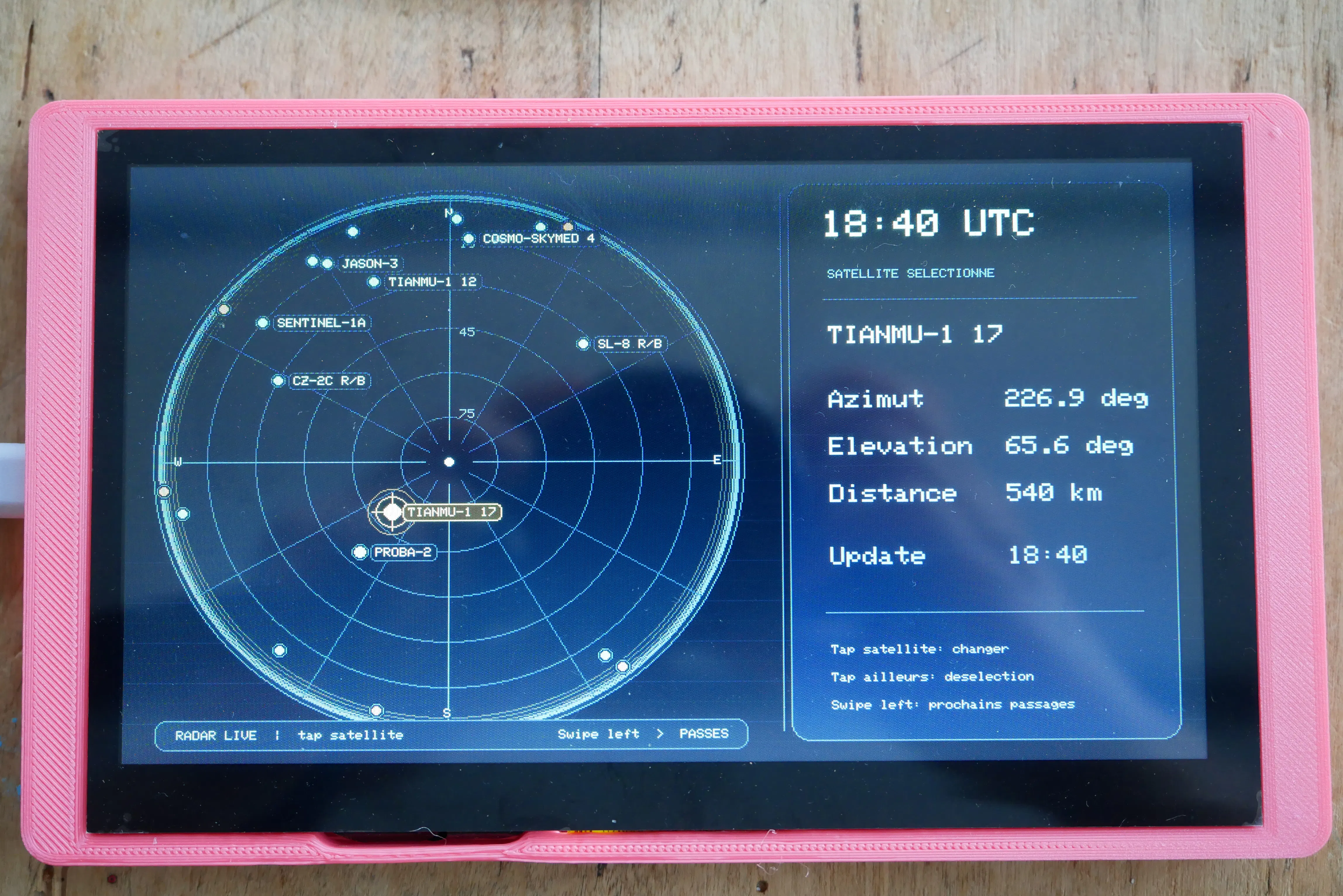
SATLIVETRACK is a standalone satellite-tracking console built on an ESP32-S3 board with a 7-inch RGB touch display. It downloads TLE orbital data, computes real-time satellite visibility using SGP4, displays a live radar view, predicts upcoming passes, and lets the user configure Wi-Fi and observer location directly from the touchscreen.
The project is designed as an autonomous embedded device: no Raspberry Pi,
no cloud backend, and no external computer required once flashed.
https://github.com/aerodynamics-py/SATLIVETRACK
Project goalsSATLIVETRACK was built with the following goals:
- run satellite tracking locally on an ESP32-S3;
- use real SGP4 orbital propagation from TLE data;
- provide a readable 800×480 live radar interface;
- support touch navigation without a keyboard or serial console;
- allow Wi-Fi setup directly from the device;
- allow observer latitude/longitude configuration from the device;
- remain stable on the Elecrow ESP32-S3 HMI 7” / CrowPanel 7.0” hardware;
- preserve a predictable boot order to avoid Wi-Fi/display conflicts.
This is not meant to be a scientific-grade tracking station. It is a practicalembedded satellite dashboard optimized for visual usability, local computation,and hardware stability.
The main page displays a real-time polar radar view:
- north at the top;
- azimuth grid every 30°;
- elevation rings every 15°;
- horizon at the outer circle;
- 0–5° horizon band visually marked;
- live satellite points with label filtering;
- tap a satellite to select it;
- tap outside any satellite to deselect;
- selected satellite highlighted;
- side panel with satellite name, azimuth, elevation, range, and update time.
The radar is refreshed using two different rhythms:
- visible satellite list refresh: every 60 seconds;
- live position update: every 1 second.
The passes page calculates future visible passes on demand:
- prediction horizon: 120 minutes by default;
- minimum pass elevation: 5° by default;
- event-based SGP4 pass prediction;
- cached UI result to avoid recomputing continuously;
- display of relative time, rise time, max elevation time, set time, max elevation, azimuth at max elevation, and range at max elevation;
- high-elevation passes visually emphasized.
The status page shows embedded system information:
- Wi-Fi status and SSID;
- IP address;
- NTP status;
- uptime;
- loaded TLE count;
- radar target count;
- active radar targets;
- radar update duration;
- time before next visible-list refresh;
- free heap and minimum heap;
- PSRAM size and free PSRAM;
- last pass calculation result;
- observer latitude/longitude.
The location page lets the user configure the observation point directly on the touchscreen:
- editable latitude;
- editable longitude;
- decimal format, for example 45.1234 or -1.5408;
- saved to ESP32 Preferences / NVS;
- radar is recalculated immediately after saving;
- altitude exists in the internal observer structure, but the current UI focuses on latitude and longitude.
The Wi-Fi system supports:
- saved network credentials in Preferences / NVS;
- automatic connection to the last working network;
- fallback compile-time network only on first installation;
- touchscreen network scan;
- SSID selection;
- touch keyboard password entry;
- saved credentials after successful connection;
- no forced restart after successful touchscreen setup.
Important behavior:
- if saved credentials exist and fail, the firmware skips the compile-time fallback and opens the touchscreen Wi-Fi setup;
- the compile-time fallback SSID/password are only used when no network has ever been saved.
Validated hardware:
- Board: Elecrow ESP32-S3 HMI 7” / CrowPanel 7.0”, SKU DIS08070H
- MCU: ESP32-S3
- Display: 7-inch RGB, 800×480
- Touch controller: GT911 capacitive touch
- Flash: 4 MB
- PSRAM: 8 MB OPI PSRAM
- Serial console: UART0
- Wi-Fi: 2.4 GHz only
Critical validated pins:
- RGB pixel clock / PCLK: GPIO0
- backlight: GPIO2
- GT911 I2C SDA: GPIO19
- GT911 I2C SCL: GPIO20
Important build flag:
-D ARDUINO_USB_CDC_ON_BOOT=0The serial console is expected on UART0, not USB CDC on boot.
Software stackDevelopment environment:
- Ubuntu
- VS Code
- PlatformIO
- Arduino framework for ESP32
Main libraries:
- NTPClient
- HttpClient / ESP32 HTTPClient
- SparkFun SGP4 Arduino Library
- LovyanGFX
- ESP32 Preferences
- ESP32 WiFi
The reviewed source archive did not include platformio.ini. A typical validated configuration is:
[env:elecrow-esp32s3-hmi-7]
platform = espressif32
board = esp32-s3-devkitc-1
framework = arduino
board_build.flash_size = 4MB
board_upload.maximum_size = 4194304
board_build.arduino.memory_type = qio_opi
board_build.psram_type = opi
board_build.partitions = default.csv
build_flags =
-D BOARD_HAS_PSRAM
-D ARDUINO_USB_CDC_ON_BOOT=0
lib_deps =
arduino-libraries/NTPClient
arduino-libraries/ArduinoHttpClient
sparkfun/SparkFun SGP4 Arduino Library
lovyan03/LovyanGFX
monitor_speed = 115200
Depending on your PlatformIO / ESP32 core version, library names may need minor adjustments.
Critical boot orderThe validated boot order is essential:
1. initialize serial and print memory state;
2. allocate TLE storage with tleManager.begin(600);
3. load observer location from Preferences / NVS;
4. connect Wi-Fi;
5. synchronize time with NTP;
6. download TLE data;
7. initialize OrbitPredictor;
8. initialize PassPredictor;
9. initialize RadarTracker with the observer location;
10. initialize the RGB display with RadarDisplay.begin();
11. initialize touch navigation;
12. perform the first visible satellite scan;
13. enter the live radar loop.
Do not initialize the normal RGB display before Wi-Fi/NTP/TLE during a standard boot. On this hardware, initializing the RGB display too early can disturb Wi-Fi connection reliability.
The only exception is the recovery Wi-Fi setup path: if Wi-Fi cannot be configured otherwise, the touchscreen setup screen starts the display so the user can enter credentials.
TLE data sourceTLE data is downloaded from CelesTrak GP endpoints.
Current groups used by the project:
- visual
- stations
- science
- weather
- engineering
- amateur
- education
- geodetic
The current code also contains resource, but invalid datasets are detected and skipped. In the validated baseline, resource is considered abandoned because it may return HTTP 200 without a usable TLE dataset.
Groups intentionally avoided for this embedded target:
- active
- starlink
- oneweb
- gps-ops
- galileo
- glo-ops
- beidou
- geo
- very large constellation groups
Reason: the ESP32-S3 can handle a few hundred satellites well, but very large catalogs would increase memory use, download time, parsing time, and UI clutter.
Typical loaded catalog size with the validated group set is around 500–600 TLE entries.
Repository structuremain.cppApplication entry point and boot orchestrator.
Responsibilities:
- define fallback Wi-Fi credentials;
- define the default observer location;
- define radar refresh timing;
- initialize all project modules in the validated order;
- synchronize NTP;
- download TLE data;
- perform the first radar scan;
- run the live loop;
- refresh visible satellites every 60 seconds;
- update satellite positions every 1 second;
- forward UI redraw requests;
- rebuild radar tracking after observer location changes.
Main customization points:
const char* WIFI_SSID = "YOUR_2G4_WIFI";
const char* WIFI_PASSWORD = "YOUR_PASSWORD";

const Observer DEFAULT_OBSERVER = {
48.8566,
// latitude
2.3522,
// longitude
0.0
// altitude in meters
};
They should be empty orThis is only used when no location has been saved in NVS yet.
#define RADAR_VISIBLE_REFRESH_INTERVAL_MS 60000UL
#define RADAR_POSITION_UPDATE_INTERVAL_MS 1000UL
#define RADAR_MIN_ELEVATION_DEG 0.0f
Keep RADAR_MIN_ELEVATION_DEG at 0.0f if you want the radar edge to represent the horizon.
BoardConfig.hBoard-level constants.
Responsibilities:
- identify the Elecrow ESP32-S3 HMI 7” target;
- define display size;
- expose hardware feature flags.
Current constants:
• DISPLAY_WIDTH = 800
• DISPLAY_HEIGHT = 480
• HAS_DISPLAY = 1
• HAS_TOUCH = 1
• HAS_PSRAM = 1
• HAS_TF_SLOT = 1
• HAS_SPEAKER = 1
Note: this file currently contains duplicate #define BOARD_CONFIG_H lines and no conventional include guard. It works as-is because the file is tiny and included safely, but it can be cleaned later if needed.
TleManager.h / TleManager.cppTLE catalog manager.
Responsibilities:
- allocate a fixed-size TLE catalog in RAM;
- download CelesTrak TLE groups;
- validate that a response looks like TLE data;
- parse name / line1 / line2 triplets;
- deduplicate satellites by NORAD ID;
- provide indexed access to loaded TLE entries.
Main customization points:
- catalog capacity in main.cpp: tleManager.begin(600);
- CelesTrak group list in TleManager.cpp;
- HTTP timeout in httpGet();
- retry count in updateFromCelestrak();
- TLE_LOG_LEVEL.
Important constants:
#define MAX_NAME_LEN 32
#define MAX_LINE_LEN 80
The catalog is RAM-based. TLE data is not persisted offline in the current V1.
OrbitPredictor.h / OrbitPredictor.cppInstantaneous satellite visibility calculator.
Responsibilities:
- use SparkFun SGP4 to compute look angles at a given timestamp;
- compute azimuth, elevation, and range from the observer location;
- scan the loaded TLE catalog;
- keep the currently visible satellites;
- sort visible satellites by elevation;
- apply the radar LEO filter.
Critical implementation detail:
SGP4 requires mutable character buffers. The code copies TLE strings into local writable buffers before initializing the SGP4 object.
The calculation must use the timestamp passed by the caller. It must not silently call time(nullptr) internally for propagation.
Validated SGP4 call pattern: sat.findsat((unsigned long)targetTime);
Main customization points:
#define MAX_VISIBLE_SATS 64In OrbitPredictor.cpp:
#define RADAR_FILTER_LEO_ONLY 1
#define RADAR_MIN_MEAN_MOTION 11.0f
#define RADAR_MAX_MEAN_MOTION 16.5f
This filter keeps the radar focused on useful LEO-like moving targets and avoids clutter from slow high-orbit objects.
PassPredictor.h / PassPredictor.cppUpcoming pass predictor.
Responsibilities:
- compute future satellite passes from the TLE catalog;
- use the SGP4 event-based prediction functions;
- store complete passes within the requested horizon;
- sort passes by rise time;
- expose pass data to the UI.
Main API:
scanPasses(observer, tleManager, 0, horizonMinutes, stepSeconds, minElevationDeg)
getPassCount()
getPass(index)
Important constants:
#define MAX_PASSES 256
#define NEXT_PASS_SEARCH_ITERATIONS 2
#define MAX_EVENT_PASSES_PER_SAT 1
stepSeconds is kept for API compatibility with an older scan-based engine.
The current engine is event-based and does not use it as a brute-force time step.
RadarTracker.h / RadarTracker.cppLive tracking layer between orbital calculation and display.
Responsibilities:
- convert visible satellites from OrbitPredictor into radar targets;
- initialize one SGP4 object per radar target;
- update all target positions every second;
- mark targets inactive when below the minimum elevation;
- provide display-safe snapshots through getTargetSnapshot().
Validated public API:
bool begin(const Observer& observer);
int refreshFromVisibleSatellites(OrbitPredictor&, TLEManager&);
int updateAll(time_t timestamp, float minElevationDeg);
bool getTargetSnapshot(int index, RadarTracker::TargetSnapshot& snapshot) const;
int getTargetCount() const;
int getActiveCount() const;
uint32_t getLastUpdateDurationMs() const;
Main customization point:
#ifndef MAX_RADAR_TARGETS
#define MAX_RADAR_TARGETS MAX_VISIBLE_SATS
#endif
For the validated UI, MAX_RADAR_TARGETS should stay aligned with
MAX_VISIBLE_SATS.Display and drawing engine.
Responsibilities:
- configure LovyanGFX for the Elecrow 7” RGB display;
- allocate and use a sprite framebuffer, preferably in PSRAM;
- draw the live radar page;
- draw the passes page;
- draw the status page;
- draw the location page;
- convert azimuth/elevation to screen coordinates;
- perform touch hit testing on satellites;
- perform touch hit testing on location page buttons;
- format clock, duration, and relative time strings.
Critical hardware settings:
- RGB PCLK must be GPIO0;
- backlight must be GPIO2;
- display size is 800×480;
- the validated pixel clock is configured in the local LovyanGFX class.
Main UI layout constants:
SCREEN_W = 800
SCREEN_H = 480
RADAR_CENTER_X = 240
RADAR_CENTER_Y = 240
RADAR_RADIUS = 216
PANEL_X = 500
PANEL_W = 300
MAX_DRAW_TARGETS = 64
MAX_LABEL_BOXES = 24
HIT_RADIUS_PX = 22
Customization examples:
- change radar size or position;
- change side panel width;
- change satellite hit radius;
- change colors;
- change pass highlighting thresholds;
- change label density;
- change status card layout;
- change location keyboard layout.
Time display note:
RadarDisplay::formatClock() formats the main clock as UTC using
gmtime_r() and displays the UTC suffix. Some shorter time formatting helpers may use local time depending on the configured timezone. If you want a strict all-UTC interface, review all time formatting helpers.
TouchInput.h / TouchInput.cppLow-level GT911 touch driver.
Responsibilities:
- initialize I2C on GPIO19/GPIO20;
- probe GT911 address 0x14 or 0x5D;
- read GT911 status and first touch point;
- clear the GT911 status register after reading;
- transform raw touch coordinates to screen coordinates.
Critical GT911 register: 0x814E
The touch point must be decoded from this register area. This is a validated fix for the Elecrow board.
Main customization points in TouchInput.h:
#define SAT_TOUCH_SDA 19
#define SAT_TOUCH_SCL 20
#define SAT_TOUCH_I2C_FREQ 400000
#define SAT_TOUCH_SCREEN_W 800
#define SAT_TOUCH_SCREEN_H 480
#define SAT_TOUCH_SWAP_XY 0
#define SAT_TOUCH_INVERT_X 0
#define SAT_TOUCH_INVERT_Y 0
#define SAT_TOUCH_DEBUG 1
If the touch coordinates are mirrored or rotated, change only the SWAP_XY and INVERT_* values first.
UsbI2CFix.hESP32-S3 GPIO19/GPIO20 protection helper.
Responsibilities:
- release or neutralize the USB Serial/JTAG function on GPIO19/GPIO20 when needed;
- prepare those pins for GT911 I2C use;
- reduce touch initialization issues on the ESP32-S3.
This file should generally be left untouched for the Elecrow board.
PageNavigator.h / PageNavigator.cppTouch gesture recognizer.
Responsibilities:
- read touch points from TouchInput;
- detect taps;
- detect left and right swipes;
- debounce gestures;
- wait for touch release to avoid double input;
- expose generic PageGesture events to the UI controller.
Main customization points:
TOUCH_DEBOUNCE_MS = 220
TOUCH_TRACK_TIMEOUT_MS = 900
RELEASE_TIMEOUT_MS = 1200
SWIPE_MIN_DX = 130
SWIPE_MAX_DY = 120
TAP_MAX_MOVE = 35
This module is intentionally independent from satellites, pages, and drawing.
SatLiveUiController.h / SatLiveUiController.cppApplication UI controller.
Responsibilities:
- manage the current page;
- implement swipe navigation;
- handle radar tap selection;
- trigger pass calculation when entering the passes page;
- cache pass calculation results;
- handle location editing;
- validate latitude and longitude;
- save observer location;
- request radar rebuild after location changes.
Current page order:
RADAR -> PASSES -> STATUS -> LOCATION -> RADARMain customization points:
static constexpr uint16_t PASS_HORIZON_MINUTES = 120;
static constexpr uint16_t PASS_STEP_SECONDS = 60;
static constexpr float PASS_MIN_ELEVATION_DEG = 5.0f;
static constexpr uint32_t PASS_CACHE_TTL_MS = 10UL * 60UL * 1000UL;
This is the best place to add a new page or adjust UI-level behavior without touching orbital computation.
WifiConfigManager.h / WifiConfigManager.cppWi-Fi credentials and scan manager.
Responsibilities:
- open ESP32 Preferences / NVS;
- read saved credentials;
- save credentials;
- verify saved credentials after writing;
- clear credentials;
- connect to saved or provided Wi-Fi;
- scan nearby Wi-Fi networks;
- remove duplicate SSIDs;
- sort networks by signal strength.
Main customization points:
MAX_NETWORKS = 20
SSID_MAX_LEN = 32
PASSWORD_MAX_LEN = 64
The NVS namespace and keys are defined in WifiConfigManager.cpp:
satwifi
ssid
pass
This file contains no display logic.
WifiSetupScreen.h / WifiSetupScreen.cppTouchscreen Wi-Fi setup interface.
Responsibilities:
- start a temporary display UI when Wi-Fi setup is required;
- initialize touch input;
- scan networks;
- show network pages;
- let the user select an SSID
- display a touch keyboard;
- enter and mask the password;
- connect and save credentials on success.
Main customization points:
NETWORKS_PER_PAGE = 7
MAX_BUTTONS = 48
Other customizable areas:
- keyboard layout;
- button sizes;
- colors;
- texts;
- timeout behavior;
- number of displayed networks per page.
Important note:
This file contains its own LovyanGFX display configuration. RadarDisplay.cpp also contains display configuration. If hardware display pins or RGB timings are changed, both locations must stay consistent.
Some comments in the header may still mention restarting after Wi-Fi setup. The current validated behavior is no forced restart: after successful setup, the current boot continues.
WifiBootstrap.h / WifiBootstrap.cppWi-Fi startup policy.
Responsibilities:
- try saved Wi-Fi credentials first;
- if saved credentials fail, skip compile-time fallback and open touch setup;
- if no saved network exists, optionally try compile-time fallback credentials;
- launch touch setup if needed;
- continue current boot after successful manual setup.
Main customization points:
WIFI_SAVED_TIMEOUT_MS = 12000
WIFI_FALLBACK_TIMEOUT_MS = 10000
This file protects the user-selected network from being overridden by an old hardcoded fallback SSID.
ObservationLocationManager.h / ObservationLocationManager.cppObserver location persistence manager.
Responsibilities:
- store observer latitude, longitude, and altitude in Preferences / NVS;
- load saved location at boot;
- fall back to DEFAULT_OBSERVER if no saved location exists;
- validate latitude and longitude;
- clear saved location.
Coordinates are stored as text for portability and readability:
lat = "48.8566"
lon = "2.3522"
alt = "0.0"
Main customization points:
- NVS namespace;
- saved key names;
- numeric precision;
- validation limits;
- future altitude UI support.
The interface uses horizontal swipes:
RADAR -> PASSES -> STATUS -> LOCATION -> RADAROn the radar page:
- tap a satellite to select it;
- tap away from satellites to clear selection.
On the location page:
- tap latitude or longitude to edit;
- use the numeric keypad;
- save to persist the observer location;
- radar is refreshed immediately after saving.
1. Prepare the development environment
Install:
- VS Code;
- PlatformIO extension;
- Git;
- USB serial permissions for your user on Ubuntu.
On Ubuntu, you may need:
sudo usermod -a -G dialout $USER
Then log out and log back in.
2. Create a PlatformIO project
Create a new PlatformIO project using:
- board: esp32-s3-devkitc-1;
- framework: Arduino.
Then add the source files to the src/ directory.
3. Configure platformio.ini
Use the configuration shown above as a starting point.
The important parts are:
board_build.flash_size = 4MB
board_upload.maximum_size = 4194304
board_build.arduino.memory_type = qio_opi
board_build.psram_type = opi
board_build.partitions = default.csv
-D BOARD_HAS_PSRAM
-D ARDUINO_USB_CDC_ON_BOOT=0
4. Customize first-install values
In main.cpp, update or blank the fallback Wi-Fi credentials:
const char* WIFI_SSID = "";
const char* WIFI_PASSWORD = "";
If left blank, the device will open the touchscreen Wi-Fi setup on first boot.
Set a generic fallback observer location:
const Observer DEFAULT_OBSERVER = {
48.8566,
2.3522,
0.0
};
You can later change the actual location from the touchscreen LOCATION page.
5. Build and upload
From the PlatformIO project folder:
pio run
pio run --target upload
pio device monitor -b 115200
6. First boot
Expected behavior:1. serial boot messages appear on UART0;
2. TLE storage is allocated;
3. observer location is loaded or defaulted;
4. Wi-Fi connects or the touch setup screen appears;
5. NTP synchronizes time;
6. TLE data is downloaded;
7. orbital modules initialize;
8. display starts;
9. first visible satellite scan runs;
10. radar page appears.
If Wi-Fi setup appears, select a 2.4 GHz network and enter the password using the touch keyboard.
Personalization guideChange observer location:- Preferred method: use the LOCATION page on the device.
- Compile-time fallback: edit DEFAULT_OBSERVER in main.cpp.
- first-install fallback credentials: main.cpp;
- saved credential behavior: WifiBootstrap.cpp;
- scan/sort/save logic: WifiConfigManager.cpp;
- touch setup UI: WifiSetupScreen.cpp.
Edit:
tleManager.begin(600);Higher values use more RAM and may slow parsing and prediction.
Change CelesTrak groupsEdit the URL list in TleManager.cpp.
Avoid very large groups unless you also redesign filtering, memory use, and UI density.
Change radar populationEdit the LEO filter in OrbitPredictor.cpp:
#define RADAR_FILTER_LEO_ONLY 1
#define RADAR_MIN_MEAN_MOTION 11.0f
#define RADAR_MAX_MEAN_MOTION 16.5fEdit in main.cpp:
#define RADAR_VISIBLE_REFRESH_INTERVAL_MS 60000UL
#define RADAR_POSITION_UPDATE_INTERVAL_MS 1000ULEdit in SatLiveUiController.h:
PASS_HORIZON_MINUTES
PASS_STEP_SECONDS
PASS_MIN_ELEVATION_DEG
PASS_CACHE_TTL_MSEdit in TouchInput.h:
SAT_TOUCH_SWAP_XY
SAT_TOUCH_INVERT_X
SAT_TOUCH_INVERT_YEdit in PageNavigator.h:
SWIPE_MIN_DX
SWIPE_MAX_DY
TAP_MAX_MOVE
TOUCH_DEBOUNCE_MSEdit RadarDisplay.cpp and, if needed, RadarDisplay.h.
Important layout constants are:
RADAR_CENTER_X
RADAR_CENTER_Y
RADAR_RADIUS
PANEL_X
PANEL_W
MAX_LABEL_BOXES
HIT_RADIUS_PXEdit WifiSetupScreen.cpp and WifiSetupScreen.h.
Be careful: display hardware configuration is duplicated between WifiSetupScreen.cpp
and RadarDisplay.cpp.
LimitationsCurrent V1 limitations:
- requires Wi-Fi at boot to download fresh TLE data;
- no offline TLE cache is persisted across boots;
- Wi-Fi is 2.4 GHz only;
- the project is validated for one specific Elecrow ESP32-S3 HMI 7” board;
- large satellite catalogs are intentionally avoided;
- radar target count is capped at 64 visible satellites;
- upcoming pass storage is capped at 256 passes;
- altitude is stored internally but not fully exposed in the V1 location UI;
- time display is mostly UTC, but all time formatting helpers should be
- reviewed if strict all-UTC output is required;
- not intended for professional tracking, antenna steering, or safety-critical use.
Have fun with it and don't hesitate to improve it !



Comments