



Hardware components | ||||||
 |
| × | 1 | |||
| × | 1 | ||||
Software apps and online services | ||||||
 |
| |||||
 |
| |||||
 |
| |||||
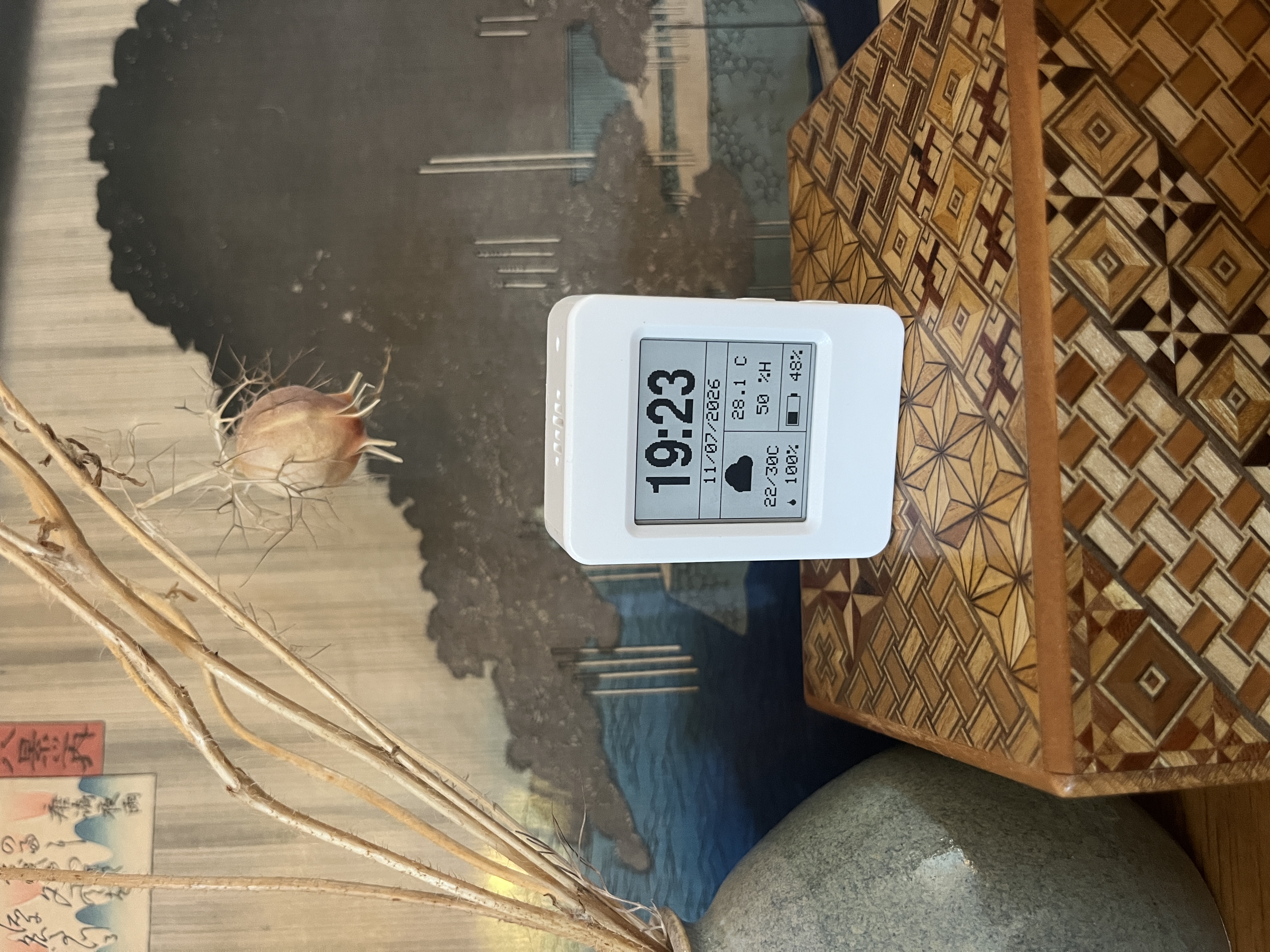
A touch-enabled ESP32-S3 dashboard with weather, local sensing, a persistent timer, system diagnostics, and an optional SNCF train page.
Difficulty: Intermediate | Estimated replication time: 2-4 hours | No additional electronic hardware required
NSM Cube turns the Waveshare ESP32-S3 Touch e-Paper 1.54 V2 into a small, persistent smart assistant. It shows useful information without demanding attention, spends most of its life in deep sleep, wakes only when required, and keeps its last valid information visible even when Wi-Fi is unavailable.
Two independent firmware variants are provided. NSM CUBE w Train adds direct SNCF journeys for French users. NSM CUBE wo Train removes every SNCF/Navitia component and is the recommended general-purpose version for users outside France. The transport concept can be ported to another operator when a suitable API exists, but that normally requires adapting the service and parser rather than changing only a URL.
1. WHY I BUILT ITPhones already provide weather, transport information, timers, and system notifications, but they are not always the best ambient interface. They require unlocking, opening an app, and accepting the distractions that come with it. E-paper is different: the information remains visible with almost no display power, looks calm in a living space, and can be updated selectively.
The goal was therefore not to build a miniature tablet. The goal was to build a quiet object that answers a few daily questions immediately:
- What time is it and what is the weather today?
- What will the next three days look like?
- What are the next direct trains to my configured destination?
- Can I start a timer that continues while the ESP32 is sleeping?
- Is the device healthy, synchronized, connected recently, and sufficiently charged?
The result is a compact assistant that uses only the peripherals already included on the board.
2. WHAT THE PROJECT DOESShared features in both firmware variants
- Persistent 200 x 200 monochrome HOME dashboard.
- Capacitive touch navigation with tap, long press, and four swipe directions.
- PCF85063 real-time clock with Europe/Paris CET/CEST handling.
- NTP synchronization at real boot and automatic retry after 03:00 when required.
- Current weather and a three-day forecast from OpenWeather.
- Local temperature and humidity from the onboard SHTC3.
- Persistent visual countdown timer from 00:01 to 99:59.
- Timer countdown continues through deep sleep and wakes the cube at expiry.
- System page with uptime, battery, RTC/NTP, network, cache age, heap, and PSRAM.
- Minute-by-minute scheduled deep-sleep wake-up.
- Two-minute interactive session after a PWR wake.
- Filtered battery measurement and confirmed critical shutdown.
- Retained weather cache when the network or API fails.
- Fast Wi-Fi reconnection using the last successful network, with full scan fallback.
- Partial e-paper refreshes only when the visible value really changes.
- Audio circuitry deliberately kept off; the onboard green LED remains available.
Additional features in NSM CUBE w Train
- Three next direct journeys between a configurable origin and destination.
- Departure and arrival times from the SNCF/Navitia API model.
- Real-time-aware journey requests.
- RTC-retained train cache.
- Automatic invalidation of cached journeys when the configured route changes.
- Weather and train data refreshed in the same Wi-Fi session.
Choose this version for the simplest and most universal build. It contains no SNCF API key, no station identifiers, no transport parser, no train cache, no train page, and no train serial command. Its horizontal navigation ends on the three-day forecast page.
NSM CUBE w TrainChoose this version if you use the French SNCF network and want the next three direct journeys between two configured stop areas. It uses the SNCF API and a Navitia-style response structure. It is designed for France, but the architecture is intentionally modular: another transport provider can replace TrainService if it exposes a usable journey API.
Adapting the idea to another operator generally requires:
1. Replacing endpoint construction and authentication.
2. Mapping the operator response to departure and arrival times.
3. Preserving or adapting the existing train report model.
4. Reviewing stale-cache rules and route invalidation.
5. Checking whether direct, zero-transfer journeys can be requested.
IMPORTANT - Treat the two variants as separate PlatformIO projects. Do not copy one src directory over the other without first deleting the old src directory, or obsolete source files may still be compiled.
4. HARDWARE AND BILL OF MATERIALSThe validated hardware is the Waveshare ESP32-S3 Touch e-Paper 1.54 V2. No external sensors, buttons, displays, or wiring are required.
- 1 x Waveshare ESP32-S3 Touch e-Paper 1.54 V2.
- 1 x USB-C data cable.
- Optional: 1 x compatible 3.7 V LiPo battery. The validated mobile setup uses 400 mAh.
- 1 x computer running Ubuntu, Visual Studio Code, and PlatformIO.
Board resources used by the project
- ESP32-S3-PICO-1-N8R8 with 8 MB flash and 8 MB OPI PSRAM.
- 1.54-inch 200 x 200 monochrome e-paper, SSD1681 controller.
- FT6336 capacitive touch controller.
- PCF85063 real-time clock.
- SHTC3 temperature and humidity sensor.
- 2.4 GHz Wi-Fi.
- BOOT and PWR/BAT_KEY buttons.
- Battery ADC and power-hold circuit.
Validated pin information
The complete mapping in src/config/BoardPins.h is the source of truth. The important validated controls are:
Green LED: GPIO3, active LOW
BOOT: GPIO0, active LOW
PWR / BAT_KEY: GPIO18, active LOW
Battery power hold: GPIO17
Battery ADC: GPIO4
E-paper power: GPIO6, active LOW
Touch reset: GPIO7
Touch interrupt: GPIO21
Audio power: GPIO42, active LOW and deliberately held OFF
I2C SDA: GPIO47
I2C SCL: GPIO48
The validated I2C frequency is 300 kHz. The active devices are FT6336 at 0x38, PCF85063 at 0x51, and SHTC3 at 0x70. The ES8311 audio codec is normally absent from an I2C scan because its power rail is intentionally disabled.
5. SOFTWARE REQUIREMENTS- Ubuntu.
- Visual Studio Code.
- PlatformIO IDE extension or PlatformIO Core.
- Arduino framework for ESP32-S3.
- Adafruit GFX Library.
- Adafruit EPD / ThinkInk.
- ArduinoJson 7.
- ESP32 Arduino core libraries: WiFi, HTTPClient, WiFiClientSecure, Preferences, Wire, and SPI.
Recommended PlatformIO configuration
Use the platformio.ini committed with the selected project as the source of truth. A representative configuration is shown below:
[env:nsm-cube]
platform = espressif32
board = esp32-s3-devkitc-1
framework = arduino
monitor_speed = 115200
board_build.arduino.memory_type = qio_opi
board_build.flash_mode = qio
board_build.psram_type = opi
board_upload.flash_size = 8MB
board_upload.maximum_size = 8388608
board_build.partitions = default_8MB.csv
build_flags =
-DBOARD_HAS_PSRAM
-DARDUINO_USB_MODE=1
-DARDUINO_USB_CDC_ON_BOOT=1
lib_deps =
adafruit/Adafruit GFX Library
adafruit/Adafruit EPD
bblanchon/ArduinoJson @ ^7
IMPORTANT - Do not silently change qio_opi, the flash size, PSRAM settings, or the two validated USB CDC flags. Once the build works, pin the PlatformIO platform and library versions for reproducibility.
6. REPOSITORY STRUCTUREThe public repository is organized as two independent PlatformIO projects:
NSM-Cube/
|-- README.md
|-- LICENSE
|-- NSM_CUBE_w_Train/
|   |-- platformio.ini
|   `-- src/
|       |-- config/
|       |-- core/
|       |-- hardware/
|       |-- services/
|       `-- main.cpp
`-- NSM_CUBE_wo_Train/
|-- platformio.ini
`-- src/
|-- config/
|-- core/
|-- hardware/
|-- services/
`-- main.cpp
The main folders have clear responsibilities:
- config - board pins, application constants, and local secrets.
- core - application orchestration and page navigation.
- hardware - display, power, RTC, touch, buttons, battery, Wi-Fi, and SHTC3.
- services - time sync, timer, weather cache/service, and optional train cache/service.
- main.cpp - minimal Arduino entry point.
Never publish real Wi-Fi passwords or API keys. The repository should provide Secrets.example.h, while the real Secrets.h is ignored by Git.
cp src/config/Secrets.example.h src/config/Secrets.h
7.2 Configure Wi-Fi and OpenWeatherBoth variants require at least one 2.4 GHz Wi-Fi network, an OpenWeather API key, and the latitude/longitude of the location to display.
#pragma once
#include <Arduino.h>
namespace Secrets
{
struct WifiCredential
{
const char* ssid;
const char* password;
};
static constexpr WifiCredential WIFI_NETWORKS[] = {
{"YOUR_2_4_GHZ_WIFI", "YOUR_WIFI_PASSWORD"}
};
static constexpr uint8_t WIFI_NETWORK_COUNT =
sizeof(WIFI_NETWORKS) / sizeof(WIFI_NETWORKS[0]);
static constexpr const char* OPENWEATHER_API_KEY =
"YOUR_OPENWEATHER_API_KEY";
static constexpr double OPENWEATHER_LATITUDE = 48.8566;
static constexpr double OPENWEATHER_LONGITUDE = 2.3522;
}
The firmware uses the OpenWeather current-weather endpoint and the 5-day / 3-hour forecast endpoint. Forecast slots are aggregated locally into daily minimum temperature, maximum temperature, rain probability, and a monochrome weather icon.
OpenWeather documentation: https://openweathermap.org/current and https://openweathermap.org/forecast5
7.3 Configure SNCF trains - train variant onlyAdd the following values inside the same Secrets namespace:
static constexpr const char* SNCF_API_KEY =
"YOUR_SNCF_API_KEY";
static constexpr const char* SNCF_ORIGIN_STOP_AREA =
"stop_area:SNCF:YOUR_ORIGIN_ID";
static constexpr const char* SNCF_DESTINATION_STOP_AREA =
"stop_area:SNCF:YOUR_DESTINATION_ID";
static constexpr const char* SNCF_DESTINATION_FILTER =
"Destination name returned by the API";
static constexpr const char* SNCF_DESTINATION_LABEL =
"DESTINATION";
SNCF_ORIGIN_STOP_AREA and SNCF_DESTINATION_STOP_AREA are full Navitia/SNCF stop_area identifiers. SNCF_DESTINATION_FILTER is used by the diagnostic parser. SNCF_DESTINATION_LABEL is the short ASCII name displayed on the 200 x 200 screen.
A typical station lookup request is:
curl 'https://api.sncf.com/v1/coverage/sncf/places?q=YOUR_STATION&type[]=stop_area' \
-H 'Authorization: YOUR_SNCF_API_KEY'
Select the returned object whose embedded_type is stop_area and copy its complete id. Navitia concepts and API model: https://doc.navitia.io/
The graphical page requests three direct journeys with real-time data and max_nb_transfers=0. A route that requires a connection may therefore return no result.
8. BUILD AND UPLOAD1. Open the directory of the selected variant in Visual Studio Code.
2. Connect the board with a USB-C data cable.
3. Create and configure src/config/Secrets.h.
4. Build the firmware.
pio run5. Upload it to the board.
pio run --target upload6. Open the serial monitor at 115200 baud.
pio device monitor --baud 115200After the first upload, one full e-paper refresh is expected. Later updates should mainly use the retained partial-refresh path.
If automatic upload mode fails, hold BOOT while starting the upload and release it when flashing begins.
9. HOW THE FIRMWARE WORKSReal boot, reset, or firmware upload
Battery power hold enabled early
- > hardware initialized
- > Wi-Fi connected
- > NTP synchronization
- > current weather
- > weather forecast
- > optional train journeys
- > Wi-Fi disabled
- > full HOME render
A full display refresh is reserved for real power-on, reset, firmware upload, incompatible interface layout version, or loss of the retained framebuffer.
Normal autonomous operation
Wake every minute
- > read RTC
- > check battery
- > update only display zones whose visible value changed
- > measure SHTC3 when due
- > refresh online data every 30 minutes when due
- > return to deep sleep
Normal timer wake-ups remain quiet on the serial console unless an error or an explicit diagnostic occurs.
Interactive operation
Pressing PWR opens a two-minute interactive session. Any valid touch gesture or button interaction resets the timeout. When the timeout expires, the firmware returns to HOME, stores the HOME framebuffer, and enters scheduled deep sleep. The cube therefore always sleeps with HOME displayed.
10. USER MANUALPage navigation - NSM CUBE w Train
SYSTEME
^
MINUTEUR <- HOME -> METEO -> PREVISIONS 3J -> TRAINS
Page navigation - NSM CUBE wo Train
SYSTEME
^
MINUTEUR <- HOME -> METEO -> PREVISIONS 3JThe on-device interface is currently in French. The gestures are:
- Swipe left - move to the page on the right.
- Swipe right - move to the page on the left.
- Swipe up from HOME - open SYSTEME.
- Swipe down from SYSTEME - return to HOME.
- Long press on METEO or PREVISIONS 3J - force an online refresh.
- Long press on TRAINS - force weather and train refresh in the train variant.
HOME shows local time, date, current weather icon, daily minimum and maximum temperature, rain probability, local SHTC3 temperature and humidity, and battery percentage.
The current-weather page shows temperature, minimum/maximum, rain probability, humidity, wind speed in km/h, cardinal wind direction, pressure, sunrise, sunset, and last update time.
The forecast page shows three days with a local monochrome icon, minimum temperature, maximum temperature, and rain probability.
The train page shows up to three direct journeys as departure time -> arrival time. Dates are intentionally omitted; a time after midnight implicitly belongs to the following day. If an online request fails, the last valid cached journeys remain visible and are marked stale according to cache age.
Swipe up from HOME. The page displays:
- UPTIME - time since the last real boot, reset, upload, or software reboot. Deep sleep does not reset it.
- BATTERIE - percentage and voltage.
- RTC/NTP - RTC validity and age of the last successful NTP synchronization.
- RESEAU - last network result and its age. Wi-Fi is normally asleep, not permanently disconnected.
- METEO or MET/TRN - age of retained online data.
- RAM/PS - free internal heap and free PSRAM.
Opening SYSTEME does not start Wi-Fi or any API request.
From HOME, swipe right to open the timer.
To configure a duration:
Long press
- > change minutes with swipe up/down
- > tap
- > change seconds with swipe up/down
- > tap to save
Tap to start. Long press while running to stop early and return to the saved duration. The timer continues through deep sleep and wakes the cube at expiry. The display stays at 00:00 until acknowledged with a tap or a short BOOT press. The current firmware intentionally produces no sound.
- BOOT short press - validate a timer action or acknowledge timer expiry when applicable.
- BOOT long press for about 5 seconds - software reboot after release.
- PWR short press - immediate manual deep sleep.
- PWR long press for about 2 seconds - battery power-off.
- PWR while off - wake or power the device.
Open the console at 115200 baud. The following one-character commands are available:
h or ?  Show help
i       Print system information
b       Force a fresh battery measurement
c       Scan the I2C bus
d       Print RTC information
e       Force a full dashboard refresh
j       Print the last SHTC3 state
m       Force a new SHTC3 measurement and partial update
n       Force NTP synchronization and full refresh
w       Force online weather refresh and print the report
g       Force weather + trains and print journeys (train version only)
s       Enter manual PWR-only deep sleep
q       Enter scheduled timer + PWR deep sleep
o       Battery power-off
p       Toggle raw button diagnostics
r       Software reboot
IMPORTANT - Use command e only as a diagnostic. Frequent full refreshes defeat the low-power e-paper strategy.12. SOFTWARE ARCHITECTURESystemControl
The central orchestrator classifies the boot, manages scheduled and interactive modes, handles pages and gestures, runs online cycles, checks the battery, applies RTC/NTP policy, handles timer expiry, enters deep sleep, and exposes serial diagnostics.
PageManagerThis is the navigation state machine. The train and no-train versions intentionally use different horizontal page graphs.
DisplayManagerThis module draws every page, generates the local monochrome weather icons, manages full and partial refreshes, and owns the retained 200 x 200 framebuffer. It also synchronizes the SSD1681 previous-image and current-image RAMs.
PowerManagerThis module asserts GPIO17 early to maintain battery power, manages peripheral rails, scheduled sleep, manual sleep, hardware power-off, and safe PWR-button release handling. The audio rail remains off by design.
RtcManager and TimeSyncServicePCF85063 is the normal time source. A successful NTP synchronization updates the RTC. The timezone is Europe/Paris with CET/CEST rules. Invalid RTC data is never silently replaced with firmware build time, and impossible calendar dates are rejected.
TouchManagerThe FT6336 driver emits high-level gestures: tap, long press, swipe up, swipe down, swipe left, and swipe right. The application reuses these events rather than interpreting raw touch data in each page.
TimerServiceThe configured duration is stored in non-volatile Preferences storage. The active countdown state is stored in RTC-retained memory. The next wake-up is shortened automatically when timer expiry occurs before the next minute boundary.
WeatherService and WeatherCacheThese modules perform OpenWeather HTTPS requests, filter JSON, aggregate daily values, retain the last valid report in RTC memory, and track data age. A failed network request does not erase good cached data.
TrainService and TrainCache - train variant onlyThese modules implement SNCF/Navitia HTTPS requests, the direct journey query, filtered parsing of deeply nested JSON, an explicit ArduinoJson NestingLimit(32), the retained journey cache, and a signature tied to the configured route.
13. MAJOR ENGINEERING CHOICESDeep sleep first
The ESP32 is not left running continuously. It wakes every minute, performs only the work that is due, and returns to deep sleep. The display preserves information without continuous power.
Wi-Fi only when useful
Wi-Fi is normally off. A real boot uses one session for NTP and all online services. Normal online refresh occurs every 30 minutes. Manual refresh is available by long press. Reconnection first tries the last successful configured network; a full scan is used only as a fallback. Wi-Fi is turned off before the e-paper refresh.
Retained caches
The last valid weather report and optional train journeys survive deep sleep. Temporary API or Wi-Fi failures therefore do not turn the dashboard into an empty screen. The default refresh interval is 30 minutes and the stale threshold is 90 minutes.
Filtered battery measurement
Battery voltage is based on 17 calibrated ADC samples with trimmed extremes, voltage-divider correction, and a calibration factor close to 1.027. Critical shutdown requires multiple confirming measurements to avoid false power-offs.
Reliable partial e-paper refresh
The firmware deliberately avoids a generic displayPartial call. It retains a complete 5, 000-byte framebuffer and explicitly handles both SSD1681 image memories:
Previous image or zone -> SSD1681 command 0x26
New image or zone -> SSD1681 command 0x24
Trigger partial update
Synchronize both controller RAMs with the new state
Retain the new framebuffer in RTC memory
The firmware also compares the value that would actually be rendered. If the battery remains at the same displayed percentage, or a sensor variation does not change the displayed text, no e-paper transition is triggered.
14. TROUBLESHOOTINGThe project does not compile
- Make sure the correct variant directory is open.
- Confirm that src/config/Secrets.h exists.
- Install ArduinoJson 7, Adafruit GFX, and Adafruit EPD.
- Check the PSRAM, flash, and USB build flags.
- For the no-train version, confirm that no old TrainService.cpp or TrainCache.cpp remains in src.
No serial output
- Use a USB-C data cable.
- Select 115200 baud.
- Confirm ARDUINO_USB_MODE=1 and ARDUINO_USB_CDC_ON_BOOT=1.
- Wake the cube with PWR because it spends most of its time sleeping.
Weather is unavailable
- Check the 2.4 GHz Wi-Fi credentials.
- Check that the OpenWeather key is active.
- Check latitude and longitude.
- Run serial command w.
- Check API quota and RTC validity.
Train data is unavailable
- Check the SNCF API key.
- Use complete stop_area identifiers.
- Check the destination filter.
- Confirm that a direct journey exists.
- Run serial command g.
- Remember that max_nb_transfers=0 excludes journeys requiring a connection.
ES8311 is missing from the I2C scan
This is expected. The audio circuit is deliberately unpowered.
E-paper content is stale or corrupted
Run serial command e once or reset the device. Do not replace the retained partial-refresh implementation with a generic library call. If you change the interface layout, increment DASHBOARD_LAYOUT_VERSION so the old RTC framebuffer is not reused.
The board powers off immediately on battery
Check battery voltage and confirm that GPIO17 is driven HIGH very early in startup. Also check PWR button behavior and the power-hold circuit.
Wi-Fi scans at every online cycle
A real reset or firmware upload clears the RTC-retained last-network index, so one full scan is normal. Later online cycles should normally use fast reconnection.
15. SECURITY AND KNOWN LIMITATIONS- The on-device interface is currently in French.
- The timezone is Europe/Paris unless changed in source.
- Audio is intentionally disabled; timer expiry is visual only.
- SHTC3 measures temperature and humidity, not CO2 or general air quality.
- Charging state is not reliably detected.
- The train version is coupled to the SNCF/Navitia response model and direct zero-transfer journeys.
- No OTA update mechanism is included.
- The microSD slot is not used.
- API availability, quotas, schemas, and commercial terms can change.
IMPORTANT - Secrets.h stores Wi-Fi passwords and API keys in firmware-readable plaintext. Do not commit it. The current HTTPS clients use WiFiClientSecure::setInsecure(), so server certificates are not validated. This is acceptable for a personal prototype with limited exposure.16. CUSTOMIZATION IDEAS
- Translate the interface by centralizing visible labels.
- Change the POSIX timezone string for another region.
- Add another transport operator by replacing TrainService while keeping the display contract.
- Design and publish a 3D-printed enclosure.
- Add certificate validation.
- Add automated tests for date handling, caches, timer boundaries, and parsers.
- Measure real current consumption and compare wake-cycle durations.
NSM Cube is intentionally modest in hardware and ambitious in behavior. It combines a persistent e-paper interface, deep-sleep-aware services, careful power control, local sensing, online data, and a touch user interface on a single integrated ESP32-S3 board.
The two firmware variants make the project useful both as a French transport assistant and as a general international weather-and-timer dashboard. More importantly, the architecture is reusable: online services are isolated, caches survive sleep, the navigation graph is explicit, and the e-paper path is designed around the real behavior of the SSD1681 rather than a generic refresh shortcut.
The complete source code for both variants should be attached in the Code section of this Hackster project and mirrored in the associated GitHub repository. No additional wiring is required, so replication is mainly a matter of selecting a variant, creating Secrets.h, building with PlatformIO, and uploading the firmware.
18. OFFICIAL REFERENCESWaveshare ESP32-S3 e-Paper 1.54 documentation:https://docs.waveshare.com/ESP32-S3-ePaper-1.54
PlatformIO Espressif32 documentation: https://docs.platformio.org/en/latest/platforms/espressif32.html
Espressif Arduino core: https://github.com/espressif/arduino-esp32
Adafruit GFX: https://github.com/adafruit/Adafruit-GFX-Library
Adafruit EPD / ThinkInk: https://github.com/adafruit/Adafruit_EPD
ArduinoJson: https://arduinojson.org/
OpenWeather API: https://openweathermap.org/api
Navitia documentation: https://doc.navitia.io/




Comments