



Hardware components | ||||||
| × | 1 | ||||
 |
| × | 1 | |||
Software apps and online services | ||||||
 |
| |||||
 |
| |||||
 |
| |||||
ESPLAY32 is a small touchscreen multi-game platform built for the Elecrow ESP32-S3 HMI 7" /CrowPanel 7.0".
It has been designed especially for 1vs1 games to play with my children.
If you have the right display with ESP32 S3 implemented so you just have to flash the code on it. If the board is different, you should make few adaptations (read what follows;) )
It runs on an 800×480 RGB display, uses the integrated GT911 capacitive touchscreen, and is written with PlatformIO / Arduino and LovyanGFX.
The project is designed as a modular mini-console: a shared home screen lists all available games, each game is implemented in its own class, and the GameManager handles navigation between the home screen and the active game.
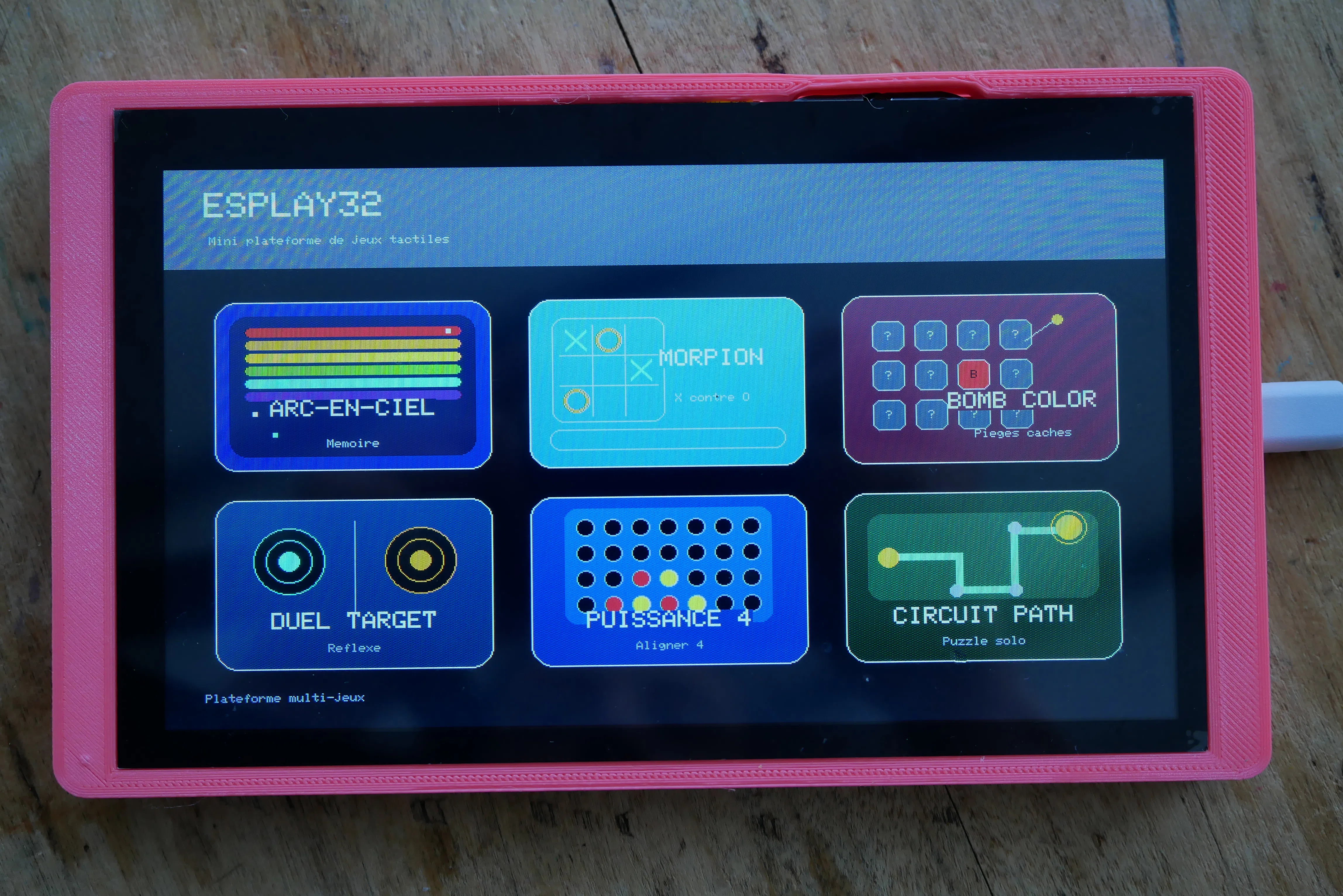
Current games:- ARC-EN-CIEL (Rainbow "Simon like game")
- MORPION (Tic Tac Toe)
- BOMB COLOR
- DUEL TARGET
- PUISSANCE 4 (Connect Four)
- CIRCUIT PATH
The goal of ESPLAY32 is to provide a clean and reusable base for simple touchscreen games on a large ESP32-S3 display.
The project focuses on:
- a stable 800×480 landscape interface;
- simple touch-first gameplay;
- modular game files;
- reusable UI helpers;
- minimal hardware requirements;
- easy reproduction with PlatformIO;
- no dependency on Wi-Fi, cloud services, SD card, or external assets.
Everything runs locally on the ESP32-S3 board.
HardwareValidated hardware:
- Board : Elecrow ESP32-S3 HMI 7" / CrowPanel 7.0"
- MCU : ESP32-S3
- Display: RGB 800×480
- Touch : GT911 capacitive touch controller
- Display library : LovyanGFX
- Development environment : PlatformIO / Arduino
- Serial console: UART0
- PSRAM: Required for the RGB framebuffer
The display configuration is contained in LGFX_Config.h
This file configures the Elecrow 7" RGB panel using LovyanGFX.
Important validated points:
- LGFX_USE_V1
- lgfx::Panel_RGB
- lgfx::Bus_RGB
- lgfx::Light_PWM
- lgfx::Touch_GT911
- RGB resolution: 800×480
- framebuffer stored in PSRAM
- validated rotation: DISPLAY_ROTATION = 2
- validated PCLK pin: GPIO0
- backlight pin: GPIO2
- GT911 I2C port: 1
- GT911 SDA: GPIO19
- GT911 SCL: GPIO20
- GT911 frequency: 400 kHz
- GT911 address: 0x14
Once the display works, avoid changing LGFX_Config.h.
Software prerequisitesInstall:
- Visual Studio Code
- PlatformIO extension
- Git, if you want to clone the repository
- A USB cable suitable for flashing the ESP32-S3 board
Required Arduino library : LovyanGFX
The project is built with the Arduino framework through PlatformIO.
Recommended PlatformIO configurationIf your repository does not already contain a platformio.ini, create one at the root of the project.
Example validated configuration:
[env:esp32-s3-devkitc-1]
platform = espressif32
board = esp32-s3-devkitc-1
framework = arduino
monitor_speed = 115200
board_build.flash_size = 4MB
board_build.partitions = default.csv
board_build.arduino.memory_type = qio_opi
board_build.flash_mode = qio
board_build.psram_type = opi
build_flags =
-D ARDUINO_USB_CDC_ON_BOOT=0
-D ARDUINO_USB_MODE=0
-D BOARD_HAS_PSRAM
lib_deps =
lovyan03/LovyanGFX
A warning about ARDUINO_USB_MODE being redefined may appear depending on the installed ESP32 Arduino core. In the validated setup, this warning does not prevent the project from building or running.
Installation1. Create a new PlatformIO project using:
- board: esp32-s3-devkitc-1
- framework: Arduino
2. Replace the generated src/ folder with the project source files.
3. Make sure the project structure matches the structure shown below.
4. Add or verify the platformio.ini configuration.
5. Connect the Elecrow ESP32-S3 HMI 7" board over USB.
6. Build and upload from PlatformIO.
7. Open the serial monitor at 115200 baud
Project structuresrc/
├── main.cpp
├── LGFX_Config.h
├── config/
│
└── AppConfig.h
├── core/
│├── Types.h
│├── Game.h
│├── GameManager.h
│└── GameManager.cpp
├── ui/
│├── UIHelpers.h
│├── UIHelpers.cpp
4│├── HomeScreen.h
│└── HomeScreen.cpp
├── audio/
│├── SoundManager.h
│└── SoundManager.cpp
└── games/
├── ArcEnCielGame.h
├── ArcEnCielGame.cpp
├── MorpionGame.h
├── MorpionGame.cpp
├── BombColorGame.h
├── BombColorGame.cpp
├── DuelTargetGame.h
├── DuelTargetGame.cpp
├── Puissance4Game.h
├── Puissance4Game.cpp
├── CircuitPathGame.h
└── CircuitPathGame.cpp
File rolesMain entry point of the application.
It performs:
• serial initialization;
• random seed initialization using esp_random() ;
• display initialization;
• brightness setup;
• sound manager initialization;
• game manager initialization;
• registration of all games;
• home screen display;
• main loop touch polling.
Touch input is debounced globally before being forwarded to the game manager.
LGFX_Config.hLow-level LovyanGFX configuration for the Elecrow ESP32-S3 HMI 7" RGB display.
It configures:
• RGB panel dimensions;
• RGB data pins;
• sync and pixel clock pins;
• RGB timing;
• PSRAM framebuffer usage;
• backlight PWM;
• GT911 touch controller.
This is the most hardware-sensitive file in the project.
If the display works, do not modify this file.
config/AppConfig.hGlobal application configuration.
It contains:
• screen width and height;
• validated display rotation;
• shared RGB565 colors;
• rgb565() helper;
• touch debounce value;
• sound configuration.
Current sound configuration:
SOUND_ENABLED = false
SOUND_PIN = -1
Sound hooks exist in the project, but sound is disabled by default because no buzzer hardware is assumed yet.
core/Types.hShared lightweight types.
Currently contains:
• Rect
• pointInRect()
These are used throughout the UI and games for button and touch hitbox handling.
core/Game.hBase interface for all games.
Each game inherits from Game and implements:
getName()
getSubtitle()
getAccentColor()
begin()
update()
handleTouch()
wantsHome()
clearHomeRequest()
This keeps all games compatible with the same GameManager.
core/GameManager.h / core/GameManager.cppCentral navigation and game lifecycle manager.
Responsibilities:
• store registered games;
• draw the home screen;
• detect which home tile was touched;
• launch the selected game;
• forward touch events to the active game;
• call the active game update() ;
• return to the home screen when a game requests it.
Current maximum number of games:
MAX_GAMES = 6The current home screen layout is designed for six games.
ui/UIHelpers.h / ui/UIHelpers.cppCommon UI drawing helpers.
They provide reusable functions for:
• headers;
• large buttons;
• small buttons;
• centered text.
This keeps the game files simpler and avoids duplicating basic UI drawing code.
ui/HomeScreen.h / ui/HomeScreen.cppDynamic home screen.
The home screen displays one tile per registered game.
Current layout:
• 3 columns;
• 2 rows
Each known game has a custom visual tile:
• rainbow strips for ARC-EN-CIEL;
• mini tic-tac-toe grid for MORPION;
• hidden bomb grid for BOMB COLOR;
• split arena for DUEL TARGET;
• Connect Four preview for PUISSANCE 4;
• circuit preview for CIRCUIT PATH.
If a game name is unknown, the home screen can draw a generic tile.
audio/SoundManager.h / audio/SoundManager.cppOptional sound abstraction layer.
Available hooks:
• playClick()
• playSequenceStep()
• playSuccess()
• playError()
• playGameOver()
Sound is disabled by default.
To enable it later, connect suitable audio hardware, choose a safe GPIO, then update:
SOUND_ENABLED = true
SOUND_PIN = <confirmed GPIO>
Do not enable sound without confirming the hardware wiring.
General software architectureESPLAY32 is built around three layers:
Hardware layer
└── LovyanGFX display and GT911 touch
Core layer
├── Game interface
├── GameManager
└── shared Rect / touch helpers
Application layer
├── HomeScreen
├── UI helpers
├── SoundManager
└── individual games
The system starts in main.cpp.
Startup flow:
1. Serial console starts.
2. Display is initialized.
3. Rotation is set to DISPLAY_ROTATION = 2.
4. Brightness is set.
5. Sound manager starts.
6. Game manager starts.
7. Games are registered.
8. Home screen is displayed.
Runtime flow:
1. loop() calls gameManager.update().
2. The main loop checks for a new touch.
3. A touch is accepted only on the rising edge.
4. The touch is debounced using TOUCH_DEBOUNCE_MS.
5. The touch is sent to GameManager.
6. If the home screen is active, the manager launches the selected game.
7. If a game is active, the manager forwards the touch to the game.
8. If the game requests home, the manager returns to the home screen.
Game interfaceEvery game follows the same structure.
A game must provide:
- const char* getName() const;
- const char* getSubtitle() const;
- uint16_t getAccentColor() const;
- void begin(lgfx::LGFX_Device& lcd, SoundManager& sound);
- void update();
- void handleTouch(int x, int y);
- bool wantsHome() const;
- void clearHomeRequest();
This makes it easy to add new games without changing the entire application.
Included games1. ARC-EN-CIEL
Type : Two-player memory game.
Goal : Remember and repeat an increasingly long sequence of colored cells.
Difficulty options : The player chooses the grid size before starting:
DifficultyGridCells
- Easy 3×3
- Normal 4×4
- Har d5×5
The 5×5 mode uses a palette of 25 distinct colors.
Rules- There is one shared sequence.
- Player 1 starts.
- Players alternate turns.
- At the beginning, the player presses GO.
- The sequence is displayed.
- The current player must reproduce the full sequence.
- After a successful turn, the sequence grows by one cell.
- The next player then plays the longer sequence.
- The first player who makes a mistake loses.
- The other player wins.
• Select difficulty: 3x3, 4x4, 5x5
• Start sequence: GO
• Return to menu: ACCUEIL
• Restart after game over: REJOUER
2. MORPION
Type : Classic two-player tic-tac-toe.
Goal: Align three symbols on a 3×3 grid.
Rules
- Player 1 plays X.
- Player 2 plays O.
- Players touch an empty cell to place their mark.
- The first player to align three marks wins.
- If the board is full and nobody wins, the game ends in a draw.
- Touch an empty cell to play.
- ACCUEIL returns to the home screen.
- REJOUER starts a new game after the end.
Type : Two-player hidden bomb game.
Goal : Reveal safe colored cells without touching a bomb.
Difficulty option
- Simple : 4×4 / 1 bomb
- Harder : 5×5 / 2bombs
- Bombs are hidden randomly.
- Players take turns choosing cells.
- If the selected cell is safe, it is revealed with a color.
- If the selected cell contains a bomb, the active player loses.
- The other player wins.
- If all safe cells are revealed, the active player wins.
- Select 4x4 or 5x5.
- Touch a hidden cell to reveal it.
- ACCUEIL returns to the home screen.
- REJOUER starts a new game after the end.
Type: Two-player reflex game.
Goal : Be the first player to touch your target.
Rules
- The screen is split into two halves.
- Player 1 uses the left side.
- Player 2 uses the right side.
- A target appears on both sides.
- The first player to touch their own target scores one point.
- First player to 5 points wins.
- Press START to begin.
- Touch your target as quickly as possible.
- ACCUEIL returns to the home screen.
- REJOUER starts a new match after the end.
The game uses the standard single-touch reading path from LovyanGFX. It works well for the current version, but true simultaneous multi-touch arbitration is not implemented.
5. PUISSANCE 4
Type : Classic two-player Connect Four.
Goal : Align four tokens horizontally, vertically, or diagonally.
Board : 7 columns × 6 rows
Rules
- Player 1 uses red tokens.
- Player 2 uses yellow tokens.
- Touch a column to drop a token.
- The token falls to the lowest available row in that column.
- The first player to align four tokens wins.
- If the grid is full and nobody wins, the game ends in a draw.
- Touch a column to play.
- ACCUEIL returns to the home screen.
- REJOUER starts a new game after the end.
Type : Solo procedural logic puzzle.
Goal : Rotate circuit tiles to connect the start point to the arrival point.
Rules- A valid solution path is generated between D and A.
- Additional decoy branches and fake networks are added.
- Tiles are converted into coherent circuit pieces.
- Rotations are scrambled.
- The player touches a tile to rotate it.
- The arrival point lights up when the circuit is connected.
- The level ends when the source and arrival are connected.
Buttons
- ButtonAction
- GENERER : Generate a new puzzle from the config screen
- RESET: Restore the current puzzle to its initial scrambled state
- NOUVEAU : Generate a new puzzle with the same settings
- CONFIG : Return to grid and length selection
- ACCUEIL : Return to the home screen
Circuit Path uses a multi-step generator:
1. Apply the selected grid size.
2. Compute the target minimum path length.
3. Generate a real solution path between D and A.
4. Build connections from the solution path.
5. Add decoy branches and fake networks.
6. Convert connection data into tile types.
7. Scramble tile rotations.
8. Save the initial puzzle state.
9. Check connectivity during play.
This ensures that every generated puzzle has a real solution.
Adding a new gameTo add a new game, create two files:
games/NewGame.h
games/NewGame.cpp
The new class must inherit from Game.
Example structure:
class NewGame : public Game {
public:
const char* getName() const override;
const char* getSubtitle() const override;
uint16_t getAccentColor() const override;
void begin(lgfx::LGFX_Device& lcd, SoundManager& sound) override;
void update() override;
void handleTouch(int x, int y) override;
bool wantsHome() const override;
void clearHomeRequest() override;
};
Then include and register the game in main.cpp.
Current release note:
GameManager::MAX_GAMES = 6The current home screen layout is also designed for six tiles. If you add a seventh game, update the maximum game count and adapt the home screen layout or add pagination.
Most labels are currently in French because the project was designed as a French-language mini-console.
The sound system is implemented but disabled by default.
Current configuration:
SOUND_ENABLED = false
SOUND_PIN = -1
The sound manager already provides event hooks:
playClick()
playSequenceStep()
playSuccess()
playError()
playGameOver()
This allows games to call sound events without knowing whether audio hardware is actually connected.
To enable sound, you must:
1. connect a suitable buzzer or audio circuit;
2. choose a safe free GPIO;
3. update SOUND_ENABLED ;
4. update SOUND_PIN ;
5. test carefully.
TroubleshootingThe display is black
Check:
- PSRAM is enabled;
- BOARD_HAS_PSRAM is defined;
- board_build.psram_type = opi ;
- LovyanGFX is installed;
- LGFX_Config.h matches the Elecrow 7" RGB panel;
- the board is powered correctly.
The board crashes after lcd.init()
This usually indicates that the RGB framebuffer cannot be allocated correctly.
Check the PlatformIO configuration:
board_build.arduino.memory_type = qio_opi
board_build.psram_type = opi
build_flags =
-D BOARD_HAS_PSRAM
PSRAM is required.
The display orientation is wrong
The validated rotation is:
DISPLAY_ROTATION = 2
The UI assumes strict landscape mode: 800×480
If the UI is rotated, clipped, or overflowing, check the rotation first.
Touch does not work
Check the GT911 configuration in LGFX_Config.h :
cfg.i2c_port = 1;
cfg.pin_sda = GPIO_NUM_19;
cfg.pin_scl = GPIO_NUM_20;
cfg.freq
= 400000;
cfg.i2c_addr = 0x14;
Also verify that the display rotation has not been changed.
Serial monitor does not show logs
Use: 115200 baud
The project uses UART0 and disables USB CDC on boot:
-D ARDUINO_USB_CDC_ON_BOOT=0
-D ARDUINO_USB_MODE=0
A warning says ARDUINO_USB_MODE is redefined
This warning may appear with some ESP32 Arduino core versions.
In the validated setup, it does not block compilation or execution.
Design choicesWhy LovyanGFX?
LovyanGFX provides low-level support for ESP32-S3 RGB panels and touch controllers. It allows the
project to drive the 800×480 RGB display directly with good performance.
19Why a modular game architecture?
Each game is isolated in its own pair of files. This makes the project easier to maintain:
- one game can be edited without touching the others;
- the home screen only needs the generic Game interface;
- the game manager does not need to know each game’s internal rules;
- new games can be added gradually.
Why no external assets?
The project draws everything using primitives:
- rectangles;
- circles;
- lines;
- text;
- simple icons.
This keeps the repository lightweight and avoids filesystem or SD card dependencies.
Current limitationsCurrent intentional limitations:
- home screen layout supports six games;
- sound is disabled by default;
- no Wi-Fi features;
- no SD card features;
- no external assets;
- no save system;
- no high-score persistence;
- no multi-touch arbitration for simultaneous duel touches.
These limitations keep the project simple, reliable, and easy to reproduce.
SummaryThis project has been designed for my children, it is totally perfectible but the games work and they are fun to play ! So copy them, improve them, have fun with them !



Comments