



Hardware components | ||||||
| × | 1 | ||||
 |
| × | 1 | |||
 |
| × | 1 | |||
 |
| × | 1 | |||
 |
| × | 1 | |||
Software apps and online services | ||||||
| ||||||
In the field of environmental conservation, the deployment of intelligent monitoring systems is severely constrained by a fundamental hardware trade-off. Standard single-board computers (SBCs) possess the computational capacity to execute deep learning models but lack the deterministic, low-latency, and low-power control loops required to interface reliably with physical actuators and sensors. Conversely, standard real-time microcontrollers (MCUs) manage physical inputs and outputs with microsecond precision but freeze under the heavy numerical load of modern computer vision networks.
The Arduino UNO Q breaks this bottleneck through a co-designed hybrid dual-brain architecture. It integrates an application processor running a full Debian Linux operating system alongside a high-performance, real-time microcontroller running an Arduino core over Zephyr RTOS on a single physical board. The two processors communicate seamlessly via an asynchronous, serialized Remote Procedure Call (RPC) layer known as the Arduino Bridge.
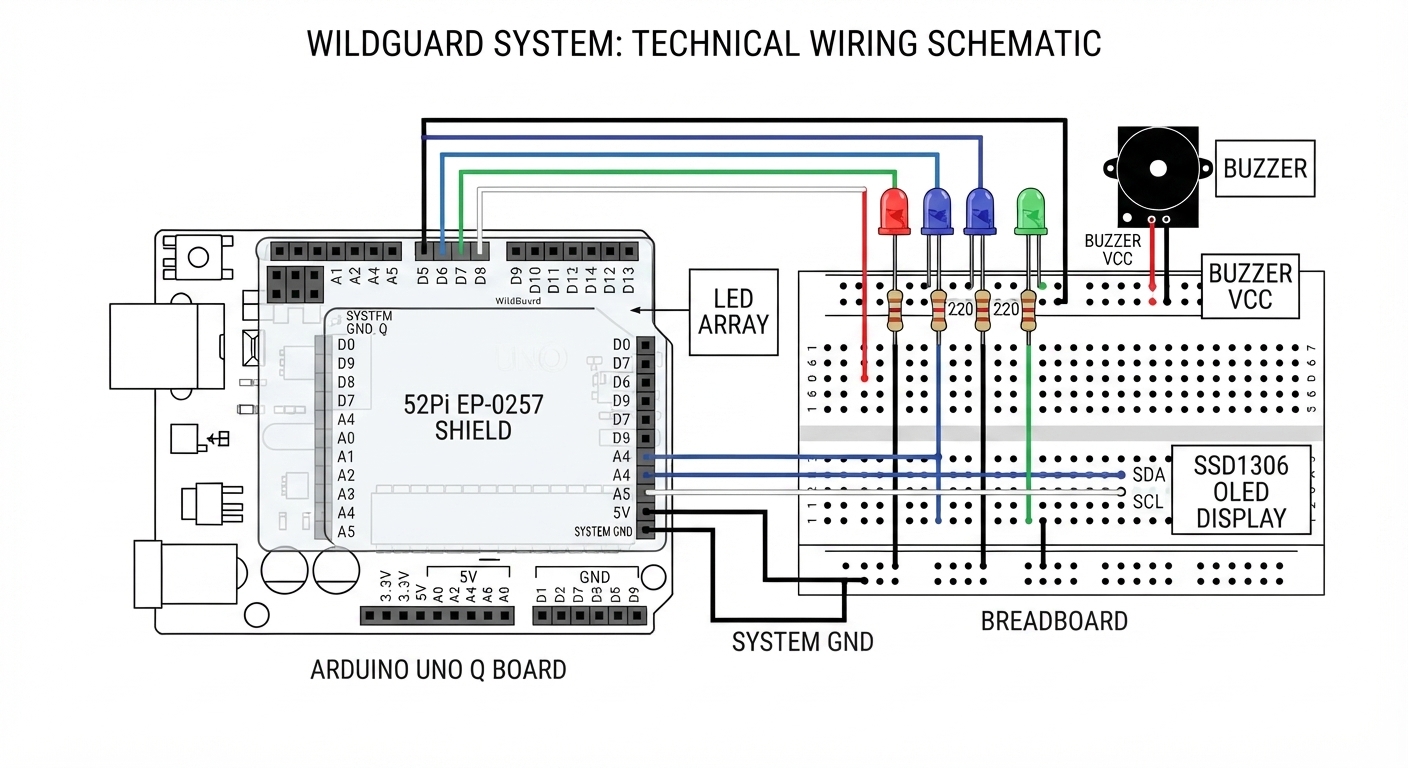
WildGuard is a fully realized, edge-based software and hardware prototype designed to detect illegal poachers and monitor animal migrations in real time. The system ingests a high-frame-rate wireless H.264 video feed from a remote smartphone camera over local Wi-Fi, runs on-device, accelerated object detection utilizing a custom-trained YOLO-Pro Nano neural network on the board's Qualcomm MPU, executes a custom debouncing and cooldown decision engine to prevent false alarms, and hands off threat alerts via the Arduino Bridge to the real-time STM32 microcontroller. The microcontroller then drives a series of local indicators—including multi-class visual LEDs, a level-shifted active piezo buzzer, and an SSD1306 OLED display for local telemetry.
2. Dual-Brain System Architecture and Communication FlowThe underlying efficiency of the WildGuard system lies in the logical separation of the high-latency vision computation and the low-latency hardware control. The Qualcomm Dragonwing QRB2210 MPU operates in the Linux domain, running the multi-threaded video stream grabber and executing the Edge Impulse YOLO model. The STMicroelectronics STM32U585 microcontroller operates in the real-time domain, running the physical alarm and display drivers.
Communication across this boundary is handled by the Arduino_RouterBridge library. Rather than requiring developers to manage raw serial packets, UART configurations, or parsing byte arrays, the Bridge abstracts the transport layer. Functions on either processor can be exposed using Bridge.provide() and invoked from the opposite side using Bridge.call() or Bridge.notify(). Because the vision processing loop can take tens of milliseconds per frame, calling the MCU synchronously via call() would introduce blocking lag. To prevent this, WildGuard implements asynchronous notifications using Bridge.notify(), allowing the Python AI pipeline to continue processing frames while the MCU handles buzzer timing and screen refreshes independently.
- Arduino UNO Q Board — 1
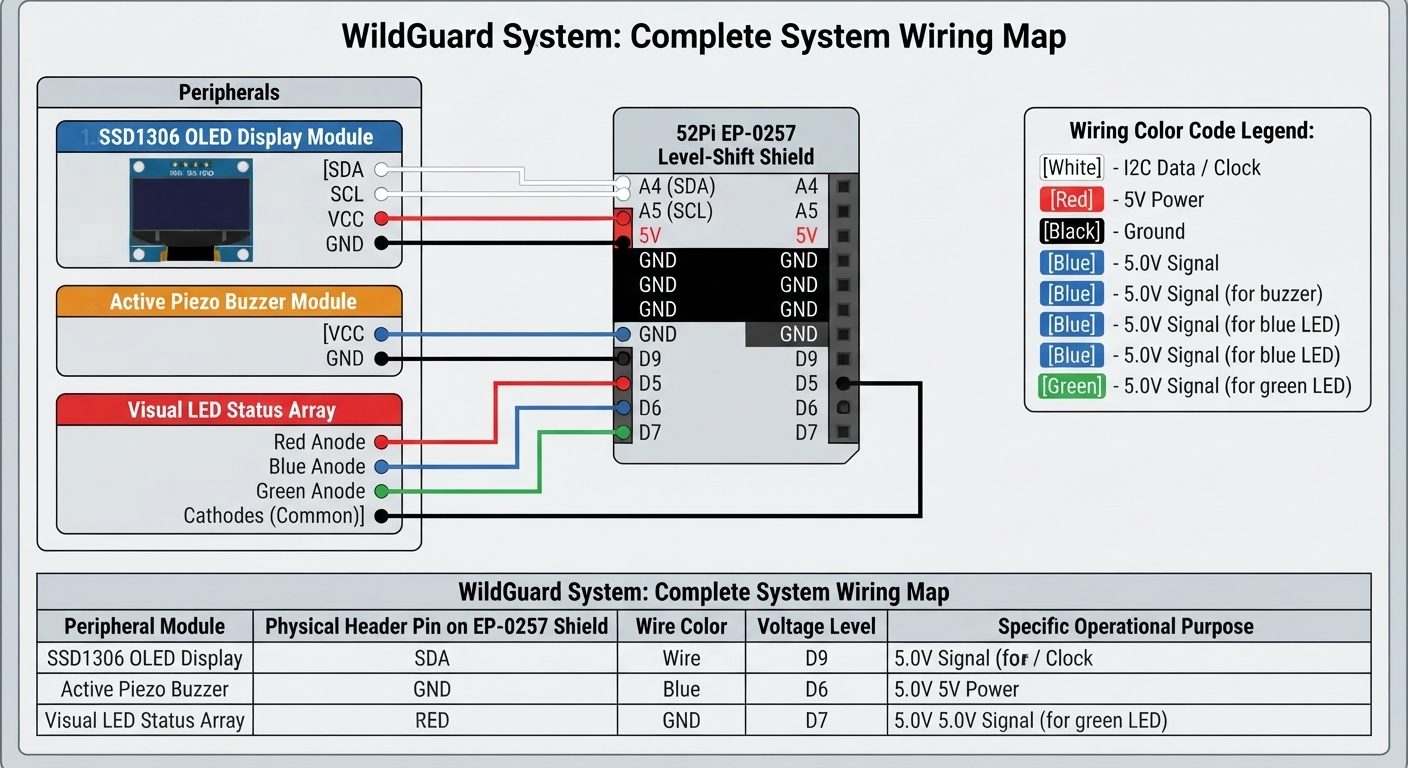
- 52Pi EP-0257 Level-Shift Shield — 1
- 0.96-inch SSD1306 OLED Display — 1
- Active Piezo Buzzer Module — 1
- Visual LED Status Array — 3
- Dual-Band Wi-Fi Router / Access Point — 1
- Android Smartphone — 1
- Powered USB-C Hub / PD Charger — 1
- Breadboard & Dupont Jumper Wires — 1
- Second Monitor / Display — 1
A primary engineering constraint of the Arduino UNO Q is the voltage limit of its real-time STMicroelectronics microcontroller. While some digital pins are 5V-tolerant in digital-only operations, the analog inputs and I2C pins (A4/A5) are strictly restricted to 3.6V maximum. Applying a 5V signal directly to these pins will cause immediate dielectric breakdown and permanent processor damage.
The 52Pi EP-0257 Level-Shift Shield resolves this by employing the TI TXS0108EPWR translation IC, shifting the STM32's native 3.3V signals up to 5V levels required by standard active buzzers, and isolating the sensitive I2C bus lines.
Establishing a reliable dual-brain environment requires careful startup synchronization. The STM32 microcontroller boots near-instantaneously (under 5 milliseconds), whereas the Qualcomm MPU must initialize the Linux kernel, launch background services, and load the Python virtual environment, a cold-boot process that takes 20 to 30 seconds.
If the MCU attempts to register serial communications or send requests over the Bridge before the MPU is ready, the serial buffer will overflow, causing the Zephyr kernel to panic and crash. To prevent this, the MCU blocks in its setup() block, polling the MPU's linux_started callback once per second until a successful handshake is returned.
Furthermore, traditional graphics libraries can cause compilations to fail because the standard compiler lacks configuration profiles for Zephyr's LLEXT dynamic loader. Developers must ensure the Adafruit_SSD1306 library is updated to v2.5.17 or later, which incorporates the official Arduino UNO Q compilation patch.
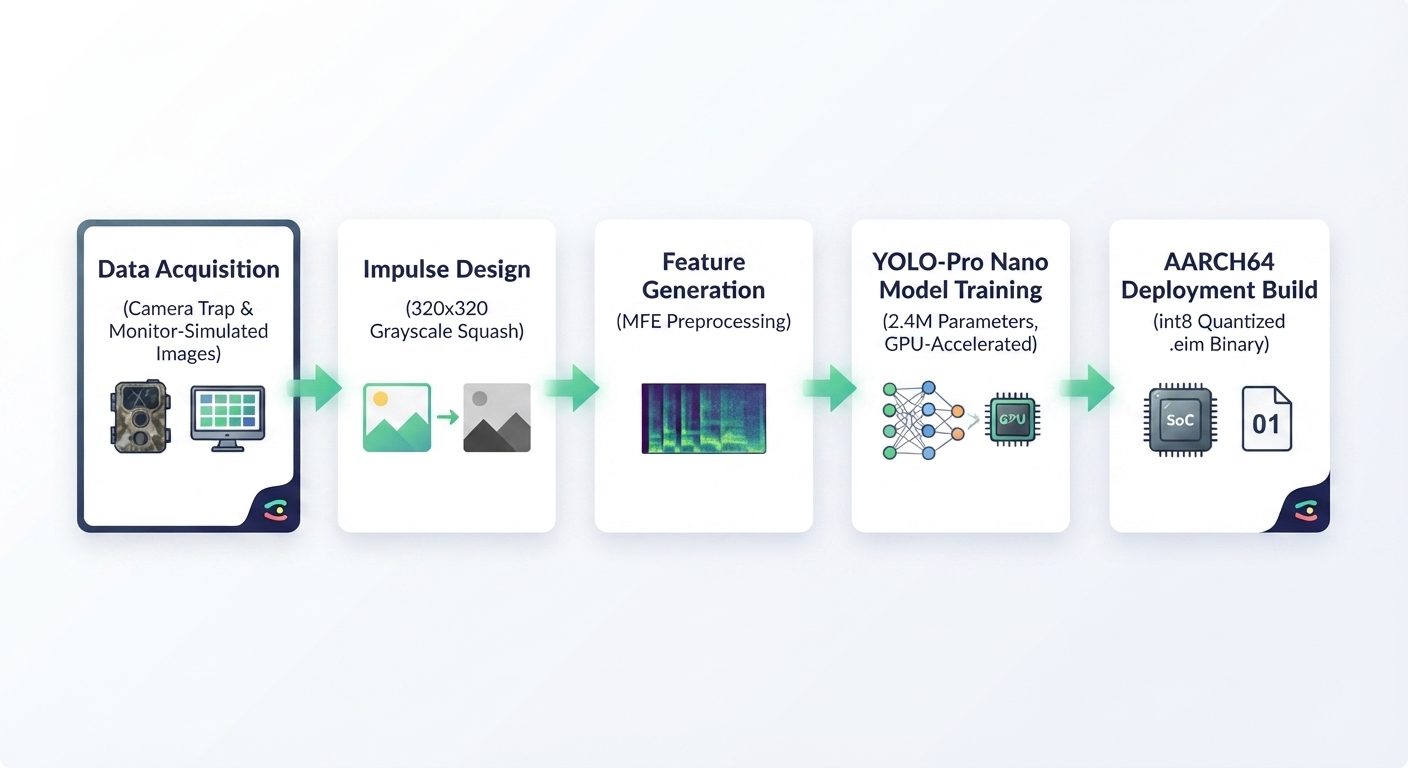
To train a robust computer vision model that generalizes across varying ambient environments, we deploy a tailored training pipeline using Edge Impulse Studio.
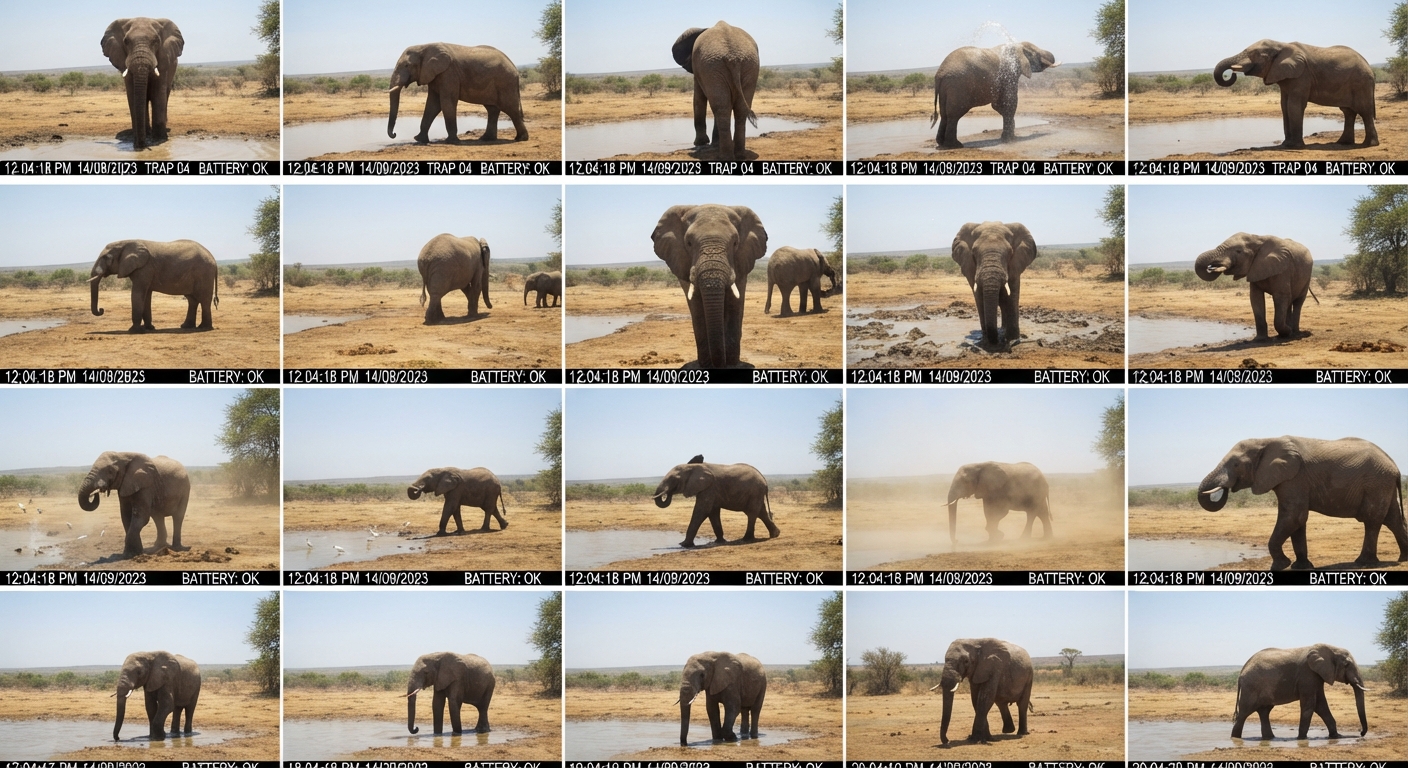
- Synthetic & Real Dataset Collection: Log into Edge Impulse Studio, open your project, and navigate to Data Acquisition. We connect our smartphone as a camera collector and record images of target wildlife and humans. To make the model robust against screen artifacts (when pointing our phone at a second monitor playing test loops), we mix in synthetic images and smartphone-captured photos of LCD monitors. This trains the model's feature extractor to overlook screen bezels and reflections. We capture 40 high-contrast images for the
humanclass and 40 images for theanimalclass.
- Bounding Box Labeling: In the Labeling Queue, drag bounding boxes tightly around the humans and animals in each frame. Label them as
humanoranimalrespectively. Empty control images are left completely unlabeled to train the background class.
- Impulse Configuration: Under Impulse Design, set the image dimensions to 320x320 pixels and the resize mode to Squash. The color depth is set strictly to Grayscale to reduce model footprint and maximize inference speed on the edge. Add an Image processing block and an Object Detection (Images) learning block. Save the configuration.
- Model Tuning & Optimization: Under the Object Detection block, change the base model from FOMO to YOLO-Pro. Select the YOLO-Pro Nano (2.4M parameters) model size to ensure the weights fit within the board's runtime memory boundaries. Set the training target explicitly to GPU on the Edge Impulse infrastructure and execute training for 80 epochs.
- int8 Quantization & Compilation: Navigate to the Deployment tab, search for Linux (AARCH64), select the int8 quantized option, and click Build. This compiles the model with full hardware-accelerated NEON vector optimizations into a single standalone
.eimexecutable binary.
Transfer the binary to the UNO Q board over SFTP and save it to: /home/arduino/ArduinoApps/wildlife_sys/models/wildlife_model.eim
Applications deployed through the Arduino App Lab runtime must adhere strictly to the board's designated folder layout.
Application File Tree/home/arduino/ArduinoApps/wildlife_sys/
├── app.yaml # Core application configuration
├── requirements.txt # Python virtual environment dependencies
├── python/
│ └── main.py # Camera stream ingest and YOLO inference
└── sketch/
├── sketch.yaml # MCU build profile & dependencies
└── sketch.ino # Real-time hardware control (OLED, Buzzer, LEDs)name: Wildlife AI Anti-Poaching System
description: "Streams camera feed over Wi-Fi, detects humans/wildlife, and drives physical alerts."
icon: 🦁
version: "1.0.0"
ports: []
bricks: []profiles:
default:
fqbn: arduino:zephyr:unoq:flash_mode=ram
platforms:
- platform: arduino:zephyr
libraries:
- MsgPack (0.4.2)
- DebugLog (0.8.4)
- ArxContainer (0.7.0)
- ArxTypeTraits (0.3.1)
- Adafruit_SSD1306 (2.5.17)
- Adafruit_GFX_Library (1.11.9)
default_profile: defaultedge_impulse_linux==1.0.8
opencv-python-headless>=4.5.1.48
pillow>=8.0.0
numpy>=1.19.08. Complete MPU Python Code ( python/main.py )
This Python application runs natively inside a virtual environment on the Qualcomm Dragonwing MPU (4x Cortex-A53) under Debian. It decodes the low-latency RTSP video feed, runs on-device inferences, applies consecutive-frame debouncing to eliminate false alerts, and transmits alarms to the MCU over the Bridge.
# SPDX-License-Identifier: MPL-2.0
# Wildlife AI Anti-Poaching System - MPU Application
# Programmed for the Qualcomm Dragonwing QRB2210 MPU

import os
import cv2
import time
import threading
from arduino.app_utils import App, Bridge
from edge_impulse_linux.image import ImageImpulseRunner

# Enforce lowest-latency RTSP streaming over UDP by setting OpenCV backend flags
os.environ["OPENCV_FFMPEG_CAPTURE_OPTIONS"] = "rtsp_transport;udp"

# Configure stream URL and model paths (Update IP to your phone's address)
RTSP_URL = "rtsp://192.168.1.100:8080/h264_pcm.sdp"
MODEL_PATH = "/home/arduino/ArduinoApps/wildlife_sys/models/wildlife_model.eim"

# Threshold Settings
CONF_THRESHOLD_HUMAN = 0.70   # Human threshold (strict to prevent false triggers)
CONF_THRESHOLD_ANIMAL = 0.60  # Animal threshold (lenient for varying animal postures)
COOLDOWN_PERIOD_SEC = 10.0     # Alert cooldown to avoid buzzer/OLED spamming

# State Tracking
last_alert_time = 0.0
human_frame_count = 0
animal_frame_count = 0
DEBOUNCE_REQUIRED_FRAMES = 2  # Target must be identified in 2 consecutive frames

class VideoStream:
    # Threaded OpenCV Video Ingest to continuously clear the RTSP network buffer
    def __init__(self, src):
        self.cap = cv2.VideoCapture(src, cv2.CAP_FFMPEG)
        if not self.cap.isOpened():
            raise RuntimeError(f"Could not open video stream: {src}")
        self.ret = False
        self.frame = None
        self.stopped = False
        self.thread = threading.Thread(target=self.update, daemon=True)
        self.thread.start()

    def update(self):
        while not self.stopped:
            ret, frame = self.cap.read()
            if ret:
                self.ret = ret
                self.frame = frame
            else:
                time.sleep(0.01)

    def read(self):
        return self.ret, self.frame

    def stop(self):
        self.stopped = True
        self.cap.release()

def linux_started():
    # Startup handshake method exposed to the MCU Bridge
    print("[MPU] Handshake requested by MCU. Confirming Linux is running.")
    return True

# Initialize Global Components
print("[MPU] Initializing Wildlife AI System...")
print("[MPU] Loading Edge Impulse YOLO-Pro Model...")
runner = ImageImpulseRunner(MODEL_PATH)
model_info = runner.init()
print(f"[MPU] Model loaded: {model_info}")

# Register startup handshake before opening camera stream
print("[MPU] Registering 'linux_started' handshake callback...")
Bridge.provide("linux_started", linux_started)

print("[MPU] Connecting to Smartphone wireless camera feed...")
stream = VideoStream(RTSP_URL)
time.sleep(2.0)  # Wait for UDP stream buffer to warm up
print("[MPU] System initialization complete. Ready for MCU connection.")

def loop():
    # Main execution loop called continuously by App.run()
    global last_alert_time, human_frame_count, animal_frame_count

    ret, frame = stream.read()
    if not ret or frame is None:
        time.sleep(0.01)
        return

    # Run AI inference on the captured frame
    features, img = runner.get_features_from_image(frame)
    res = runner.classify(features)

    detected_human = False
    detected_animal = False
    highest_human_conf = 0.0
    highest_animal_conf = 0.0

    # Parse Edge Impulse inference results
    if "bounding_boxes" in res["result"]:
        for bb in res["result"]["bounding_boxes"]:
            label = bb["label"].lower()
            value = bb["value"]

            if label == "human" and value >= CONF_THRESHOLD_HUMAN:
                detected_human = True
                if value > highest_human_conf:
                    highest_human_conf = value
            elif label == "animal" and value >= CONF_THRESHOLD_ANIMAL:
                detected_animal = True
                if value > highest_animal_conf:
                    highest_animal_conf = value

    current_time = time.time()
    cooldown_active = (current_time - last_alert_time) < COOLDOWN_PERIOD_SEC

    # Decision Logic and Debouncing Filtering
    if detected_human:
        human_frame_count += 1
        animal_frame_count = 0  # Prioritize human intruder alarms
        print(f"[MPU] Human detected ({human_frame_count}/{DEBOUNCE_REQUIRED_FRAMES}) | Conf: {highest_human_conf:.2f}")

        if human_frame_count >= DEBOUNCE_REQUIRED_FRAMES:
            if not cooldown_active:
                last_alert_time = current_time
                print("[MPU] VERIFIED THREAT: Poacher/Human detected! Sending async notification to MCU...")

                # Asynchronous notification ensures the computer vision thread doesn't lag
                Bridge.notify("trigger_alert", 1, int(highest_human_conf * 100))
            else:
                remaining = COOLDOWN_PERIOD_SEC - (current_time - last_alert_time)
                print(f"[MPU] Human active, but alert is in cooldown ({remaining:.1f}s left).")

    elif detected_animal:
        animal_frame_count += 1
        human_frame_count = 0
        print(f"[MPU] Animal detected ({animal_frame_count}/{DEBOUNCE_REQUIRED_FRAMES}) | Conf: {highest_animal_conf:.2f}")

        if animal_frame_count >= DEBOUNCE_REQUIRED_FRAMES:
            if not cooldown_active:
                last_alert_time = current_time
                print("[MPU] VERIFIED WILDLIFE: Animal detected! Sending async notification to MCU...")
                Bridge.notify("trigger_alert", 2, int(highest_animal_conf * 100))
            else:
                print("[MPU] Animal active, but alert is in cooldown.")

    else:
        # Gradually decay consecutive frames counters when targets disappear
        if human_frame_count > 0:
            human_frame_count -= 1
        if animal_frame_count > 0:
            animal_frame_count -= 1

# Start Python app under App Lab daemon control
App.run(user_loop=loop)
9. Complete MCU C++ Code ( sketch/sketch.ino )
The C++ sketch runs on the real-time STMicroelectronics STM32U585 MCU (Cortex-M33) under Zephyr RTOS. It remains in deep sleep or runs low-overhead polling loops, processing asynchronous incoming RPC alerts via the serial Bridge. It drives the visual LED arrays, writes status texts to the OLED display, and outputs pulsed alarm patterns to the piezo buzzer.
// SPDX-License-Identifier: MPL-2.0
// Wildlife AI Anti-Poaching System - MCU Application
// Programmed for the STMicroelectronics STM32U585 MCU over Zephyr RTOS

#include <Wire.h>
#include <Adafruit_GFX.h>
#include <Adafruit_SSD1306.h>
#include <Arduino_RouterBridge.h>

// Screen Configurations
#define SCREEN_WIDTH  128
#define SCREEN_HEIGHT  64
#define OLED_RESET     -1  // No physical reset pin on 4-pin I2C modules
Adafruit_SSD1306 display(SCREEN_WIDTH, SCREEN_HEIGHT, &Wire, OLED_RESET);

// I/O Connections (Mapped through level-shifting shield)
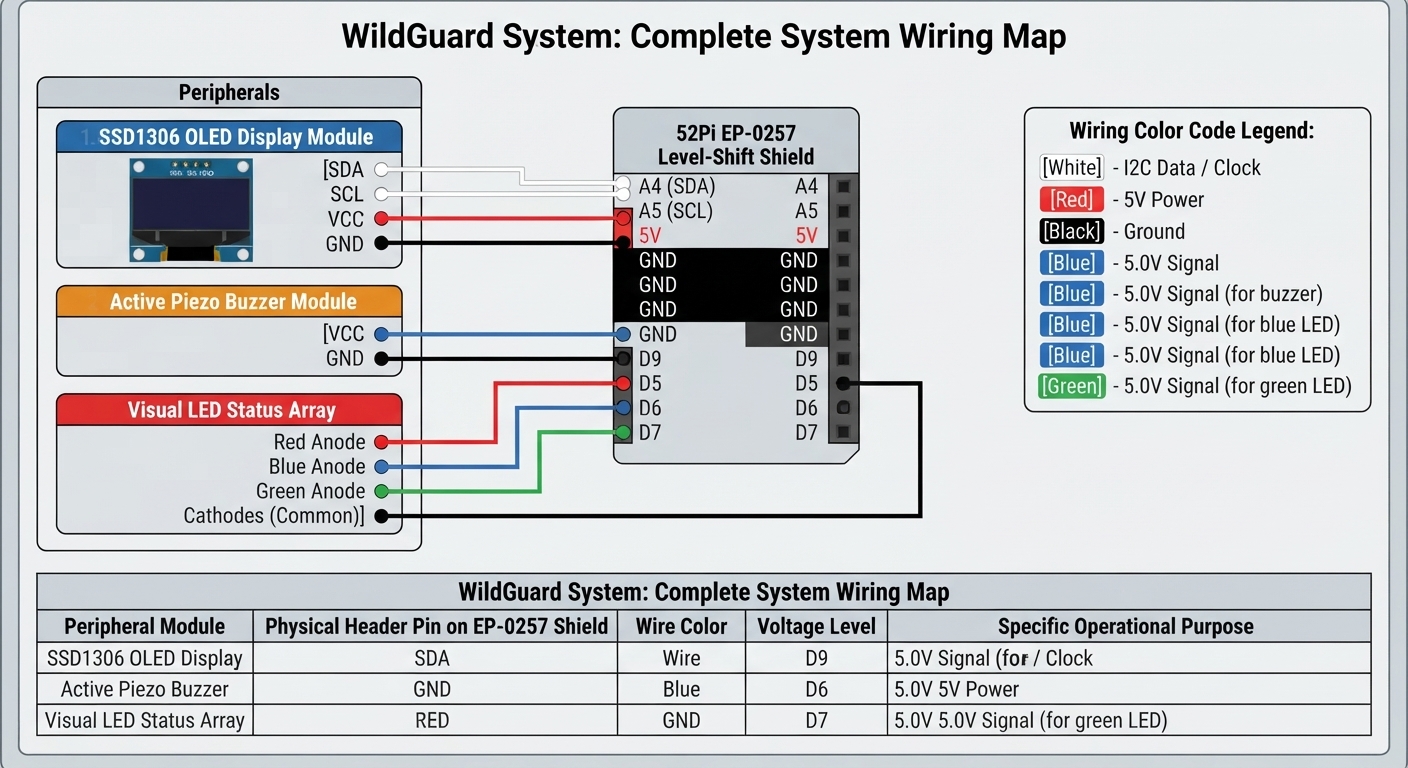
#define PIN_RED_LED   5   // Red LED indicating human intrusion
#define PIN_BLUE_LED  6   // Blue LED indicating wildlife presence
#define PIN_GRN_LED   7   // Green LED indicating system secure/scanning
#define PIN_BUZZER    9   // 5V Active Buzzer triggered HIGH

// State Management
volatile int current_alert_type = 0; // 0 = Secure, 1 = Human, 2 = Animal
volatile int current_confidence = 0;
volatile bool alert_state_changed = false;

unsigned long alert_start_time = 0;
const unsigned long alert_duration_ms = 4000; // Alert active on OLED/Buzzer for 4 seconds

void trigger_alert(int alert_type, int confidence) {
  // Callback invoked on the background RPC thread.
  // We keep this function extremely brief and thread-safe.
  current_alert_type = alert_type;
  current_confidence = confidence;
  alert_state_changed = true;
  alert_start_time = millis(); // Reset display persistence timer
}

void setup() {
  // 1. MUST initialize Bridge BEFORE initializing Monitor to prevent serial lockups
  Bridge.begin();
  Monitor.begin();

  // 2. MCU boots instantly. Poll the MPU for a handshake to ensure Linux is fully booted.
  // This startup synchronization prevents buffer overflow hangs.
  boolean mpu_ready = false;
  while (!mpu_ready) {
    Bridge.call("linux_started").result(mpu_ready);
    delay(1000); // Poll once per second
  }
  Monitor.println("Handshake successful. MPU is running.");

  // 3. Configure Hardware Pins
  pinMode(PIN_RED_LED, OUTPUT);
  pinMode(PIN_BLUE_LED, OUTPUT);
  pinMode(PIN_GRN_LED, OUTPUT);
  pinMode(PIN_BUZZER, OUTPUT);

  // Initialize status pins
  digitalWrite(PIN_RED_LED, LOW);
  digitalWrite(PIN_BLUE_LED, LOW);
  digitalWrite(PIN_GRN_LED, HIGH); // System starts in secure scanning state
  digitalWrite(PIN_BUZZER, LOW);

  // 4. Initialize OLED display (Address 0x3C is standard for SSD1306)
  if (!display.begin(SSD1306_SWITCHCAPVCC, 0x3C)) {
    Monitor.println("CRITICAL ERROR: OLED Display allocation failed.");
    for (;;); // Loop indefinitely
  }

  display.clearDisplay();
  display.setTextSize(1);
  display.setTextColor(SSD1306_WHITE);
  display.setCursor(0, 0);
  display.println("ANTI-POACHING ACTIVE");
  display.println("--------------------");
  display.println("STATUS: SECURE");
  display.println("SCANNING...");
  display.display();

  // 5. Expose the trigger_alert callback safely to the Python environment
  // provide_safe ensures execution happens inside the loop() thread context
  Bridge.provide_safe("trigger_alert", trigger_alert);
  Monitor.println("MCU Setup complete. Alert callback registered.");
}

void loop() {
  // Update the RPC router to process incoming packets from the MPU
  Bridge.update();

  unsigned long current_time = millis();

  // Non-blocking timer to clear alerts and return to secure scanning state
  if (current_alert_type != 0 && (current_time - alert_start_time >= alert_duration_ms)) {
    current_alert_type = 0;
    current_confidence = 0;
    alert_state_changed = true;
  }

  // Update physical indicators only on alert state transitions (reduces display lag)
  if (alert_state_changed) {
    alert_state_changed = false;
    display.clearDisplay();
    display.setCursor(0, 0);

    if (current_alert_type == 0) {
      // Secure monitoring state
      digitalWrite(PIN_RED_LED, LOW);
      digitalWrite(PIN_BLUE_LED, LOW);
      digitalWrite(PIN_GRN_LED, HIGH);
      digitalWrite(PIN_BUZZER, LOW);

      display.setTextSize(1);
      display.println("ANTI-POACHING SECURE");
      display.println("--------------------");
      display.println("STATUS: MONITORING");
      display.println("SYSTEM: SCANNING...");
    }
    else if (current_alert_type == 1) {
      // Human threat alert
      digitalWrite(PIN_BLUE_LED, LOW);
      digitalWrite(PIN_GRN_LED, LOW);
      digitalWrite(PIN_RED_LED, HIGH);

      display.setTextSize(1);
      display.println("!!! THREAT ALARM !!!");
      display.println("--------------------");
      display.setTextSize(2);
      display.println("HUMAN INTR");
      display.setTextSize(1);
      display.print("Confidence: ");
      display.print(current_confidence);
      display.println("%");
    }
    else if (current_alert_type == 2) {
      // Animal detection warning
      digitalWrite(PIN_RED_LED, LOW);
      digitalWrite(PIN_GRN_LED, LOW);
      digitalWrite(PIN_BLUE_LED, HIGH);

      display.setTextSize(1);
      display.println("WILDLIFE DETECTED");
      display.println("--------------------");
      display.setTextSize(2);
      display.println("ANIMAL ENTR");
      display.setTextSize(1);
      display.print("Confidence: ");
      display.print(current_confidence);
      display.println("%");
    }
    display.display();
  }

  // Actuator Control (Buzzer pulsing patterns)
  if (current_alert_type == 1) {
    // Human Alert: Rapid, piercing pulses to deter poachers (100ms ON / 100ms OFF)
    unsigned long pulse = (current_time / 100) % 2;
    digitalWrite(PIN_BUZZER, pulse ? HIGH : LOW);
  }
  else if (current_alert_type == 2) {
    // Animal Alert: Brief, soft chirps to alert monitoring rangers without scaring wildlife
    unsigned long chirp_cycle = current_time % 1200;
    if (chirp_cycle < 60) {
      digitalWrite(PIN_BUZZER, HIGH);
    } else {
      digitalWrite(PIN_BUZZER, LOW);
    }
  }
  else {
    // Secure State: Silence buzzer
    digitalWrite(PIN_BUZZER, LOW);
  }

  // Small delay to prevent tight loop MCU overheating
  delay(10);
}


Comments