



Hardware components | ||||||
 |
| × | 1 | |||
 |
| × | 1 | |||
 |
| × | 1 | |||
 |
| × | 1 | |||
 |
| × | 1 | |||
Software apps and online services | ||||||
| ||||||
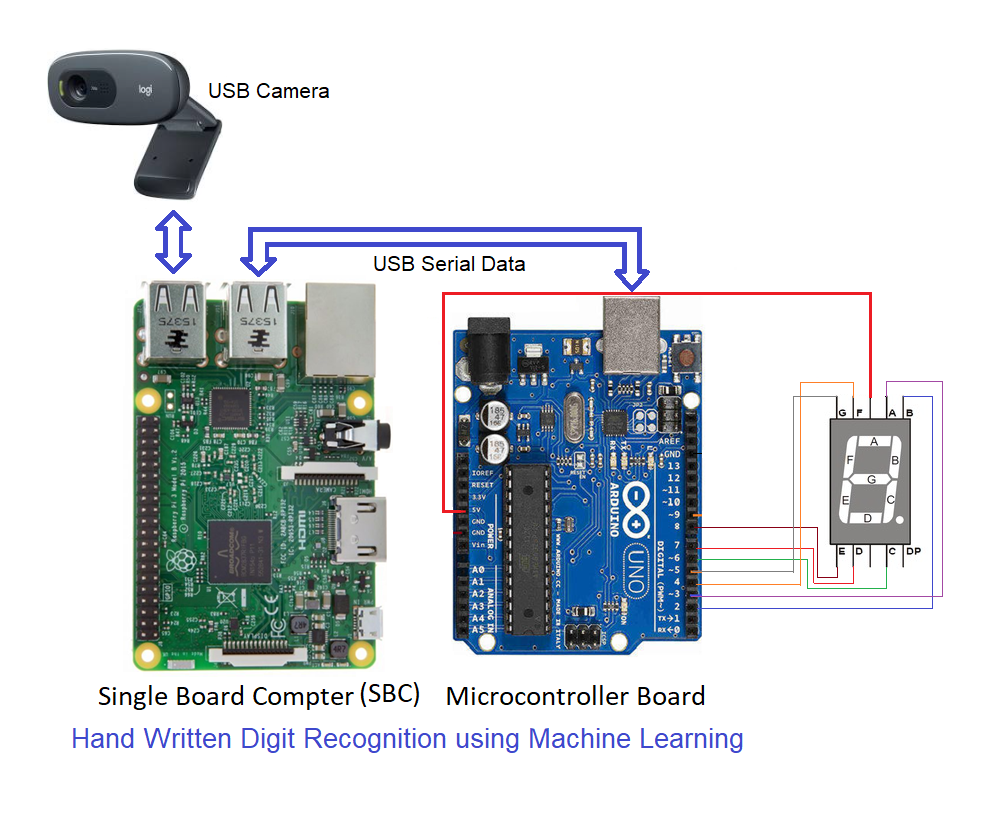
This project uses Raspberry Pi-3/4 or Aaeon Up x86 single board computers (SBCs) to detect hand written digits from live video captured by the USB camera and send the recognized digit to Arduino Uno to display on a 7 segment display.For this purpose, we use CASP software to program the SBC and Arduino Uno with respective logics.
This project demonstrate how to integrate Arduino boards with SBCs to do some really useful tasks. It also demonstrate the capabilities of CASP to model and program individual targets to achieve a common objective.
Basic LogicStep 1: On the host PC (native target), we develop a simply 2 layer 128 neurons per layer feed forward neural network model and train the model with MNIST number data set. We save the model during the training process.
We then test the trained model with live images from USB camera connected to the native PC
Step 2: On the Arduino Uno target we develop a logic to receive a number from the PC via serial communication and display it on a 7-segment display
Step 3: We then test the complete logic on the native PC. That is, when a digit is recognized in the live video from USB camera the corresponding digit shall be displayed on the 7 segment display.
Step 4: We now transfer the model from Step-1 to the target SBC and connect USB camera and Arduino Uno to the SBC. We run the model on the target SBC to recognize hand written digits and display on the 7-segment display.
ProcedureStep 1. Install CASP and ensure board support packages (BSP) of following are installed (based on your target) before proceeding.
a. Raspberry Pi 3B (Remote Build), Raspberry Pi 4B (64bit Remote Build)
b. Ubuntu 64bit OS (Remote Build), Windows 64bit OS (Remote Build)
c. Arduino Uno
These are available at this link: https://aadhuniklabs.com/?page_id=550. Please go through this link: https://aadhuniklabs.com/?page_id=554 for video tutorials on CASP. Please note that this project is supported on CASP version 0.9.4.0 and above only.
Step 2: Download Tutorial-11 on machine learning on this page and follow the below video tutorial on how to perform the above logic



Comments