



Hardware components | ||||||
 |
| × | 1 | |||
| × | 1 | ||||
| × | 1 | ||||
 |
| × | 1 | |||
| × | 1 | ||||
Software apps and online services | ||||||
 |
| |||||
 |
| |||||
| ||||||
Hand tools and fabrication machines | ||||||
| ||||||
 |
| |||||
Hi, I’m a first-year Computer Science student at UCLA, and this is my first Hackster project. I enjoy combining engineering, design, and creativity to turn simple ideas into visually interesting projects.
In this build, I created a DIY 3D-Printed Spiral Lamp that comes to life through motion and light. When the motor starts spinning, the spiral structure rotates smoothly, and RGB LEDs begin to glow. The LEDs change color every five seconds, and when combined with the rotating spiral shape, they create a beautiful and almost magical visual illusion.
The entire lamp was designed in Autodesk Fusion 360, with a strong focus on smooth motion, balance, and clean aesthetics. A DFRobot FireBeetle 2 ESP32-C6 controls both the motor and the RGB LEDs, allowing precise timing and smooth operation.
This project is my attempt to explore how spinning motion and programmable lighting can transform a simple lamp into an engaging kinetic art piece—something that looks different every time you watch it.
Support My Work: If you liked this project and want to support future builds, you can buy me a coffee here: https://ko-fi.com/thespannerStep 1: 3D Printing the Parts
The first step of this project is 3D printing all the required parts. I designed every component from scratch using Autodesk Fusion 360, focusing on smooth curves, proper clearances, and easy assembly. The main parts include:
- Spiral Body
- Base Enclosure
- Midde Plate
- Motor Gear
- Bottom Plate
Thanks to JLC3DPfor supporting this project with their high-quality 3D printing service. All the parts used in this build were printed through JLC3DP, and the results were clean, accurate, and ready to use.
JLC3DP offers a user-friendly online platform with instant quoting, fast 48-hour production, and reliable delivery. They provide professional, industry-grade print quality at an affordable price—starting at just $0.3, with up to $70 in new user coupons. If you’re looking for reliable and high-quality 3D printing at a low cost, JLC3DP is a great choice.
After completing the design, I sent the files to JLC3DP for printing. The parts were printed with good surface quality and accurate dimensions, which helped ensure smooth rotation and proper fitting during assembly.
To add a personal and professional touch, I customized the Midde Plate design by embedding the Autodesk, Fusion 360, and Instructables logos directly into the model. These logos were added during the design stage in Fusion 360, making them part of the print itself rather than an external sticker or engraving. Once the parts were printed, I checked each piece for fit and finish before moving on to the assembly steps
Step 2: N20 Gear Motor AssemblyIn this step, we install the N20 gear motor inside the base enclosure. This motor is responsible for rotating the spiral smoothly and consistently. The base enclosure was designed with a dedicated motor mount, so the N20 motor fits securely without any modification. Carefully insert the motor into the mounting slot and make sure it sits straight and firmly in place.
Route the motor wires through the opening inside the enclosure to keep them neat and out of the way for later wiring. Ensure that the motor shaft is centered and aligned properly, as this will help the gear system run smoothly without vibration.
Step 3: Gear AssemblyIn this step, we install the motor gear onto the shaft of the N20 gear motor. This gear is responsible for transferring motion from the motor to the spiral assembly.
Carefully press the 3D-printed motor gear onto the motor shaft. Make sure the gear is fully seated and sits straight to avoid wobbling during rotation. The fit should be snug—tight enough to prevent slipping, but not forced.
Once installed, gently rotate the gear by hand to confirm that it spins smoothly without rubbing against the base enclosure. Proper alignment at this stage is important for smooth and quiet operation when the lamp is running.
Step 4: RGB LED Strip AssemblyIn this step, we mount the RGB LED strip onto the middle plate, which is responsible for creating the glowing and color-changing effect of the spiral lamp. First, cut the RGB LED strip to match the shape of the middle plate. Plan the layout so the LEDs are evenly distributed for uniform lighting.
The LED strip already comes with pre-applied adhesive on the back. Simply peel off the protective layer and carefully press the strip onto the surface of the middle plate. Apply gentle pressure along the strip to ensure it sticks firmly and stays in place.
Once the strip is mounted, connect the LEDs in series:
- VCC → VCC
- GND → GND
- DO (Data Out) → DI (Data In)
This daisy-chain connection allows all LEDs to work together and display smooth color transitions. Keep the wiring short and tidy so everything fits neatly inside the enclosure without interfering with the rotating parts.
Step 5: DC Jack AssemblyIn this step, we install the DC power jack into the base enclosure, which provides external power to the entire system.
Insert the DC jack into the dedicated slot on the base enclosure. Make sure it sits properly and is aligned with the opening so the power adapter can be plugged in easily from outside. Secure the jack firmly in place using a small amount Super glue.
Once mounted, route the positive and negative wires neatly inside the enclosure. Keep the wires organized and away from the rotating motor and gear assembly to avoid any interference during operation.
Step 6: Code CustomizationThis project uses the FireBeetle 2 ESP32-C6 to control both the motor rotation and the RGB LED color effects. The code is written using the Adafruit NeoPixel library and is easy to modify based on your needs.
Below are the key sections of the code that you can customize.
Motor Control PinsThese pins control the N20 gear motor through the MX1508 motor driver:
#define MOTOR_IN1 7 // GPIO7
#define MOTOR_IN2 6 // GPIO6
🔧 You can change these pins if you use different GPIOs on the ESP32-C6.
Motor Speed ControlThe motor speed is controlled using PWM:
#define MOTOR_SPEED 130🔧 Customization tips:
- Increase the value (up to 255) for faster rotation
- Decrease the value for slower, smoother motion
- Slower speeds often create better optical illusion effects
This pin sends data to the WS2812B LED strip:
#define LED_PIN 8 // GPIO8🔧 Change this only if you connect the LED strip to a different GPIO pin.
Number of LEDsSet the number of LEDs according to your strip length:
#define NUM_LEDS 30🔧 Adjust this value if you use:
- More LEDs → brighter and more detailed effects
- Fewer LEDs → lower power consumption
strip.setBrightness(250);🔧 Recommended range:
- 100–150 → soft ambient lighting
- 200–255 → bright, vivid illumination
The LEDs change color every 5 seconds using a non-blocking timer:
const long interval = 5000;🔧 You can reduce this value for faster color changes or Increase it for slow and relaxing transitions
Color Sequence CustomizationThe color array defines the order of color changes:
uint32_t colors[] = {
strip.Color(255, 0, 0),
strip.Color(0, 255, 0),
strip.Color(0, 0, 255),
strip.Color(255, 255, 0),
strip.Color(255, 0, 255),
strip.Color(0, 255, 255),
strip.Color(255, 255, 255),
strip.Color(255, 165, 0)
};
🔧 You can add new colors, remove unwanted colors & create your own RGB combinations
Step 7: Uploading CodeBefore uploading the code to the FireBeetle 2 ESP32-C6, make sure your Arduino IDE is properly set up.
1. Install ESP32 Board SupportFirst, ensure that the ESP32 board package is already installed in your Arduino IDE. If it is not installed, add the ESP32 board manager URL and install the ESP32 boards from the Boards Manager. Full Tutorial
2. Install Required LibraryThis project uses the Adafruit NeoPixel library for controlling the RGB LED strip.
- Go to Sketch → Include Library → Manage Libraries
- Search for Adafruit NeoPixel
- Install the latest version
Now configure the Arduino IDE settings as shown in the image:
- Go to Tools → Board
- Select DFRobot FireBeetle 2 ESP32-C6
- Go to Tools → Port
- Select the correct COM port for your FireBeetle board
Make sure the board is properly connected to your computer via USB.
4. Upload the CodeOnce everything is set:
- Click the Upload button in the Arduino IDE
- Wait for the compilation and upload process to complete
- If the upload is successful, the FireBeetle will automatically start running the code
Now move on to assembling the electronics onto the bottom plate. Place the DFRobot FireBeetle 2 ESP32-C6 and the motor driver module into their respective slots on the bottom plate.
Once you are satisfied with the placement, secure the components using a small amount of super glue. Apply the glue carefully only at the edges or mounting points—avoid covering any buttons, ports, or electronic components. Allow the glue to dry completely. This ensures the electronics remain firmly fixed and do not move during rotation of the lamp.
Step 9: Middle Plate AssemblyIn this step, we assemble the middle plate inside the base enclosure. Carefully place the middle plate into the base enclosure. Align the plate properly so that the wire cutouts match the DC jack and power switch positions.
Once everything is aligned correctly, press the middle plate down until it sits firmly inside the enclosure. After that, apply a small amount of super glue along the edges to secure the plate in place.
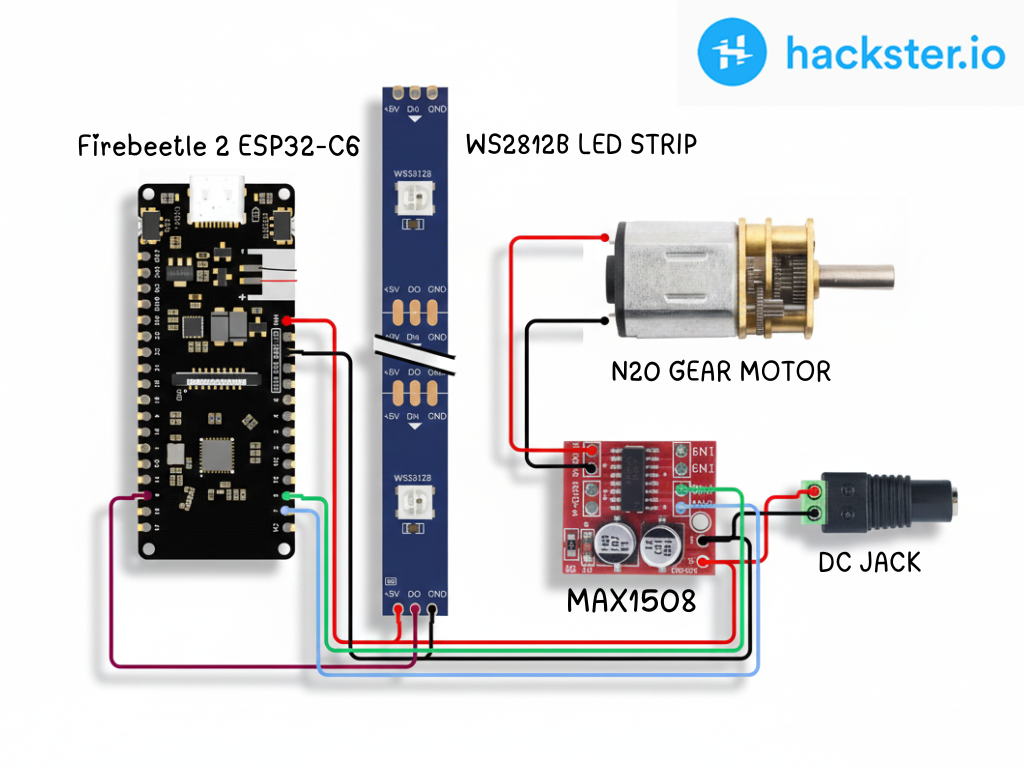
Step 10: ConnectionsFollow the connections below carefully to complete the wiring of your project. All connections are made according to the circuit shown in the diagram and the assembled hardware.
FireBeetle 2 ESP32-C6 → MX1508 Motor Driver
- FireBeetle GPIO7 → MX1508 IN1
- FireBeetle GPIO6 → MX1508 IN2
- FireBeetle 5V → MX1508 VCC
- FireBeetle GND → MX1508 GND
N20 Gear Motor → MX1508
- Motor terminals → MX1508 Motor Output (M+ / M−)
External Power Source → MX1508
- External Power → MX1508 VM
FireBeetle 2 ESP32-C6 → WS2812B RGB LED Strip
- FireBeetle GPIO8 → LED Strip Data Input (DI)
- FireBeetle 5V → LED Strip 5V
- FireBeetle GND → LED Strip GND
All LED segments are connected in series using DO to DI, allowing smooth color transitions across the entire strip.
Common Ground (Important)
Ensure that GND is common between:
- FireBeetle ESP32-C6
- MX1508 motor driver
- RGB LED strip
In this step, Carefully place the bottom plate, which holds the FireBeetle ESP32-C6 and MX1508 motor driver, onto the base enclosure. Once everything is aligned, apply super glue along the edges of the bottom plate and gently press it into place. Hold it for a few seconds to allow the glue to bond firmly. After the glue sets, the enclosure becomes rigid and secure.
Step 12: Spiral Structure AssemblyIn this step, Carefully align the inner gear teeth of the 3D-printed spiral with the small motor gear mounted on the base. Once aligned, gently lower the spiral onto the base so the gears mesh smoothly. Make sure the spiral sits evenly and can rotate freely without rubbing against the enclosure. Now manually rotate the spiral once to confirm smooth motion. This completes the mechanical assembly and prepares the lamp for its mesmerizing spinning light effect. ✨
Step 13: TestingAfter completing all the assembly and wiring, I connected the power supply to the DC jack and switched the lamp ON. As soon as it powered up, the motor started rotating smoothly and the RGB LEDs lit up. The spiral began to spin, and the LEDs started changing colors automatically every 5 seconds. When the rotating spiral combined with the color-changing light, it created a really magical and eye-catching visual effect.
Everything worked as expected on the first test & the DIY 3D-Printed Spiral Lamp was fully functional and ready to use.
Note: Due to the limited camera quality, the video does not fully capture the actual visual effect. The spinning and RGB lighting look much more vibrant and impressive in real life.Step 14: Conclusion
This project was a fun and rewarding experience for me. By combining 3D printing, electronics, and motion, I was able to turn a simple idea into a visually attractive and interactive spiral lamp.
The spinning spiral along with the color-changing RGB LEDs creates a unique illusion that looks different every time you watch it. This lamp can be used as a decorative light, for parties, room ambience, desk decoration, or even as a creative showpiece.

_t9PF3orMPd.png?auto=compress%2Cformat&w=40&h=40&fit=fillmax&bg=fff&dpr=2)


Comments