


Hardware components | ||||||
 |
| × | 1 | |||
| × | 1 | ||||
| × | 4 | ||||
 |
| × | 1 | |||
 |
| × | 1 | |||
 |
| × | 1 | |||
| × | 1 | ||||
| × | 6 | ||||
 |
| × | 1 | |||
| × | 1 | ||||
| × | 1 | ||||
| × | 1 | ||||
Software apps and online services | ||||||
| ||||||
 |
| |||||
Meyou is a companion cat robot, and it has Keyword Spotting, Object Detection, Cloud LLM, TTS API, OCR, and flame sensing. Meyou can also help the elderly: finding objects, Medication reminders, and playing some games- like Finding a Colored object or Guess the Number as cognitive games that are easy to play and also help with logical thinking. As a social assistance Robot, it can play games with the user and talk too. It has its web dashboard where you can see Meyou view- the camera feed and essentially what Meyou sees, status logs, sensors and motors logs, detected objects, OCR text read, Game reminders and suggestions, and buttons for manually controlling Meyou. Other than that, there are emotion and mood labels, which change depending on the interaction between Meyou and the user. Meyou has an animated cat face that expresses its emotions and the input and output message bubbles. So, to keep Meyou happy, keep talking and interacting with Meyou- a good way to keep the conversation going on! Finally, it can send messages on Discord too; if a person is detected, if the game is won, or if the reminder is set, it can alert the caretaker or user.
Meyou can now move, listen, talk, play, and remind!
Here is Meyou playing the Guess the Number game!
I wanted to make a robot cat that could walk on its own, roam, read, detect objects, and talk using a single board. Its movement and detection could be used to search for misplaced objects, and it could also do facial recognition and patrol. It can talk, act as a companion, and also play games. With the elderly, it can be used to remind medication timings, detect if they are not feeling well, play cognitive games, answer questions, detect obstacles while walking, see if there is any open flame anywhere, and alert the caretaker in case of any problem. Most of these are helpful to everyone, as I often forget even after setting reminders, but again, Meyou can help sometimes; it just needs the code and features.
As I worked on Meyou, I wanted to make this offline, or at least make ASR and LLM offline, but the packages and the dependencies take up space, and I couldn't figure out how to make them all work together, so for now, I'm working with Cloud bricks.
Other than that, I really struggled with making the board not heat up with the OCR and Object detection working at once and on all frames, so I changed them to look at frames at intervals and not spawn threads continuously.
Keyword Spotting Edge Impulse model has many keywords that are recognized now, but the accuracy and the distance at which the mic picks up needs more work.
I added states too, so Meyou can move with manual commands or automatically later in self-wander mode.
Before, I added IR sensors for obstacle detection and avoidance, but I wanted to switch to Ultrasonic sensors, as IR didn't give the right movements when lighting changed. This feature will be added later, though, as I am working on it now.
SystemSo, here the two sides, Linux and STM, control two different things, like python side handles the camera, keywords, object detection, and sends the movement command to the STM side, which in turn moves Meyou by turning the motors on. While the STM side reads sensor values and sends them to the Python side to go to the FLAME_DETECTION state if triggered, they handle this through Bridge RPC.
Other than that, if keywords aren't spoken for a while, any other state can be chosen, like IDLE or WANDER, where Meyou sits for a while, stretches legs, stands, sits, or walks.
FeaturesDual Brain: Debian Linux and STM side
Linux side
- Keyword spotting
- Camera feed to Web UI
- Frame based motion detection for servo eye movement sent over ridge RPC
- Speech recognition - ASR
- Response - LLM
- Speech output - TTS
- Object Detection
- OCR and object detection- find object
- OCR text
- OCR games
- Reminder setting by OCR
- Reminder setting by UI
- Status logs
- Automatic and keyword based state change
- Bridge RPC based flames sensor values to Flame detection state
- Bridge RPC based movement information
- Mood and emotion change depending on keywords and states
- Web UI interface updates based on previous functions
STM side
- Flame sensor value to Linux side by Bridge RPC
- Change movements based on command sent by Linux side over bridge RPC
- Change servo angle for eye movement depending on value sent by Linux side by calculating and motion detection
First, I uploaded the CameraWebServer example code to ESP32- CAM on Arduino IDE.
I checked if the ESP32-CAM could connect to the UNO Q, and then I added the Keyword Spotting brick. The Hey Arduino example in App Lab was really great, so I trained my own Edge Impulse model with FORWARD, BACKWARD, LEFT, RIGHT, STATUS, SIT, MEYOU, DANCE, STOP, and HI as keywords.
Next, I added Cloud ASR, Cloud LLM, and Google TTS API. I tried making use of offline packages like Vosk and also llama.cpp, but I couldn't get them to work without heating the board and massive CPU usage. Also, the present bricks and packages like OpenCV and Rapid OCR were making the usage spike in large amounts. So, I added intervals where the bricks get the frame. Also, OpenCV does motion tracking for the servo that controls Meyou's eyes, so I added intervals and delays to all of them.
To make it detect if someone fell before Meyou, I trained a visual image model with Fallen and Standing labels and added this to the Image Classification brick or Object Detection brick.
But considering that running too many models takes up space and makes the CPU run at its limit, I considered removing the Fall Detection Edge Impulse model, I was using both Image Classification and Object Detection, and OCR, so finally, I decided to keep the Object Detection brick, as it detects objects and helps in finding any misplaced objects.
But the integration of bricks and movements on UNO Q works well, so Meyou is dancing the victory dance now!
Now, Meyou has some features removed because I didn't want the board to overheat and do unnecessary tasks. Meyou can now find objects, converse, dance, detect flames, listen to keywords, and do medication and hydration reminders.
Assembled the components on the wooden chassis like this with four wooden legs and fixed brackets for motor placement! Similarly, mounted eye servo on the back of face.
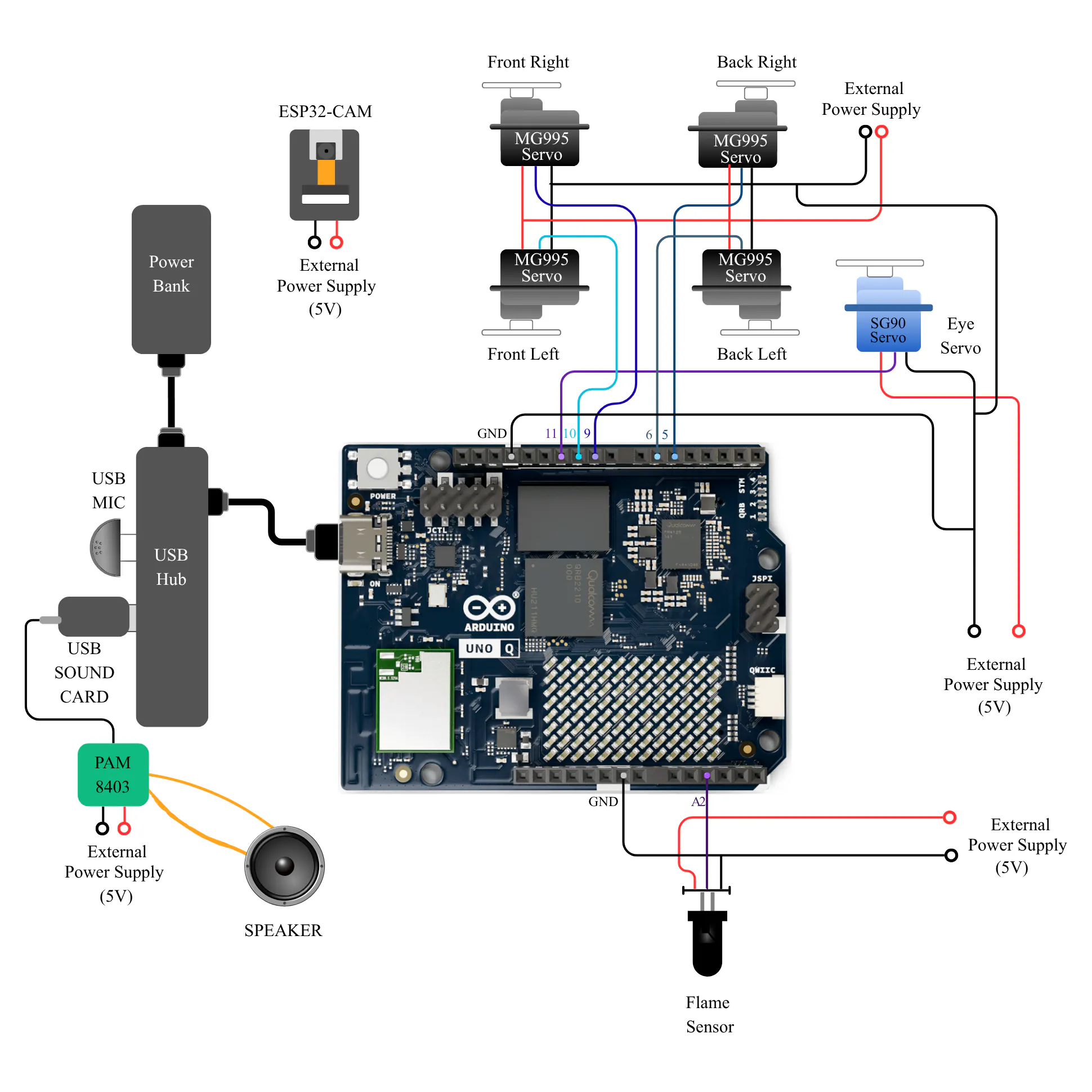
Connect the components as shown in the circuit diagram!
Input:
- Flame Sensor: Flame detection; the robot cat moves back
Flame Sensor -- A2 - ESP32CAM: Uploaded the CameraWebServer code first using the Arduino IDE. The webpage link from it is used as a URL in UNO Q’s code
- USB MIC: Connected to USB Hub
- Speaker
UNO Q:
- Connected to USB Hub
- Sensors and motors pin connections
- Two codes: Python and C++
- Used Native bricks
Output:
- Front Left(FL), Front Right(FR), Back Left(BL), Back Right(BR) servos for gait and movement
- Eye Servo for eye movement
- Neck servos for up/down and left/right movement
- CameraWebServer on ESP32-CAM using Arduino IDE; copy the camera's URL!
- App Lab
1. Create a new app and code Python, sketch, and index files
2. Make sure to note down API's and credentials for Bricks
3. Install packages like OpenCV (headless), RapidOCR, Google Text-to-Speech
4. Add the Servo library using the Add Library option in App Lab - Add the code to main.py, index.html, and sketch.ino
- Make sure tts json is present in credentials folder in python folder and add it to environment path in code
- Add some Meow sounds in the root
- Configure mic and speaker in command console so their names can be known
- Install the packages using the command console of UNO Q board
- Check the code and run the app, debug, and check the outputs
UNO Q App Lab has Bricks that are used for specific coding.
1. Cloud ASR
For configuration, an API key is needed; add it to the brick
2. Cloud LLM
Add the API key and check the model in code
3. Keyword Spotting
Trained the car_commands model, added by connecting the Edge Impulse account to App Lab
4. Object Detection
Using General Purpose Object Detection – YoloX Nano in the configuration list
5. Web UI – HTML
Used for webpage demonstration; it has input buttons and cat animation with input and output commands shown
Google TTS
Added without using brick, need API key for configuration
Discord Webhook
To send images when objects are detected and send messages
Arduino sketch.ino code:1. Flame Sensor sends analog values to the Python side using Bridge RPC.
2. Gait commands are sent by the Python side to change walking styles like FORWARD, BACKWARD, LEFT, RIGHT, HI, SIT, DANCE, and eye movement.
Assets:HTML File
1. MEYOU VIEW
This is the camera feed of ESP32-CAM, which is shown on the web UI of UNO Q
2. Command Buttons
Similar to the Arduino IOT Cloud Dashboard, we have Forward, Backward, Left, Right, Stop, Hi, Status, and Meyou buttons
3. Emotion and Mood value
This shows the emotion value that increases with interaction and decreases when Meyou is left alone. And it shows the mood corresponding to the emotion value, like HAPPY, SAD, or EXCELLENT.
4. Cat Emoji Animation
The cat’s face changes with emotion, and any command or input is shown as an input bubble, and the cat’s reaction is shown as an output bubble
5. Status Log
This log activates by saying the STATUS keyword, and it shows the status of the camera, mic, speaker, and servos
6. OCR text
When any text is shown to the camera, the OCR library RapidOCR gives the text, and it is displayed in this portion
7. Game updates
Updates of the games- COLOR GAME, GUESS THE NUMBER are shown here
8. Sensor triggers
Shows if the FLAME sensor is triggered
Demo1. Game demo for daily cognitive games and reminder settings via OCR and UI
- Game 1: Find the number- Three tries, and after showing each number, the code block checks if it is greater than, less than, or equal to ( in this case, the game is won), and then continues
- Game 2: Color game - Show game card with object of color said by Meyou
2. HI and movements
Moves using Keyword Spotting or Manual buttons on the dashboard, like Forward, Backward, Left, Right, Sit, Stop, HI, or Dance! Python side sends to the STM side, and the corresponding command is executed.
3. ASR, LLM, and TTS
Speech-to-text, text-to-response, and text-to-speech using the Cloud ASR brick, Cloud LLM brick, and TTS API to show Meyou listening and talking!
Here's some chat excerpt between the user and Meyou where the user called the keyword Meyou and then asked a question, which was then sent to the LLM, and then TTS, and then played as a WAV file.
4. Finding Object- Object detection brick
Object detection brick and example Edge Impulse model YOLO NANO in App Lab used to find objects
This shows the object_history log where I checked with random objects!
And when asked to find an object, it logs that too!
This is the Discord message sent when the ball is detected after showing the card "FIND BALL" to be read by the Rapid OCR package.
5. Flame Detection
Flame sensor value is read by the STM side, then sent to the Python side, which sets the Flame detection state, then sounds an alarm, sends a Discord message, and backs away.
6. UI Dashboard
UI dashboard has
- Manual controls of movements
- Camera view
- Animated cat
- Input and output speech bubbles
- Interaction, mood, and emotion values
- Status log
It was really fun and worthwhile to assemble bricks and make them work all together. I learned how to work with containers and how to use Python coding with Arduino. I tried using offline models and trained a Fallen/ Standing model that detects if someone fell, but I couldn't use it here. So, the next versions could have many more things. Mostly, I feel that one board controlling many kinds of inputs and outputs is a challenging task, but UNO Q does it.
As a quadruped robot, making Servos move at precise angles and show some cat-like movements, along with gaits, speed, speech, camera- all these systems working at once- it is hard to make it look like they work seamlessly. So, Meyou is precisely developing in this direction, where it can have more features that many robots have without overloading the boards and parts, and providing social care to the elderly, or any other user!
At present, Meyou can make the elderly feel less lonely by talking and answering their questions like a companion assistant, playing cognitive games that can make them look around for things and objects, reading text, finding objects, and giving medication and hydration reminders, and alerting the caretaker too. With repeated interaction, by making Meyou happy, the user also feels good by playing and talking. Walking with Meyou is also fun!


Comments