



Hardware components | ||||||
| × | 1 | ||||
| × | 1 | ||||
| × | 1 | ||||
 |
| × | 1 | |||
| × | 1 | ||||
| × | 1 | ||||
| × | 1 | ||||
 |
| × | 1 | |||
 |
| × | 1 | |||
| × | 1 | ||||
Software apps and online services | ||||||
 |
| |||||
Hand tools and fabrication machines | ||||||
 |
| |||||
 |
| |||||
 |
| |||||
Hi, My name is Piyush!
I have been very Curious and Interested in a Measuring Device I saw on Amazon, It wasn't something regular like you would find like a ruler, Rather, it was a Circular device that you Roll across a Surface and how much Distance it has traveled. What I was looking at was an "Electronic Digital Tape Measure". I wanted to check this out because it Solves Great Problems we have with Regular Rulers. It could Measure a Surface with any Shape, But the only Problem was that it was Expensive (Around $60 on eBay). So I just Ended up Ignoring it, Until I saw the "Build A Tool Contest" By Instructables!
This Device has Many Advantages:
Advantages:
- Very Easy To Use
- Quick/Fast To Use
- Measurement Conversion
- Small and Compact
- Cheaper than the Actual Device but Still Effective
- Measure Any Shape
- Friendly User Interface
- 99% Accuracy
So I Thought This was A perfect time To Build a Unique, Functional but Budget-Measuring Device!
Here is the Link To the Expensive Electronic Measuring Device I Got Inspired From: eBay Link
SuppliesComponents:
- Self-Lock Push Button Switch
- Motor GearWheel
- Rotary Potentiometer
- 2 PCB pins
- 3.7 Volts Drone Battery
- 128x64 OLED Display
- Arduino Pro Micro
- Wires - Coloured Wires if Possible
- Half Cut Jumper Wires (Female)
- Tactile Push Button
- Wooden Stick
Tools:
- Scissors
- Soldering Iron
- Glue Gun with Glue Sticks
- Wire Splitter
- Sand Paper
In this Step, We form the Wooden Stick According to The Wheel to Fix it to the Rotray Potentiometer.
First, Take your Pencil and Ruler, Mark the measurements on the Wooden Stick, and Cut it out with Scissors.
Next, Put the Final Measurements on the Stick and use the Sand Paper to sand the middle part until the gap is 1 mm It should look like the Final Picture.
We did this to mount this Stick to the Wheel and the bump in the middle of the stick can be attached to the Rotary Potentiometer.
Step 2: Attach Rotary Potentiometer to WheelIn this step, You are going to Attach the Wooden Stick from the previous Step and Attach it to the Rotary Encoder. After that, You are going to attach the Whole Thing to the Wheel!
First, Take your Wooden Stick and Attach the Middle Part between the Gap of the Rotary Encoder.
After That, Take the Stick with the Encoder on it and place it in the Wheel in such a manner that it goes through the Diameter and It should look like the Picture Above.
In this Step, you will Make the Base of the device by Putting All the Components Together.
Firstly, Take your 3.7 Volts Drone Battery and Glue it To the Rotary Encoder with Hot Glue.
Next, Solder Some Wires To the Encoder as shown in the Picture Above.
After That, Take 4 Cut Female Jumper Wires and Attach them to the 128x64 OLED Display as shown in the Picture Above. Take a Picture of your Connections from The OLED Display Because we will be Putting The Microcontroller on Top of it so the Wires will be Hidden.
Next, Take your Oled Display and Attach the Jumper Wires on top of the Battery Like in the Picture.
Now, take your Self Lock Switch, Place Glue on the Button and Gule it right Under the Oled Display so the Button sticks to the OLED display and the Encoder as shown in the Picture;*To make it Easier for Yourself, You can Temporarily Take out The OLED Display from the Jumper Wires and then Hot Glue Like I did in the Picture. By doing this, when you Press on the OLED Display, The Device Turns On.
The next step is to place your Push Button on the Rotary Encoder's pins. Make Sure to Position the button so that one of the Pins is touching the Ground of the Rotary Potentiometer as shown in the Picture.
Finally, Attach The Arduino Pro Micro on Top of the Jumper Wires To complete Adding all the Components
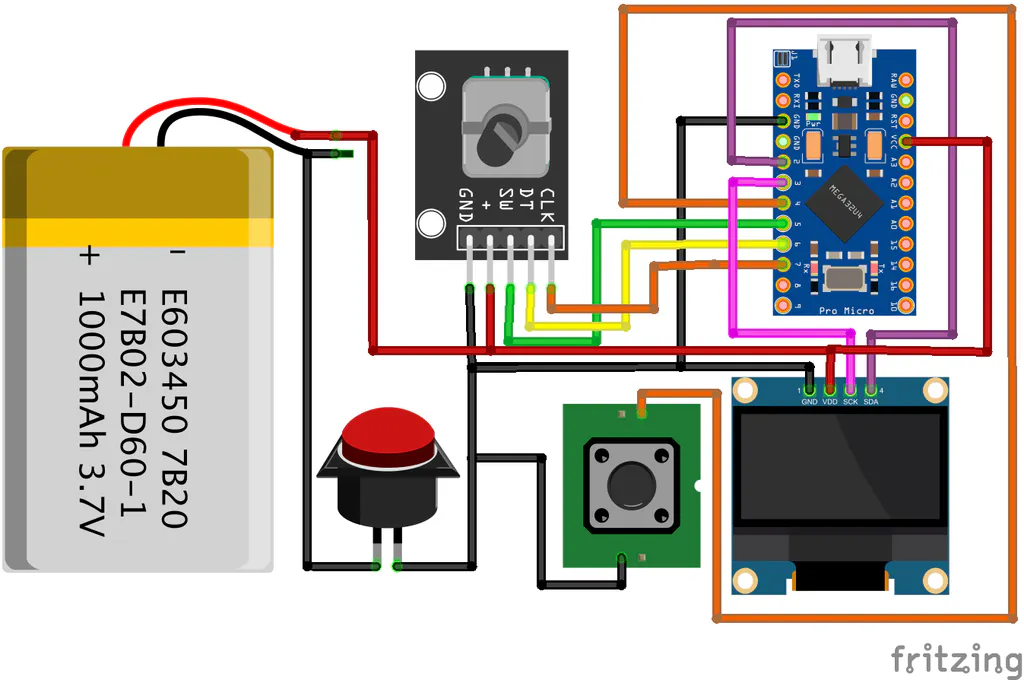
Step 4: ConnectionsIn this Step, You will Make all the Connections by the Schematic Provided.
For the Battery Connector, take your 2 PCB Pins and attach the First Pin to the VCC of the Arduino Pro Micro And GND to One of the Switch's Terminal. I made the mistake of connecting the GND Pin Directly to The Microcontroller Instead of the Self Locking Switch which I Realized at the End of doing all the Connections, Look at Picture 7 which shows the Connections for Self Locking Switch.
Next, Connect all the GNDs and the VCCs Together, as Shown in Pictures 1, 2, And 3. I connected The OLED Display's VCC (Purple Wire) and the Rotary Potentiometer to the Microcontroller's VCC as Shown in Picture 1. I Connected All the GNDs Together and wired them to the Arduino Pro Micro's GND as shown in Pictures 2 and 3.
Then, We will Wire The I2C Communication Pins for the OLED Display - SDA and SCL to 2 and 3 Respectively as Shown in Picture 4.
After That, Wire the S1, S2 and Key, Pins of the Rotary Potentiometer to Pins 5, 6, and 7 of the Arduino Pro Micro Respectively as shown in Picture 5.
Finally, Attach the Last Terminal of the Tactile Push Button to Pin 4 as shown in Picture 6. And The Last Terminal of the Self Locking Switch To the Second PCB Pin as shown in Picture 7.
Step 5: CodeFinally, to Finish This Fun Project, We need to Upload the Code.
Code:
// importing the Libraries: Download "Adafruit SD1306" and the "Adafruit GFX Library"
#include <Wire.h>
#include <Adafruit_GFX.h>
#include <Adafruit_SSD1306.h>

#define SCREEN_WIDTH 128  // OLED display width, in pixels
#define SCREEN_HEIGHT 64  // OLED display height, in pixels

#define SCREEN_ADDRESS 0x3C  // Oled Display's Address

Adafruit_SSD1306 display(SCREEN_WIDTH, SCREEN_HEIGHT, &Wire, -1);

// Change The Setting Acording To your Setup. If you Followed the Instructions, No need to Change Anything
#define unitChangePin 5
#define PotPin1 7
#define PotPin2 6
#define corner_resetPin 4

const int pulsePerRound = 21;
const float circumference = 15;
const float corner = (circumference / 3.1415);
int cornerTimeGoal = 1500;

// Some variables use in Program
int pulseCounter;
float cm;
int unit = 0;
int cornercount;
unsigned long premilli;
bool buttonPresedBefore = false;

void setup() {
  // put your setup code here, to run once:
  Serial.begin(9600);  // Start Serial Com

  if (!display.begin(SSD1306_SWITCHCAPVCC, SCREEN_ADDRESS)) {
    Serial.println(F("SSD1306 allocation failed"));
    for (;;)
      ;
  }

  display.clearDisplay();  // Clear Display
  display.display();


  display.setTextColor(WHITE);
  display.setRotation(3);  // Rotate the screen: 0 = 0° ,1 = 90° , 2 = 180° ,3 = 270°

  attachInterrupt(digitalPinToInterrupt(PotPin1), rotaryPot, RISING);//Attaching Interupt
  pinMode(corner_resetPin, INPUT_PULLUP);
}

void loop() {
  // put your main code here, to run repeatedly:
  cm = abs(pulseCounter) * (circumference / pulsePerRound) + (cornercount * corner);  // Convert Pulses from Rotary Pot and convert to Cm

  if (!digitalRead(unitChangePin)) { //if Unit Changing Button Clicked
    unit++;
    if (unit == 2) {
      unit = 0;
    }
    Serial.print("Unit Changed! ");
    Serial.println(unit);
    delay(300); //De-bounce delay
  }

  if (!digitalRead(corner_resetPin)) {//We are Checking if the Button is Being Held or Clicked

    if (!buttonPresedBefore) {
      buttonPresedBefore = true;
      delay(100);
      premilli = millis();
    }

  } else {
    if (buttonPresedBefore) {
      if (millis() - premilli > cornerTimeGoal) {
        Serial.println(millis() - premilli);
        buttonPresedBefore = false;

        cornercount++;
        Serial.print("Corner Counter is Set to:");// How many Times are we Going to Multiply the corner Variable
        Serial.println(cornercount);

      } else {
        buttonPresedBefore = false;

        pulseCounter = 0;
        cornercount = 0;
        Serial.println("Reseting Data...");
      }
    }
  }


  // This is the Part where We are Displaying Stuff

  display.clearDisplay();// Clearing Display For New Data
  display.drawRect(0, 0, 64, 128, 1);// Make the UI look better

  if (unit == 0) {// Making the Correct Measurements and Setting and Display them
    display.setTextSize(3);
    display.setCursor(18, 20);
    if (cm < 10) {
      display.print("0" + String(cm));
    } else if (cm < 100) {
      display.print(String(cm, 2));
    } else {
      display.print(String(99.99, 2));
    }
    display.setCursor(15, 80);
    display.print("CM");

  } else if (unit == 1) {

    display.setTextSize(3);
    display.setCursor(15, 15);

    display.print(String(int(cm / 100)) + ".");

    display.setCursor(15, 40);
    char buffer[10];
    if ((int(cm) - (int(cm / 100) * 100)) < 10) {
      sprintf(buffer, "0%i", (int(cm) - (int(cm / 100) * 100)));
      display.print(buffer);

    } else if ((int(cm) - (int(cm / 100) * 100)) >= 10) {
      display.print(int(cm) - (int(cm / 100) * 100));
    }
    display.setCursor(22, 75);
    display.setTextSize(4);
    display.print("M");
  }


  if (buttonPresedBefore) {// 3 Dots Animation

    if (cornerTimeGoal / 3 < millis() - premilli) {
      display.drawPixel(22, 110, 1);
    }
    if (cornerTimeGoal * 2 / 3 < millis() - premilli) {
      display.drawPixel(32, 110, 1);
    }
    if (cornerTimeGoal < millis() - premilli) {
      display.drawPixel(42, 110, 1);
    }
  }

  display.display(); // Display EVERYTHING!
}


void rotaryPot() {// Function to Get the Pulses From the Rotary Pot by Interrupt

  if (digitalRead(PotPin2) == HIGH) {
    pulseCounter++;
    delay(10);
  }
  if (digitalRead(PotPin2) == LOW) {
    pulseCounter--;
    delay(10);
  }
}- Watch this Video To See this Device Works!
- Checkout my Instuctables Page and Youtube too
Thank you for following along with this project and I Hope you Build This Useful Project for Yourself And I will see you in my next Instructable!
The last Step is To Start Measuring Weird Shaped Items!
Have a Great day!


Comments