Piyush Garg
Published © GPL3+

Ardu-Flute (An Electronic Flute) !

An electronic flute you blow into, with real breath control, adjustable Pitch, and Lights that react as you play!

BeginnerFull instructions provided1 hour157
Ardu-Flute (An Electronic Flute) !

Things used in this project

Hardware components

Passive Buzzer
×1
Arduino Pro Mini 328 - 3.3V/8MHz
SparkFun Arduino Pro Mini 328 - 3.3V/8MHz
×1
Single Turn Potentiometer- 10k ohms
×1
Battery, 3.7 V
Battery, 3.7 V
×1
LED Strip, NeoPixel Digital RGB
×1
Tactile Switch, SPST-NO
×5
Jumper wires (generic)
×1
SG90 Micro-servo motor
×1
Wooden Sticks
×1
FT232RL FTDI
×1
Water Flow Sensor
×1

Software apps and online services

Arduino IDE
Arduino IDE

Hand tools and fabrication machines

Soldering iron (generic)
Solder Wire, Lead Free
Hot glue gun (generic)

Story

Read more

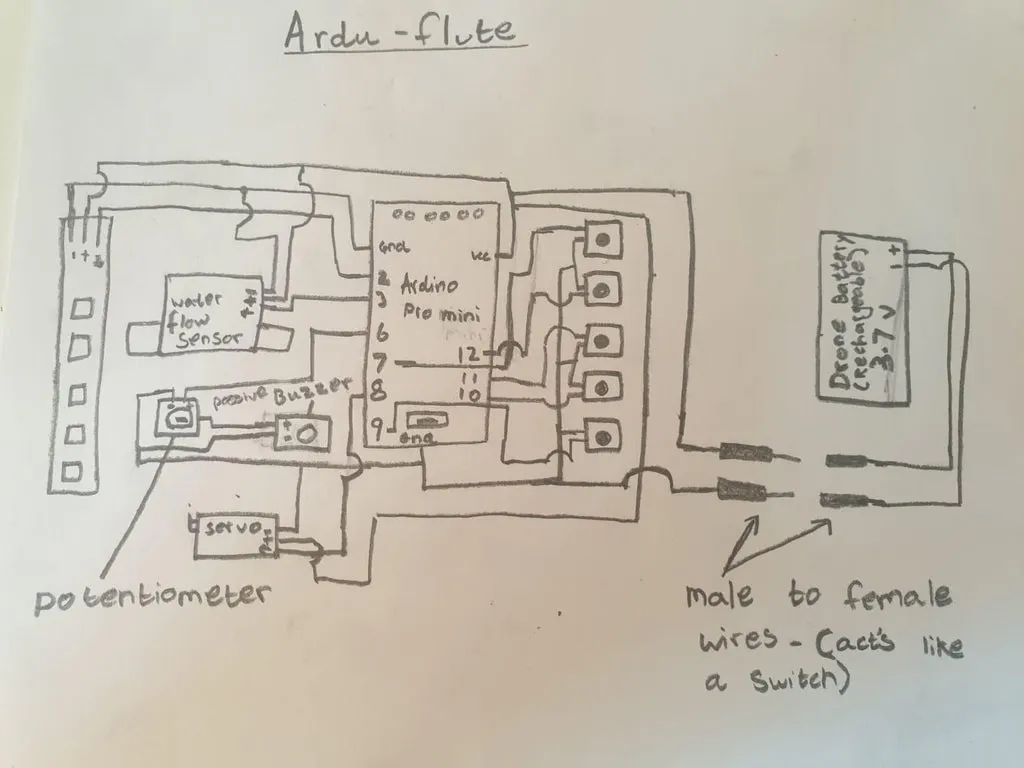
Schematics

Schematic

Code

Ardu_Flute.ino

Arduino
#include <Servo.h>
#include <FastLED.h>
Servo myservo;

#define water_flow_sensor 3
#define buzzerpin 6
#define NUM_LEDS 5
#define DATA_PIN 2

CRGB leds[NUM_LEDS];

char colour;
int button;
int clock_;
long stopwatch;
int counter;
int remap;
int ledremaptarget;
int ledremap;
int readpins;
int buttonstate1, buttonstate2, buttonstate3, buttonstate4, buttonstate5;
void setup() {

  FastLED.addLeds<NEOPIXEL, DATA_PIN>(leds, NUM_LEDS);

  myservo.attach(8);
  pinMode(7, INPUT_PULLUP);
  pinMode(9, INPUT_PULLUP);
  pinMode(10, INPUT_PULLUP);
  pinMode(11, INPUT_PULLUP);
  pinMode(12, INPUT_PULLUP);


  pinMode(water_flow_sensor, INPUT);
  pinMode(buzzerpin, OUTPUT);

  Serial.begin(9600);
  attachInterrupt(digitalPinToInterrupt(3), increase,  FALLING);
  attachInterrupt(digitalPinToInterrupt(3), decrease, RISING);
}
void loop() {
  buttonstate1 = digitalRead(9);
  buttonstate2 = digitalRead(10);
  buttonstate3 = digitalRead(11);
  buttonstate4 = digitalRead(12);
  buttonstate5 = digitalRead(7);

  if (buttonstate1 == 0) {
    tone(buzzerpin, 659); // E
//    fill_solid(leds, NUM_LEDS, CRGB::Green);
    colour = 1;
  } else if (buttonstate2 == 0) {
    tone (buzzerpin, 587); // D
//    fill_solid(leds, NUM_LEDS, CRGB::Yellow);
    colour = 2;
  } else if (buttonstate3 == 0) {
    tone(buzzerpin, 523); // C
//    fill_solid(leds, NUM_LEDS, CRGB::Cyan);
    colour = 3;
  } else if (buttonstate4 == 0) {
    tone(buzzerpin, 494); // B
//    fill_solid(leds, NUM_LEDS, CRGB::Orange);
    colour = 4;
  } else if (buttonstate5 == 0) {
    tone(buzzerpin, 440); // A
//    fill_solid(leds, NUM_LEDS, CRGB::Purple);
    colour = 5;
  } else {
    noTone (buzzerpin);
    colour = 6;
  }

  FastLED.show();
  clock_++;

}
void increase() {

  counter = clock_;

}
void decrease() {

  stopwatch = clock_ - counter;
  clock_ = 0;

  if (stopwatch <= 34) {
    remap = map(stopwatch, 34, 0, 0, 254);
    myservo.write(remap + 10);
    ledremaptarget = map(stopwatch, 34, 0, 0, 5);
    ledremap=0;
    while (ledremap != ledremaptarget) {
      
      if (colour == 1) {
        leds[ledremap] = CRGB::Green;
      } else if (colour == 2) {
        leds[ledremap] = CRGB::Yellow;
      } else if (colour == 3) {
        leds[ledremap] = CRGB::Cyan;
      } else if (colour == 4) {
        leds[ledremap] = CRGB::Orange;
      } else if (colour == 5) {
        leds[ledremap] = CRGB::Purple;
      } else if (colour == 6) {
        leds[ledremap] = CRGB::Black;
      }
      ledremap=ledremap+1;
    }
    while (ledremaptarget != 5) {
      ledremaptarget = ledremaptarget + 1;
      leds[ledremaptarget] = CRGB::Black;
    }
  }
}

Credits

Piyush Garg
3 projects • 2 followers
Hi! My name is Piyush, exploring electronics while making cool and intresting projects!

Comments