#include <Keyboard.h>

// gpio mapping between beetle and buttons

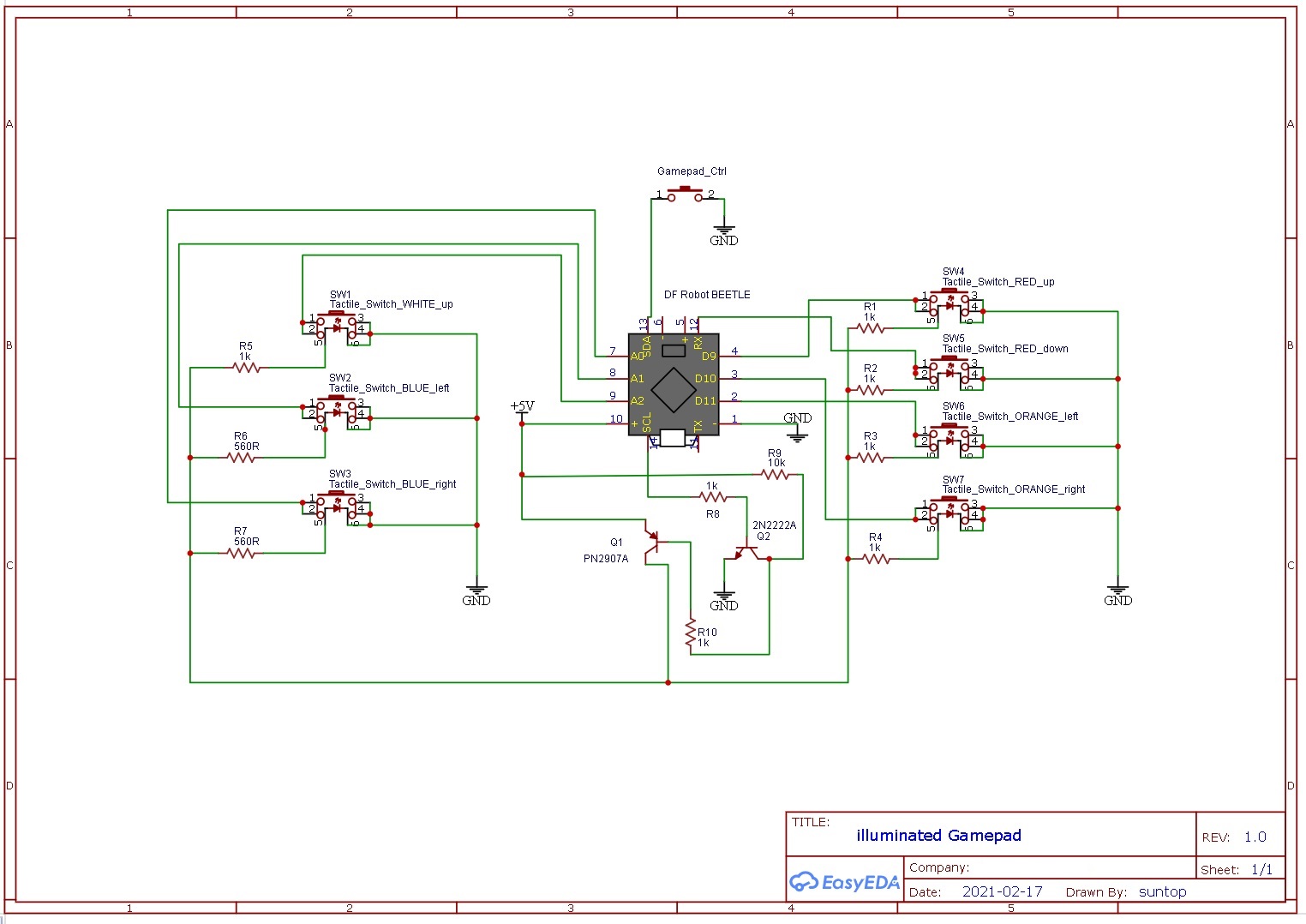
#define LED_CONTROL     3
#define GAMEPAD_CONTROL 2

#define SW_RED_UP       9
#define SW_RED_DOWN     0
#define SW_ORANGE_LEFT  11
#define SW_ORANGE_RIGHT 10
#define SW_BLUE_LEFT    A1
#define SW_BLUE_RIGHT   A0
#define SW_WHITE_UP     A2

// keyboard key binding

#define RED_UP       KEY_UP_ARROW
#define RED_DOWN     KEY_DOWN_ARROW
#define ORANGE_LEFT  KEY_LEFT_ARROW
#define ORANGE_RIGHT KEY_RIGHT_ARROW
#define BLUE_LEFT    'c'
#define BLUE_RIGHT   'v'
#define WHITE_UP     'q'


int brightness = 0;
int fadeAmount = 5;
volatile boolean state = 0;
//////////////////////////////////////
void setup()
{
  pinMode(LED_CONTROL, OUTPUT);

  pinMode(GAMEPAD_CONTROL, INPUT_PULLUP);
  attachInterrupt(digitalPinToInterrupt(GAMEPAD_CONTROL),selector,FALLING);

  pinMode(SW_RED_UP, INPUT_PULLUP);
  pinMode(SW_RED_DOWN, INPUT_PULLUP);
  pinMode(SW_ORANGE_LEFT, INPUT_PULLUP);
  pinMode(SW_ORANGE_RIGHT, INPUT_PULLUP);
  pinMode(SW_BLUE_LEFT, INPUT_PULLUP);
  pinMode(SW_BLUE_RIGHT, INPUT_PULLUP);
  pinMode(SW_WHITE_UP, INPUT_PULLUP);

  // safety delay
  delay(5000);


}


/////////////////////////////////////

void loop()
{
if (state == 0)
  {
    gamepad_standby();
  }

if (state == 1)
  {
    gamepad_active();
  }

// scan for button press in gamepad enable mode
while (state == true)
  {

    if(!digitalRead(SW_RED_UP))
    {
      Keyboard.press(RED_UP);
    }

    if(!digitalRead(SW_RED_DOWN))
    {
      Keyboard.press(RED_DOWN);
    }

    if(!digitalRead(SW_ORANGE_LEFT))
    {
      Keyboard.press(ORANGE_LEFT);
    }

    if(!digitalRead(SW_ORANGE_RIGHT))
    {
      Keyboard.press(ORANGE_RIGHT);
    }

      if(!digitalRead(SW_BLUE_LEFT))
    {
      Keyboard.press(BLUE_LEFT);
    }

    if(!digitalRead(SW_BLUE_RIGHT))
    {
      Keyboard.press(BLUE_RIGHT);
    }

      if(!digitalRead(SW_WHITE_UP))
    {
      Keyboard.press(WHITE_UP);
    }

    delay(5);
    Keyboard.releaseAll();

  }

}

/////////////////////////////////////
void gamepad_standby(void)
{


  Keyboard.releaseAll();
  Keyboard.end();

  while(!state)
  {

  analogWrite(LED_CONTROL, brightness);
  brightness = brightness + fadeAmount;
  if (brightness <= 0 || brightness >= 255)
    {
    fadeAmount = -fadeAmount;
    }
   delay(10);
  }

}

/////////////////////////////////////
void gamepad_active(void)
{
   analogWrite(LED_CONTROL, 255);
   Keyboard.begin();
}

////////////////////////////////////

void selector()
{
state =!state;
delay(50); // not a good practice but does some debounce
}







Comments