




Cycling accidents involving collisions with vehicles are a significant concern, especially during low-light conditions or when cyclists make sudden maneuvers. To address this issue, we aim to develop a cycling uniform fitted with LED light panels that act as indicators for braking and turning. This technology will enhance cyclist visibility and improve communication with other road users, ultimately reducing the risk of accidents.
Statistical data indicates that a significant number of cycling accidents occur due to the lack of proper signaling. By integrating LEDs into the cycling uniform, we can provide a clear and intuitive signaling system for cyclists, similar to motorcycles, thereby increasing their safety on the road.
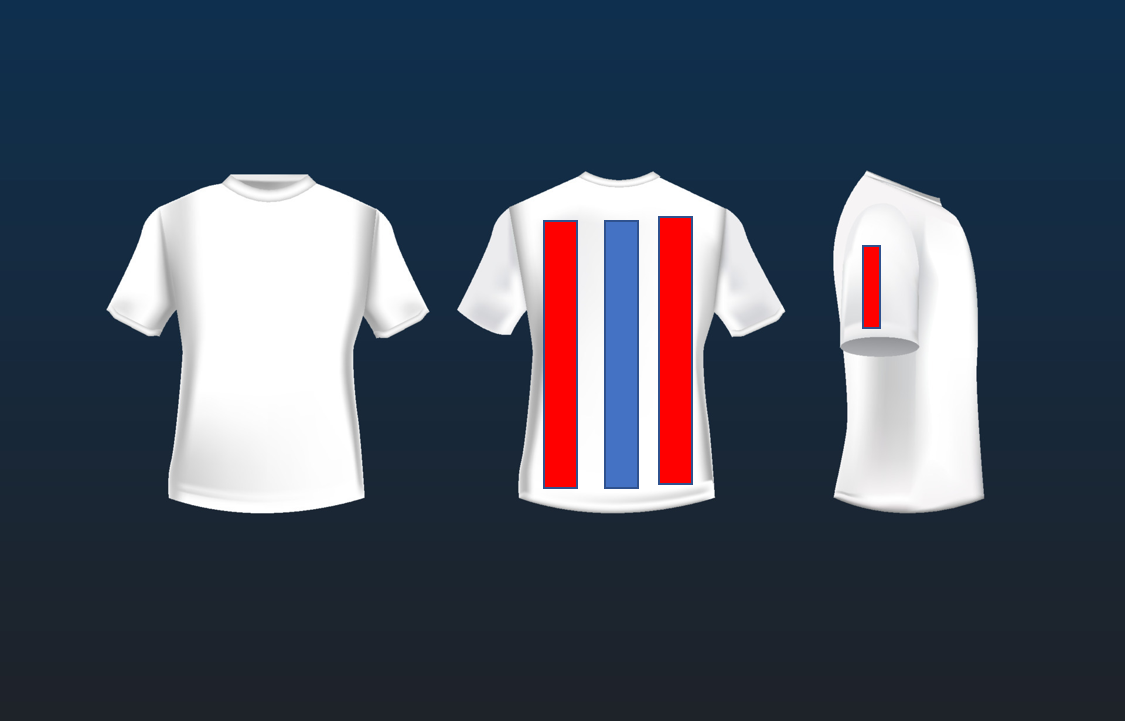
SolutionThe proposed solution is to design a cycling uniform that incorporates LED light panels on the back and shirt sleeves. When the cyclist applies the brakes, the LEDs at the center of the back will glow red. Furthermore, when the right arm is raised to the side, the LEDs on the right side of the back and the right arm sleeve will glow red. Similarly, when the left arm is raised to the side, the LEDs on the left side of the back and the left arm sleeve will glow red. Additionally, the Arduino Nano, in combination with MPU6050 IMU modules, will detect hand movements using acceleration readings and operate relays to switch on the power supplies to the corresponding NLiten LED panels.
ImplementationComponents
- Cycling uniform: Choose a suitable fabric that is breathable, flexible, and can accommodate the LED light panels and wiring without hindering movement.
- LED light panels: Utilize NLiten LED panels for their ease of installation, flexibility, and adhesive backing.
- Arduino Nano: The Arduino Nano will serve as the primary microcontroller to receive inputs from the MPU6050 IMU modules and operate the relay modules.
- MPU6050 IMU modules: Place one module on the cyclist's helmet, one on the right arm sleeve, and one on the left arm sleeve to detect acceleration and hand movements.
- Relay modules: Use relay modules to switch on the power supplies to the NLiten LED panels based on the inputs from the IMU modules.
Circuit Connection
- Connect the MPU6050 IMU modules to the Arduino Nano using the I2C communication protocol.
- Connect the relay modules to the Arduino Nano, ensuring proper wiring connections for the power supplies of the NLiten LED panels.
Operation
- Program the Arduino Nano to read and process the acceleration values from the MPU6050 IMU modules.
- Monitor the forward acceleration from the IMU module on the helmet to detect braking. If the forward acceleration falls below a certain threshold, operate the relay module connected to the power supply of the central LED panel on the back, switching it on to glow red.
- Monitor the sideways acceleration from the IMU modules on the right and left arm sleeves to detect arm movements. If the right arm is raised to the side, operate the relay module connected to the power supply of the NLiten LED panels on the right side of the back and the right arm sleeve, switching them on to glow red. Similarly, if the left arm is raised to the side, operate the relay module connected to the power supply of the NLiten LED panels on the left side of the back and the left arm sleeve, switching them on to glow red.
- Implement appropriate timing and signaling patterns for the NLiten LED panels to indicate the respective signals.
- Ensure the Arduino Nano manages power consumption and implements safety measures for reliable operation.
Here is the Arduino code to illustrate the operation based on the described functionality:
// Include necessary libraries
#include <Wire.h>
#include <MPU6050.h>

// Define MPU6050 objects
MPU6050 helmetIMU;
MPU6050 rightArmIMU;
MPU6050 leftArmIMU;

// Define relay pins
const int brakeRelayPin = 2;
const int rightArmRelayPin = 3;
const int leftArmRelayPin = 4;

void setup() {
  // Initialize MPU6050 IMU modules
  helmetIMU.begin(MPU6050_SCALE_2G, MPU6050_RANGE_250DEG);
  rightArmIMU.begin(MPU6050_SCALE_2G, MPU6050_RANGE_250DEG);
  leftArmIMU.begin(MPU6050_SCALE_2G, MPU6050_RANGE_250DEG);

  // Set pin modes for relay modules
  pinMode(brakeRelayPin, OUTPUT);
  pinMode(rightArmRelayPin, OUTPUT);
  pinMode(leftArmRelayPin, OUTPUT);
}

void loop() {
  // Read acceleration values from IMU modules
  int helmetAccelX = helmetIMU.getAccelerationX();
  int rightArmAccelY = rightArmIMU.getAccelerationY();
  int leftArmAccelY = leftArmIMU.getAccelerationY();

  // Brake signal
  if (helmetAccelX < -5000) { // Adjust the threshold as per calibration
    digitalWrite(brakeRelayPin, HIGH);  // Turn on the brake relay
  } else {
    digitalWrite(brakeRelayPin, LOW);  // Turn off the brake relay
  }

  // Right arm signal
  if (rightArmAccelY > 5000) { // Adjust the threshold as per calibration
    digitalWrite(rightArmRelayPin, HIGH);  // Turn on the right arm relay
  } else {
    digitalWrite(rightArmRelayPin, LOW);  // Turn off the right arm relay
  }

  // Left arm signal
  if (leftArmAccelY > 5000) { // Adjust the threshold as per calibration
    digitalWrite(leftArmRelayPin, HIGH);  // Turn on the left arm relay
  } else {
    digitalWrite(leftArmRelayPin, LOW);  // Turn off the left arm relay
  }

  // Add appropriate delay for desired signaling duration
  delay(100);
}// Include necessary libraries
#include <Wire.h>
#include <MPU6050.h>The code begins by including the required libraries for I2C communication and the MPU6050 IMU module.
// Define MPU6050 objects
MPU6050 helmetIMU;
MPU6050 rightArmIMU;
MPU6050 leftArmIMU;
In this section, MPU6050 objects are defined for the helmet, right arm, and left arm IMU modules.
// Define relay pins
const int brakeRelayPin = 2;
const int rightArmRelayPin = 3;
const int leftArmRelayPin = 4;
The relay pins used to control the power supplies to the NLiten LED panels are defined here.
void setup() {
  // Initialize MPU6050 IMU modules
  helmetIMU.begin(MPU6050_SCALE_2G, MPU6050_RANGE_250DEG);
  rightArmIMU.begin(MPU6050_SCALE_2G, MPU6050_RANGE_250DEG);
  leftArmIMU.begin(MPU6050_SCALE_2G, MPU6050_RANGE_250DEG);

  // Set pin modes for relay modules
  pinMode(brakeRelayPin, OUTPUT);
  pinMode(rightArmRelayPin, OUTPUT);
  pinMode(leftArmRelayPin, OUTPUT);
}
The setup function is responsible for initializing the MPU6050 IMU modules with the desired scale and range. It also sets the pin modes for the relay modules as output.
void loop() {
  // Read acceleration values from IMU modules
  int helmetAccelX = helmetIMU.getAccelerationX();
  int rightArmAccelY = rightArmIMU.getAccelerationY();
  int leftArmAccelY = leftArmIMU.getAccelerationY();

  // Brake signal
  if (helmetAccelX < -5000) { // Adjust the threshold as per calibration
    digitalWrite(brakeRelayPin, HIGH);  // Turn on the brake relay
  } else {
    digitalWrite(brakeRelayPin, LOW);  // Turn off the brake relay
  }

  // Right arm signal
  if (rightArmAccelY > 5000) { // Adjust the threshold as per calibration
    digitalWrite(rightArmRelayPin, HIGH);  // Turn on the right arm relay
  } else {
    digitalWrite(rightArmRelayPin, LOW);  // Turn off the right arm relay
  }

  // Left arm signal
  if (leftArmAccelY > 5000) { // Adjust the threshold as per calibration
    digitalWrite(leftArmRelayPin, HIGH);  // Turn on the left arm relay
  } else {
    digitalWrite(leftArmRelayPin, LOW);  // Turn off the left arm relay
  }

  // Add appropriate delay for desired signaling duration
  delay(100);
}
The loop function is where the main functionality resides. It reads the acceleration values from the helmet, right arm, and left arm IMU modules. It then checks the acceleration values against predefined thresholds to determine the activation of the corresponding relay modules.
The first if statement checks if the helmet acceleration along the X-axis is below a certain threshold (indicating braking). If true, it turns on the brake relay, and if false, it turns it off.
The second if statement checks if the acceleration along the Y-axis of the right arm is above a certain threshold (indicating the arm being raised to the side). If true, it turns on the right arm relay, and if false, it turns it off.
The third if statement checks if the acceleration along the Y-axis of the left arm is above a certain threshold (indicating the arm being raised to the side). If true, it turns on the left arm relay, and if false, it turns it off.
The appropriate delay is added at the end to control the signalling duration before the next loop iteration.
Final LookNote that the coloured bars indicate LED panels
CreditsChatGPT - for the no-code software development

Comments