



Hardware components | ||||||
 |
| × | 1 | |||
 |
| × | 1 | |||
 |
| × | 1 | |||
Software apps and online services | ||||||
 |
| |||||
 |
| |||||
What if an old racing wheel could become the steering system for a real robot?
That simple question inspired this project.
Instead of letting a classic Logitech Wingman Formula Force GP collect dust on a shelf, I decided to give it a new purpose. Using Python, Pygame, Wi-Fi, and a Seeed Studio XIAO ESP32-C3, I transformed this vintage gaming controller into a wireless control system for a four-wheel robot.
The result is a surprisingly responsive robot that feels much more natural to drive than a traditional joystick or keyboard.
Project OverviewThe project consists of two independent software components communicating over a local Wi-Fi network.
PC Application (Python)The desktop application is responsible for:
- Detecting the Logitech steering wheel
- Reading steering wheel and pedal positions using Pygame
- Converting the analog values into movement commands
- Sending commands to the robot through a TCP connection
The robot runs MicroPython on a Seeed Studio XIAO ESP32-C3.
Its responsibilities include:
- Connecting to the Wi-Fi network
- Running a lightweight TCP server
- Receiving driving commands from the PC
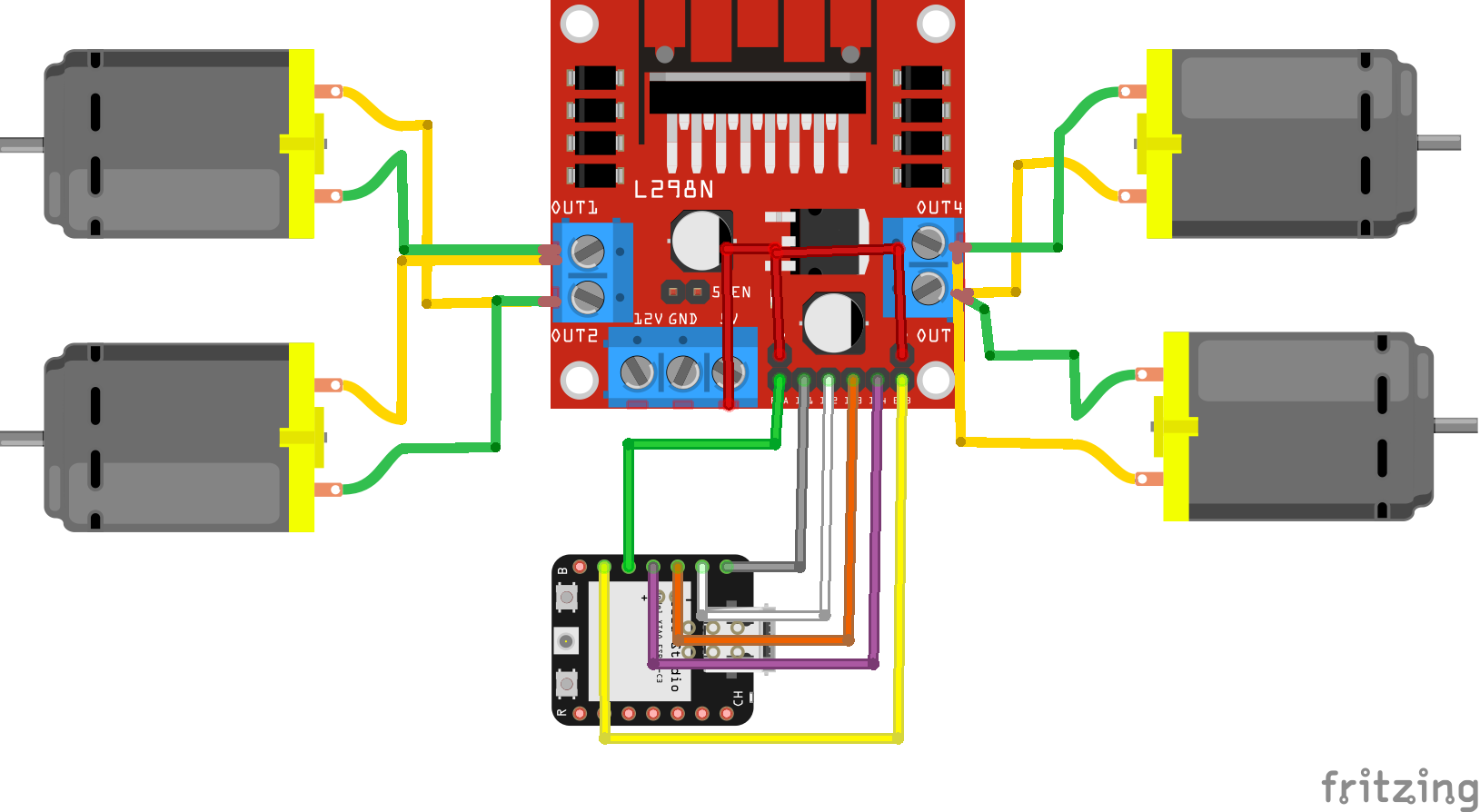
- Controlling the motors through the L298N motor driver
The communication protocol is intentionally simple. Instead of sending complex binary packets, the PC transmits plain-text commands such as:
- forward
- backward
- left
- right
- stop
This makes the project easy to understand, debug, and extend.
Software ArchitectureThe overall data flow is straightforward:
Logitech Steering Wheel → Python (Pygame) → TCP Socket → Wi-Fi → ESP32-C3 → L298N Driver → DC Motors
This modular architecture makes it easy to replace any individual component. For example:
- another joystick
- a gamepad
- a mobile application
- a web interface
- autonomous navigation algorithms
could all be connected without changing the robot firmware significantly.
Code WalkthroughRather than explaining every line of code, here's what each section is responsible for.
Python ApplicationThe desktop application begins by initializing Pygame and detecting connected joystick devices.
After a successful connection, it establishes a persistent TCP connection with the ESP32.
One useful optimization is the send_command() function.
Instead of continuously transmitting identical commands, the application remembers the last command that was sent. If the next command is identical, it is ignored.
This simple optimization:
- reduces Wi-Fi traffic
- lowers CPU usage
- avoids unnecessary processing on the ESP32
Another useful feature is automatic reconnection. If the Wi-Fi connection is interrupted, the application reconnects automatically without requiring a restart.
Inside the main loop, the steering wheel axes are read every 20 milliseconds.
The analog values are compared against predefined thresholds and converted into five driving commands:
- Forward
- Backward
- Left
- Right
- Stop
The ESP32 firmware is intentionally lightweight.
After connecting to Wi-Fi, it starts a TCP server listening on port 80.
Whenever a command arrives, it simply compares the received text and calls the corresponding motor control function.
Each movement function updates the GPIO pins connected to the L298N motor driver.
This keeps the firmware clean, readable, and easy to modify.
If the client disconnects unexpectedly, the robot immediately stops for safety.
Why TCP?Although UDP could provide slightly lower latency, TCP guarantees reliable packet delivery.
For robot control, reliability is generally more important than saving a few milliseconds of latency.
TCP also simplifies the software since there is no need to implement packet acknowledgment or error recovery manually.
About the Logitech Wingman Formula Force GPDespite being released more than two decades ago, the Logitech Wingman Formula Force GP is still an impressive controller.
Here are a few interesting facts:
- Released in the early 2000s, it became one of Logitech's most popular entry-level racing wheels.
- It features approximately 240 degrees of steering rotation, making it ideal for racing simulations.
- The wheel includes analog pedals for throttle and brake, providing much smoother control than digital keyboard input.
- Thanks to standard HID support, modern operating systems can still recognize the wheel without proprietary software in many cases.
- Because it works with Pygame, it can be repurposed for robotics, simulators, industrial HMI experiments, and many other engineering projects.
Giving older hardware a second life is one of the most rewarding aspects of maker projects.
Watch the Full VideoThe complete build process, software explanation, live demonstration, and source code walkthrough are available in the accompanying YouTube video embedded below.
If you'd like to build your own version, you'll also find the complete source code in this GitHub repository.
Happy building!




Comments