
David Patricio Escamiilla Marquez
Published © MIT

TrackProd: IIoT QR Traceability System

Real-time industrial traceability system using QR and IIoT to monitor, track, and optimize production processes in SMEs

AdvancedWork in progressOver 1 day6
TrackProd: IIoT QR Traceability System

Things used in this project

Hardware components

Arduino UNO Q
Arduino UNO Q
×1
LED (generic)
LED (generic)
These LEDs represent an industrial stack light (signal tower), where each color indicates system status: green (normal operation), yellow (warning), red (error), and blue (communication failure).
×4
Buzzer
Buzzer
The buzzer provides audible alerts for abnormal conditions, such as system warnings or failures, complementing the industrial stack light for real-time operator notification.
×1
Nextion NX8048T070 - Generic 7.0" HMI TFT LCD Touch Display
Itead Nextion NX8048T070 - Generic 7.0" HMI TFT LCD Touch Display
×1
Relay (generic)
×5
LoRa Module
Wireless-Tag LoRa Module
This module represents a LoRa SX1278 transceiver used for long-range wireless communication between devices in the system. It enables reliable data transmission in industrial environments where traditional connectivity is limited.
×1
5V 2.5A Switching Power Supply
Digilent 5V 2.5A Switching Power Supply
Industrial-grade AC-DC switching power supply used to convert 120V AC into a stable DC voltage (5V/6V) for powering the IIoT system components, ensuring reliable and continuous operation.
×1

Software apps and online services

Arduino IDE
Arduino IDE
VS Code
Microsoft VS Code

Story

Read more

Schematics

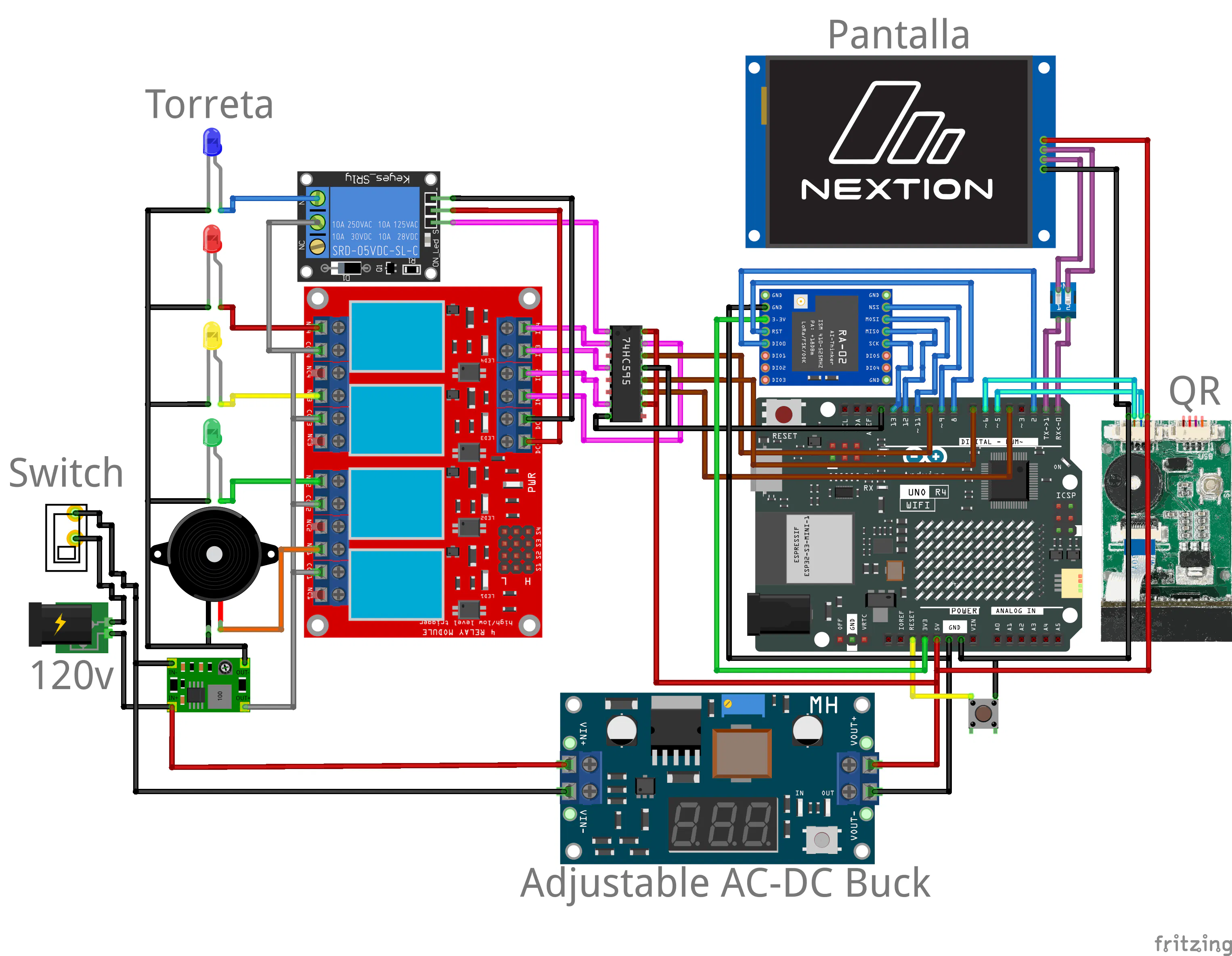
IIoT Hardware Architecture and Circuit Diagram

This diagram represents the hardware architecture of the TrackProd IIoT system for real-time industrial traceability.

The system is designed to be implemented using the Arduino UNO Q as the main controller, providing advanced processing, connectivity, and scalability for Industrial IoT applications.

In this diagram, an Arduino UNO R4 WiFi is used as a visual reference due to the lack of an official Arduino UNO Q representation in Fritzing. However, the actual system architecture and implementation are intended for the Arduino UNO Q platform.

The system integrates a QR code reader module, a relay module, an industrial stack light (signal tower), and a Nextion display for user interaction and control. Additionally, a LoRa communication module is used for long-range wireless data transmission between devices, enabling reliable communication in industrial environments where traditional connectivity may be limited.

A power supply module converts 120V AC into a stable DC power source for system operation.

Data is collected and transmitted—either directly or via LoRa—to a web-based platform, where it is stored and visualized in real time, enabling monitoring, traceability, and process optimization in industrial environments.
Code

TrackProd IIoT System Code with LoRa, QR and Nextion

C/C++
This code implements the core functionality of the TrackProd IIoT system for real-time industrial traceability.

It integrates QR code reading via serial communication, LoRa wireless transmission for long-range data exchange, and a Nextion HMI display for user interaction.

Once a QR code is scanned, the data is displayed on the screen and transmitted via LoRa to another node. The system can also receive data through LoRa and display it in real time. A confirmation button on the Nextion interface allows sending acknowledgment messages back through LoRa.

The system includes an industrial signal tower controlled by relays (green, yellow, and red lights) to indicate system status, along with a buzzer for alerts. Additionally, a blue LED indicates communication failure when no LoRa data is received within a defined time.

Sensor inputs are continuously monitored to determine system state, enabling intelligent decision-making for industrial process control.
/*
===========================================================
   TRACKPROD IIoT SYSTEM - INDUSTRIAL TRACEABILITY
===========================================================

Este sistema realiza:

1. Lectura de cdigo QR (identificacin del producto)
2. Visualizacin en pantalla Nextion
3. Comunicacin inalmbrica LoRa (envo y recepcin)
4. Confirmacin desde interfaz (botn en Nextion)
5. Control de torre de sealizacin industrial:
      - Verde: operacin correcta
      - Amarillo: advertencia
      - Rojo: error total
      - Azul: fallo de comunicacin LoRa
6. Activacin de buzzer en fallos
7. Monitoreo de sensores industriales

Hardware (segn diagrama):
- Arduino UNO Q (main controller)
- Mdulo LoRa RA-02 (comunicacin)
- Pantalla Nextion (interfaz HMI)
- Mdulo de rels (control de torreta)
- Torreta luminosa industrial
- Buzzer
- Lector QR (serial)
- Fuente AC-DC (120V DC)

===========================================================
*/

#include <SPI.h>
#include <LoRa.h>

// ================= PINES =================

// Rels (torreta)
#define RELAY_GREEN 3     // Luz verde (OK)
#define RELAY_YELLOW 4    // Luz amarilla (advertencia)
#define RELAY_RED 5       // Luz roja (error)

// Buzzer
#define BUZZER 6

// LED indicador de estado LoRa
#define LED_BLUE 11       //  Error de comunicacin

// Sensores (simulacin / entrada digital)
#define SENSOR1 7
#define SENSOR2 8
#define SENSOR3 A0

// Pines LoRa (RA-02 / SX1278)
#define LORA_SS 10
#define LORA_RST 9
#define LORA_DIO0 2

// ================= VARIABLES =================

String qrData = "";        // QR ledo
String loraReceived = ""; // Datos recibidos LoRa

unsigned long lastLoRaTime = 0; // Control de comunicacin

// ================= SETUP =================
void setup() {

  // Comunicacin serial
  Serial.begin(9600);     // Debug
  Serial1.begin(9600);    // QR
  Serial2.begin(9600);    // Nextion

  // Configuracin de salidas
  pinMode(RELAY_GREEN, OUTPUT);
  pinMode(RELAY_YELLOW, OUTPUT);
  pinMode(RELAY_RED, OUTPUT);
  pinMode(BUZZER, OUTPUT);
  pinMode(LED_BLUE, OUTPUT);

  // Sensores
  pinMode(SENSOR1, INPUT);
  pinMode(SENSOR2, INPUT);
  pinMode(SENSOR3, INPUT);

  digitalWrite(LED_BLUE, LOW);

  // Inicializacin LoRa
  LoRa.setPins(LORA_SS, LORA_RST, LORA_DIO0);

  if (!LoRa.begin(433E6)) {
    Serial.println("Error LoRa");
    digitalWrite(LED_BLUE, HIGH); //  Indica fallo
    while (1); // Detener sistema
  }

  Serial.println("LoRa OK");

  resetOutputs();
}

// ================= LOOP =================
void loop() {

  readQR();         // Leer QR
  receiveLoRa();    // Recibir datos LoRa
  readNextion();    // Leer botn Nextion
  checkSensors();   // Evaluar sensores

  // Verificar comunicacin LoRa (timeout)
  if (millis() - lastLoRaTime > 5000) {
    digitalWrite(LED_BLUE, HIGH); //  fallo comunicacin
  }
}

// ================= LECTURA QR =================
void readQR() {

  while (Serial1.available()) {

    char c = Serial1.read();

    if (c == '\n') {

      Serial.println("QR: " + qrData);

      sendToNextion(qrData);       // Mostrar QR
      sendLoRa("QR:" + qrData);    // Enviar por LoRa

      qrData = "";

    } else {
      qrData += c;
    }
  }
}

// ================= RECEPCIN LORA =================
void receiveLoRa() {

  int packetSize = LoRa.parsePacket();

  if (packetSize) {

    loraReceived = "";

    while (LoRa.available()) {
      loraReceived += (char)LoRa.read();
    }

    Serial.println("Recibido LoRa: " + loraReceived);

    lastLoRaTime = millis();         // Comunicacin activa
    digitalWrite(LED_BLUE, LOW);     //  OFF

    sendToNextion(loraReceived);     // Mostrar datos
  }
}

// ================= NEXTION INPUT =================
void readNextion() {

  if (Serial2.available()) {

    String cmd = Serial2.readString();

    // Botn "Aceptar"
    if (cmd.indexOf("OK") != -1) {

      Serial.println("Confirmado desde Nextion");

      sendLoRa("CONFIRMADO"); // Enviar confirmacin
    }
  }
}

// ================= ENVO A NEXTION =================
void sendToNextion(String text) {

  Serial2.print("t0.txt=\"");
  Serial2.print(text);
  Serial2.print("\"");

  // Terminacin obligatoria
  Serial2.write(0xFF);
  Serial2.write(0xFF);
  Serial2.write(0xFF);
}

// ================= ENVO LORA =================
void sendLoRa(String data) {

  LoRa.beginPacket();
  LoRa.print(data);
  LoRa.endPacket();

  Serial.println("Enviado LoRa: " + data);
}

// ================= SENSORES =================
void checkSensors() {

  bool s1 = digitalRead(SENSOR1);
  bool s2 = digitalRead(SENSOR2);
  bool s3 = digitalRead(SENSOR3);

  int fails = (!s1) + (!s2) + (!s3);

  if (fails == 0) {
    estadoOK();
  }
  else if (fails < 3) {
    estadoAdvertencia();
  }
  else {
    estadoError();
  }
}

// ================= ESTADO OK =================
void estadoOK() {

  digitalWrite(RELAY_GREEN, HIGH);
  digitalWrite(RELAY_YELLOW, LOW);
  digitalWrite(RELAY_RED, LOW);

  digitalWrite(BUZZER, LOW);

  sendStatusNextion("OK");
}

// ================= ADVERTENCIA =================
void estadoAdvertencia() {

  digitalWrite(RELAY_GREEN, LOW);
  digitalWrite(RELAY_YELLOW, HIGH);
  digitalWrite(RELAY_RED, LOW);

  tone(BUZZER, 1000, 200);

  sendStatusNextion("WARNING");
}

// ================= ERROR =================
void estadoError() {

  digitalWrite(RELAY_GREEN, LOW);
  digitalWrite(RELAY_YELLOW, LOW);
  digitalWrite(RELAY_RED, HIGH);

  tone(BUZZER, 2000);

  sendStatusNextion("ERROR");
}

// ================= RESET =================
void resetOutputs() {

  digitalWrite(RELAY_GREEN, LOW);
  digitalWrite(RELAY_YELLOW, LOW);
  digitalWrite(RELAY_RED, LOW);
  digitalWrite(BUZZER, LOW);
}

// ================= STATUS NEXTION =================
void sendStatusNextion(String status) {

  Serial2.print("t1.txt=\"");
  Serial2.print(status);
  Serial2.print("\"");

  Serial2.write(0xFF);
  Serial2.write(0xFF);
  Serial2.write(0xFF);
}

Credits

David Patricio Escamiilla Marquez
1 project • 0 followers

Comments