// This sample shows how to do three things:
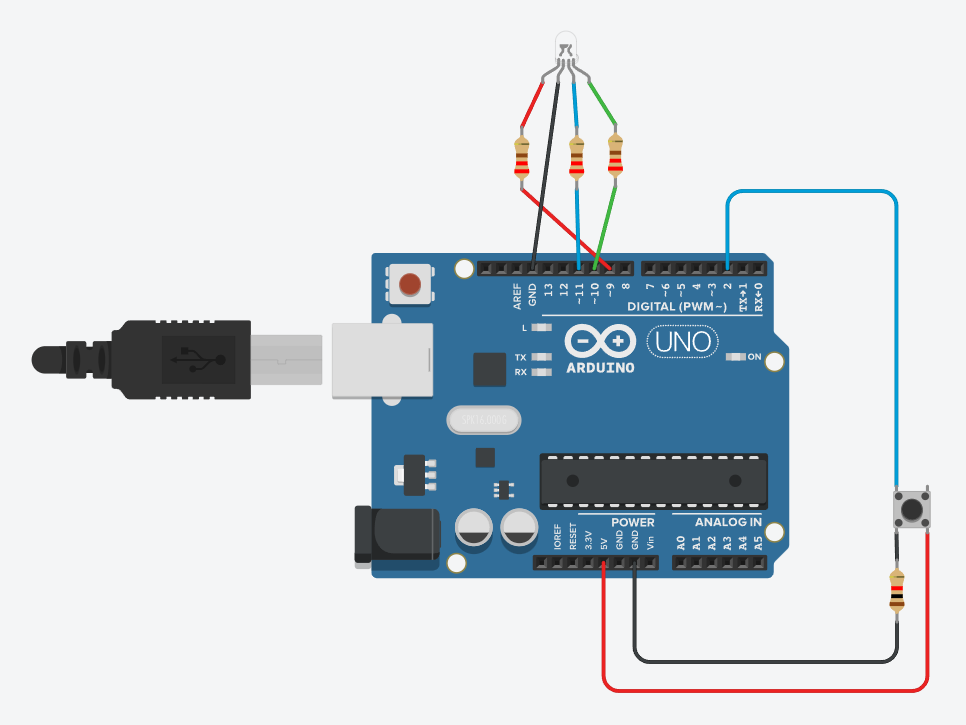
//	1. Use an RGB LED with analogWrite
//		This is well-documented.
//			The int [colour] = [#] line just makes it easier to refer to the colours
//			repeating the analogWrite(green, 0) is unnecessary - I included it only for ease of readability
//	2. Use a variable for a delay
//		I chose to use two (the button press determines which is used)
//		When you use a lot of delays, it's nice to declare them once in case you want to change them
//	3. Use a button
//		I have no idea /why/ it works this way; it was a challenge to find a simple sample showing how to 'just use a button'
//		It works ... but don't skip any of the lines that have 'button' in them

int red = 9;			    // Define pin 9 as red (to refer to later)
int green = 10;			  // Define pin 10 as green (to refer to later)
int blue = 11;			  // Define pin 11 as blue (to refer to later)
int button = 2;			  // Define pin 2 as button (to refer to later)
int buttonState = 0;	// Button is unpressed at start
int time1 = 500;		  // Unpressed time in MS
int time2 = 250;		  // Pressed time in MS

void setup()
{
  pinMode(red, OUTPUT);		// Declare pin 9 as output
  pinMode(green, OUTPUT);	// Declare pin 10 as output
  pinMode(blue, OUTPUT);  // Declare pin 11 as output
  pinMode(button, INPUT);	// Declare pin 2 as input
}

void loop()
{
  buttonState = digitalRead(button);	// Tells it to 'listen' to the button pin

  if(buttonState != HIGH)	  // This is unpressed
  {
    analogWrite(red, 255);	// Red 100%
    analogWrite(green, 0);	// Green 0%
    analogWrite(blue, 0);	  // Blue 0%

    delay(time1);			      // Above declared unpressed time

    analogWrite(9, 0);		  // Red 0%
    analogWrite(green, 0);	// Green 0%
    analogWrite(blue, 255);	// Blue 100%

    delay(time1);			      // Above declared unpressed time
  }
  else						          // This is pressed
  {
    analogWrite(red, 255);	// Red 100%
    analogWrite(green, 0);	// Green 0%
    analogWrite(blue, 0);	  // Blue 0%

    delay(time2);			      // Above declared pressed time

    analogWrite(red, 0);	  // Red 0%
    analogWrite(green, 0);	// Green 0%
    analogWrite(blue, 255);	// Blue 100%

    delay(time2); 			    // Above declared pressed time
  }
}




_ztBMuBhMHo.jpg?auto=compress%2Cformat&w=48&h=48&fit=fill&bg=ffffff)




Comments