



Hardware components | ||||||
_ztBMuBhMHo.jpg?auto=compress%2Cformat&w=48&h=48&fit=fill&bg=ffffff) |
| × | 1 | |||
 |
| × | 1 | |||
 |
| × | 1 | |||
Software apps and online services | ||||||
 |
| |||||
Stack Player is a simple yet creative automation project that plays the popular Stack mobile game automatically using an Arduino and a servo motor.
The idea is straightforward:
The Stack game works on a single tap mechanism.If we automate the tapping action at the correct interval, the game can be played without human interaction.
What started as a small servo experiment evolved into a product-style hardware build — complete with a custom-designed enclosure manufactured using professional 3D printing services like JUSTWAY.
This project demonstrates:
- Servo motor control
- Timing-based automation
- Mechanical design integration
- Product-level presentation thinking
- Arduino (Uno / Nano)
- SG90 Servo Motor
- Stylus / Capacitive Pen
- Jumper wires
- USB cable
- Custom 3D printed enclosure
- Servo mounting bracket
- Screws / Adhesive
- Tablet or Mobile device
The Stack game requires one tap to drop each block.
To automate this:
- The servo rotates downward (tap position).
- The stylus touches the screen.
- The servo returns to its original position.
- The process repeats continuously.
Two key angles are used:
- 125° → Stylus Up
- 90° → Tap Position
By controlling delay timing, we control stacking rhythm.
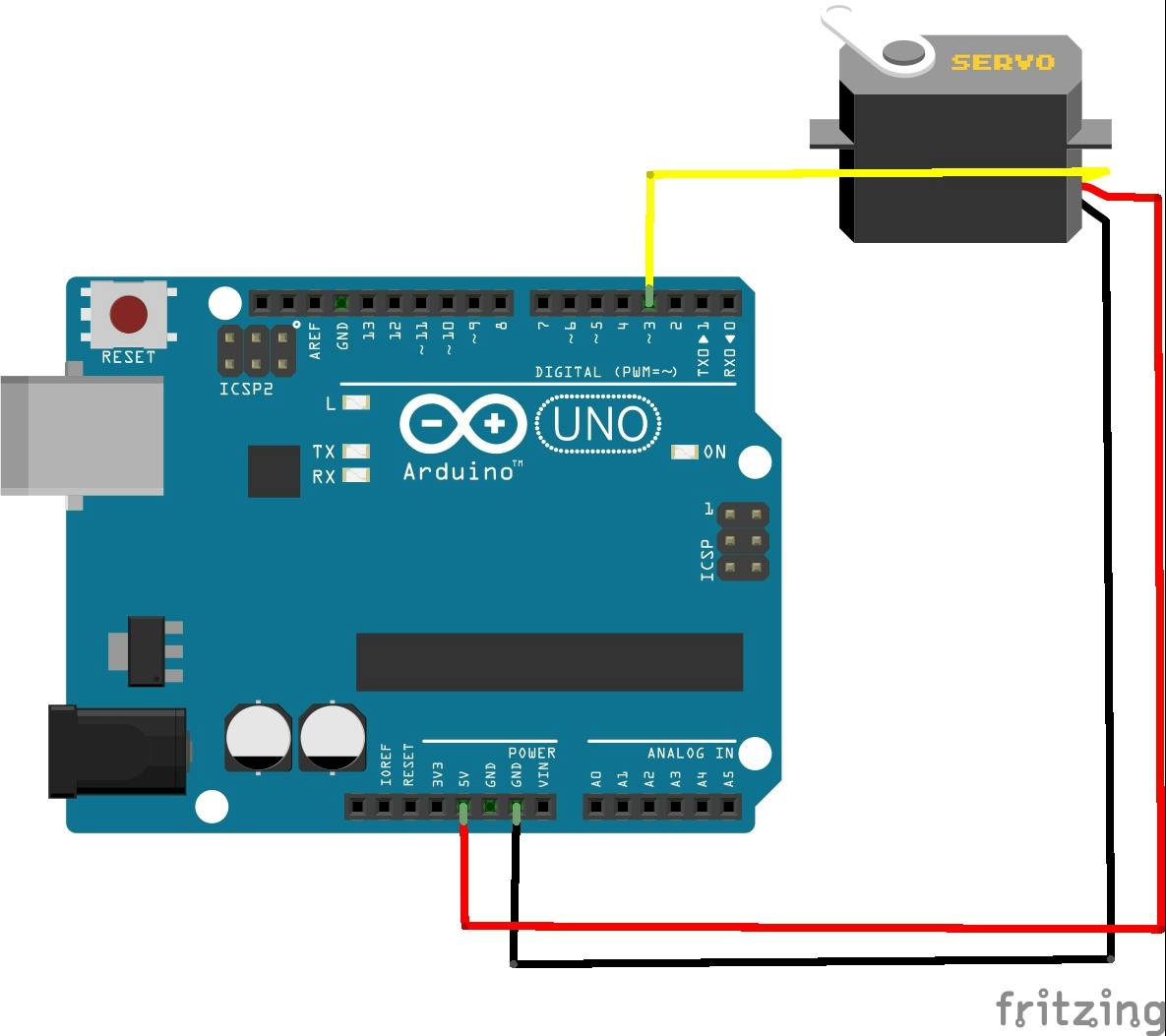
Step 2: Circuit Connections- Servo Red → 5V
- Servo Brown/Black → GND
- Servo Orange → Digital Pin 3
- Connect Arduino via USB
Ensure stable power for smooth servo operation.
Step 3: Upload the Code#include <Servo.h>
Servo servo1;
void setup()
{
servo1.attach(3);
servo1.write(125);
delay(5000);
servo1.write(90);
delay(200);
servo1.write(125);
delay(750);
}
void loop()
{
servo1.write(90);
delay(200);
servo1.write(125);
delay(600);
}servo1.attach(3);→ Connect servo to pin 3servo1.write(90);→ Tap screenservo1.write(125);→ Release tapdelay()→ Controls tap duration and speed
Adjust delays to improve stacking performance.
Step 4: Mechanical Setup- Fix servo securely near the screen
- Attach stylus to servo arm
- Align stylus tip with tapping zone
- Ensure light but consistent contact
Stability is critical. Even small vibrations affect accuracy.
Step 5: From Prototype to Product – Designing the Cloud Enclosure
A bare PCB with exposed wires works perfectly for testing.
But when you want to:
- Present at exhibitions
- Showcase at demo days
- Build a portfolio project
- Make your hardware look product-ready
Presentation becomes critical.
So instead of leaving it as an open circuit, I designed a custom cloud-shaped enclosure.
Design Goals- Perfect display alignment
- Hidden internal wiring
- Secure mounting structure
- Smooth, rounded aesthetic
- Desk-friendly compact size
The objective was simple:Transform a working prototype into a product-grade build.
Step 7: Professional Manufacturing with JUSTWAY
To achieve a clean and refined finish, the enclosure can be manufactured using professional services like JUSTWAY.
JUSTWAY provides:
- Rapid prototyping
- High-detail resin 3D printing
- Nylon printing for durability
- CNC machining for metal parts
- Injection molding for scaling production
- Urethane casting for small batches
For projects like Stack Player, professional fabrication ensures:
- Better surface finish
- Accurate tolerances
- Stronger structure
- Clean, premium appearance
These services don’t change how your circuit works —they change how your project is perceived.
And in hardware design, perception matters.
A clean enclosure builds:
- Credibility
- Confidence
- Professional appeal
Through this project, you learn
- Servo motor control
- Arduino programming
- Timing optimization
- Mechanical alignment
- CAD design fundamentals
- Product prototyping workflow
Stack Player started as a simple servo experiment.
But by integrating mechanical design and professional manufacturing, it evolved into something that feels intentional and product-ready.
Great hardware is not just about electronics.It is about engineering + design + presentation.
And when those elements combine —even a simple Arduino project can look startup-ready.



Comments