



Hardware components | ||||||
_wzec989qrF.jpg?auto=compress%2Cformat&w=48&h=48&fit=fill&bg=ffffff) |
| × | 1 | |||
 |
| × | 1 | |||
 |
| × | 1 | |||
 |
| × | 1 | |||
| × | 1 | ||||
Software apps and online services | ||||||
 |
| |||||
Sometimes the best projects don't start with complexity - they start with a fun idea.
In this case, the goal was simple "Can I build something that feels like a truck-style alarm system, but automated and visually satisfying?
- Real-time scheduling
- Audio playback
- Visual feedback
- Display interface
And most importantly - a strong focus on presentation and experience, not just functionality.
Project ConceptThis project is a time-based automated alarm system that simulates a rhythmic truck-style sound pattern.
At a scheduled time:
- The system triggers automatically
- Plays a defined audio sequence
- Synchronizes LED Blinking
- Displays real-time clock continuously
Unlike basic buzzer alarms, this system creates a pattern based audio experience, making it feel more dynamic and engaging.
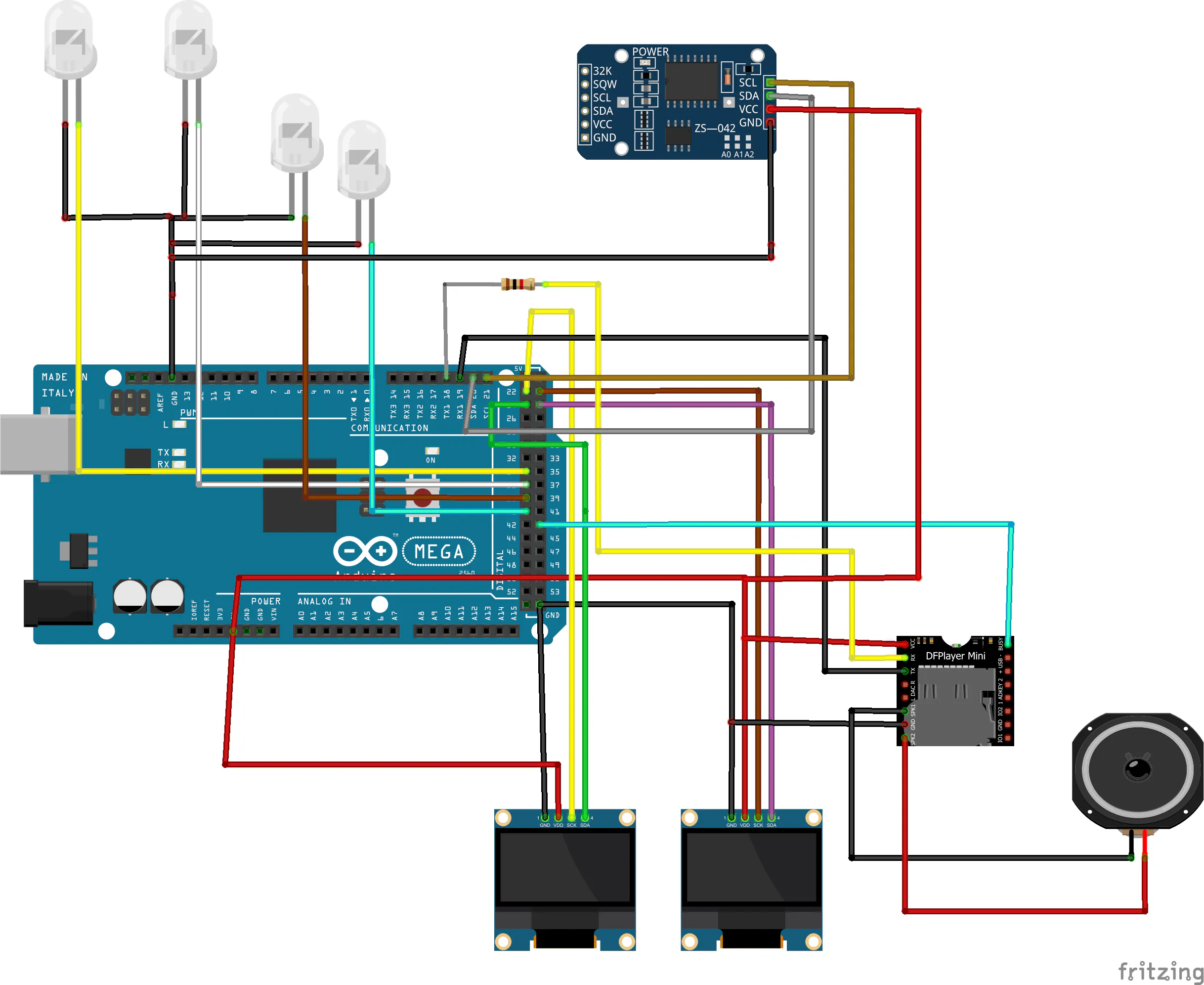
System ArchitectureThe system is built around four main modules:
Microcontroller: Arduino Mega 2560, handles logic, timing decisions, and communication
Timekeeping: DS3231 RTC Module, provides accurate real-time tracking independent of power cycles
AudioSystem: DFPlayer Mini, plays preloaded MP3 files from SD card controlled via Serial Communcation
Display&FeedBack: Dual OLED displays for hours and minutes, LEDs for visual indication during active alarm
How the System WorksContinuous Time MonitoringThe Arduino continuously reads time from the RTC moduleThis ensures:
- High Accuracy
- No dependency on system resets
At a predefined time (e.g. 12:50):
- The system exits idle mode
- Plays an initial audio track
- Prepares for looping sequence
- This is controlled using flags (startTriggered) to prevent repeated triggering
Instead of using delays or fixed timing, the system uses the DFPlayer BUSY pin.
This is a key design decision
- When BUSY goes HIGH Track finished
- Arduino immediately triggers the next track
This creates a seamless loop:
2 4 4 repeat
Result:
- No timing guesswork
- No audio overlap
- Smooth transition
This system is structured using defined states:
- Idle waiting for trigger
- Start playing initial sound
- Loop repeating pattern
- Stop final sound + shutdown
This approach ensures:
- Clean logic separation
- Easy debugging
- Future scalability
During the loop phase:
- LEDs toggle continuously
- Create a blinking effect synched with system activity
Outside loop:
- LEDs remain OFF
Instead of showing full time on one screen:
- OLED1 → Displays Hours
- OLED2 → Displays Minutes
This design choice:
- Improves readability
- Adds a unique aesthetic
- Makes the project visually stand out
From Prototype to Product Thinking
At the prototype stage, the system works perfectly on a breadboard.
But for:
- Exhibitions
- Competitions
- Portfolio showcase
Functionality alone is not enough.
Presentation becomes equally important.
A clean build:
- Communicates professionalism
- Improves durability
- Enhances user perception
To elevate the project, a custom enclosure can be designed with:
- Precise OLED cutouts
- Internal mounting supports
- Hidden wiring channels
- Smooth, rounded external design
- Compact and desk-friendly footprint
The goal is clear:
Convert a working circuit into a product-like system
Convert a working circuit into a product-like systemProfessional Fabrication with JUSTWAY
To achieve a high-quality finish, the enclosure can be manufactured using services like JUSTWAY.
They offer:
- High-detail resin 3D printing
- Durable nylon printing
- CNC machining for precision parts
- Injection molding for scaling
- Urethane casting for small production runs
Using professional fabrication improves:
- Surface finish (no rough prints)
- Dimensional accuracy
- Structural strength
- Overall product appeal
And most importantly:
👉 It transforms your project from “DIY prototype” → “portfolio-grade hardware”
📦 From Breadboard to Showcase BuildEven though the system performs well on an open setup:
Moving to an enclosure:
- Protects components
- Improves reliability
- Enhances visual impact
- Makes it demo-ready
This step defines whether your project is:👉 Just working👉 Or truly presentable
🛠️ Ordering Process with JUSTWAYStep 1: Upload CAD FilesUpload your STL/STEP enclosure design
Step 2: Select MaterialChoose between plastic, resin, or metal
Step 3: Preview ModelCheck dimensions and fit in 3D
Step 4: Place OrderTransparent pricing and quick delivery
🚀 Final ThoughtsThis project highlights an important lesson:
Great hardware is not just about functionality —it’s about experience, presentation, and execution.
Great hardware is not just about functionality —it’s about experience, presentation, and execution.
By combining:
- Smart logic
- Audio interaction
- Visual feedback
- Product-level thinking
A simple idea becomes a complete showcase system.



Comments