



Hardware components | ||||||
 |
| × | 1 | |||
| × | 1 | ||||
| × | 1 | ||||
| × | 1 | ||||
| × | 1 | ||||
| × | 1 | ||||
| × | 3 | ||||
Software apps and online services | ||||||
 |
| |||||
Hand tools and fabrication machines | ||||||
 |
| |||||
 |
| |||||
| ||||||
Young Padawan, every Jedi must build their own lightsaber. Imagine a glowing blade that extends from your hilt, shifts color with a flick of your wrist, and retracts with a simple gesture—no buttons, only the Force (and a little technology). This is the path you will follow.
In this training, you will construct an Obi-Wan style lightsaber controlled entirely by your movements. The firmware runs on the Infineon PSOC™ 6 AI KIT Evaluation Kit (CY8CKIT-062S2-AI), reads the built-in BMI270 gyroscope over I²C, and powers a WS2812-compatible blade with 378 pixels. All is written in MicroPython, with animated ignite/retract effects, a watchdog, and live serial diagnostics to guide you.
Here is how your saber will respond to your commands:
- Fast twist to the left: Turn the blade on and change the color
- Another fast twist to the left: Move to the next of the 5 colors
- Fast twist to the right: Turn the blade off
You will wield five classic colors: Obi-Wan blue, Jedi green, Sith red, Mace Windu purple, and white. Their brightness is limited to about 40%—a wise balance between visibility, heat, and power.
Padawan, if you have not yet worked with the PSOC™ 6 AI KIT gyroscope, study Infineon’s tutorial Accelerometer & Gyroscope with PSOC™ 6 AI KIT and MicroPython. The motion setup here builds upon that wisdom.
How Does Motion Detection Work?
Padawan, your saber senses your movements through the BMI270 gyroscope, which speaks over I²C. When you hold your saber upright, a twist of your wrist rotates it around the Z-axis:
- Twist to the left → positive Z rotation rate
- Twist to the right → negative Z rotation rate
A strong, deliberate flick can reach several hundred degrees per second, while a calm hand remains much lower. The firmware uses a threshold of 200 deg/s and a debounce of 0.45 s to distinguish true gestures from accidental motion.
The IMU is polled every 50 ms, caching the latest reading. This keeps the saber responsive without overwhelming the I²C bus. The serial console will show you regular status updates: blade state, color index, sensor status, and the last gyro values—tools for a Padawan’s tuning.
Should the BMI270 fail during startup or later, the firmware will not crash. Instead, it marks the sensor as faulty, keeps the main loop alive, and reports the issue over serial output—so you, Padawan, can see and solve the problem.
HardwarePadawan, your saber’s heart is its hardware. The firmware expects NUM_LEDS = 126 and LED_PIN = P9_0. If your blade or wiring differs, adjust these constants before you proceed.
Follow these steps, young one:
1. Print the mechanical parts.
2. Remove both tabs from the LED tube.
3. Remove the LEDs inside the LED tube (shown in the following holocrons, aka. pictures).
4. Glue the triangle parts together as shown in the build photos and let them cure fully.
5. Attach the LED strips to the triangle assembly.
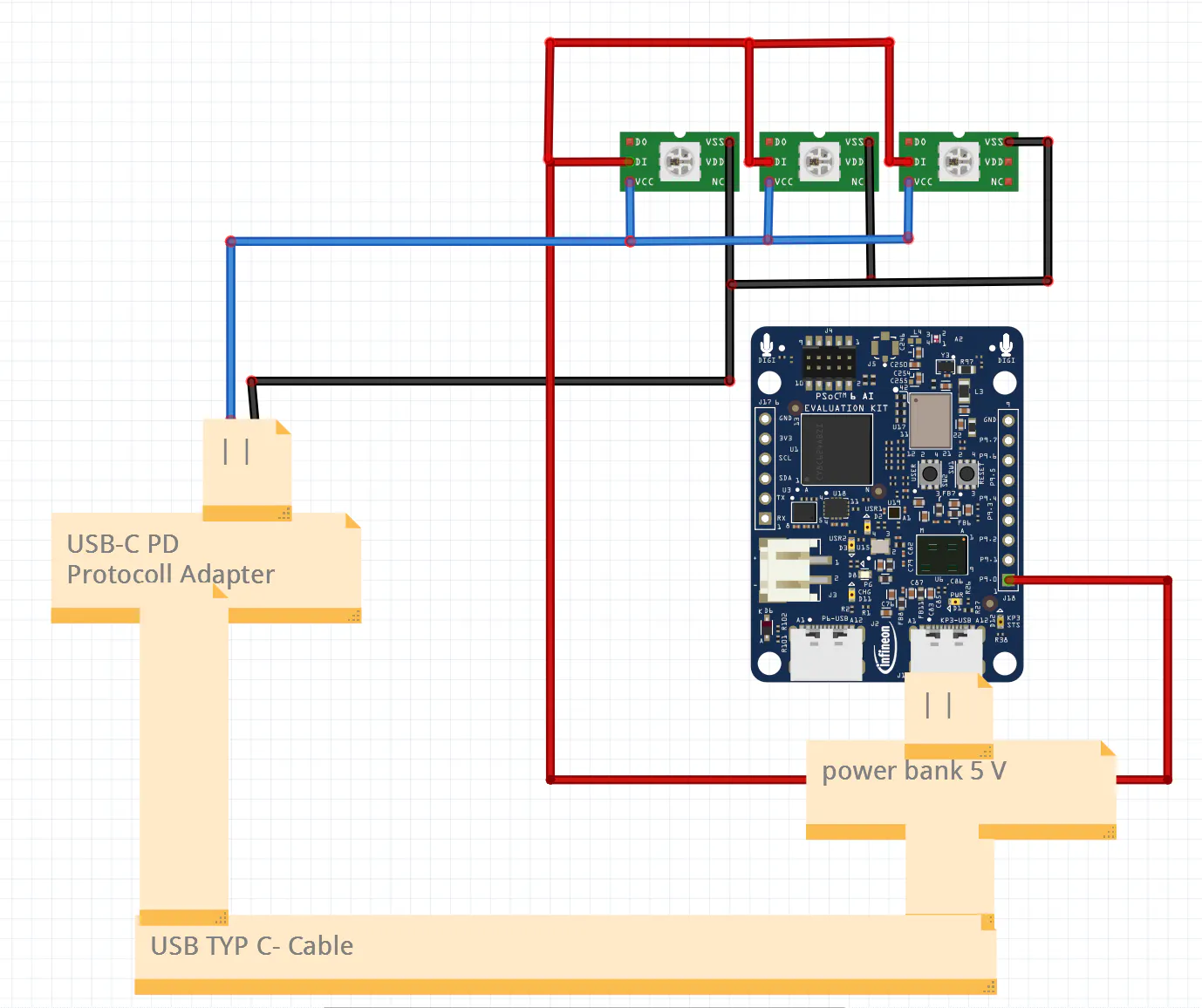
6. Wire the three strips in parallel:
- connect all
5Vlines together - connect all
GNDlines together - connect all
datainputs together
7. If you are using WS2813B LEDs, the backup data input can remain unused.
8. Route the three main wires through the hole in the lightsaber shaft.
9. Remove the plastic and rubber cover from the power bank (like in the following pictures) to make it a little bit smaller. If you want you can glue the power converter part from the batter on the batterie.
10. Connect LED power to the PD power supply converter. The PSOC™ 6 AI KIT alone cannot safely supply the current for three parallel LED strips.
11. Connect the shared LED data line to P9_0.
Though you have three physical strips, the firmware addresses 126 LED positions. They are in parallel to each other.
SoftwareNow, Padawan, prepare your software:
1. Flash MicroPython onto your PSOC™ 6 AI KIT. If you have not yet done so, follow the instructions here.
2. In Thonny, install the required libraries:
bmi270neopixel
3. Copy the code below to your board as main.py.
4. Open the serial console in Thonny to monitor startup messages, gyro diagnostics, and gesture detection output. This is your window into the saber’s mind.
The Code
Here, Padawan, is the MicroPython firmware. It is divided into configuration, sensor handling, LED animation helpers, and a main loop with diagnostics and watchdog supervision. Study it well, for understanding your code is the path to mastery. If you want it every time on the PSOC™ 6 AI KIT.
"""
Obi-Wan Lightsaber - MicroPython firmware for the PSOC(TM) 6 AI Kit
-------------------------------------------------------------------
Gesture-controlled lightsaber:
  * Fast flick to the LEFT  -> turn the blade ON (or change color if already on)
  * Fast flick to the RIGHT -> turn the blade OFF

There are 5 selectable blade colors. Every left flick while the blade is
already lit advances to the next color and wraps around.

Hardware:
  * Infineon CY8CKIT-062S2-AI (PSOC(TM) 6 AI Kit) running MicroPython
  * Built-in BMI270 6-axis IMU (I2C on P0_2/P0_3)
  * WS2812-compatible LED strip on P9_0 (126 LEDs)

Required MicroPython packages: bmi270, neopixel
  -> Thonny: Tools > Manage Packages > search & install
"""

from machine import Pin, I2C, WDT
import time
import neopixel
import bmi270

# ---------------------------------------------------------------------------
# Watchdog - initialized after startup so boot-time setup cannot trip it.
# ---------------------------------------------------------------------------
WDT_TIMEOUT_MS = 2000
wdt = None
USE_SENSOR = True
TEST_ALL_LEDS_ON = False
SENSOR_POLL_MS = 50
ANIMATION_STEP_DELAY_S = 0.001

# ---------------------------------------------------------------------------
# LED configuration
# ---------------------------------------------------------------------------
NUM_LEDS = 126              # number of LEDs in the blade
LED_PIN = 'P9_0'            # data line of the WS2812 strip

np = neopixel.NeoPixel(Pin(LED_PIN), NUM_LEDS)

# Five blade colors (R, G, B). Max brightness capped at 40% (~102).
COLORS = [
    (  0,  64, 102),  # 0 - Obi-Wan light blue
    (  0, 102,   0),  # 1 - Qui-Gon / Luke green
    (102,   0,   0),  # 2 - Sith red
    ( 64,   0, 102),  # 3 - Mace Windu purple
    (102, 102, 102),  # 4 - white / Rey
]

# ---------------------------------------------------------------------------
# Gyroscope configuration
# ---------------------------------------------------------------------------
i2c = None
bmi = None
sensor_init_error = None
if USE_SENSOR:
    try:
        i2c = I2C(scl='P0_2', sda='P0_3')
        bmi = bmi270.BMI270(i2c)
    except Exception as e:
        sensor_init_error = e
        bmi = None
last_twist_read_ms = time.ticks_ms()
last_twist_value = 0.0
sensor_fault = False
last_gyro_values = (0.0, 0.0, 0.0)


def feed_watchdog():
    if wdt is not None:
        wdt.feed()


FLICK_THRESHOLD = 200.0
DEBOUNCE_S = 0.45
TWIST_AXIS = 'z'
LEFT_IS_POSITIVE = True


def read_twist():
    global bmi, last_twist_read_ms, last_twist_value, sensor_fault, last_gyro_values
    now = time.ticks_ms()

    if not USE_SENSOR:
        return 0.0

    if time.ticks_diff(now, last_twist_read_ms) < SENSOR_POLL_MS:
        return last_twist_value

    if bmi is None:
        return 0.0

    try:
        gx, gy, gz = bmi.gyro()
        last_gyro_values = (gx, gy, gz)
        last_twist_read_ms = now
        sensor_fault = False
    except Exception as e:
        print("Gyro read error: {}".format(e))
        bmi = None
        sensor_fault = True
        return 0.0
    if TWIST_AXIS == 'x':
        last_twist_value = gx
        return last_twist_value
    if TWIST_AXIS == 'y':
        last_twist_value = gy
        return last_twist_value
    last_twist_value = gz
    return last_twist_value


# ---------------------------------------------------------------------------
# LED helpers
# ---------------------------------------------------------------------------
def show_solid(color):
    for i in range(NUM_LEDS):
        np[i] = color
    np.write()


def blade_off():
    for i in range(NUM_LEDS):
        np[i] = (0, 0, 0)
    np.write()


def ignite(color, step_delay=ANIMATION_STEP_DELAY_S):
    """Animate the blade extending from the hilt to the tip."""
    blade_off()
    for i in range(NUM_LEDS):
        np[i] = color
        np.write()
        feed_watchdog()
        time.sleep(step_delay)


def retract(color, step_delay=ANIMATION_STEP_DELAY_S):
    """Animate the blade retracting from the tip back into the hilt."""
    for i in range(NUM_LEDS - 1, -1, -1):
        np[i] = (0, 0, 0)
        np.write()
        feed_watchdog()
        time.sleep(step_delay)


# ---------------------------------------------------------------------------
# Main loop
# ---------------------------------------------------------------------------
def main():
    global wdt, bmi
    color_index = 0
    is_on = True
    if TEST_ALL_LEDS_ON:
        show_solid(COLORS[color_index])
    else:
        ignite(COLORS[color_index])
    wdt = WDT(timeout=WDT_TIMEOUT_MS)
    feed_watchdog()
    last_action = time.ticks_ms()
    last_status = time.ticks_ms()
    status_interval_ms = 1000

    print("Lightsaber ready. Flick LEFT to ignite / change color, RIGHT to retract.")
    if not USE_SENSOR:
        print("Sensor disabled for diagnostics. Twist input forced to 0.0 dps.")
    elif sensor_init_error is not None:
        print("Sensor init failed: {}".format(sensor_init_error))
    else:
        print("Sensor diagnostics active. Status output will show gyro values.")
    if TEST_ALL_LEDS_ON:
        print("LED test mode active. All LEDs are held on with a fixed color.")

    while True:
        try:
            now = time.ticks_ms()

            if time.ticks_diff(now, last_status) >= status_interval_ms:
                if not USE_SENSOR:
                    sensor_status = "DISABLED"
                elif bmi is None:
                    sensor_status = "FAULT"
                elif sensor_fault:
                    sensor_status = "ERROR"
                else:
                    sensor_status = "OK"

                if is_on:
                    print(
                        "Status | blade=ON | color_index={} | color_rgb={} | sensor={} | gyro=({:.1f}, {:.1f}, {:.1f}) | twist={:.1f} dps".format(
                            color_index,
                            COLORS[color_index],
                            sensor_status,
                            last_gyro_values[0],
                            last_gyro_values[1],
                            last_gyro_values[2],
                            last_twist_value
                        )
                    )
                else:
                    print(
                        "Status | blade=OFF | sensor={} | gyro=({:.1f}, {:.1f}, {:.1f}) | twist={:.1f} dps".format(
                            sensor_status,
                            last_gyro_values[0],
                            last_gyro_values[1],
                            last_gyro_values[2],
                            last_twist_value
                        )
                    )
                last_status = now

            if time.ticks_diff(now, last_action) < int(DEBOUNCE_S * 1000):
                feed_watchdog()
                time.sleep(0.01)
                continue

            twist = read_twist()
            if not LEFT_IS_POSITIVE:
                twist = -twist

            # --- Left flick -------------------------------------------------
            if twist > FLICK_THRESHOLD:
                print("LEFT flick detected | twist={:.1f}".format(twist))
                if not is_on:
                    color_index = 0
                    print("Igniting (color {})".format(color_index))
                    ignite(COLORS[color_index])
                    is_on = True
                else:
                    color_index = (color_index + 1) % len(COLORS)
                    print("Switching to color {} = {}".format(color_index, COLORS[color_index]))
                    show_solid(COLORS[color_index])
                last_action = time.ticks_ms()

            # --- Right flick ------------------------------------------------
            elif twist < -FLICK_THRESHOLD:
                print("RIGHT flick detected | twist={:.1f}".format(twist))
                if is_on:
                    print("Retracting blade")
                    retract(COLORS[color_index])
                    is_on = False
                    last_action = time.ticks_ms()

        except Exception as e:
            print("Loop error: {}".format(e))
            bmi = None

        feed_watchdog()
        time.sleep(0.01)


try:
    main()
except KeyboardInterrupt:
    blade_off()
    print("Lightsaber stopped.")
What Is Happening Here?
- read_twist(): This function polls the BMI270 every
SENSOR_POLL_MSmilliseconds and caches the last valid reading. This keeps gesture detection responsive without overwhelming the I²C bus. - WDT(timeout=WDT_TIMEOUT_MS): The watchdog timer is started only after the initial boot animation, protecting your saber during runtime without accidental resets at startup.
- COLORS: Five
(R, G, B)tuples, each capped at about 40% brightness. This is wise for power and still bright enough for your blade. - ignite() and retract(): These animate the blade one LED at a time, while show_solid() and blade_off() handle instant updates.
- USE_SENSOR and TEST_ALL_LEDS_ON: These are diagnostic switches for isolating IMU issues or verifying LED wiring. Use them as a Jedi uses the Force—wisely.
Padawan, every saber is unique. Adjust these parameters to suit your hand and your hardware:
- If motion detection is too sensitive, increase FLICK_THRESHOLD. If it is sluggish, decrease it.
- DEBOUNCE_S: Controls how quickly the next gesture can be recognized after a flick.
- ANIMATION_STEP_DELAY_S: Changes the speed of the ignite and retract animation.
- If left and right feel inverted, set LEFT_IS_POSITIVE = False.
- Set TEST_ALL_LEDS_ON = True for a quick LED-only test.
- Set USE_SENSOR = False to debug blade behavior without the BMI270.
Padawan, with the PSOC™ 6 AI KIT, robust MicroPython firmware, and the BMI270 sensor, you have built a lightsaber worthy of a Jedi: animated blade motion, gesture-based color cycling, serial diagnostics, and a watchdog to keep your system alive. There are no buttons—only your movement and your mastery.
Your journey does not end here. Expand your saber’s abilities:
- More gestures: A strong swing could trigger a flash or clash effect.
- Sound effects: Add a sound module and a speaker to your lightsaber.
- Battery management: Use the PSOC™ 6 AI KIT power-saving modes for longer missions.
- Custom choreography: Rainbow effects, pulsing, or a kyber crystal charging sequence when powering on.
May the Force—and your lightsaber—be with you.



Comments