/**
 * ================================================================
 *        WiFi RC CAR CONTROLLER  ESP8266 NodeMCU
 * ================================================================
 *
 * Project : WiFi RC Car using ESP8266 NodeMCU
 * Brand   : Humanix Tech
 * Author  : Humanix Tech
 * Version : 1.0
 * Board   : ESP8266 NodeMCU / Wemos D1 Mini
 * GitHub  : https://github.com/humanixtech
 * Video   : <YouTube link (optional)>
 * HOW IT WORKS:
 *   ESP8266 creates its own WiFi hotspot  connect your phone
 *    open browser  http://192.168.4.1  control the car!
 *
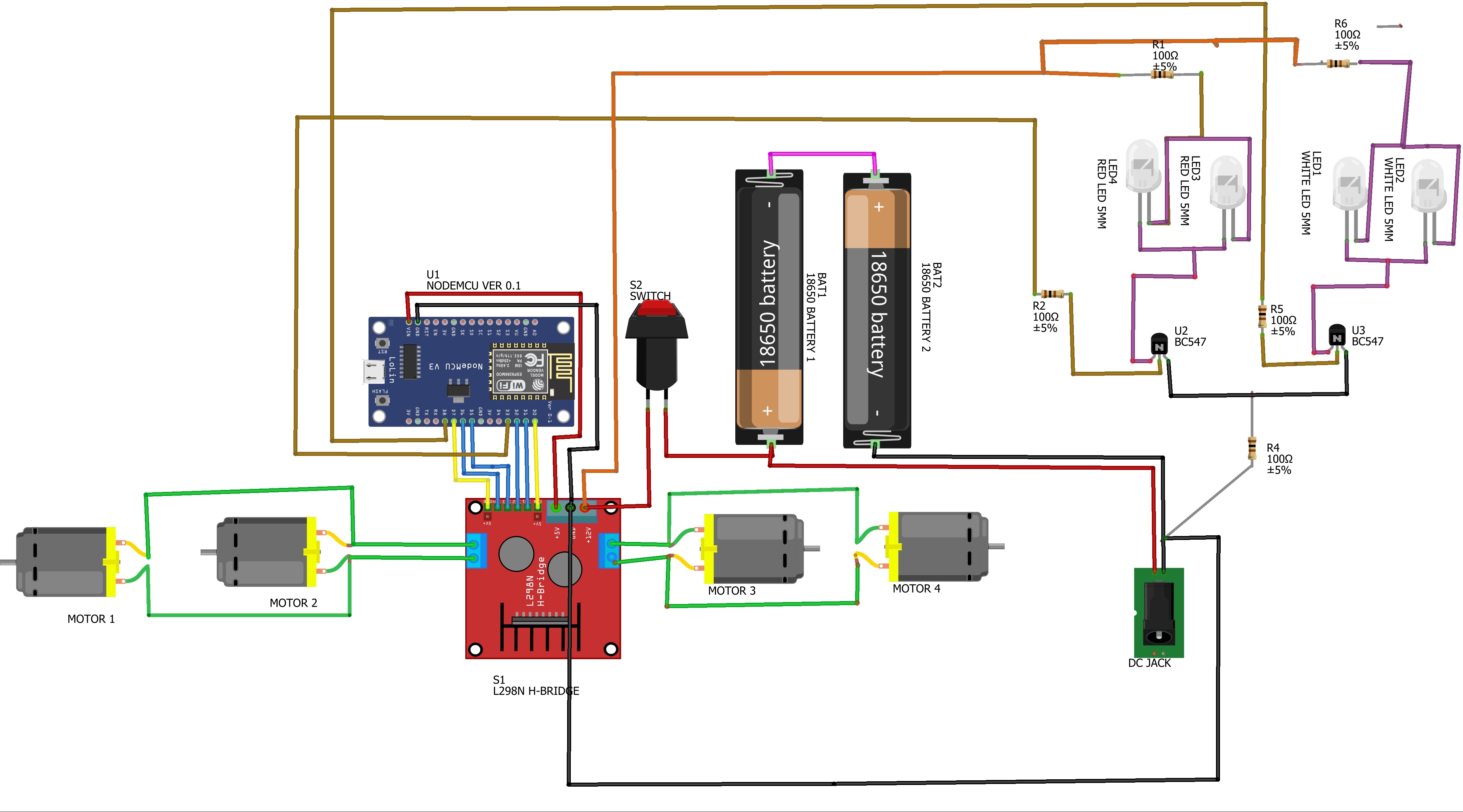
 * WIRING SUMMARY:
 *   L298N IN1=D1, IN2=D2, IN3=D5, IN4=D6
 *   L298N ENA=D7, ENB=D0
 *   Red  LED  D3 (Active HIGH, 100 to GND)
 *   White LED  D8 (Active HIGH, 100 to GND)
 *
 * ----------------------------------------------------------------
 *    If this project helped you:
 *    LIKE the video
 *    SUBSCRIBE for more ESP8266 / Arduino projects
 *    STAR this repo on GitHub
 *    COMMENT below with questions or your build!
 *    SHARE with your friends who love robotics!
 *  Your support keeps this going  thank you!
 * ================================================================
**/


#include <ESP8266WiFi.h>
#include <ESP8266WebServer.h>

const char* ssid = "CAR_v1.0";
const char* password = "12345678";

ESP8266WebServer server(80);

// ===== PINS =====
#define IN1 D1
#define IN2 D2
#define IN3 D5
#define IN4 D6
#define ENA D7
#define ENB D0
#define RED_LED   D3   // external -- ACTIVE HIGH (HIGH=ON, LOW=OFF)
#define WHITE_LED D8   // external -- ACTIVE HIGH (HIGH=ON, LOW=OFF)

int driveSpeed = 512;
int turnSpeed  = 512;

// ===== PARKING / HAZARD BLINK STATE =====
bool parkingOn       = false;       // true when PARKING button is ON
bool redLedState     = false;       // current physical LED state
unsigned long lastBlinkTime = 0;
const unsigned long BLINK_INTERVAL = 500; // ms  blink every 500ms (1 Hz)

// ===== WEBPAGE =====
String webpage = R"=====(
<!doctype html>
<html>
<head>
<meta name="viewport" content="width=device-width, initial-scale=1.0, user-scalable=no">
<title>CAR CTRL</title>
<style>

*, *::before, *::after { box-sizing: border-box; margin:0; padding:0; }

html, body {
  width:100%; height:100%;
  overflow:hidden;
  font-family: 'Segoe UI', Tahoma, sans-serif;
  touch-action: manipulation;
  -webkit-tap-highlight-color: transparent;
  user-select: none;
  background: #0b0d12;
}

/*  MAIN LAYOUT  */
.container {
  display: flex;
  flex-direction: row;
  justify-content: center;
  align-items: center;
  height: 100dvh;
  gap: 18px;
  padding: 20px 16px;
}

/*  PANEL CARD  */
.panel {
  display: flex;
  flex-direction: column;
  align-items: center;
  justify-content: center;
  border-radius: 26px;
  padding: 20px 16px 18px;
  gap: 14px;
  position: relative;
}

/*
   SECTION 1  DRIVE (Blue)
 */
.panel-move {
  background: linear-gradient(160deg, #0d1e3a, #071428);
  border: 1px solid rgba(33,150,243,0.25);
  box-shadow:
    0 8px 32px rgba(0,0,0,0.55),
    inset 0 1px 0 rgba(33,150,243,0.15),
    0 0 40px rgba(33,150,243,0.06);
  min-width: 120px;
}

.btn-fwd {
  width: 110px;
  height: 100px;
  clip-path: polygon(50% 0%, 100% 100%, 0% 100%);
  background: linear-gradient(175deg, #2979ff, #1565c0);
  box-shadow: none;
  border: none;
  border-radius: 0;
  display: flex;
  align-items: flex-end;
  justify-content: center;
  padding-bottom: 10px;
  color: white;
  font-size: 13px;
  font-weight: 900;
  letter-spacing: 2px;
  cursor: pointer;
  transition: filter 0.1s ease, transform 0.08s ease;
  -webkit-tap-highlight-color: transparent;
  text-transform: uppercase;
  position: relative;
  filter: drop-shadow(0 6px 14px rgba(41,121,255,0.5));
}
.btn-fwd::after {
  content: 'FWD';
  position: absolute;
  bottom: 14px;
  font-size: 12px;
  font-weight: 900;
  letter-spacing: 1.5px;
  color: rgba(255,255,255,0.9);
}
.btn-fwd.pressing {
  filter: drop-shadow(0 2px 20px rgba(130,177,255,0.9)) brightness(1.3);
  transform: scale(0.95) translateY(4px);
}

.btn-rev {
  width: 110px;
  height: 100px;
  clip-path: polygon(0% 0%, 100% 0%, 50% 100%);
  background: linear-gradient(175deg, #5c9fff, #1976d2);
  box-shadow: none;
  border: none;
  border-radius: 0;
  display: flex;
  align-items: flex-start;
  justify-content: center;
  padding-top: 10px;
  color: white;
  font-size: 13px;
  font-weight: 900;
  letter-spacing: 2px;
  cursor: pointer;
  transition: filter 0.1s ease, transform 0.08s ease;
  -webkit-tap-highlight-color: transparent;
  text-transform: uppercase;
  position: relative;
  filter: drop-shadow(0 6px 14px rgba(68,138,255,0.45));
}
.btn-rev::after {
  content: 'REV';
  position: absolute;
  top: 14px;
  font-size: 12px;
  font-weight: 900;
  letter-spacing: 1.5px;
  color: rgba(255,255,255,0.9);
}
.btn-rev.pressing {
  filter: drop-shadow(0 2px 20px rgba(144,202,249,0.9)) brightness(1.3);
  transform: scale(0.95) translateY(-4px);
}

/*
   SECTION 2  CONTROL (Purple)
 */
.panel-center {
  background: linear-gradient(160deg, #1a1226, #0e0b18);
  border: 1px solid rgba(180,100,255,0.2);
  box-shadow:
    0 8px 32px rgba(0,0,0,0.6),
    inset 0 1px 0 rgba(180,100,255,0.1),
    0 0 40px rgba(140,80,255,0.05);
  padding: 18px 14px 16px;
  gap: 12px;
}

.grid4 {
  display: grid;
  grid-template-columns: repeat(2, 1fr);
  gap: 12px;
}

/*  EMERGENCY STOP  */
.btn-estop {
  width: 100%;
  height: 46px;
  background: linear-gradient(175deg, #4a0000, #2a0000);
  border: 1.5px solid rgba(255,50,50,0.3);
  border-radius: 12px;
  color: #ff6b6b;
  font-size: 12px;
  font-weight: 900;
  letter-spacing: 3px;
  cursor: pointer;
  text-transform: uppercase;
  transition: all 0.1s ease;
  -webkit-tap-highlight-color: transparent;
  box-shadow:
    0 5px 0 #1a0000,
    0 8px 20px rgba(180,0,0,0.25),
    inset 0 1px 0 rgba(255,80,80,0.1);
  display: flex;
  align-items: center;
  justify-content: center;
  gap: 8px;
}
.btn-estop.active {
  background: linear-gradient(175deg, #ff1a1a, #cc0000) !important;
  color: white !important;
  border-color: rgba(255,120,120,0.8) !important;
  transform: translateY(3px) !important;
  box-shadow:
    0 2px 0 #7a0000,
    0 0 40px rgba(255,0,0,1),
    0 0 80px rgba(255,0,0,0.5),
    inset 0 1px 0 rgba(255,200,200,0.3) !important;
  animation: estopPulse 0.6s ease-in-out infinite alternate;
}
@keyframes estopPulse {
  from { box-shadow: 0 2px 0 #7a0000, 0 0 30px rgba(255,0,0,0.8), 0 0 60px rgba(255,0,0,0.4); }
  to   { box-shadow: 0 2px 0 #7a0000, 0 0 55px rgba(255,0,0,1),   0 0 100px rgba(255,0,0,0.6); }
}
.estop-dot {
  width: 8px; height: 8px;
  border-radius: 50%;
  background: currentColor;
  opacity: 0.8;
}
.btn-estop.active .estop-dot {
  animation: dotBlink 0.4s ease-in-out infinite alternate;
}
@keyframes dotBlink {
  from { opacity: 0.4; } to { opacity: 1; }
}

/*  PARKING / HAZARD (RED) button  blinks UI when ON  */
.btn-red {

  width: 90px; height: 90px;
  border: none; border-radius: 18px;
  background: linear-gradient(175deg, #5c1010, #3a0000);
  box-shadow: 0 7px 0 #1a0000, 0 10px 18px rgba(180,0,0,0.3), inset 0 1px 0 rgba(255,100,100,0.15);
  color: #ff8a80;
  font-size: 11px; font-weight: 800; letter-spacing: 1px;
  cursor: pointer;
  transition: transform 0.08s ease, box-shadow 0.1s ease, background 0.1s ease;
  -webkit-tap-highlight-color: transparent;
  text-transform: uppercase;
  display: flex; flex-direction: column; align-items: center; justify-content: center; gap: 4px;
}
/* Blinking animation for PARKING ON state */
@keyframes hazardBlink {
  0%,100% {
    background: linear-gradient(175deg, #ff3333, #cc0000);
    color: white;
    box-shadow: 0 4px 0 #7a0000, 0 0 35px rgba(255,80,0,1), 0 0 70px rgba(255,80,0,0.5), inset 0 1px 0 rgba(255,200,200,0.3);
    transform: translateY(3px);
  }
  50% {
    background: linear-gradient(175deg, #5c1010, #3a0000);
    color: #ff8a80;
    box-shadow: 0 7px 0 #1a0000, 0 10px 18px rgba(180,0,0,0.3), inset 0 1px 0 rgba(255,100,100,0.15);
    transform: translateY(0px);
  }
}
.btn-red.on {
  animation: hazardBlink 0.5s ease-in-out infinite !important;
}

/* Hazard triangle icon () inside button */
.hazard-icon {
  font-size: 18px;
  line-height: 1;
}

/*  LIGHTS (WHITE) button  solid ON  */
.btn-white {
  width: 90px; height: 90px;
  border: none; border-radius: 18px;
  background: linear-gradient(175deg, #3a3a3a, #222);
  box-shadow: 0 7px 0 #111, 0 10px 18px rgba(0,0,0,0.4), inset 0 1px 0 rgba(255,255,255,0.08);
  color: #aaa;
  font-size: 11px; font-weight: 800; letter-spacing: 1px;
  cursor: pointer;
  transition: transform 0.08s ease, box-shadow 0.1s ease, background 0.1s ease;
  -webkit-tap-highlight-color: transparent;
  text-transform: uppercase;
  display: flex; flex-direction: column; align-items: center; justify-content: center; gap: 4px;
}
.btn-white.on {
  background: linear-gradient(175deg, #ffffff, #dddddd) !important;
  color: #111 !important;
  transform: translateY(3px);
  box-shadow: 0 4px 0 #999, 0 0 35px rgba(255,255,255,0.95), 0 0 70px rgba(255,255,255,0.4), inset 0 1px 0 rgba(255,255,255,0.5) !important;
}

/* Light beam icon */
.light-icon {
  font-size: 18px;
  line-height: 1;
}

/*  M1 SWITCH  */
.btn-m1 {
  width: 90px; height: 90px;
  border: none; border-radius: 18px;
  background: linear-gradient(175deg, #7a6010, #5a4500);
  color: #ffd54f;
  box-shadow: 0 7px 0 #3a2c00, 0 10px 18px rgba(100,80,0,0.3), inset 0 1px 0 rgba(255,220,100,0.12);
  font-size: 13px; font-weight: 800; letter-spacing: 1px;
  cursor: pointer;
  transition: transform 0.08s ease, box-shadow 0.1s ease, background 0.1s ease;
  -webkit-tap-highlight-color: transparent;
  text-transform: uppercase;
  display: flex; align-items: center; justify-content: center;
}
.btn-m1.on {
  background: linear-gradient(175deg, #ffca28, #f9a825) !important;
  color: #1a0f00 !important;
  transform: translateY(3px);
  box-shadow: 0 4px 0 #b37600, 0 0 25px rgba(255,200,0,0.8), 0 0 50px rgba(255,200,0,0.3), inset 0 1px 0 rgba(255,255,255,0.35) !important;
}

/*  M2 SWITCH  */
.btn-m2 {
  width: 90px; height: 90px;
  border: none; border-radius: 18px;
  background: linear-gradient(175deg, #0a4a52, #053035);
  color: #4dd0e1;
  box-shadow: 0 5px 0 #021e22, 0 8px 18px rgba(0,80,90,0.3), inset 0 1px 0 rgba(0,200,220,0.1);
  font-size: 13px; font-weight: 800; letter-spacing: 1px;
  cursor: pointer;
  transition: transform 0.08s ease, box-shadow 0.1s ease, background 0.1s ease;
  -webkit-tap-highlight-color: transparent;
  text-transform: uppercase;
  display: flex; align-items: center; justify-content: center;
}
.btn-m2.on {
  background: linear-gradient(175deg, #26c6da, #00838f) !important;
  color: white !important;
  transform: translateY(3px);
  box-shadow: 0 4px 0 #005662, 0 0 25px rgba(0,200,220,0.8), 0 0 50px rgba(0,200,220,0.3), inset 0 1px 0 rgba(255,255,255,0.25) !important;
}

/*
   SECTION 3  STEER (Green)
 */
.panel-turn {
  background: linear-gradient(160deg, #0a2010, #061408);
  border: 1px solid rgba(76,175,80,0.25);
  box-shadow:
    0 8px 32px rgba(0,0,0,0.55),
    inset 0 1px 0 rgba(76,175,80,0.12),
    0 0 40px rgba(76,175,80,0.05);
  flex-direction: column;
  gap: 10px;
  padding: 20px 14px 18px;
}

.steer-row {
  display: flex;
  flex-direction: row;
  gap: 10px;
  align-items: center;
}

.btn-left {
  width: 100px; height: 80px;
  clip-path: polygon(0% 50%, 100% 0%, 100% 100%);
  background: linear-gradient(to right, #43a047, #2e7d32);
  border: none; border-radius: 0;
  display: flex; align-items: center; justify-content: center;
  padding-left: 28px;
  color: white; font-size: 12px; font-weight: 900; letter-spacing: 1.5px;
  cursor: pointer;
  transition: filter 0.1s ease, transform 0.08s ease;
  -webkit-tap-highlight-color: transparent;
  text-transform: uppercase;
  position: relative;
  filter: drop-shadow(0 4px 12px rgba(67,160,71,0.5));
}
.btn-left::after {
  content: 'LEFT';
  position: absolute; right: 12px;
  font-size: 12px; font-weight: 900;
  color: rgba(255,255,255,0.9); letter-spacing: 1px;
}
.btn-left.pressing {
  filter: drop-shadow(0 2px 20px rgba(165,214,167,0.9)) brightness(1.3);
  transform: scale(0.95) translateX(-4px);
}

.btn-right {
  width: 100px; height: 80px;
  clip-path: polygon(0% 0%, 100% 50%, 0% 100%);
  background: linear-gradient(to left, #66bb6a, #388e3c);
  border: none; border-radius: 0;
  display: flex; align-items: center; justify-content: center;
  padding-right: 28px;
  color: white; font-size: 12px; font-weight: 900; letter-spacing: 1.5px;
  cursor: pointer;
  transition: filter 0.1s ease, transform 0.08s ease;
  -webkit-tap-highlight-color: transparent;
  text-transform: uppercase;
  position: relative;
  filter: drop-shadow(0 4px 12px rgba(102,187,106,0.5));
}
.btn-right::after {
  content: 'RIGHT';
  position: absolute; left: 12px;
  font-size: 11px; font-weight: 900;
  color: rgba(255,255,255,0.9); letter-spacing: 1px;
}
.btn-right.pressing {
  filter: drop-shadow(0 2px 20px rgba(200,230,201,0.9)) brightness(1.3);
  transform: scale(0.95) translateX(4px);
}

/*  LANDSCAPE  */
@media (orientation: landscape) {
  .container {
    flex-direction: row;
    justify-content: space-evenly;
    padding: 10px 16px;
    gap: 16px;
  }
  .panel { padding: 14px 12px 12px; gap: 10px; border-radius: 20px; }
  .btn-fwd, .btn-rev { width: 96px; height: 88px; }
  .btn-red, .btn-white, .btn-m1, .btn-m2 { width: 78px; height: 78px; font-size: 11px; }
  .btn-estop { height: 40px; font-size: 11px; }
  .btn-left, .btn-right { width: 88px; height: 70px; }
  .grid4 { gap: 9px; }
}

body.estop-mode {
  animation: bodyRedFlash 0.5s ease-in-out infinite alternate;
}
@keyframes bodyRedFlash {
  from { background: #0b0d12; }
  to   { background: #1a0303; }
}

</style>
</head>
<body>

<div class="container">

  <!-- SECTION 1: DRIVE -->
  <div class="panel panel-move">
    <button id="forward"  class="btn-fwd"></button>
    <button id="backward" class="btn-rev"></button>
  </div>

  <!-- SECTION 2: CONTROL -->
  <div class="panel panel-center">
    <div class="grid4">
      <!-- PARKING: blinks RED LED when ON -->
      <button id="redLight" class="btn-red">
        <span class="hazard-icon"></span>
        Hazard
      </button>
      <!-- LIGHTS: solid WHITE LED when ON -->
      <button id="whiteLight" class="btn-white">
        <span class="light-icon"></span>
        LIGHTS
      </button>
      <button id="mode1" class="btn-m1">M1</button>
      <button id="mode2" class="btn-m2">M2</button>
    </div>
    <button id="eStop" class="btn-estop">
      <span class="estop-dot"></span>
      STOP
      <span class="estop-dot"></span>
    </button>
  </div>

  <!-- SECTION 3: STEER -->
  <div class="panel panel-turn">
    <div class="steer-row">
      <button id="left"  class="btn-left"></button>
      <button id="right" class="btn-right"></button>
    </div>
  </div>

</div>

<script>
var emergencyStop = false;

var toggleStates = {
  redLight:   false,
  whiteLight: false,
  mode1:      false,
  mode2:      false
};

function resetAllToggles(){
  var ids = ['redLight','whiteLight','mode1','mode2'];
  for(var k = 0; k < ids.length; k++){
    var id = ids[k];
    if(toggleStates[id]){
      toggleStates[id] = false;
      document.getElementById(id).classList.remove('on');
      fetch('/' + id + '?state=false');
    }
  }
  fetch('/stop');
}

//  EMERGENCY STOP
var eStopBtn = document.getElementById('eStop');
function activateEStop(){
  emergencyStop = !emergencyStop;
  if(emergencyStop){
    eStopBtn.classList.add('active');
    document.body.classList.add('estop-mode');
    resetAllToggles();
  } else {
    eStopBtn.classList.remove('active');
    document.body.classList.remove('estop-mode');
  }
}
eStopBtn.addEventListener('touchstart', function(e){ e.preventDefault(); activateEStop(); }, { passive: false });
eStopBtn.addEventListener('click', activateEStop);

//  MOVEMENT BUTTONS
var moveIds = ['forward','backward','left','right'];
for(var i = 0; i < moveIds.length; i++){
  (function(id){
    var btn = document.getElementById(id);
    btn.addEventListener('touchstart', function(e){
      e.preventDefault();
      if(emergencyStop) return;
      btn.classList.add('pressing');
      fetch('/' + id);
    }, { passive: false });
    btn.addEventListener('touchend', function(){
      btn.classList.remove('pressing');
      if(!emergencyStop) fetch('/stop');
    });
    btn.addEventListener('touchcancel', function(){
      btn.classList.remove('pressing');
      if(!emergencyStop) fetch('/stop');
    });
    btn.addEventListener('mousedown', function(){
      if(emergencyStop) return;
      btn.classList.add('pressing');
      fetch('/' + id);
    });
    btn.addEventListener('mouseup', function(){
      btn.classList.remove('pressing');
      if(!emergencyStop) fetch('/stop');
    });
  })(moveIds[i]);
}

//  TOGGLE SWITCHES
// redLight   sends /redLight?state=true/false  Arduino blinks RED LED
// whiteLight  sends /whiteLight?state=true/false  Arduino turns WHITE LED solid ON/OFF
var switchIds = ['redLight','whiteLight','mode1','mode2'];
for(var j = 0; j < switchIds.length; j++){
  (function(id){
    var btn = document.getElementById(id);
    function doToggle(){
      if(emergencyStop) return;
      toggleStates[id] = !toggleStates[id];
      if(toggleStates[id]) btn.classList.add('on');
      else                 btn.classList.remove('on');
      fetch('/' + id + '?state=' + toggleStates[id]);
    }
    btn.addEventListener('touchstart', function(e){ e.preventDefault(); doToggle(); }, { passive: false });
    btn.addEventListener('click', doToggle);
  })(switchIds[j]);
}
</script>

</body>
</html>
)=====";

// ===== MOTOR FUNCTIONS =====
void forward(){
  analogWrite(ENA, driveSpeed);
  analogWrite(ENB, driveSpeed);
  digitalWrite(IN1,LOW); digitalWrite(IN2,HIGH);
  digitalWrite(IN3,LOW); digitalWrite(IN4,HIGH);
}

void backward(){
  analogWrite(ENA, driveSpeed);
  analogWrite(ENB, driveSpeed);
  digitalWrite(IN1,HIGH); digitalWrite(IN2,LOW);
  digitalWrite(IN3,HIGH); digitalWrite(IN4,LOW);
}

void stopCar(){
  digitalWrite(IN1,LOW); digitalWrite(IN2,LOW);
  digitalWrite(IN3,LOW); digitalWrite(IN4,LOW);
}

void left(){
  analogWrite(ENA, turnSpeed / 3);
  analogWrite(ENB, turnSpeed);
  digitalWrite(IN1,HIGH); digitalWrite(IN2,LOW);
  digitalWrite(IN3,LOW); digitalWrite(IN4,HIGH);
}

void right(){
  analogWrite(ENA, turnSpeed);
  analogWrite(ENB, turnSpeed / 3);
  digitalWrite(IN1,LOW); digitalWrite(IN2,HIGH);
  digitalWrite(IN3,HIGH); digitalWrite(IN4,LOW);
}

// ===== LIGHTS =====

// PARKING  sets parkingOn flag; blinking is handled in loop()
void handleRedLight(){
  if(server.arg("state") == "true"){
    parkingOn = true;
  } else {
    parkingOn    = false;
    redLedState  = false;
    // RED_LED is ACTIVE HIGH: LOW = OFF
    digitalWrite(RED_LED, LOW);
  }
  server.send(200, "text/plain", "OK");
}

// WHITE LIGHTS  solid ON/OFF
void handleWhiteLight(){
  if(server.arg("state") == "true") digitalWrite(WHITE_LED, HIGH);
  else                              digitalWrite(WHITE_LED, LOW);
  server.send(200, "text/plain", "OK");
}

// ===== MODES =====
void handleMode1(){
  if(server.arg("state") == "true") driveSpeed = 1023;
  else                              driveSpeed = 512;
  server.send(200, "text/plain", "OK");
}

void handleMode2(){
  if(server.arg("state") == "true") turnSpeed = 1023;
  else                              turnSpeed = 512;
  server.send(200, "text/plain", "OK");
}

// ===== SETUP =====
void setup(){
  pinMode(IN1,OUTPUT); pinMode(IN2,OUTPUT);
  pinMode(IN3,OUTPUT); pinMode(IN4,OUTPUT);
  pinMode(ENA,OUTPUT); pinMode(ENB,OUTPUT);
  pinMode(RED_LED,OUTPUT);
  pinMode(WHITE_LED,OUTPUT);

  stopCar();
  digitalWrite(RED_LED,   LOW);    // OFF (active-high, so LOW = OFF)
  digitalWrite(WHITE_LED, LOW);    // OFF

  analogWrite(ENA, driveSpeed);
  analogWrite(ENB, driveSpeed);

  WiFi.softAP(ssid, password);

  server.on("/",          HTTP_GET, []{ server.send(200,"text/html",webpage); });
  server.on("/forward",   HTTP_GET, []{ forward();  server.send(200,"text/plain","OK"); });
  server.on("/backward",  HTTP_GET, []{ backward(); server.send(200,"text/plain","OK"); });
  server.on("/left",      HTTP_GET, []{ left();     server.send(200,"text/plain","OK"); });
  server.on("/right",     HTTP_GET, []{ right();    server.send(200,"text/plain","OK"); });
  server.on("/stop",      HTTP_GET, []{ stopCar();  server.send(200,"text/plain","OK"); });
  server.on("/redLight",   HTTP_GET, handleRedLight);
  server.on("/whiteLight", HTTP_GET, handleWhiteLight);
  server.on("/mode1",      HTTP_GET, handleMode1);
  server.on("/mode2",      HTTP_GET, handleMode2);

  server.begin();
}

// ===== LOOP =====
void loop(){
  server.handleClient();

  //  HAZARD BLINK for RED LED (PARKING mode)
  // RED_LED is ACTIVE HIGH: HIGH = ON, LOW = OFF
  if(parkingOn){
    unsigned long now = millis();
    if(now - lastBlinkTime >= BLINK_INTERVAL){
      lastBlinkTime = now;
      redLedState = !redLedState;
      // Active-high: when redLedState=true  write HIGH (ON)
      digitalWrite(RED_LED, redLedState ? HIGH : LOW);
    }
  }
}




Comments