



Tired of your Raspberry Pi just running Home Assistant or retro games? This project shows how to use the Hiwonder PuppyPi—a fully open-source, ROS-native quadruped robot platform—to turn your Raspberry Pi (CM4/4B/5) into a mobile AI lab that can walk, see, and learn. We'll explore a practical path from reinforcement learning training to multi-robot swarms.
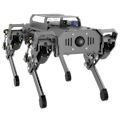
Project Overview: It's Far More Than a "Robot Dog Kit"The PuppyPi is a desktop-grade quadruped robot development platform designed for makers and developers. Its core lies in "deep open-source" and a "research-grade architecture":
- The Brain: Your Raspberry Pi (CM4 or 4B/5) directly becomes the robot's main controller, seamlessly integrating with the entire Linux and ROS ecosystem.
- The Body: A sturdy CNC aluminum alloy frame with 8 high-performance servos provides a stable and reliable motion foundation.
- The Senses: A 130° wide-angle camera allows you to work on real computer vision projects immediately.
- The Soul: Native support for ROS 1/ROS 2, with a complete Gazebo simulation model. This means you can run countless virtual training sessions on your computer (like teaching it to walk via reinforcement learning) before deploying the code to the physical robot with one click.
This project will take you beyond basic control to explore three advanced applications:
1) Training an adaptive gait AI in simulation;
2) Implementing visual SLAM for autonomous navigation;
3) Building a low-cost multi-robot cluster for cooperative experiments. If you're looking for the ultimate challenge for your Raspberry Pi, this is it.
Hardware & Software ListHardware List:
- HiWonder PuppyPi Robot Kit (main structure, servos, camera)
- Raspberry Pi Compute Module 4 (or Raspberry Pi 4B/5) – the robot's "brain"
- Micro SD Card (at least 32GB)
- Power Supply: Compatible for both the Raspberry Pi and the servo system (usually included in the kit)
- (Optional, for Swarm) Multiple PuppyPi units, a shared local network environment
Software List:
- Operating System: Ubuntu 22.04 LTS or 20.04 LTS
- Middleware: ROS 2 Humble or ROS Noetic (choose based on your Ubuntu version)
- Key Tools: Gazebo (simulation), Rviz (visualization), OpenCV (vision)
- PuppyPi Packages: ROS packages, simulation models, and example code from HiWonder's official GitHub repository.
You can access the full PuppyPi tutorials to build your projects!Project Steps & Build Instructions
Step 1: Start in Simulation, Train Your AI Risk-Free
This is the coolest part—you can teach your robot anything in a virtual world before breaking anything real.
- Set Up the Environment: On your Ubuntu+ROS computer, clone and compile the official PuppyPi simulation package.
- Launch the Virtual World: Load a Gazebo scene with rugged terrain or obstacles, and the precise PuppyPi model.
- Run Your First AI Training: Use existing reinforcement learning frameworks in the ROS ecosystem (like stable_baselines3) to connect to the Gazebo environment. Set a reward function (e.g., reward for forward speed, penalty for falling) and start training an adaptive walking policy. Within hours, you'll have a "brain" that can handle complex terrain in simulation.
Step 2: Bridge the "Reality Gap, " Deploy to the Real PuppyPi
Bringing a simulation-trained AI into the real world is one of the most exciting moments in robotics.
- Hardware Assembly: Assemble your PuppyPi following the guide and ensure the Raspberry Pi communicates properly with the servo system.
- Create a Communication Bridge: Connect both the physical PuppyPi and your training computer to the same ROS network via Wi-Fi. Your computer can then act as a control node sending commands.
- Sim-to-Real Transfer: Deploy the policy network trained in simulation to the physical robot. Thanks to the accurate simulation model, you'll be amazed to see it actually walk! Of course, you'll need to fine-tune some parameters to handle real-world friction and sensor noise—this is where the real engineering fun begins.
Step 3: Give It "Eyes" and "Intelligence" for Autonomous Navigation
Make PuppyPi more than just an order-follower—let it understand the world itself.
- Enable Vision: Use the PuppyPi's camera to publish an image topic, and run vision nodes either on the Raspberry Pi or on your computer.
- Run SLAM: Launch a lightweight visual SLAM algorithm (like RTAB-Map) and let the PuppyPi move around a room while building a map in real-time. You can watch the map being created live in Rviz.
- Autonomous Cruise: Click a target point on the map, and using the ROS navigation stack, let PuppyPi plan its own path, avoid unknown obstacles, and reach the destination.
Step 4 (Advanced Play): Build Your Robot Army
If one is cool, two must be cooler.
- Network Configuration: Ensure two or more PuppyPi units are on the same network and configure the ROS 2 DDS domain for mutual discovery and communication.
- Distributed Task: Code a simple cooperative demo. For example, have one robot act as an "explorer" to create a map, while another acts as a "follower" based on the shared map. You've just validated a basic concept of multi-robot cooperation at home.
Demo Video (Concept):
- Timelapse of reinforcement learning training in Gazebo.
- Side-by-side comparison: Left shows PuppyPi navigating obstacles in simulation, right shows the physical robot executing the same policy.
- PuppyPi building a map of a real room using visual SLAM and autonomously navigating to a specified point.
- (If two units available) A simple leader-follower cooperative demo.
Code Repository: The project will link to a GitHub repository containing:
- Gazebo world and launch files
- Example scripts for reinforcement learning training (based on PyTorch)
- Configuration files for visual SLAM and autonomous navigation
- Example nodes for multi-robot communication
🔥People Also Like: I Added a Robotic Arm to PuppyPi & Unlocked Cool Functions!Conclusion
Through this project, the PuppyPi proves it's not a "finished toy" but an idea accelerator. It lowers the barrier to entering the fields of legged robotics, ROS, and physical AI deployment. On Hackster, we share projects to inspire the next one. We hope this deep dive into integrating Raspberry Pi, ROS, and AI with PuppyPi sparks your idea for the next hardcore robotics project. Ready to make your Raspberry Pi truly move?


Comments