



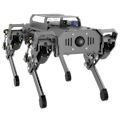
I’ve always been fascinated by how robots walk, but inverse kinematics and gait planning felt like abstract math—until I got my hands on the Hiwonder PuppyPi. This project is about breaking down those barriers. I didn’t just program a robot; I visually designed and tuned its walking gait in real-time, turning complex theory into something I could see, touch, and debug immediately. Here’s how I used PuppyPi to make a robot dog walk, trot, and even climb, all by dragging sliders and visualizing the math.
Project Goals: Why This Isn't a Black BoxMy goal was to move beyond being a “coder” to becoming a “movement designer.” I wanted to:
- Visually control inverse kinematics (IK) to create poses and actions intuitively.
- Understand and tweak biomimetic gaits (Walk, Trot) by adjusting real parameters, not just calling pre-made functions.
- Solve a real physical challenge—like climbing a step—by combining gait planning and IK.
The PuppyPi was perfect for this because it’s built as an open platform: its Raspberry Pi 5 brain, ROS support, and 8 smart servos provide the computational and physical tools, while its software makes the complex math accessible.
🔥Free download PuppyPi tutorials, and you can get all schematics, source codes, video tutorials and various experimental cases, etc.The Hardware: A Responsive Robotic Body
You can’t tune dynamic gait on a shaky platform. The PuppyPi’s hardware is built for responsive feedback:
- Linkage Leg Design: This isn’t just for looks. The four-bar linkage system gives a wider, more natural range of motion. It directly translates servo rotation into efficient leg movement, which is the foundation for stable gait.
- Coreless Servos with Feedback: These are key. Unlike basic servos, they report their position and load back to the controller. This closed-loop feedback is what allows for real-time adjustment and stable posture holding.
- Lightweight Aluminum Frame: The reduced inertia lets the robot start and stop movements quickly, making gait transitions smooth and responsive on a desktop.
The real unlock is the software suite. It turns abstract coordinates into living motion.
1. Visual Inverse Kinematics Control: This was my starting point. The software provides a 3D space where you simply drag a foot to a new position. The IK solver instantly calculates all the necessary joint angles (hip, knee) and moves the leg. I went from zero to designing a “bow” and a “wave” pose in minutes—no math required.
2. Real-Time Gait Parameter Tuning: This is the core of the experiment. The software exposes the key levers of a walking engine:
- Step Height & Length: Controls how high the foot lifts and how far it reaches.
- Gait Cycle: The speed of the complete step sequence.
- Duty Factor: The percentage of time a foot is on the ground versus in the air. Tuning these while the dog walks lets you see the direct impact. Crank up the step height and cycle, and a stable Walk (three feet always grounded) transforms into a bouncing Trot (diagonal legs moving in sync).
Understanding the tools is one thing; using them together is where it gets exciting. I set a classic challenge: autonomously climb a low step.
Step 1: Gait Planning for Stability. I kept the robot in a slow, stable Walk gait. This guaranteed three points of contact for balance while moving toward the obstacle.
Step 2: IK for Precision Foot Placement. As the front legs reached the step, I didn’t calculate angles. I used the visual IK tool to drag the foot target position onto the step surface. The IK solver handled the complex trajectory, lifting the leg and placing it precisely.
Step 3: Dynamic Posture Adjustment. To shift its weight forward for the climb, I used the “Body Pose” controls to tilt the torso forward slightly while it was walking. This real-time adjustment kept the center of gravity over the supporting legs.
Step 4: Repeat and Iterate. I repeated the process for the hind legs, observing how the body pose and step timing needed to sync. After a few iterations, the PuppyPi climbed the step smoothly.
Challenges, Debugging, and Key Learnings1. Challenge: Gait Transition Stumbles. Initially, switching from Walk to Trot mid-stride caused a stumble. The timing was off.
Fix: I used the gait phase diagram in the software to visualize each leg’s state. I adjusted the “offset” parameter for each leg to ensure a smooth transition, learning firsthand about inter-leg coordination.
2. Challenge: IK “Singularity” Poses. Sometimes dragging a foot too far under the body would cause a jerky motion—a classic IK singularity.
Fix: The software provides joint angle limits. I learned to work within these visual boundaries, which taught me more about viable robot poses than any textbook.
3. Key Learning: The most stable gaits came from small, incremental tuning. Changing multiple parameters at once made it impossible to understand cause and effect. The hands-on process built an intuitive sense of dynamic balance.
ConclusionThis project proved that PuppyPi is more than a pre-assembled robot. It’s a hands-on kinematics laboratory. By making IK and gait parameters visual and adjustable, it transforms one of robotics’ hardest topics into a tactile, experimental process.


Comments