//www.elegoo.com
//2016.12.8

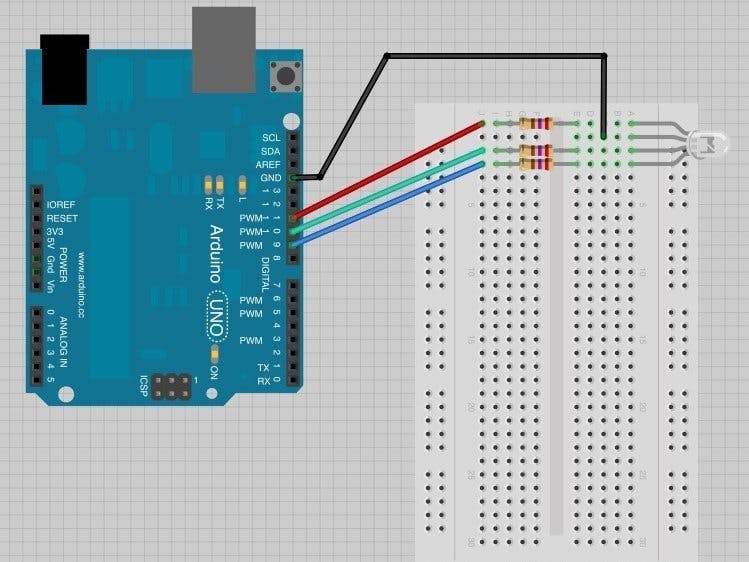
// Define Pins
#define BLUE 3
#define GREEN 5
#define RED 6

void setup()
{
pinMode(RED, OUTPUT);
pinMode(GREEN, OUTPUT);
pinMode(BLUE, OUTPUT);
digitalWrite(RED, HIGH);
digitalWrite(GREEN, LOW);
digitalWrite(BLUE, LOW);
}

// define variables
int redValue;
int greenValue;
int blueValue;

// main loop
void loop()
{
#define delayTime 10 // fading time between colors

redValue = 255; // choose a value between 1 and 255 to change the color.
greenValue = 0;
blueValue = 0;

// this is unnecessary as we've either turned on RED in SETUP
// or in the previous loop ... regardless, this turns RED off
// analogWrite(RED, 0);
// delay(1000);

for(int i = 0; i < 255; i += 1) // fades out red bring green full when i=255
{
redValue -= 1;
greenValue += 1;
// The following was reversed, counting in the wrong directions
// analogWrite(RED, 255 - redValue);
// analogWrite(GREEN, 255 - greenValue);
analogWrite(RED, redValue);
analogWrite(GREEN, greenValue);
delay(delayTime);
}

redValue = 0;
greenValue = 255;
blueValue = 0;

for(int i = 0; i < 255; i += 1) // fades out green bring blue full when i=255
{
greenValue -= 1;
blueValue += 1;
// The following was reversed, counting in the wrong directions
// analogWrite(GREEN, 255 - greenValue);
// analogWrite(BLUE, 255 - blueValue);
analogWrite(GREEN, greenValue);
analogWrite(BLUE, blueValue);
delay(delayTime);
}

redValue = 0;
greenValue = 0;
blueValue = 255;

for(int i = 0; i < 255; i += 1) // fades out blue bring green full when i=255
{
// The following code has been rearranged to match the other two similar sections
blueValue -= 1;
redValue += 1;
// The following was reversed, counting in the wrong directions
// analogWrite(BLUE, 255 - blueValue);
// analogWrite(RED, 255 - redValue);
analogWrite(BLUE, blueValue);
analogWrite(RED, redValue);
delay(delayTime);
}
}





_ztBMuBhMHo.jpg?auto=compress%2Cformat&w=48&h=48&fit=fill&bg=ffffff)



Comments