



Hardware components | ||||||
 |
| × | 1 | |||
| × | 1 | ||||
 |
| × | 1 | |||
 |
| × | 1 | |||
Software apps and online services | ||||||
 |
| |||||
Hand tools and fabrication machines | ||||||
 |
| |||||
First, I would like to thank all the Frontliners who are risking their lives everyday and I hope you guys are all doing OK [Yes, you too] despite the pandemic.
Welcome to Part 2 of the Bike Turn Signal Project Series.
This video would mostly consist small code changes and power draw tests.
I received the new pair of WS2812B matrices as replacement for the broken ones a few days before making the video.
I initially tried to use delays for the "blink" effect and opted to use FastLED's EVERY_N_MILLISECONDS instead.
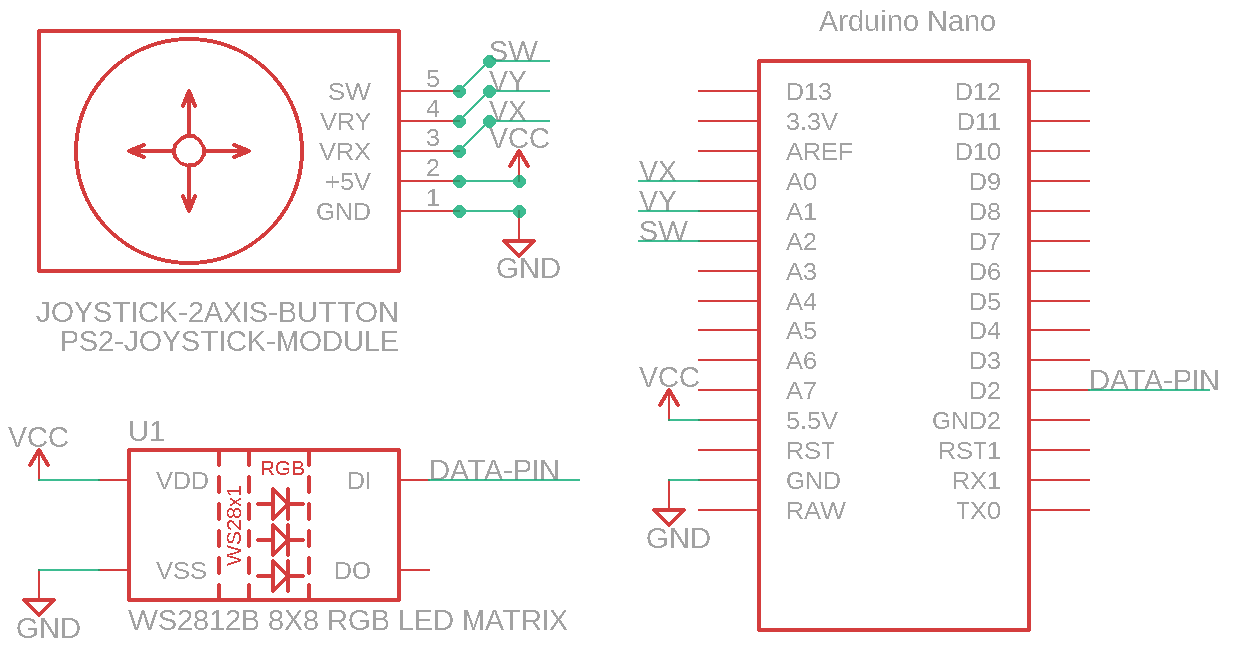
On this project, I would still use the same ArduinoNANO, 8x8 RGB LED Matrix and PS2 Joystick Module.
I would also use my DIY Powerbank for the power source.
******************************************************************************
Social Media Links To Follow (I mean, if you want to):******************************************************************************

#include "FastLED.h"  // Include FastLED Library
#define Vx A0 // Define / Equate "Vx" with A0, the pin where Vx is connected
#define Vy A1 // Define / Equate "Vy" with A1, the pin where Vy is connected
#define Button A2 // Define / Equate Button with A2, the pin where the button is conne
#define NUM_LEDS 64 //  The number of LEDS on your matrix
#define DATA_PIN 2  //  Data-In of your matrix
#define BRIGHTNESS 64
CRGB leds[NUM_LEDS];


void setup() {


  pinMode(Vx, INPUT); // Configure Vx (A0) as an Input
  pinMode(Vy, INPUT); // Configure Vy (A1) as an Input
  pinMode(Button, INPUT_PULLUP); // Configure Button (A2) as an Input, internally "pulled-up" to 5v
  FastLED.addLeds<WS2812B, DATA_PIN, GRB>(leds, NUM_LEDS);
  Serial.begin(9600);

}

void loop() {

  if (analogRead(Vx) <= 50) { // X-Axis Left
    LeftArrowBlink();
  }
  if (analogRead(Vx) >= 900) { // X-Axis Right
    RightArrowBlink();
  }
  if (analogRead(Vy) <= 50) { // Y-Axis Up
    BlinkGreen();
  }
  if (analogRead(Vy) >= 900) { // Y-Axis Down
    BlinkRed();
  }
  if (digitalRead(Button) == 0) { // Clear / Reset
    Clear();
  }
}


void LeftArrowBlink() { // Function that is called when Vx is <= 80 and shows a Left Blinking Arrow on the matrix


  FastLED.clear();
  leds[3] = CRGB(255, 18, 0);
  leds[4] = CRGB(255, 18, 0);
  leds[11] = CRGB(255, 18, 0);
  leds[12] = CRGB(255, 18, 0);
  leds[19] = CRGB(255, 18, 0);
  leds[20] = CRGB(255, 18, 0);
  leds[24] = CRGB(255, 18, 0);
  leds[27] = CRGB(255, 18, 0);
  leds[28] = CRGB(255, 18, 0);
  leds[31] = CRGB(255, 18, 0);
  leds[32] = CRGB(255, 18, 0);
  leds[33] = CRGB(255, 18, 0);
  leds[35] = CRGB(255, 18, 0);
  leds[36] = CRGB(255, 18, 0);
  leds[38] = CRGB(255, 18, 0);
  leds[39] = CRGB(255, 18, 0);
  leds[41] = CRGB(255, 18, 0);
  leds[42] = CRGB(255, 18, 0);
  leds[43] = CRGB(255, 18, 0);
  leds[44] = CRGB(255, 18, 0);
  leds[45] = CRGB(255, 18, 0);
  leds[46] = CRGB(255, 18, 0);
  leds[50] = CRGB(255, 18, 0);
  leds[51] = CRGB(255, 18, 0);
  leds[52] = CRGB(255, 18, 0);
  leds[53] = CRGB(255, 18, 0);
  leds[59] = CRGB(255, 18, 0);
  leds[60] = CRGB(255, 18, 0);
  FastLED.setBrightness(BRIGHTNESS);
  FastLED.show();
  delay(500);
  FastLED.clear();
  FastLED.show();
  delay(500);
}


void RightArrowBlink()  {// Function that is called when Vx is >= 1000 and shows a Right Blinking Arrow on the matrix

  FastLED.clear();
  leds[3] = CRGB(255, 18, 0);
  leds[4] = CRGB(255, 18, 0);
  leds[10] = CRGB(255, 18, 0);
  leds[11] = CRGB(255, 18, 0);
  leds[12] = CRGB(255, 18, 0);
  leds[13] = CRGB(255, 18, 0);
  leds[17] = CRGB(255, 18, 0);
  leds[18] = CRGB(255, 18, 0);
  leds[19] = CRGB(255, 18, 0);
  leds[20] = CRGB(255, 18, 0);
  leds[21] = CRGB(255, 18, 0);
  leds[22] = CRGB(255, 18, 0);
  leds[24] = CRGB(255, 18, 0);
  leds[25] = CRGB(255, 18, 0);
  leds[27] = CRGB(255, 18, 0);
  leds[28] = CRGB(255, 18, 0);
  leds[30] = CRGB(255, 18, 0);
  leds[31] = CRGB(255, 18, 0);
  leds[32] = CRGB(255, 18, 0);
  leds[35] = CRGB(255, 18, 0);
  leds[36] = CRGB(255, 18, 0);
  leds[39] = CRGB(255, 18, 0);
  leds[43] = CRGB(255, 18, 0);
  leds[44] = CRGB(255, 18, 0);
  leds[51] = CRGB(255, 18, 0);
  leds[52] = CRGB(255, 18, 0);
  leds[59] = CRGB(255, 18, 0);
  leds[60] = CRGB(255, 18, 0);
  FastLED.setBrightness(BRIGHTNESS);
  FastLED.show();
  delay(500);
  FastLED.clear();
  FastLED.show();
  delay(500);

}


void BlinkGreen()  {// Function that is called when Vy is <= 10 and shows a blinking solid_fill of Green LEDs on the matrix
  FastLED.clear();
  fill_solid (leds, NUM_LEDS, CRGB::Green);
  FastLED.setBrightness(BRIGHTNESS);
  FastLED.show();
  delay(500);
  FastLED.clear();
  FastLED.show();
  delay(500);
}


void BlinkRed()  {// Function that is called when Vy is >= 1000 and shows a blinking solid_fill of Red LEDs on the matrix
  FastLED.clear();
  fill_solid (leds, NUM_LEDS, CRGB::Red);
  FastLED.setBrightness(BRIGHTNESS);
  FastLED.show();
  delay(500);
  FastLED.clear();
  FastLED.show();
  delay(500);
}


void Clear()  {

  FastLED.clear();
  FastLED.show();
}
#include "FastLED.h"  // Include FastLED Library
#define Vx A0 // Define / Equate "Vx" with A0, the pin where Vx is connected
#define Vy A1 // Define / Equate "Vy" with A1, the pin where Vy is connected
#define Button A2 // Define / Equate Button with A2, the pin where the button is conne
#define NUM_LEDS 64 //  The number of LEDS on your matrix
#define DATA_PIN 2  //  Data-In of your matrix
#define BRIGHTNESS 20 //  Set Brightness Level

CRGB leds[NUM_LEDS];

//Setup booleans and variables here:
boolean XL, XR, YU, YD, BT0, BT1;
int xAxisLeft = 80;
int xAxisRight = 700;
int yAxisUp = 50;
int yAxisDown = 700;

void setup() {

  pinMode(Vx, INPUT); // Configure Vx (A0) as an Input
  pinMode(Vy, INPUT); // Configure Vy (A1) as an Input
  pinMode(Button, INPUT_PULLUP); // Configure Button (A2) as an Input, internally "pulled-up" to 5V
  // Note, we're configuring an Analog input as digital input
  // which is perfectly fine.  I did this to make the wiring easier
  // and keep all of the wires on the same side of the board
  FastLED.addLeds<WS2812B, DATA_PIN, GRB>(leds, NUM_LEDS);
  FastLED.setBrightness(BRIGHTNESS);
}

void loop() {

  // Unblock this part to see the values on serial monitor, then setup your values for the Joystick
  /* Serial.begin(9600);
     Serial.print(x);  // Print the X value to the serial port
     Serial.print("\t"); // Print a Tab character
     Serial.print(y);  // Print the Y value
     Serial.print("\t"); // Print a Tab
     Serial.println(btn); // Print the value of the Btn (0=Pushed, 1 = Not Pushed)
     delay(250); // Delay 250ms so the results don't print too quickly */

  //X-AXIS
  if (analogRead(Vx) <= xAxisLeft) { // Read the value of Vx and if it's *less than or equal to* xAxisLeft which is 80.
    BT0 = false;
    BT1 = true; // BT1 is set to true, because when the button is open (unpushed), the input will read High (+5V). When the button is closed (pressed), the input pin is connected to ground and will read Low (0V).
    XL = true;  // XL is set to true, because we will call it together with the function LeftArrowBlink();
    XR = false;
    YU = false;
    YD = false;
  }

  else if (analogRead(Vx) > xAxisRight) { // Read the value of Vx and if it's *greater than* xAxisRight which is 1000.
    BT0 = false;
    BT1 = true; // BT1 is set to true, because when the button is open (unpushed), the input will read High (+5V). When the button is closed (pressed), the input pin is connected to ground and will read Low (0V).
    XR = true;  // XR is set to true, because we will call it together with the function RightArrowBlink();
    XL = false;
    YU = false;
    YD = false;
  }

  //Y-AXIS
  if (analogRead(Vy) <= yAxisUp) { // Read the value of Vy and if it's *less than or equal to* yAxisUp which is 50.
    BT0 = false;
    BT1 = true; // BT1 is set to true, because when the button is open (unpushed), the input will read High (+5V). When the button is closed (pressed), the input pin is connected to ground and will read Low (0V).
    YU = true;  // YU is set to true, because we will call it together with the function BlinkGreen();
    YD = false;
    XL = false;
    XR = false;
  }
  else if (analogRead(Vy) > yAxisDown) { // Read the value of Vy and if it's *greater than* yAxisDown which is 700.
    BT0 = false;
    BT1 = true; // BT1 is set to true, because when the button is open (unpushed), the input will read High (+5V). When the button is closed (pressed), the input pin is connected to ground and will read Low (0V).
    YD = true;  // YD is set to true, because we will call it together with the function BlinkRed();
    YU = false;
    XL = false;
    XR = false;
  }
  if (digitalRead(Button) == BT0) { // Read the value of Button and if it *is equal to* BT0 which is 0.
    BT0 = true; // BT0 is set to true, because when the button is closed (pressed), the input pin is connected to ground and will read Low (0V).
    BT1 = false;// BT1 is set to false, because BT0 is active.
    YD = false;
    YU = false;
    XL = false;
    XR = false;
  }
  // booleans + Functions.
  if (XL) LeftArrowBlink();
  if (XR) RightArrowBlink();
  if (YU) BlinkGreen();
  if (YD) BlinkRed();
  if (BT0) Clear();
}
void LeftArrowBlink() {         // Being called when XL is set to true (active)
  EVERY_N_MILLISECONDS(500) {   // I set EVERY_N_MILLISECONDS to different values, because something weird is happening when they are the same and IDK why.
    FastLED.clear();            // To clear any active LEDs before activating LeftArrowBlink();
    leds[3] = CRGB(255, 18, 0);
    leds[4] = CRGB(255, 18, 0);
    leds[11] = CRGB(255, 18, 0);
    leds[12] = CRGB(255, 18, 0);
    leds[19] = CRGB(255, 18, 0);
    leds[20] = CRGB(255, 18, 0);
    leds[24] = CRGB(255, 18, 0);
    leds[27] = CRGB(255, 18, 0);
    leds[28] = CRGB(255, 18, 0);
    leds[31] = CRGB(255, 18, 0);
    leds[32] = CRGB(255, 18, 0);
    leds[33] = CRGB(255, 18, 0);
    leds[35] = CRGB(255, 18, 0);
    leds[36] = CRGB(255, 18, 0);
    leds[38] = CRGB(255, 18, 0);
    leds[39] = CRGB(255, 18, 0);
    leds[41] = CRGB(255, 18, 0);
    leds[42] = CRGB(255, 18, 0);
    leds[43] = CRGB(255, 18, 0);
    leds[44] = CRGB(255, 18, 0);
    leds[45] = CRGB(255, 18, 0);
    leds[46] = CRGB(255, 18, 0);
    leds[50] = CRGB(255, 18, 0);
    leds[51] = CRGB(255, 18, 0);
    leds[52] = CRGB(255, 18, 0);
    leds[53] = CRGB(255, 18, 0);
    leds[59] = CRGB(255, 18, 0);
    leds[60] = CRGB(255, 18, 0);
    FastLED.setBrightness(BRIGHTNESS); // Defined brightness setting
    FastLED.show();
  }
  EVERY_N_MILLISECONDS(1000) {  // 2nd FastLED *delay* that clears LeftArrowBlink(); then activates it again to imitate blinking.
    FastLED.clear();
    FastLED.show();
  }
}
void RightArrowBlink() {         // Being called when XR is set to true (active)
  EVERY_N_MILLISECONDS(500) {
    FastLED.clear();            // To clear any active LEDs before activating RightArrowBlink();
    leds[3] = CRGB(255, 18, 0);
    leds[4] = CRGB(255, 18, 0);
    leds[10] = CRGB(255, 18, 0);
    leds[11] = CRGB(255, 18, 0);
    leds[12] = CRGB(255, 18, 0);
    leds[13] = CRGB(255, 18, 0);
    leds[17] = CRGB(255, 18, 0);
    leds[18] = CRGB(255, 18, 0);
    leds[19] = CRGB(255, 18, 0);
    leds[20] = CRGB(255, 18, 0);
    leds[21] = CRGB(255, 18, 0);
    leds[22] = CRGB(255, 18, 0);
    leds[24] = CRGB(255, 18, 0);
    leds[25] = CRGB(255, 18, 0);
    leds[27] = CRGB(255, 18, 0);
    leds[28] = CRGB(255, 18, 0);
    leds[30] = CRGB(255, 18, 0);
    leds[31] = CRGB(255, 18, 0);
    leds[32] = CRGB(255, 18, 0);
    leds[35] = CRGB(255, 18, 0);
    leds[36] = CRGB(255, 18, 0);
    leds[39] = CRGB(255, 18, 0);
    leds[43] = CRGB(255, 18, 0);
    leds[44] = CRGB(255, 18, 0);
    leds[51] = CRGB(255, 18, 0);
    leds[52] = CRGB(255, 18, 0);
    leds[59] = CRGB(255, 18, 0);
    leds[60] = CRGB(255, 18, 0);
    FastLED.setBrightness(BRIGHTNESS);
    FastLED.show();
  }
  EVERY_N_MILLISECONDS(1000) {  // 2nd FastLED *delay* that clears RightArrowBlink(); then activates it again to imitate blinking.
    FastLED.clear();
    FastLED.show();
  }
}

void BlinkGreen() {             // Being called when YU is set to true (active)
  EVERY_N_MILLISECONDS(500) {
    FastLED.clear();            // To clear any active LEDs before activating BlinkGreen();
    fill_solid (leds, NUM_LEDS, CRGB::Green);
    FastLED.setBrightness(BRIGHTNESS);
    FastLED.show();
  }
  EVERY_N_MILLISECONDS(1000) {  // 2nd FastLED *delay* that clears RightArrowBlink(); then activates it again to imitate blinking.
    FastLED.clear();
    FastLED.show();
  }
}
void BlinkRed() {               // Being called when YD is set to true (active)
  EVERY_N_MILLISECONDS(500) {
    FastLED.clear();            // To clear any active LEDs before activating BlinkRed();
    fill_solid (leds, NUM_LEDS, CRGB::Red);
    FastLED.setBrightness(BRIGHTNESS);
    FastLED.show();
  }
  EVERY_N_MILLISECONDS(1000) {  // 2nd FastLED *delay* that clears RightArrowBlink(); then activates it again to imitate blinking.
    FastLED.clear();
    FastLED.show();
  }
}

void Clear()  {               // Being called when BT0 is set to true (active)

  FastLED.clear();            // To clear any active LEDs
  FastLED.show();
}



Comments