



Hardware components | ||||||
 |
| × | 1 | |||
Have you ever wanted to monitor your battery pack or power supply remotely without being tied to a multimeter? This project addresses that need. In this blog, I will guide you through the process of building a Wi-Fi-connected power meter that can measure up to 30A of current. You will have access to a live web dashboard displaying voltage, current, and wattage, which can be viewed on your phone or browser.
This build features a custom PCB, a 3D-printed enclosure, and a compact ESP32-based microcontroller, resulting in a clean and professional-looking device that is genuinely useful in real-world application
- ✅ Measure voltage, current, and wattage in real time
- ✅ Up to 30A current measurement
- ✅ Wi-Fi connected — monitor from any browser on your network
- ✅ Live dashboard via IP address — no app needed
- ✅ Great for battery packs, power supplies, and automotive use
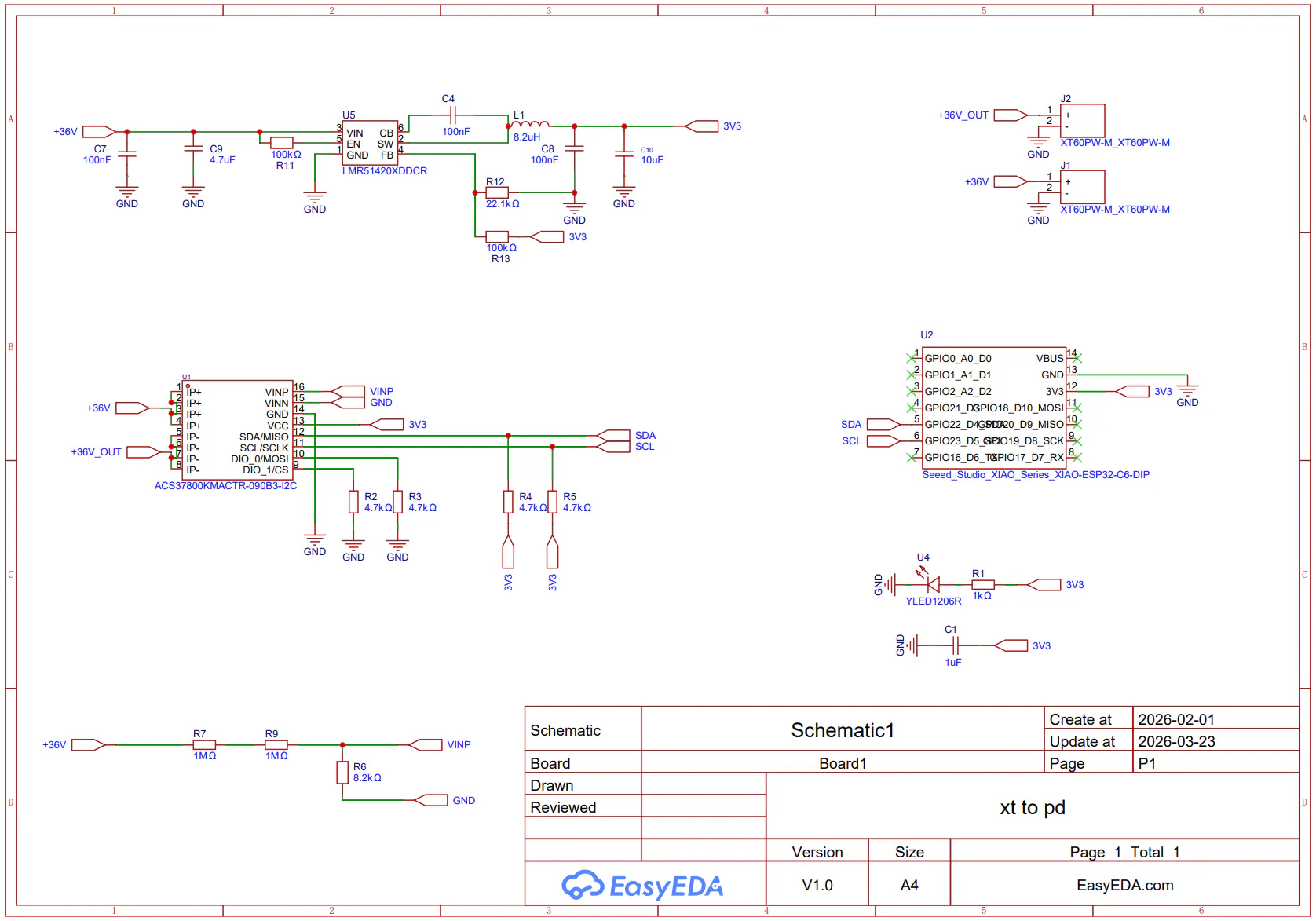
find all the BOM components in the PCB file. Here are some of the main components.
- Seeed Studio XIAO ESP32-C6
- ACS37800
- 2*XT60PW30 Male Connector
The heart of this build is the ACS37800 — a power monitoring IC from Allegro that can measure both current (via a shunt) and line voltage over I2C. This makes wiring incredibly simple: only four wires connect it to the ESP32-C6 (VCC, GND, SDA, SCL).
The XIAO ESP32-C6 was chosen because of its tiny footprint, built-in Wi-Fi, and enough GPIO for this project. It reads power data from the ACS37800 over I2C and hosts a lightweight web server that streams live readings to any connected browser.
Step 2: Designing and Ordering the PCBI designed the PCB using EasyEDA (which integrates directly with JLCPCB for ordering). The design keeps everything compact so it fits neatly inside the enclosure.
Once the design was ready, I exported the Gerber files and placed the order on JLCPCB. I opted for the white PCB finish to match the enclosure aesthetic.
The enclosure was designed in Fusion 360 to snugly fit the PCB with minimal play. I added cutouts for: XT60, USBC and WIFI
I ordered the print from JLC3DP in 8001 transparent resin — this gives the enclosure a frosted, premium look while still letting you see the PCB inside. The result looks far more polished than a standard FDM print.
Assembling the PCBWith the PCB and components in hand, it's time to solder everything up.
I hand-soldered all of the SMD components for the project.
If you're skilled enough, you can do it, but it's better to create a PCBA for this project. If you need a pick and place file for this project, let me know in the comments.
On the front side of the PCB, we will place the Xiao and the voltage regulator. On the back side of the PCB, we will position the current sensor. Additionally, ensure that you apply some solder to the exposed positive contact, as this is a high current path. You may also solder some copper wire to this exposed pad to create a better pathway for high current flow.
Step 5: Installing Into the EnclosurePlace the PCB onto the back panel. After that, use four M3 X 10mm screws to secure everything.
So we're done with building
Step 6: Flashing the FirmwareYou can upload this code to Xiao. Just change the password and SSID in the code. Also, make sure to install the SparkFun_ACS37800_Arduino_Library.
/*
============================================================
DC POWER MONITOR — XIAO ESP32-C6 + ACS37800
Max rating: 36V DC / 30A
Web dashboard served over home WiFi
============================================================
*/
#include <Arduino.h>
#include "SparkFun_ACS37800_Arduino_Library.h"
#include <Wire.h>
#include <WiFi.h>
#include <WebServer.h>
#include <ArduinoJson.h>
// ── WiFi credentials ─────────────────────────────────────
const char* WIFI_SSID = "YOUR_WIFI_SSID";
const char* WIFI_PASSWORD = "YOUR_WIFI_PASSWORD";
// ── Hardware limits (ACS37800 30A variant, 36V DC max) ───
constexpr float MAX_VOLTAGE = 36.0f;
constexpr float MAX_CURRENT = 30.0f;
// ── Calibration ───────────────────────────────────────────
// CURRENT_SCALE: calibrated against a 2.000 A reference load (reads 1.916 A)
// → new scale = old_scale × (true / read) = 2.882 × (2.000 / 1.916) = 3.008
// To recalibrate: CURRENT_SCALE = true_amps / sensor_raw_amps_before_scaling
constexpr float CURRENT_SCALE = 3.008f;
// CURRENT_OFFSET: zero-load current offset (amps), captured at startup.
// Auto-zeroed in setup() — keep load disconnected at boot.
float gAmpsOffset = 0.0f;
// VOLTAGE_SCALE: calibrated from 3-point measurement
// 10V→10.11, 20V→20.27, 30V→30.43 (pure gain error, not offset)
// scale = true / read = 30.00 / 30.43 = 0.9859
// Cross-check: 10.11*0.9859=9.97V 20.27*0.9859=19.99V checkmark
// To recalibrate: VOLTAGE_SCALE = true_volts / displayed_volts
constexpr float VOLTAGE_SCALE = 0.9859f;
// ── Objects ───────────────────────────────────────────────
ACS37800 sensor;
WebServer server(80);
// ── Live readings (updated in loop) ──────────────────────
volatile float gVolts = 0.0f;
volatile float gAmps = 0.0f;
volatile float gWatts = 0.0f;
// ─────────────────────────────────────────────────────────
// HTML dashboard (stored in flash with PROGMEM)
// ─────────────────────────────────────────────────────────
const char INDEX_HTML[] PROGMEM = R"rawhtml(
<!DOCTYPE html>
<html lang="en">
<head>
<meta charset="UTF-8">
<meta name="viewport" content="width=device-width, initial-scale=1.0">
<title>Power Monitor</title>
<link rel="preconnect" href="https://fonts.googleapis.com">
<link rel="preconnect" href="https://fonts.gstatic.com" crossorigin>
<link href="https://fonts.googleapis.com/css2?family=Share+Tech+Mono&family=Barlow+Condensed:wght@300;600;800&display=swap" rel="stylesheet">
<style>
:root {
--bg: #0a0c0f;
--panel: #0f1318;
--border: #1e2530;
--accent: #00e5ff;
--accent2: #ff6b35;
--warn: #ffcc00;
--danger: #ff2244;
--text: #c8d8e8;
--dim: #4a5a6a;
--mono: 'Share Tech Mono', monospace;
--sans: 'Barlow Condensed', sans-serif;
}
*, *::before, *::after { box-sizing: border-box; margin: 0; padding: 0; }
html, body {
height: 100%;
background: var(--bg);
color: var(--text);
font-family: var(--sans);
overflow-x: hidden;
}
/* subtle scanline texture */
body::before {
content: '';
position: fixed; inset: 0;
background: repeating-linear-gradient(
0deg,
transparent,
transparent 2px,
rgba(0,229,255,0.015) 2px,
rgba(0,229,255,0.015) 4px
);
pointer-events: none;
z-index: 999;
}
/* ── top bar ── */
header {
display: flex;
align-items: center;
justify-content: space-between;
padding: 14px 24px;
border-bottom: 1px solid var(--border);
background: var(--panel);
}
.logo {
font-family: var(--sans);
font-weight: 800;
font-size: 1.15rem;
letter-spacing: 0.18em;
text-transform: uppercase;
color: var(--accent);
}
.logo span { color: var(--text); font-weight: 300; }
.status-dot {
width: 9px; height: 9px;
border-radius: 50%;
background: var(--accent);
box-shadow: 0 0 8px var(--accent);
animation: pulse 2s ease-in-out infinite;
}
@keyframes pulse {
0%,100% { opacity: 1; }
50% { opacity: 0.35; }
}
/* ── main grid ── */
main {
padding: 28px 20px 40px;
display: flex;
flex-direction: column;
gap: 18px;
max-width: 540px;
margin: 0 auto;
}
/* ── metric card ── */
.card {
background: var(--panel);
border: 1px solid var(--border);
border-radius: 4px;
padding: 20px 24px 18px;
position: relative;
overflow: hidden;
transition: border-color 0.3s;
}
.card::before {
content: '';
position: absolute;
top: 0; left: 0;
width: 3px; height: 100%;
background: var(--card-accent, var(--accent));
}
.card-label {
font-family: var(--sans);
font-weight: 600;
font-size: 0.7rem;
letter-spacing: 0.22em;
text-transform: uppercase;
color: var(--dim);
margin-bottom: 6px;
}
.card-value {
font-family: var(--mono);
font-size: 3.4rem;
line-height: 1;
color: var(--card-accent, var(--accent));
transition: color 0.3s;
letter-spacing: -0.02em;
}
.card-unit {
font-family: var(--sans);
font-weight: 300;
font-size: 1rem;
color: var(--dim);
margin-left: 6px;
vertical-align: baseline;
letter-spacing: 0.08em;
}
/* accent colours per card */
.card-v { --card-accent: #00e5ff; }
.card-a { --card-accent: #ff6b35; }
.card-w { --card-accent: #b4ff6e; }
/* ── bar gauge ── */
.gauge-wrap {
margin-top: 14px;
height: 4px;
background: var(--border);
border-radius: 2px;
overflow: hidden;
}
.gauge-fill {
height: 100%;
border-radius: 2px;
background: var(--card-accent, var(--accent));
transition: width 0.4s ease;
box-shadow: 0 0 6px var(--card-accent, var(--accent));
}
/* ── warn state ── */
.card.warn { border-color: var(--warn); }
.card.warn .card-value { color: var(--warn) !important; }
.card.warn .gauge-fill { background: var(--warn) !important; box-shadow: 0 0 6px var(--warn) !important; }
.card.danger { border-color: var(--danger); animation: blink-border 0.6s step-end infinite; }
.card.danger .card-value { color: var(--danger) !important; }
.card.danger .gauge-fill { background: var(--danger) !important; box-shadow: 0 0 6px var(--danger) !important; }
@keyframes blink-border {
0%,100% { border-color: var(--danger); }
50% { border-color: transparent; }
}
/* ── power factor strip ── */
.pf-row {
display: flex;
align-items: center;
justify-content: space-between;
background: var(--panel);
border: 1px solid var(--border);
border-radius: 4px;
padding: 14px 24px;
font-family: var(--mono);
font-size: 0.78rem;
color: var(--dim);
letter-spacing: 0.05em;
}
.pf-row strong { color: var(--text); font-family: var(--sans); font-weight: 600; font-size: 0.85rem; }
/* ── timestamp ── */
.ts {
text-align: center;
font-family: var(--mono);
font-size: 0.65rem;
color: var(--dim);
letter-spacing: 0.08em;
}
@media (min-width: 500px) {
.card-value { font-size: 4rem; }
}
</style>
</head>
<body>
<header>
<div class="logo">DC<span>meter</span></div>
<div class="status-dot" id="dot"></div>
</header>
<main>
<!-- Voltage -->
<div class="card card-v" id="card-v">
<div class="card-label">Voltage</div>
<div class="card-value" id="val-v">--.--<span class="card-unit">V</span></div>
<div class="gauge-wrap"><div class="gauge-fill" id="bar-v" style="width:0%"></div></div>
</div>
<!-- Current -->
<div class="card card-a" id="card-a">
<div class="card-label">Current</div>
<div class="card-value" id="val-a">--.--<span class="card-unit">A</span></div>
<div class="gauge-wrap"><div class="gauge-fill" id="bar-a" style="width:0%"></div></div>
</div>
<!-- Power -->
<div class="card card-w" id="card-w">
<div class="card-label">Power</div>
<div class="card-value" id="val-w">---.--<span class="card-unit">W</span></div>
<div class="gauge-wrap"><div class="gauge-fill" id="bar-w" style="width:0%"></div></div>
</div>
<!-- Quick stats row -->
<div class="pf-row">
<span>MAX 36V / 30A</span>
<strong id="load-pct">LOAD — %</strong>
<span id="ts-lbl">--:--:--</span>
</div>
<div class="ts" id="ts-full">waiting for data…</div>
</main>
<script>
const MAX_V = 36.0;
const MAX_A = 30.0;
const MAX_W = MAX_V * MAX_A; // 1080 W theoretical max
const elV = document.getElementById('val-v');
const elA = document.getElementById('val-a');
const elW = document.getElementById('val-w');
const barV = document.getElementById('bar-v');
const barA = document.getElementById('bar-a');
const barW = document.getElementById('bar-w');
const cardV = document.getElementById('card-v');
const cardA = document.getElementById('card-a');
const cardW = document.getElementById('card-w');
const dot = document.getElementById('dot');
const loadPct = document.getElementById('load-pct');
const tsLbl = document.getElementById('ts-lbl');
const tsFull = document.getElementById('ts-full');
function fmt(v, dec) { return (v >= 0 ? v : 0).toFixed(dec); }
function setCardState(card, pct, warnPct = 80, dangerPct = 95) {
card.classList.remove('warn', 'danger');
if (pct >= dangerPct) card.classList.add('danger');
else if (pct >= warnPct) card.classList.add('warn');
}
async function fetchData() {
try {
const r = await fetch('/data', { cache: 'no-store' });
if (!r.ok) throw new Error('bad response');
const d = await r.json();
const v = parseFloat(d.volts);
const a = parseFloat(d.amps);
const w = parseFloat(d.watts);
const pctV = Math.min((v / MAX_V) * 100, 100);
const pctA = Math.min((a / MAX_A) * 100, 100);
const pctW = Math.min((w / MAX_W) * 100, 100);
elV.innerHTML = fmt(v, 2) + '<span class="card-unit">V</span>';
elA.innerHTML = fmt(a, 2) + '<span class="card-unit">A</span>';
elW.innerHTML = fmt(w, 1) + '<span class="card-unit">W</span>';
barV.style.width = pctV.toFixed(1) + '%';
barA.style.width = pctA.toFixed(1) + '%';
barW.style.width = pctW.toFixed(1) + '%';
setCardState(cardV, pctV);
setCardState(cardA, pctA);
setCardState(cardW, pctW);
loadPct.textContent = 'LOAD ' + pctW.toFixed(0) + '%';
dot.style.background = '#00e5ff';
dot.style.boxShadow = '0 0 8px #00e5ff';
const now = new Date();
const hms = now.toTimeString().split(' ')[0];
tsLbl.textContent = hms;
tsFull.textContent = 'Last update: ' + now.toLocaleString();
} catch (e) {
dot.style.background = '#ff2244';
dot.style.boxShadow = '0 0 8px #ff2244';
tsFull.textContent = 'Connection lost — retrying…';
}
}
fetchData();
setInterval(fetchData, 500); // poll every 500 ms
</script>
</body>
</html>
)rawhtml";
// ─────────────────────────────────────────────────────────
// Route handlers
// ─────────────────────────────────────────────────────────
void handleRoot() {
server.send_P(200, "text/html", INDEX_HTML);
}
void handleData() {
// Build a tiny JSON: {"volts":12.34,"amps":1.50,"watts":18.51}
StaticJsonDocument<128> doc;
doc["volts"] = serialized(String(gVolts, 3));
doc["amps"] = serialized(String(gAmps, 3));
doc["watts"] = serialized(String(gWatts, 3));
String out;
serializeJson(doc, out);
server.sendHeader("Access-Control-Allow-Origin", "*");
server.sendHeader("Cache-Control", "no-cache");
server.send(200, "application/json", out);
}
void handleNotFound() {
server.send(404, "text/plain", "Not found");
}
// ─────────────────────────────────────────────────────────
// setup()
// ─────────────────────────────────────────────────────────
void setup() {
Serial.begin(115200);
delay(500);
Serial.println("\n=== DC Power Monitor — XIAO ESP32-C6 ===");
// ── I2C + sensor init ──────────────────────────────────
Wire.begin();
if (!sensor.begin()) {
Serial.println("[ERROR] ACS37800 not found. Check wiring / I2C address.");
while (true) { delay(1000); }
}
Serial.println("[OK] ACS37800 detected.");
// DC mode: fixed sample window (bypass zero-crossing detection)
sensor.setNumberOfSamples(1023, true); // max samples, write to EEPROM
sensor.setBypassNenable(true, true); // bypass N, write to EEPROM
// Explicitly set 30A current range (required — default may be wrong variant)
sensor.setCurrentRange(30);
// Give EEPROM writes time to settle before first read
delay(100);
// ── Auto zero-offset calibration ──────────────────────
// Boot with NO load connected. Takes 20 averaged samples to find baseline.
Serial.println("[CAL] Auto-zeroing current offset — disconnect load now...");
delay(2000); // 2 s window to disconnect load if needed
float offsetAccum = 0.0f;
const int CAL_SAMPLES = 20;
for (int i = 0; i < CAL_SAMPLES; i++) {
float cv = 0.0f, ca = 0.0f;
sensor.readRMS(&cv, &ca);
offsetAccum += ca;
delay(50);
}
gAmpsOffset = offsetAccum / CAL_SAMPLES;
Serial.printf("[CAL] Zero offset = %.4f A\n", gAmpsOffset);
// ── WiFi ───────────────────────────────────────────────
WiFi.mode(WIFI_STA);
WiFi.begin(WIFI_SSID, WIFI_PASSWORD);
Serial.print("[WiFi] Connecting");
uint8_t attempts = 0;
while (WiFi.status() != WL_CONNECTED && attempts < 30) {
delay(500);
Serial.print('.');
attempts++;
}
if (WiFi.status() == WL_CONNECTED) {
Serial.println();
Serial.print("[WiFi] Connected! IP: ");
Serial.println(WiFi.localIP());
Serial.println("[Web] Open http://" + WiFi.localIP().toString() + " in your browser");
} else {
Serial.println("\n[WiFi] Connection failed — check credentials.");
// Device keeps running; WiFi will auto-reconnect
}
// ── Web server routes ──────────────────────────────────
server.on("/", handleRoot);
server.on("/data", handleData);
server.onNotFound(handleNotFound);
server.begin();
Serial.println("[Web] HTTP server started on port 80");
}
// ─────────────────────────────────────────────────────────
// loop()
// ─────────────────────────────────────────────────────────
void loop() {
// Handle any incoming HTTP clients
server.handleClient();
// Read sensor (~every 250 ms)
static unsigned long lastRead = 0;
if (millis() - lastRead >= 250) {
lastRead = millis();
float v = 0.0f, a = 0.0f;
// readRMS() averages over the full 1023-sample window — correct for DC.
ACS37800ERR err = sensor.readRMS(&v, &a);
if (err != ACS37800_SUCCESS) {
Serial.printf("[WARN] readRMS error code: %d\n", (int)err);
}
// Apply calibration:
// 1. Subtract zero-load offset captured at boot
// 2. Multiply by scale factor (corrects for gain error)
float aCal = (a - gAmpsOffset) * CURRENT_SCALE;
float vCal = v * VOLTAGE_SCALE;
// For DC: P = V x I
float w = vCal * aCal;
// Clamp negatives (DC — no negative current expected in normal use)
gVolts = max(vCal, 0.0f);
gAmps = max(aCal, 0.0f);
gWatts = max(w, 0.0f);
// Safety: flag if limits are approached
if (gVolts > MAX_VOLTAGE * 0.95f || gAmps > MAX_CURRENT * 0.95f) {
Serial.printf("[WARN] Near limit — V:%.2f A:%.2f W:%.2f\n",
gVolts, gAmps, gWatts);
}
// Shows raw vs calibrated so you can fine-tune CURRENT_SCALE
Serial.printf("V: %6.3f A(raw): %+7.4f A(cal): %6.3f W: %7.3f\n",
v, a, gAmps, gWatts);
}
}Power the device up and wait a few seconds for it to connect to Wi-Fi. Then, from any browser on the same network, navigate to the IP address shown in the serial monitor.
for me it is 192.168.1.75
You'll see a live dashboard with:
- Voltage (V)
- Current (A)
- Power (W)
A huge thanks JLC3DP for supporting this project with their amazing 3D printing service.
LC3DP is the future of manufacturing, offering a user-friendly online platform for advanced 3D printing with:
- ✅ Instant quoting & real-time tracking
- ✅ 48-hour lead time & door-to-door delivery
- ✅ 20+ material options
- ✅ Enterprise-grade quality
- ✅ Prices starting at just $0.3, with up to $123in new user coupons!
✨ Try them out at JLC3DP.com
If you like my project and would like to see more projects,
you can buy me a coffee to keep supporting my work.


Comments