Published © CC BY-NC-SA

How to Control a Servo With Arduino

Lets control a Servo Motor with Arduino!

BeginnerShowcase (no instructions)30 minutes4,813
How to Control a Servo With Arduino

Things used in this project

Story

Read more

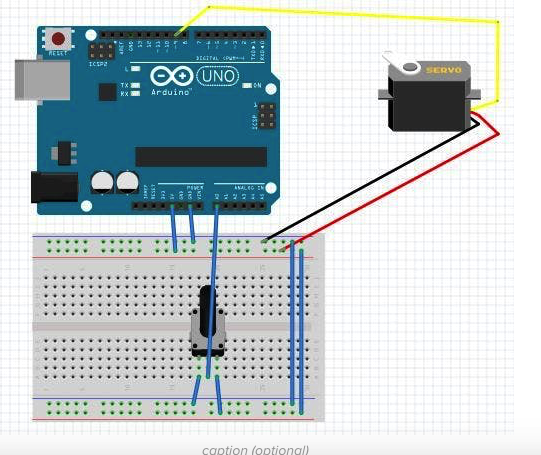
Schematics

snip20171223_4_4vqGOzS4uy.png

Code

Code snippet #1

Plain text
#include 

Servo myservo;  // create servo object to control a servo

int potpin = 0;  // analog pin used to connect the potentiometer
int val;    // variable to read the value from the analog pin

void setup() {
  myservo.attach(9);  // attaches the servo on pin 9 to the servo object
}

void loop() {
  val = analogRead(potpin);            // reads the value of the potentiometer (value between 0 and 1023)
  val = map(val, 0, 1023, 0, 180);     // scale it to use it with the servo (value between 0 and 180)
  myservo.write(val);                  // sets the servo position according to the scaled value
  delay(15);                           // waits for the servo to get there
}

Untitled file

Arduino
#include 
Servo myservo;  // create servo object to control a servo
int potpin = 0;  // analog pin used to connect the potentiometer
int val;    // variable to read the value from the analog pin
void setup() {
  myservo.attach(9);  // attaches the servo on pin 9 to the servo object
}
void loop() {
  val = analogRead(potpin);            // reads the value of the potentiometer (value between 0 and 1023)
  val = map(val, 0, 1023, 0, 180);     // scale it to use it with the servo (value between 0 and 180)
  myservo.write(val);                  // sets the servo position according to the scaled value
  delay(15);                           // waits for the servo to get there
} 

Credits

Comments