



Watch the full Video here - DIY 3D Printed Robotic Hand Controlled by Mobile | ESP32 + MG90 Servo Project | Full Build Guide
🧠 IntroductionIn this project, I’ll walk you through how to make a fully functional 3D Printed Robotic Hand that you can control using your mobile phone. This hand uses MG90S servo motors, an ESP32 development board, and a PCA9685 servo driver to smoothly control each finger.
Whether you're an electronics hobbyist, a robotics student, or a maker looking for your next DIY challenge, this tutorial will help you build your very own robotic hand from scratch — complete with 3D printed parts and a wireless control interface.
🎯 Features🖐️ 5-Finger robotic hand with palm and thumb📱 Mobile-controlled via Web UI (no app needed!)⚙️ Smooth motion using MG90S servo motors🧩 Fully 3D printed design🔌 ESP32 + PCA9685-based control system
🛒 Optional: You can get high-quality screws, nuts, and mechanical parts from JLCMC with fast delivery and amazing prices!
🖨️ Step 1: 3D Print the Robotic Hand PartsYou’ll need to 3D print the following components:
🖐️ Palm base👉 4 Finger segment
👍 Thumb segment
🔩 Servo holders for each joint
Recommended settings:
Material: PLA or PETG
Layer Height: 0.2 mm
Infill: 20%Supports: Enabled (for overhangs))
Once printed, clean up any rough edges using a file or sandpaper.
🔧 Step 2: Assemble the Mechanical StructureMount each MG90S servo into a servo holder using M3 screws.
- Mount each MG90S servo into a servo holder using M3 screws.
Attach servo holders to the palm using bolts.
- Attach servo holders to the palm using bolts.
Fix the fingers onto the servo arms using screws.
- Fix the fingers onto the servo arms using screws.
Repeat the process for all 4 fingers and finally the thumb.
- Repeat the process for all 4 fingers and finally the thumb.
Make sure all mechanical joints move freely and are properly aligned.
- Make sure all mechanical joints move freely and are properly aligned.
💡 Use MG90S instead of SG90 for better stability — SG90s can jitter and affect grip.
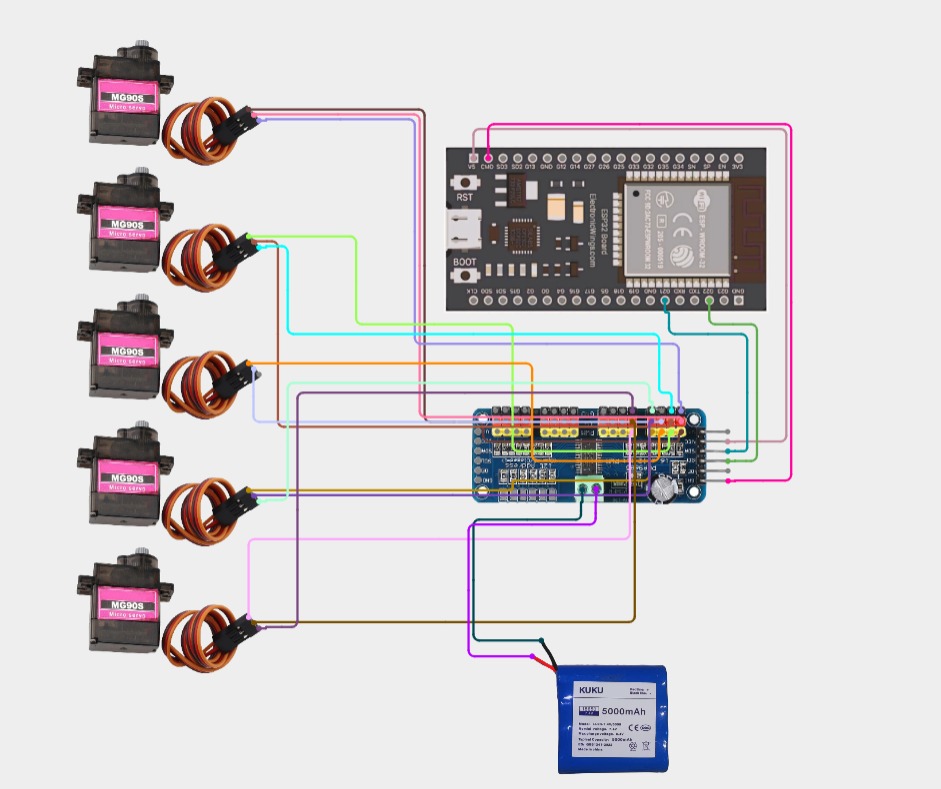
🔌 Step 3: Wiring the ElectronicsMake sure you power the servos externally with 5V 2A — do not run them from the ESP32's onboard 3.3V/5V.
🧠 Step 4: Code & Web InterfaceUpload the code using the Arduino IDE.
✅ Libraries Needed:Wire.hAdafruit_PWMServoDriver.hWiFi.hESPAsyncWebServer.h
🔗 [Get the full source code DM me]
After uploading, your ESP32 will host a simple web server interface with buttons to control each finger.
📱 Open the IP address on your mobile browser (shown in Serial Monitor), and start controlling the robotic hand in real-time!
Now that everything is set up:
Try gripping objects like bottles, pens, or even small tools.
Calibrate the servo angles in the code if any fingers don’t move correctly.Tune the motion for a smoother response.
🧼 Optional Improvements- Add feedback sensors for touch or pressure
- Use flex sensors on a glove for gesture control
- Add a Bluetooth interface for offline use
- Print in different colors for a custom aesthetic
This project was proudly sponsored by JLCMC. They provide high-quality mechanical parts like aluminum enclosures, gearboxes, shafts, and more — starting at just $0.5!
Why JLCMC?✅ Superfast global shipping ✅ Custom part selection ✅ High precision ✅ $70 welcome coupon with my link
🔗 [Sign up now and claim your $70 coupon –https://jlcmc.com/?from=elec]
Building a 3D Printed Robotic Hand is not just a fun project — it’s a great learning experience for those interested in robotics, servo control, and ESP32-based IoT systems.
You now have a functional robotic hand you can control from your phone! If you liked this project, don't forget to:
✅ Like ✅ Share ✅ Comment ✅ And follow me for more awesome build
Watch the full Video here - DIY 3D Printed Robotic Hand Controlled by Mobile | ESP32 + MG90 Servo Project | Full Build



Comments