



Hardware components | ||||||
 |
| × | 1 | |||
 |
| × | 1 | |||
 |
| × | 1 | |||
| × | 1 | ||||
Software apps and online services | ||||||
 |
| |||||
Hand tools and fabrication machines | ||||||
| ||||||
Overview
Key Features
How It Works
Firmware Highlights
Use Cases
Read moreThis project demonstrates how to build an IoT-enabled smart energy meter that measures real-time electrical parameters, including voltage, current, power, energy, frequency, and power factor. It displays these parameters locally, streams them online, and sends SMS alerts when abnormal conditions are detected. It uses an ESP32, a PZEM-004T energy sensor, and a lightweight MQTT dashboard for remote monitoring.
Smart Energy Meter Using IoT
- 📊 Real-time Power Monitoring — Tracks voltage, current, power, energy, frequency, and power factor.
- 🌐 Remote Dashboard — Uses MQTT to stream data to a web dashboard accessible from anywhere.
- 📩 SMS Alerts — Sends alerts via Circuit Digest Cloud API when abnormal conditions (e.g., high voltage) are detected.
- 🖥 Local Display — Shows values on a 16×2 LCD with anI2C interface.
Block Diagram
- Measurement: The PZEM-004T module measures AC parameters using its internal metering IC and an external current transformer
- Data Acquisition: ESP32 communicates with the PZEM via UART (Modbus) to read electrical values.
- Local Display: Values are shown on a 16×2 LCD in a rotating manner (e.g., voltage → current → power factor).
- Remote Streaming: ESP32 publishes the readings to an MQTT broker (e.g., HiveMQ) for dashboard visualisation.
- Alert Logic: When a parameter crosses a predefined threshold (e.g., voltage > 255 V), the ESP32 triggers an SMS alert via the Circuit Digest Cloud API.
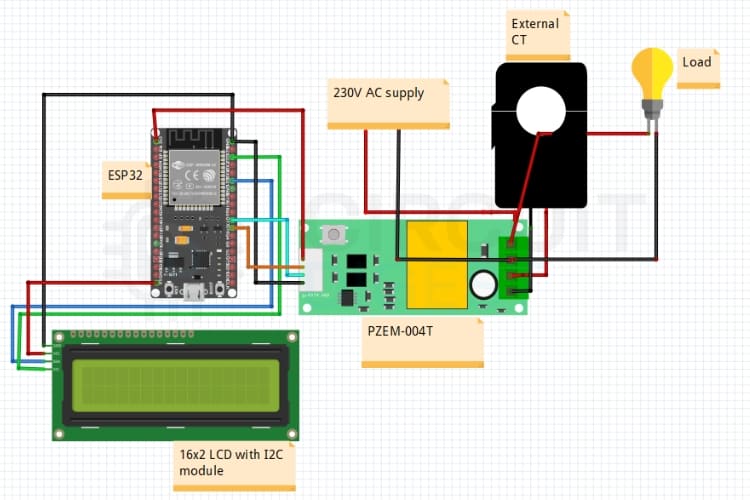
Circuit diagarm
- Libraries: Includes WiFi, MQTT, PZEM interface, and I2C LCD support.
- Parameter Loop: Continuously reads and publishes sensor data.
- SMS Trigger: Sends a JSON payload to Circuit Digest Cloud when an alert condition is met.
- Dashboard Support: Web interface connects to MQTT over WebSockets for dynamic updates.
- Save the provided HTML file from the project repo.
- Open it in a browser.
- Configure the MQTT broker URL to match your setup (e.g., ws://broker.hivemq.com:8000/mqtt).
Dashboard
- 🏠 Home Energy Monitoring — Track real consumption from anywhere.
- ⚡ Safety Alerts — Get notified about overloads or faults.
- 🧰 DIY Power Analytics — Base platform for automation and analytics.
- If the current reads zero, ensure the CT clamp is placed correctly around the live conductor only.
- Incorrect LCD output often means wrong I2C address — try scanning 0x27 or 0x3F
- Stable Wi-Fi is needed for SMS alerts via the API.
This Smart Energy Meter Using IoT brings local and remote power monitoring together with alerting capability, making it an excellent choice for makers and home automation enthusiasts. With minimal hardware and open protocols like MQTT and HTTP, you gain both visibility and safety insights into your electrical system.


Comments