



Hardware components | ||||||
| × | 1 | ||||
| × | 1 | ||||
 |
| × | 1 | |||
 |
| × | 1 | |||
 |
| × | 1 | |||
 |
| × | 1 | |||
Software apps and online services | ||||||
 |
| |||||
Hand tools and fabrication machines | ||||||
| ||||||
Text-to-Speech (TTS) allows devices to convert written text into spoken audio. It is commonly used in voice assistants, accessibility tools, alert systems, and smart devices. While computers can generate speech locally, microcontrollers usually lack the processing power and memory required for high-quality speech synthesis.
In this ESP32 C3 Text to Speech using AI, we build a cloud-based Text-to-Speech system using the ESP32-C3. The microcontroller sends text to the Wit.ai AI speech API, which converts the text into audio and streams it back to the device. The ESP32-C3 then plays the audio through an I2S amplifier and speaker.
This approach allows even small embedded devices to produce natural-sounding speech without running complex AI models locally.
Instead of generating speech directly on the microcontroller, the ESP32-C3 uses a cloud-based workflow:
- The ESP32-C3 connects to Wi-Fi.
- Text is sent to the Wit.ai API.
- Wit.ai converts the text into audio.
- The generated audio is streamed back to the ESP32-C3.
- The audio is played through an I2S amplifier and speaker.
This method keeps the firmware lightweight while still enabling high-quality speech output.
To build this project, you will need:
- ESP32-C3 development board
- MAX98357A I2S digital amplifier
- 4Ω or 8Ω speaker
- Breadboard
- Jumper wires
- USB cable for programming and power
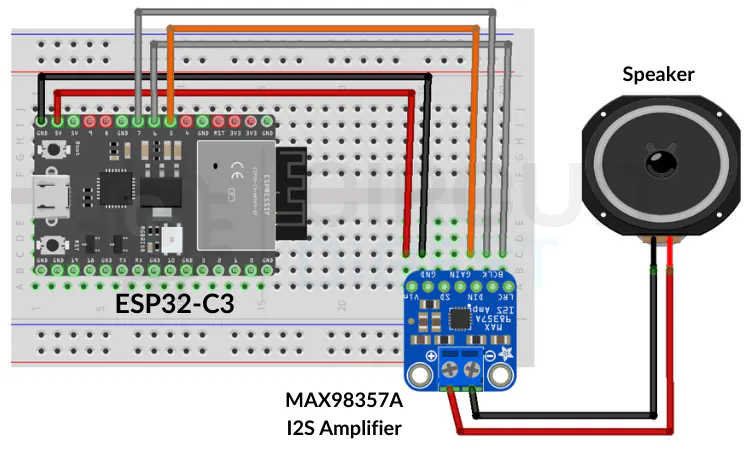
Connect the ESP32-C3 to the MAX98357A amplifier using the I2S interface.
ESP32-C3 Pin MAX98357A Pin Function
GPIO07 BCLK Bit Clock
GPIO06 LRC Left/Right Clock
GPIO05 DIN Audio Data
5V VIN Power
GND GND Ground
The amplifier drives the speaker and plays the audio generated by the cloud TTS service.
Before uploading the code, create a Wit.ai account and obtain an API token.
Steps:
- Create an account on the Wit.ai platform.
- Create a new application.
- Navigate to the settings page.
- Copy the Server Access Token.
- Use this token in your Arduino sketch for authentication.
The token allows your ESP32-C3 to securely communicate with the Wit.ai servers.
Installing the Required LibraryThe project uses the WitAITTS Arduino library, which handles:
- Wi-Fi connection
- HTTPS communication
- Audio streaming
- MP3 decoding
- I2S audio playback
Install it using the Arduino Library Manager:
- Open Arduino IDE
- Go to Library Manager
- Search for WitAITTS
- Click Install
Then open the example sketch:
File → Examples → WitAITTS → ESP32_C3_Basic
Update the following values in the code:
- Wi-Fi SSID
- Wi-Fi password
- Wit.ai API token
#include <WitAITTS.h>
const char* WIFI_SSID = "YourWiFiSSID";
const char* WIFI_PASSWORD = "YourWiFiPassword";
const char* WIT_TOKEN = "YOUR_WIT_AI_TOKEN_HERE";
WitAITTS tts;
void setup() {
Serial.begin(115200);
if (tts.begin(WIFI_SSID, WIFI_PASSWORD, WIT_TOKEN)) {
tts.setVoice("wit$Remi");
tts.setSpeed(100);
tts.setPitch(100);
}
}
void loop() {
tts.loop();
if (Serial.available()) {
String text = Serial.readStringUntil('\n');
text.trim();
if (text.length() > 0) {
tts.speak(text);
}
}
}- Upload the sketch to the ESP32-C3.
- Open the Serial Monitor.
- Type any sentence and press Enter.
- The ESP32 sends the text to Wit.ai.
- The generated speech will play through the speaker.
Because the audio is streamed, playback begins quickly without downloading the full file first.
Advantages of Cloud-Based TTS- High-quality AI voices
- Minimal memory usage on the microcontroller
- Support for multiple languages and voices
- Ability to speak dynamic text at runtime
- Simpler firmware implementation
This type of system can be used in many embedded and IoT projects, including:
- Smart home voice alerts
- Sensor notification systems
- Assistive devices for visually impaired users
- Interactive learning tools
- IoT devices with spoken status updates
This project demonstrates how to add AI-powered text-to-speech to an ESP32-C3 using a cloud-based approach. By combining Wi-Fi connectivity, the Wit.ai API, and an I2S audio amplifier, even a small microcontroller can deliver clear and natural voice output.
The design is lightweight, scalable, and ideal for IoT projects that require voice feedback without the complexity of running speech models locally.
Explore more hands-on AI builds and tutorials in the complete collection of embedded AI projects on CircuitDigest.


Comments