



Hardware components | ||||||
 |
| × | 1 | |||
 |
| × | 4 | |||
 |
| × | 1 | |||
Software apps and online services | ||||||
 |
| |||||
Hand tools and fabrication machines | ||||||
| ||||||
Bring your own custom Arduino game controller to life! In this project, you’ll build a USB game controller that connects to your PC and sends keyboard inputs based on joystick moves and button presses. This controller works with most games because it emulates a standard keyboard — no drivers required.
You’ll assemble an Arduino-powered game controller with:
- A 2-axis joystick for directional input
- Four push buttons for action controls
- USB keyboard emulation so your computer recognizes your controller instantly
- Arduino Uno R4 – Main controller with native USB HID support
- Analog Joystick Module – Reads X and Y motion
- Push Buttons (×4) – For actions like jump/shoot
- Veroboard – For a neat build
- Jumper wires and soldering tools
When connected via USB, the Arduino appears as a keyboard to your PC. It continuously reads:
Joystick movement, converting it into arrow key presses
Button presses, mapped to keys like W, A, S, D
This lets you control games that accept keyboard input — covering most PC games with no special setup.
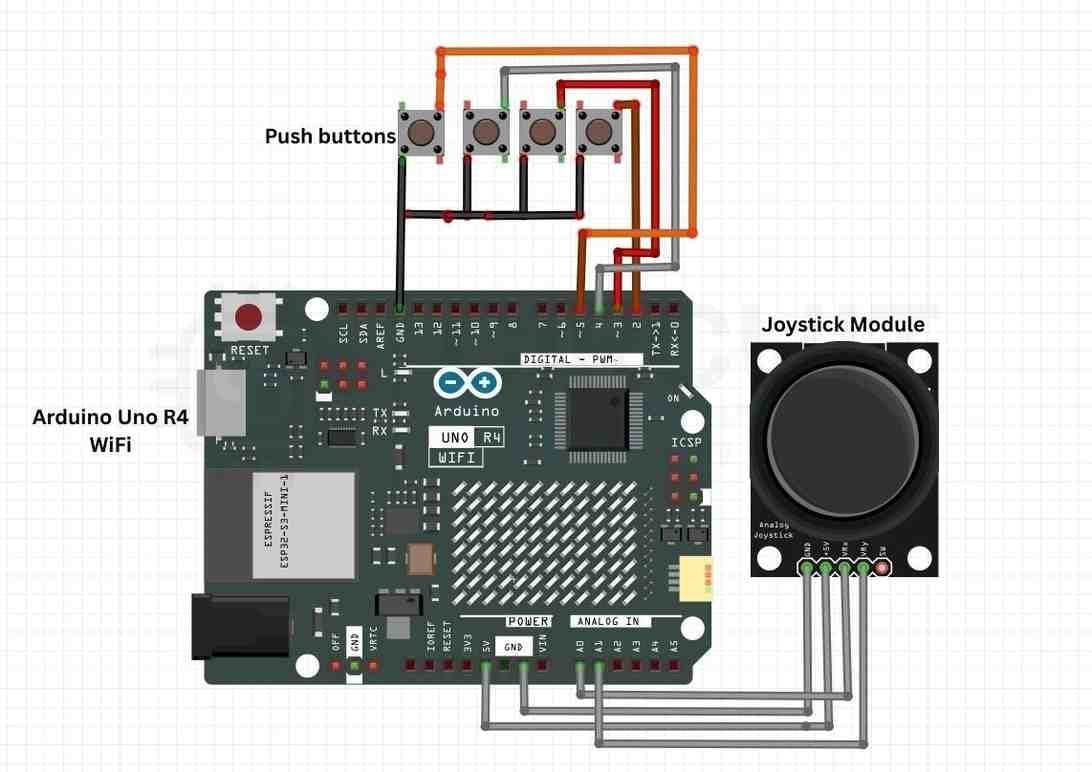
Wire the Joystick:
VCC → 5V, GND → GND
X → A0, Y → A1 on the Arduino
Connect Buttons:
One side of each button to pins 2–5
The other side of GND
Arduino’s internal pull-ups handle debouncing
Upload Code:
Use the Arduino IDE and the built-in Keyboard.h library to program the controller behavior.
Test on PC:
Plug into a computer — the Arduino will register as a keyboard device. Try moving the joystick and pressing buttons in a game that supports keyboard controls.
- Joystick thresholds avoid unintentional movement
- Keyboard emulation turns physical input into key presses
- Debouncing through built-in pull-ups simplifies wiring
- Affordable — uses easy-to-find components
- Universal compatibility — works with thousands of PC games
- Expandable — add more buttons, LEDs, or even wireless support
- Ensure the Arduino is recognised as a keyboard (delaying Keyboard.begin() helps USB enumeration).
- Adjust joystick dead-zone thresholds in software if inputs feel jumpy.
Explore a collection of creative and beginner-friendly Arduino builds on the official Arduino Projects.


Comments