



Hardware components | ||||||
| × | 1 | ||||
 |
| × | 1 | |||
 |
| × | 1 | |||
Software apps and online services | ||||||
 |
| |||||
Hand tools and fabrication machines | ||||||
| ||||||
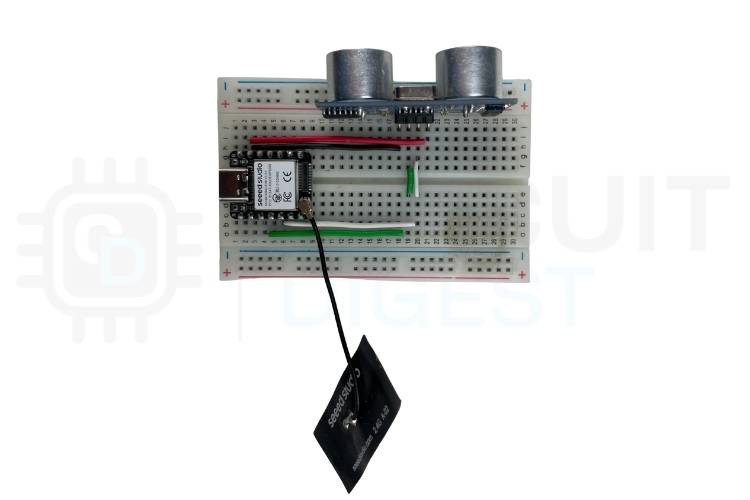
Use a tiny Send SMS Alert using Seeed Studio XIAO ESP32 to detect nearby movement and send an SMS alert to your phone over Wi-Fi using a free cloud SMS API. When an object comes within a set distance, the system instantly sends a text message using the internet — no SIM card or GSM module required.
A compact IoT device that:
- Monitors distance using an HC-SR04 ultrasonic sensor
- Detects when an object crosses a distance threshold
- Connects to Wi-Fi
- Sends an SMS alert via a cloud SMS API
- Power up & Wi-Fi connect: The XIAO connects to your Wi-Fi network.
- Distance sensing: The HC-SR04 continuously measures distance.
- Trigger detection: If an object comes closer than the threshold (e.g., 100 cm), it triggers an alert.
- HTTP request to SMS API: The ESP32 sends an HTTP POST to the cloud SMS service with API credentials and message details.
- SMS delivery: The cloud service sends the SMS to your phone.
This approach avoids needing a GSM module entirely by relying on internet connectivity and a cloud SMS provider.
Libraries & Definitions
#include <WiFi.h>
// Ultrasonic pins
#define TRIG_PIN 5
#define ECHO_PIN 3
long duration;
float distance;
// Wi-Fi credentials
const char *ssid     = "Your_SSID";
const char *password = "Your_PASSWORD";
// SMS API details
const char* apiKey      = "YOUR_API_KEY";
const char* templateID  = "TEMPLATE_ID";
const char* mobileNumber = "91XXXXXXXXXX";
const char* var1 = "Motion";
const char* var2 = "Detected";
bool alertSent = false;
Setup Function
void setup() {
Serial.begin(9600);
pinMode(TRIG_PIN, OUTPUT);
pinMode(ECHO_PIN, INPUT);
// Connect to Wi-Fi
WiFi.begin(ssid, password);
while (WiFi.status() != WL_CONNECTED) {
delay(500);
Serial.print(".");
}
Serial.println("Wi-Fi connected!");
Serial.println(WiFi.localIP());
}
Distance Measurement
float readDistance() {
digitalWrite(TRIG_PIN, LOW);
delayMicroseconds(2);
digitalWrite(TRIG_PIN, HIGH);
delayMicroseconds(10);
digitalWrite(TRIG_PIN, LOW);
duration = pulseIn(ECHO_PIN, HIGH);
return duration * 0.034 / 2; // cm
}
Send SMS Function
void sendSMS() {
if (WiFi.status() == WL_CONNECTED) {
WiFiClient client;
if (client.connect("www.circuitdigest.cloud", 80)) {
String payload = "{\"mobiles\":\"" + String(mobileNumber) +
"\",\"var1\":\"" + String(var1) +
"\",\"var2\":\"" + String(var2) + "\"}";
client.println("POST /send_sms?ID=" + String(templateID) + " HTTP/1.1");
client.println("Host: www.circuitdigest.cloud");
client.println("Authorization: " + String(apiKey));
client.println("Content-Type: application/json");
client.println("Content-Length: " + String(payload.length()));
client.println();
client.println(payload);
while (client.available()) {
Serial.println(client.readStringUntil('\n'));
}
client.stop();
}
}
}
Main Loop
void loop() {
float dist = readDistance();
Serial.print("Distance: ");
Serial.println(dist);
if (dist < 100 && !alertSent) {
sendSMS();
alertSent = true;
}
if (dist >= 100) {
alertSent = false;
}
delay(500);
}Upload the code using the Arduino IDE.
Open the Serial Monitor at 9600 baud.
Walk in front of the sensor — when the object is within 100 cm, you should see log messages and receive an SMS.
ApplicationsThis compact SMS alert system can be used for:
- Home security systems
- Parking space monitoring
- Water tank level alerts
- Agricultural intrusion detection
- Industrial safety alerts
Replace the sensor and adjust the logic to fit other use cases (e.g., temperature or moisture).


_3u05Tpwasz.png?auto=compress%2Cformat&w=40&h=40&fit=fillmax&bg=fff&dpr=2)
Comments