



Hardware components | ||||||
 |
| × | 1 | |||
 |
| × | 1 | |||
| × | 1 | ||||
| × | 1 | ||||
| × | 1 | ||||
 |
| × | 1 | |||
Software apps and online services | ||||||
 |
| |||||
 |
| |||||
 |
| |||||
 |
| |||||
 |
| |||||
 |
| |||||
 |
| |||||
AI Forest Tag: Monitoring different species and maintaining biodiversity, their interactions with climate and environment and its impact, as well as protecting them from human intervention, is one of the crucial things for forests and wildlife. The AI tag, a smart tag, is a BLE-based mesh network. Tags connected with each other, equipped with a BME688/BME690 sensor, MEMS microphone, Lux light sensor and MCU unit, and battery, continuously monitor the forest and wildlife using the microphone and AI training. It does segmentation of different wildlife present in the forest by identifying the sounds of different birds and animals. Using the ENV sensor, it collects data on climate change as well. Another sensor tag in the network will use the MEMS mic to detect human intervention and deforestation using log-cutting sounds and other human sounds. Then, using AI for data logging, it logs different sounds of birds and animals, which helps in training the data for animal interaction. All these data are transferred from one node to another node mounted on trees as tags—only 2.7 cm BLE tags with sensors and battery. Then, all that mesh network data is sent to a central node that transfer the data to the nearest substation. So, using the Biodiversity tag, it collects and segments the data, running the Edge Impulse model to identify the animals' and birds' sounds and tell us the relative number of species in that forest. Using another tag in the mesh—the Interact tag—running the Edge Impulse model to detect human intervention, animal fights, other activities of interaction, and do segmentation of those. Then, using another Environment tag, it collects data on the environment: temperature, humidity, air pressure, rain, and forest fire detection. And in the same mesh network, an Animal Interaction tag that collects all the sound data of birds and animals that is fed to Edge Impulse to make ML models, helping humans to interact with animals like an animal language translator. https://helloinelephant.com. It acts as a mesh network of AI tags that gives a complete solution for protection and monitoring of wildlife and its biodiversity and its interactions with humans and the environment and the impact of climate change on them.
Forest Sense Tag DesignWe have designed a custom Sense Tag for forests that is incredibly small, measuring only 2.5 cm in size. It can run AI models such as Edge Impulse and has both Bluetooth Low Energy (BLE) and Wi-Fi capabilities, along with mesh network support. We have finalized the selection of two chips that have multiple cores and PSRAM, which allows us to run two threads simultaneously for AI processing and sensor data logging. We have finalized two chips, ESPc6 and ESPS3, that have both BLE and Wi-Fi, along with two cores and PSRAM, supporting Edge Impulse and Tiny ML.
Here we have designed two different Forest Sense Sensor Nodes: one is hexagonal and the other is circular PCB . The hexagonal sensor node has a PCB with a size of around 3.8 cm and can be mounted on various places in the forest, such as trees, branches, trunks, stones, caves, and different areas. The circular sensor node is smaller, measuring 2.8 cm, and can be used as a tag on the necks of animals.
In this project we are currently using the free PCB and PCBA and support from NEXT PCB for PCB manufacturing. We need to choose only one design, so we have manufactured the circular sensor node. I would like to thank NEXT PCB for the free prototype manufacturing. However, we believe the hexagonal PCB design of the sensor node looks more aesthetically pleasing and is better for heat dissipation. We have attached and added the hexagonal PCB design here.
Both sensor designs are similar, except for a slight difference in size. In the testing phase, we used the circular sensor node, but I recommend using the pentagonal PCB design.
PCB Design
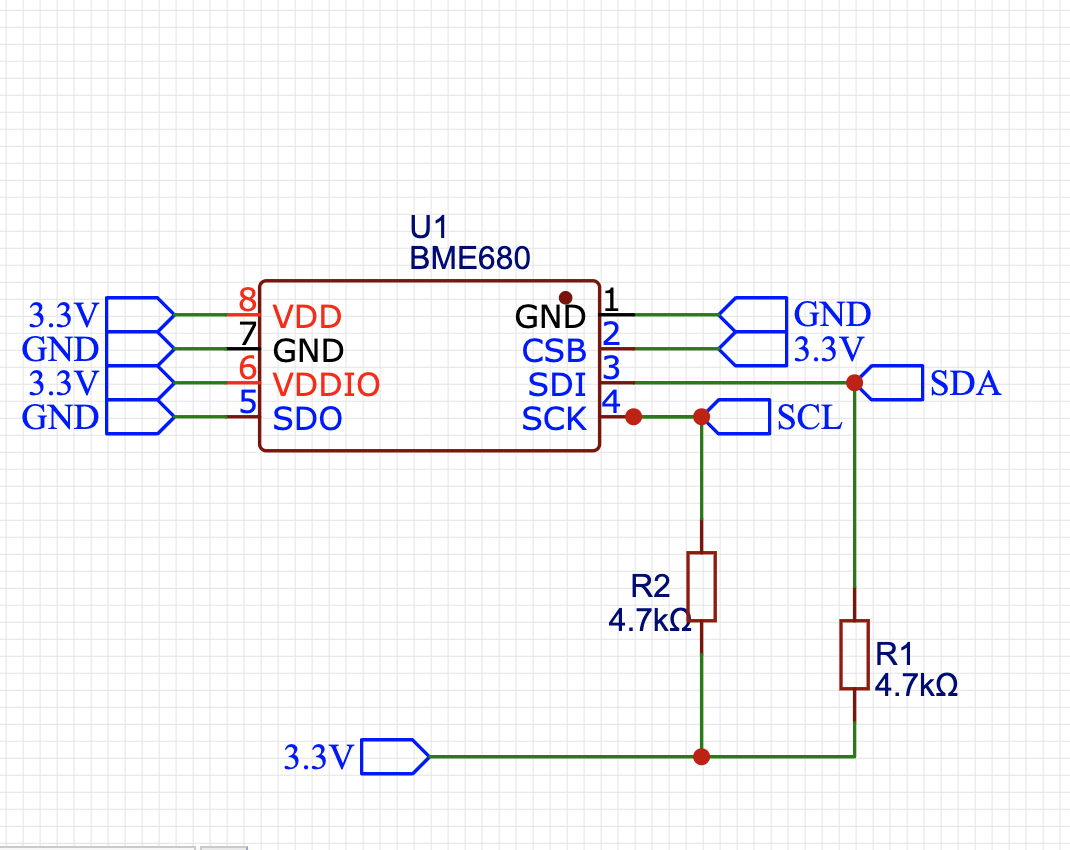
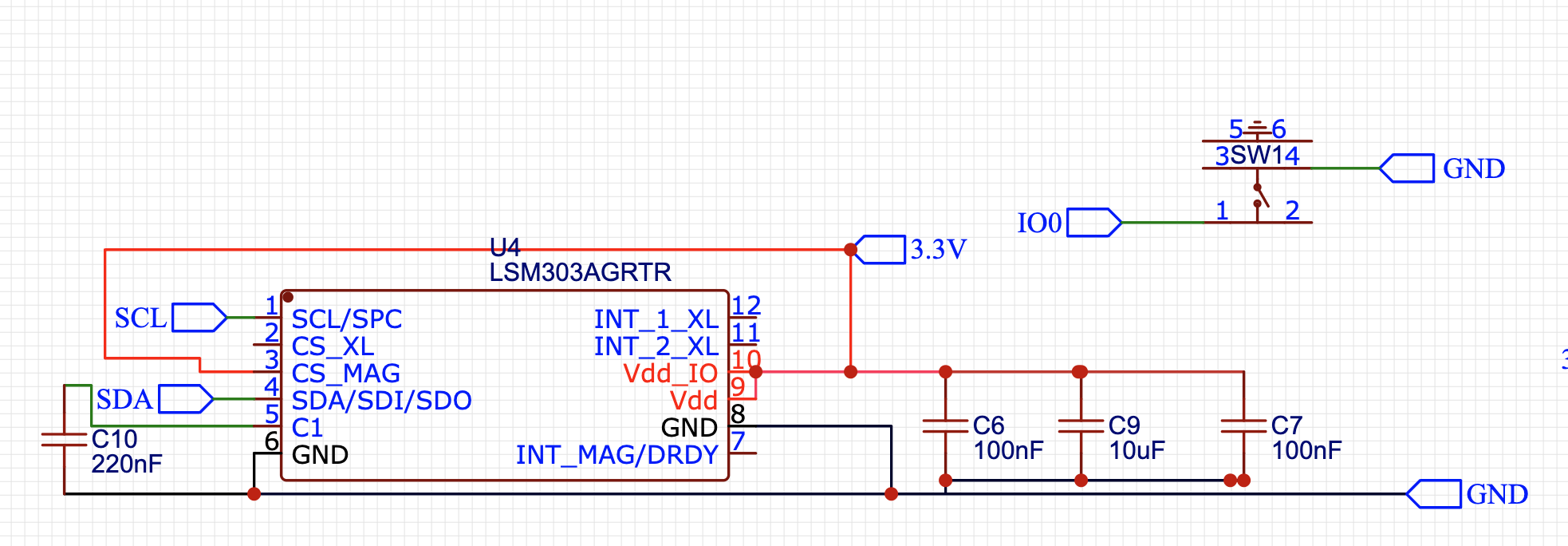
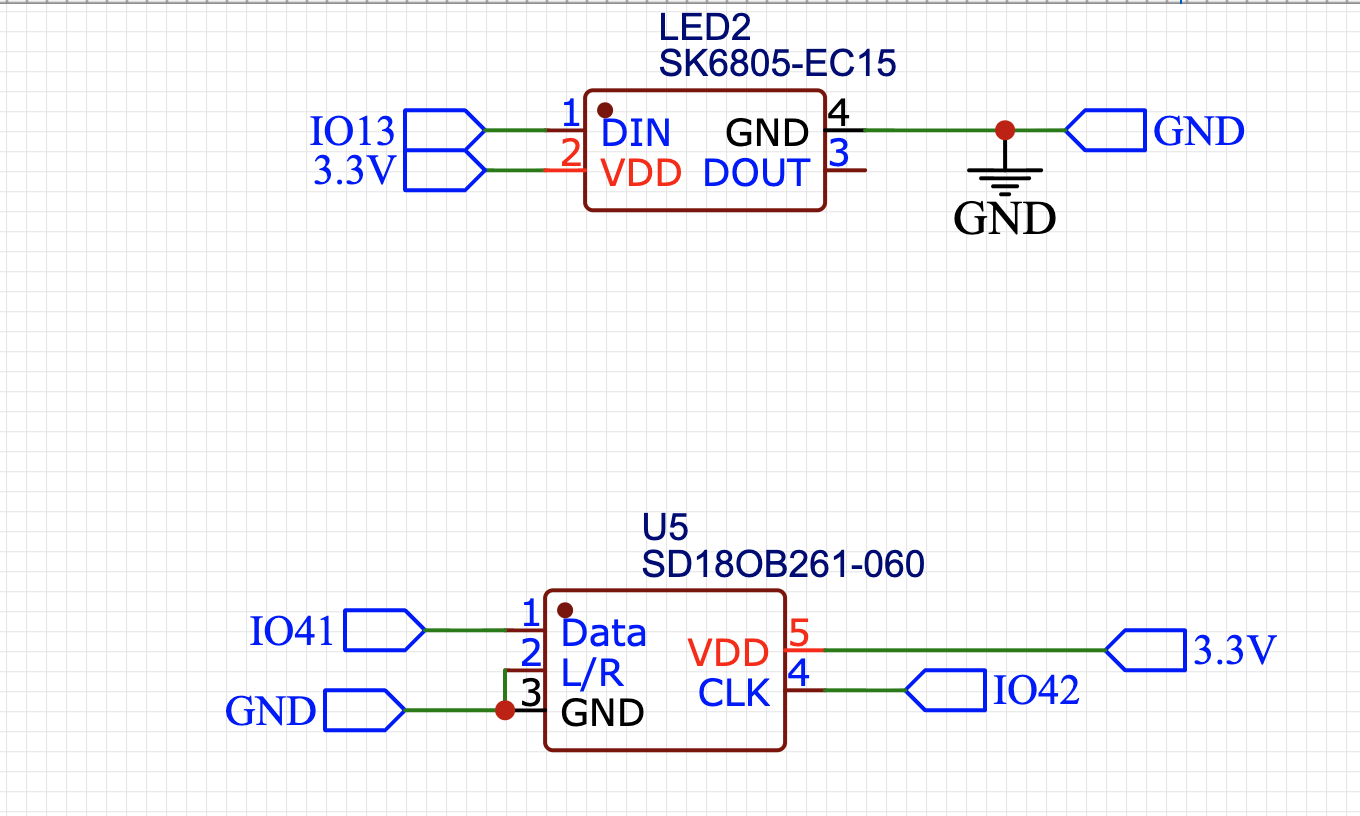
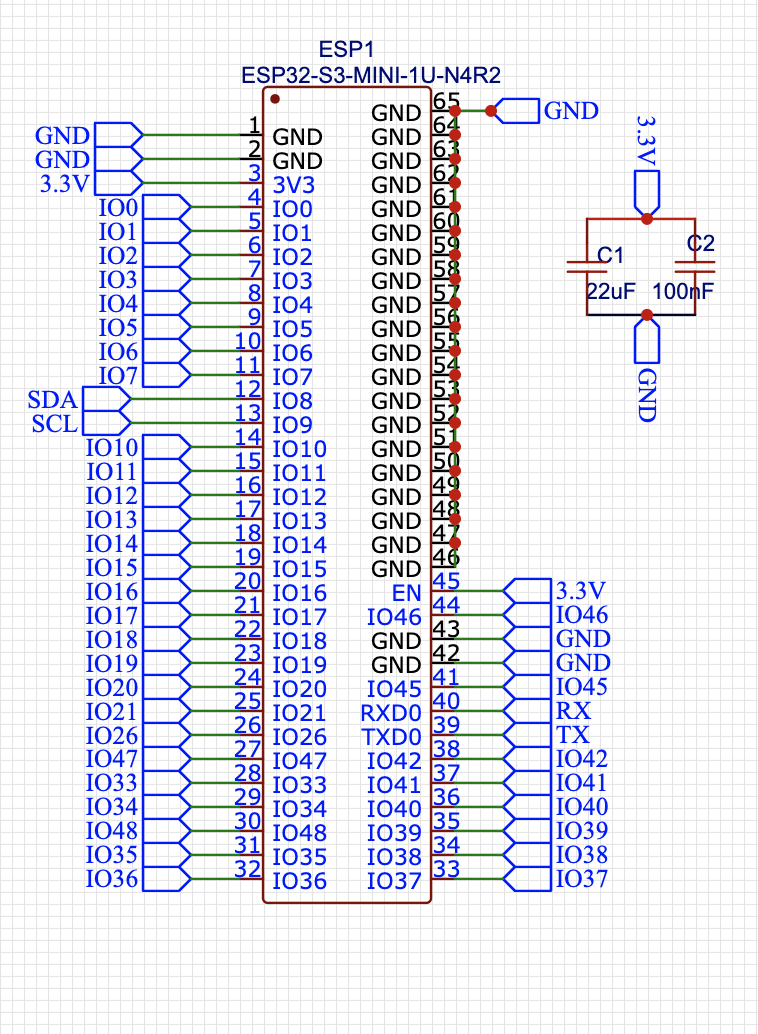
Here’s the PCB design, kept as small as possible for the pentagon shape, measuring just 4 cm, and for the circular shape, only 2.8 cm. The MEMS Mic Array is integrated into the PCB to capture forest audio, which will be used to determine and classify bird and animal species based on their sounds and edge impulses. Additionally, it will assist in detecting illegal logging and cutting, hunting in forests, and capturing gunshot sounds, logging, and cutting esclavating sounds. The BME690/688 sensor will monitor the forest climate, including humidity, air quality, gas index, temperature, and air flow pressure. A few ports and I/O are exposed on the PCB to connect GPS, LORA, and other sensors in the future, such as gas sensors, CO2 sensors, and so on. This design is future-proof and provides an option to develop more ROS-based solutions for forest management.
PCB Manufacturing
To manufacture the PCB, you need to provide the designed Gerber file, Bill of Materials (BOM), and Pick and Place file to the PCB manufacturer. Here, we are using the NEXT PCB for both manufacturing and assembly. We have ordered 10 PCBs and PCBA units for testing the mesh network of 10 nodes. The design is circular in shape. However, you can customize your deployment with both circular-shaped PCB nodes and hexagonal-shaped ones as well.
Now that our PCB design is ready, we can proceed with manufacturing. Before that, let’s clarify what we’re going to design as the final design and how it will solve the problem and act as a Guardians Of the Forest.
Our solution utilizes the ESP32-S3 or a similar BLE and Wi-Fi MCU that can also run Edge Impulse, combined with an MMS mic, BME 280, and other similar environmental sensors, along with a LoRa module. The main features are: it is the smallest and lightest 2.5 cm wireless Wi-Fi + BLE mesh network and Thread-capable tag with conformal coating, waterproof, and easily mounted on forest trees at a distance of 10 to 30 cm. The device, being only 2.5 cm, sticks to tree trunks like a tag and forms a mesh network. It runs Edge Impulse AI for detection and segmentation of animal and bird species, climate change and abnormality detection, forest fire detection, illegal cutting, gunshots, and hunting detection. It also records the sounds and data to develop an ML model for creating an animal language translator, similar to this: https://helloinelephant.com. Here, we use NEXT PCB to manufacture the device tag PCB and handle SMT works. We already have experience in designing the smallest development board for AI-based monitoring and detection: https://www.hackster.io/ashwini-kumar-sinha/buttonboard-button-sized-wearable-sensor-board-5b97ac. We will use the NEXT PCB coupon for manufacturing the PCB and conducting the SMT works for the smallest AI tag manufacturing.
So, here’s how our Forest AI tag is being used and what functions it has for solving problems:
- Classification Tag: This tag uses the MEMS microphone on the sensor node and an Edge Impulse-trained model to detect and classify the species of birds and animals in the forest. It captures sounds and provides real-time data on the number of species present in the forest, including any unknown or unique species.
- Protection Sense Tag: This sensor node tag also uses the MEMS microphone to capture real-time sounds in the forest. It then uses an Edge Impulse-trained ML model to detect hunting, exploitation, human intervention, illegal cutting, and logging in the forest. It notifies the main station about these issues to help save trees and animals.
- Environment Sense Tag: This tag uses the Light sensor BME 690/688 to capture other environmental data such as air quality, gas resistance, humidity, air temperature, and air pressure. This data helps us analyze the logging data of the forest environment to understand the relationship between the environment and climate change, as well as the interaction between animals and birds in the forest. It also detects forest fires and provides early warnings using mid-infrared and temperature data.
- Master Tag: The master tag transfers all the data collected from all sensor node tags in the mesh node to the central dashboard for real-time alerts, monitoring, and other purposes.
Now, we need to design and prepare the deployment first. We’ll start by tagging the Classification Tag.
This tag will help us classify and identify all the species of birds and animals present in the forest using the sounds they make. We’ll use an ML model for classification. Additionally, it will capture and store the data of unknown species’ sounds for further research.
To train the ML model, we can either capture the sounds from the microphone of each species and prepare a dataset, or we can use a pre-collected dataset of species. For testing, I used the pre-collected dataset of birds found on Kelkgole for training the ML model.
To train the ML model, I used the Edge Impulse. You can check how to train the ML model in Edge Impulse at this link: https://edgeimpulse.com
First upload the dataset for sounds of birds and animal with their label.You can download the pre collected dataset from kaggle.
Here I am showing to train ML model and deploy on the device.
- First Upload/collect the dataset for each animal and species , Make sure label the dataset with correct name of animal species if you want to detect the animal emotion like angry, hunting, playing using sound you can label and collect the dataset of each animal accordingly
Next select the spectrogram in design impulse section and also select the impulse as classifier .
Now train and test the Ml model then go to deployment section select the deployment method here export the ML model as Arduino library. Then add the library to arduino Ide then modify the predection and clasification code to send data to BLE mesh and act as BLE mesh network. so the ML model capturs sound using MEMS mic in real time then it send the detetion in BLE mesh network . The devices keep sending and buffering the packets of each other the nerast sensor node to master node transfer all those data to master master then display same on IoT dashboard and also provide alerts connected on the dashboard
Train and Deploy the ML model for rest of the tag node as well
Deployment Of Forest Ai Tag
Now that all our sensor and data tags are ready to connect to each other in a mesh network and transfer data to the main master nodes, we need to deploy them in the forest at a distance of 10 to 30 meters within the Bluetooth range to form a connected mesh network. Of course, before that, we need to design robust enclosures that contain our devices and protect them from rain, water, dust, etc. I have designed two different cases for the AI sensor nodes: one for circular-shaped and the other for hexagonal-shaped. Place the AI sensor nodes with batteries connected in the case and apply the waterproof coating over the case.
Species classify tag in action :-
Env Tag :
All Forest Sense Tag Data
Research Animal Language Translator
The voice collected for the tag now aids in understanding elephants and their interactions better. Based on a dataset of elephant sounds, we’ve developed a machine learning model that translates elephant vocalizations into your language. This model uses elephant sounds to determine their emotions, such as happiness, greeting, food requests, or anger. I’ve attached the web assembly file of the trained model for download and testing. Additionally, we’ve provided the Arduino library and Translator tag code that can run on a local device, enabling real-time translation of elephant vocalizations.
To use the model, first download the web assembly ML model file and unzip it. Open a browser and either run the Python script python3 server.py or open it in a Python IDE to execute it. Next, copy the URL of the local host from the web browser and paste the parameters found in the Edge Impulse in the impulse design section and the web page parameter input section. Finally, run the interference.
To interact with the elephant, bring the microphone near it. When the elephant makes any sound, the ML model analyzes the sound and informs you about its intentions, such as greeting, expressing anger, or requesting food.
Please note that this is still under research, and you may want to conduct your own research to develop a more accurate and similar ML model that can understand animals and birds and their interactions with the environment and each other.
There are other platforms that offer similar functionalities. You can find one here: https://helloinelephant.com. This platform was created by another amazing person, and we were inspired by their work to conduct similar research and develop our own similar ML model using the Forest Air Tag that we designed.
Next, we can now use this tag data to understand the relationship and interaction of species with climate environments and seasons. Additionally, the data collected on sounds can also be used to create an AI translator that can use the sounds made by animals and birds to translate them into our language, using ML model training.

Comments